Your new post is loading...
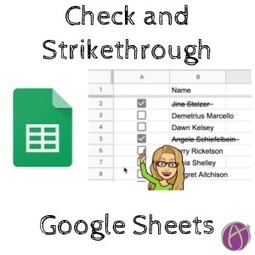
Check Off and Strikethrough a Name I was asked if it is possible to have a list item strike out in a Google Sheets spreadsheet when a checkbox is checked. Yes you can. Insert Checkboxes In a spreadsheet highlight a range of cells or click on the column indicator and use the Insert menu to …
Via Dr. Tom D'Amico (@TDOttawa)
The webcam feature in many Google products (Docs, Slides, Drawings, etc.) makes a lot of cool learning activities possible.
Via Dr. Tom D'Amico (@TDOttawa)
Free resource of educational web tools, 21st century skills, tips and tutorials on how teachers and students integrate technology into education
Via Dr. Tom D'Amico (@TDOttawa)
"After publishing My Top 10 EdTech Tools for 2019 list in January I had some excellent feedback from Secondary teachers, sharing their favorite tools that I may have missed. As I explained to them, …" Penzu Remind Schmoop Wakelet EdPuzzle Grammarly Canva PearDeck CoSpace Adobe Illustrator and Photoshop
Via Leona Ungerer

|
Rescooped by
Dennis Swender
from Learning & Technology News
March 1, 2019 12:11 PM
|
While many EdTech enhancements, such as digital text books and the increased use of video have had demonstrable results; other emerging styles, such as adaptive learning have shown some progress, but are yet to deliver definitive results.
Via Nik Peachey
For creating interactive content based on Googl Speadsheets.
Via Nik Peachey
|
|
Scooped by
Dennis Swender
March 1, 2019 12:08 PM
|
Why is a paired testing effort important? A tester’s or a developer’s stand-alone effort won’t produce 100% coverage but if done, say by incorporating the DevSecOps ideology or by testing in a team with a sighted as well as a non-sighted engineer.. More@ https://qainfotech.com/paired-testing-effort-important/ #AccessibilityTesting #a11y #PairedTesting
|
|
Rescooped by
Dennis Swender
from Education 2.0 & 3.0
March 1, 2019 12:05 PM
|
The book-crammed Free Library of Philadelphia has found a way to stay relevant in the 21st century: ebooks. Last year, 28 percent of the Free Library’s total circulation of more than five million books came from ebooks and other digital content.
But it hasn’t been nirvana for the library and its taxpayer-funded peers.
As popularity soars, publishers and content providers have adopted “metered access” and per-checkout models for ebooks and other content. Those models are guzzling library cash and resulting in book-lending inefficiencies, library officials warn. A so-called perpetual ebook license for libraries could be four or five times the cost of either the printed book or the digital copies sold to consumers.
And these are only some of the latest clashes over digital licensing as publishers seek to squeeze more profits out of their content as the world moves away from ink and paper. Click headline to read more and access hot links--
Via Chuck Sherwood, Former Senior Associate, TeleDimensions, Inc, Yashy Tohsaku
To improve outcomes student agency has to be at the forefront. I’ve always preferred tools that let students take control of their learning by turning passive consumers into creators because it allows them to tap into their imagination, while the learning happens naturally. I was blown away when I discovered Metaverse and seeing it utilized in a classroom during a recent coaching visit. It is a platform that makes it easy for anyone to create augmented reality experiences without having to code. I have not seen any other tools come close when it comes to ease of use and student engagement.
So, what is augmented reality (AR)? Using the camera on a mobile device (phone, tablet) AR overlays images/media over the real world. It is a social experience, as opposed to virtual reality (VR) where a single student would wear goggles that would obstruct them from their surroundings. AR might have started out as a novelty but has now become a fantastic way to engage students through authentic learning experiences. There are many reasons to incorporate AR in the classroom. A short list includes letting students experience characters/imagery that would not otherwise be accessible (historical figures), new places (enhanced field trips), added interactivity to classroom materials, gamified learning, and more immersive opportunities aligned to the curriculum.
Via John Evans
|
|
Rescooped by
Dennis Swender
from Tools for Teachers & Learners
February 27, 2019 4:52 PM
|
Easily record your video (or voice) question & share a link with anyone. Respondents answer via their mobile or computer without needing to sign up. You get rich, meaningful video (or voice) answers + full text transcriptions. Easy peasy.
Via Nik Peachey
|
|
Rescooped by
Dennis Swender
from Educational Technology News
February 27, 2019 4:49 PM
|
Digital credentials that shows precisely which skills a job applicant has obtained are more accessible and will become increasingly relevant, he says.
Via EDTECH@UTRGV
Campuses are deploying Alexa to improve the student experience in and out of the classroom As technology offers more ways to stay connected and access information, forward-thinking higher-ed leaders are leveraging voice technology such as Amazon’s Alexa to help students acclimate to campus life and feel like they’re at home.
That’s what happened last year at Saint Louis University (SLU), for instance, when the college deployed Alexa-enabled devices in every student room on campus.
Campus leaders had begun looking at voice technology as a way to help improve the student experience and personalize social and academic activities down the road.
Via Elizabeth E Charles
|
|
Rescooped by
Dennis Swender
from APRENDIZAJE
February 27, 2019 1:31 AM
|
Extensive breakdown on the different types of learning systems. Includes LMS, LXP, learning platforms.
Via Marta Torán
|
|
|
Rescooped by
Dennis Swender
from Educational Technology News
March 1, 2019 12:15 PM
|
Representing workforce-oriented and online education, they want colleges to have freedom to explore educational models without losing Title IV access.
Via EDTECH@UTRGV
|
|
Rescooped by
Dennis Swender
from Education 2.0 & 3.0
March 1, 2019 12:13 PM
|
With all of the amazing information that’s currently available to each of us on the internet, it can sometimes be very hard to find the real gems. To assist with that, I’d like to share what tens of thousands of educational blog readers thought was most valuable via our Top 20 Blog Posts list. See if any of these resources resonate with you! #20 For Fun and Creativity, Try a Digital Sign Generator: Looking to add a little flair to student words and presentations? Try a digital sign generator. It will make your titles and headings pop! #19 Math Tools for Chrome: This blog will showcase some of the many powerful math tools that your students (and you!) can use with the Chrome browser. #18 Four Things NOT to Do on the First Day of School: The first day of school can be critical in setting the tone for the whole year. Learn exactly what NOT to do to ensure your students are successful! #17 Teaching Kids (and Adults) About Clickbait: As if email spam wasn’t bad enough, we now have website spam in the form of clickbait. Learn some ways to identify and then ignore this big time waster. #16 A New Type of Writing Prompt: Elementary teachers, looking for a fun way to get kids to write? Try this emoji writing prompt generator. Your students will love it! #15 Learning from Your Peers with Pineapple Charts: Where can educators learn best how to be better at what they do? From other educators, of course. And using a pineapple chart makes scheduling that learning simple and convenient. #14 ClassroomScreen: You Will Love This Resource!: If you think you don’t need any more amazing resources for your classroom, think again. ClassroomScreen is simple, but life changing for a teacher! #13 Four Tips for Green Screen in the Classroom: If you aren’t taking advantage of green screen to add depth to project-based learning in your classroom, then you will want to read this primer on how to get started. In this entry, we take the direct route to inexpensive green screen tools and offer real examples from classrooms. #12 Wondrous Ways to Use Google Drawings: The next time you need to cover standards where students must explain, diagram, justify, develop, plan, and describe, consider using Google Drawings. Find out how in this post. #11 The Pringles Challenge: A Fun-Filled STEM Activity: One of my favorite tasks at TCEA is to find GOOD resources for teachers, and the following STEM activity is definitely one I would add to my lesson plan book. #10 Take Advantage of the Power of Google Forms for Perfect Rubrics: Get rid of your old paper rubrics and embrace Google Forms as a way for students to evaluate each other and themselves. This will simplify your grading and make the process simpler for students. #9 10 Chrome-ifying Tips and Tricks: Learn how to power up your Chrome browser usage with these tips and tricks that require no extensions or add-ons, just plain Chrome goodness! #8 Best Parodies for Teachers: If you are a teacher and you like parodies of popular songs, then you’ll want to check out this list to add to your collection for enjoyment. #7 Forms Smackdown: Google vs. Microsoft: The growth and use of online forms to gather and disseminate data has reached K-12 schools. But which form, Google or Microsoft, offers the most features? #6 Classroom Smackdown: Google vs. Microsoft: Compare the top two Learning Management Systems currently available to schools in this smackdown between Google Classroom and Microsoft Classroom. #5 Digitizing Cornell Note-Taking with OneNote: If you’re a fan of OneNote, then you’ll want to add these templates and tips to your collection to make it even stronger and more personalized. #4 Alexa: Your New Teacher Assistant: Get a jump start on Alexa, one of the newest technologies, and how it can be used in your classroom to reinforce content and fun! #3 Lesson Planning: 5E Model + Technology: Lesson planning remains a tool for teachers to use to make sure they are covering the required material. If you follow the 5E Model for planning and add technology to it, you end up with a very powerful way to bring the curriculum to life for all students. #2 Google Templates for Students: Looking for a template to get your students started on a project? We’ve found some great Google Docs and Slides templates to use as they are or change up to match your classroom. And finally, drum roll please! #1 Free Templates for PowerPoint/Google Slides: Looking for ways to beautify your slide presentations? We have the perfect place for you to download gorgeous, free templates. Leave a comment comments
Via Yashy Tohsaku
|
|
Rescooped by
Dennis Swender
from MiniTool Software Solution
March 1, 2019 12:12 PM
|
Read this post, and then you will find how to change video resolution for better viewing on different video platforms.
Via MiniTool Software, Yashy Tohsaku
|
|
Rescooped by
Dennis Swender
from Edumorfosis.it
March 1, 2019 12:10 PM
|
Some weeks ago, I wrote about my key takeaways from the free content strategy sessions I started last year. During these sessions, I did not only confirm how some common misconceptions are held year after year, but also how these false truths spread across industries. As instructional designers, we need to advocate for examples that dispel these misconceptions and also, we need to show clients and stakeholders which is the right path to create meaningful learning experiences. Otherwise, we are doing a disservice to them and to our learners.
Via Edumorfosis
|
|
Rescooped by
Dennis Swender
from Edumorfosis.it
March 1, 2019 12:09 PM
|
As full-time question-wrestlers, we enjoy drawing back the curtains on spaces rarely seen. At the beginning of this year, we were presented with the task of telling a story taking place nationwide. The setting: higher education institutions in the US. The main characters: Instructional Designers. If you’re unfamiliar with that title, don’t fret, we once were too.
As digital tools evolve and become more prominent in higher education, instructional designers, learning designers, instructional technologists, and folks with a dozen other related titles are assuming a more integral role in the learning process. But who are these mysterious designers of instruction, and what do they do? We also asked:
What is the typical background and training of instructional designers in Higher Ed? What are their biggest barriers, and what skills are most important for success? What tools do they use and what does their workflow look like? How are instructional designers distributed across institutions, and how do their teams operate?
Via Edumorfosis
|
|
Rescooped by
Dennis Swender
from Education 2.0 & 3.0
March 1, 2019 12:05 PM
|
Maker City PD needs your help! Hackers have stolen a 3d printer from the local makerspace and the police can’t chase them until their lights are working.
Use this project tutorial to make flashing police car lights using paper circuits. You will need copper tape, LEDs and a coin cell battery.
This paper circuit project will also teach you about switches and how to create one using a paper clip.
Via John Evans
|
|
Scooped by
Dennis Swender
February 27, 2019 4:54 PM
|
Last updated: February 2, 2019 at 13:16 pm Tools to create e-learning, courses and lessons. Listed in alphabetical order.
Discussion is key to our democracy! Learn why and how schools and teachers should help students have civic and political discussion with people who have different opinions from their own. In this video you will hear from district leaders, teachers, students, and leading researchers. Discussion is key to our democracy! Learn why & how schools and teachers should help students
Via Dr. Tom D'Amico (@TDOttawa)
|
|
Rescooped by
Dennis Swender
from Educational Technology News
February 27, 2019 4:48 PM
|
"A lot has changed since 2012 or, the year the New York Times dubbed the "Year of the MOOC." The premise back then was that classes would make high-quality online education accessible for all—and for free. Today, many MOOC providers now charge a fee. They’ve rolled out bundles of courses called ‘Specializations’ or ‘Nanodegrees.’ And popular providers like Coursera and edX are increasingly partnering with colleges and universities to offer MOOC-based degrees online."
Via EDTECH@UTRGV
Many businesses spend huge amounts of time, energy, and resources developing content strategies that don’t live up to expectations. Obviously, this isn’t ideal or sustainable, but why do such a large number of blog posts,...read more
Via Stefano Principato, massimo facchinetti
|