Zoom video conferencing is the most popular online meeting app in the world. But do you know how to get the most out of Zoom while you work remotely or from home? In this video, Scott Friesen shows you his favorite tips from keyboard shortcuts to advanced sharing techniques. Get ready to become the master of Zoom meetings!
Every Meet can have Files attached to the meeting. Everyone in your meeting can access these links and use them during the Conference Call. This is not only a great way of making sure everyone has the files they need, but you can keep Meeting notes and other important information linked to the online Meet up.
This video will show you everything you need to know about scheduling a Meeting with files attached.
I found this interesting as it's not a technology I've used. But in terms of sharing files and working collaboratively it seems more practical than something like zoom. The video steps through how to set everything up in a very easy to understand fashion. And as it links to Google Classroom, another tech I have yet to use, it would be an interesting series of videos to consider viewing.
How to crop video online? If your video contains a watermark or any other unwanted thing, then you can read this post to learn how to crop video to remove it.
If you routinely switch between your iPhone, iPad, and Mac, you might want to move web pages from one device to another. handshakeInstead of using the History or Reading List features, try these seamless methods to move Safari tabs between Apple devices.
"Artificial Intelligence is everywhere. It forms the core of how the majority of media has consumed for years already. It is also the latest buzzword of the Learning and Development industry. Here are a few useful things to know about it, along with long-held misconceptions and its untapped potential."
John McGowan is a GENIUS!!!! He is the inventor of g(Math) Add-on (which is now EquatIO), and he recently released Automagical Forms that turns your PDF worksheets into a Google Form. He has now coded adding voice typing to Google Slides and made it FREE!!!
Slides translator is an awesome add-on to Google Slides that can make your life easier. This add-on gives you the ability to speak to text within your Google Slide. This can be used for your PreK and K students that do not know who to write yet. This could also be used with different ability groups to include this population. Best of all this is a free add-on!
Arizona State University and their online high school program, ASU Prep Digital, have put together ASU For You, a library of no-cost resources to help supplement current learning plans.
Arizona State University (ASU) has online course materials and it is available for any school until the end of May. It also has created a library of training videos and teaching support programs are available.
Training Topics Include:
Online curriculum
Learning Management System
Best practices in online instruction
Setting up a virtual instruction plan Web 2.0 tools (web conferencing, plagiarism detection, etc.)
Live lessons
Pace charts
Setting up a home page
Supporting students with special needs
Creating supplemental resources and customizations
Academic integrity & discussion-based assessments
Preparing for “go live” with students Best practices for effective communication
Monitoring student progress
Building social presence
Social and emotional learning in an online environment
"Mark Loundy has been on top of reporting how the new Meet integration works in Google Classroom. Follow him on Twitter: @markloundy He’s the guy to ask for Meet questions!!! Super helpful. Check out his short video on using video chat Meet in Google Classroom.
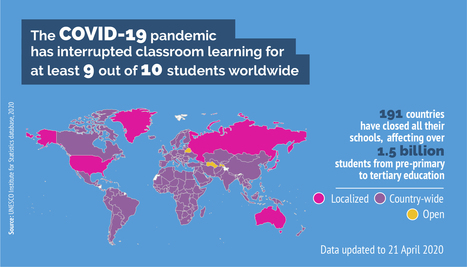
"Half of the total number of learners – some 826 million students – kept out of the classroom by the COVID-19 pandemic, do not have access to a household computer and 43% (706 million) have no internet at home, at a time when digitally-based distance learning is used to ensure educational continuity in the vast majority of countries ..."
Universities around the world are racing to offer students on-line learning opportunities that allow them to continue studying despite the restrictions imposed to stop the spread of COVID-19.
Australian universities have pioneered a series of world-leading on-line learning initiatives that have already proven highly effective, delivering impressive results in terms of student engagement and subject grasp. Their experiences provide valuable insights for other universities which are also seeking to deliver genuinely rich learning experiences, by rapidly spinning up powerful collaborative on-line learning communities, with sustained benefits for both students and academics.
"In partnership with Microsoft Universities around the world are racing to offer students on-line learning opportunities that allow them to continue studying despite the restrictions imposed to stop the spread of COVID-19. Australian universities have pioneered a series of world-leading on-line learning initiatives that have already proven highly effective, delivering impressive results in terms of student engagement and subject grasp. Their experiences provide valuable insights for other universities which are also seeking to deliver genuinely rich learning experiences, by rapidly spinning up powerful collaborative on-line learning communities, with sustained benefits for both students and academics."
If you are looking to add some fun into your online classes. Filters and special effects like these can leave an impact on students. A fun lesson is always remembered. And being online or teaching remotely doesn't have to mean we no longer try new and exciting things for our students. Here is a way to get special effects and live filters in any Video conferencing software you might be using with your students.
For even more Tips and tricks in addition to the YouTube content, consider joining my Patreon here: https://www.patreon.com/eduflip �
Disclaimer: Some of these links are affiliate links where I'll earn a small commission if you make a purchase at no additional cost to you. Some links will link out to one of my websites. These videos have been made for educational purposes and all views or opinions expressed are my own.
Content curation isn't a new word in the content marketing world. When we talk about content curation, we usually talk about how easy it is to get our work done without worrying about content creation.
Whiteboards are a staple of face-to-face classrooms. During remote learning, you can still recreate that experience. Here are 10 ideas to get you started. Let's face it. When you're not present in your classroom, you miss your whiteboard. It's convenient. Everyone in the room can see it.
Let Microsoft Education provide a great remote learning environment for your class. Improve distance learning by taking advantage of tools all in one place.
I don't agree with much of what Peter Adams says here. Old school thinking for old school mode. It's not the tool, it's how you use the tool. He mentions pedagogy but does not consider modern learning theories aligned to social learning in a digital world. Too teacher centric. Saying 'In an online world, it's hard to replicate good teaching' and 'how do we capture this in zoom' shows a lack of understanding of well designed #TEL learning activities.
Saving seniors from Covid-19 requires worsening isolation. In an article in the NY Times, Paula Span’s title said it all: Just What Older People Didn’t Need: More Isolation. The article attempts a number of references to mitigation, including the use of GrandPad in two Pace programs. These are compelling, but the overall story is about the oldest on the wrong side of the Digital Divide, which is notable and particularly pitiful in settings like nursing homes, Note in the Johns Hopkins Covid-19 guidance about nursing homes, at the very end, authors acknowledge the risk of social isolation and make a few (lame) recommendations. These do not include, unfortunately, providing usable technologies to connect isolated seniors with families. What might they be to help with loneliness? Here are six that businesses and non-profits serving older adults should provide for each of their constituents. Please nominate another six -- especially consider those with dementia. GrandPad. "GrandPad® is designed with seniors in mind – the innovative device comes with features for connecting with loved ones, without the complicated features of other tablets. The large buttons and intuitive interface make the GrandPad a simple tablet for seniors who are ready to start video chatting and sharing memories with family and friends around the world. Built-in Wi-Fi and private data sharing family network." Learn more at GrandPad.net. Claris Companion. "We believe that everyone (especially older seniors) deserve to be connected with friends, family and caregivers online – even if they’re uncomfortable using technology. We designed the Claris Companion tablet for seniors living at home so their family can connect with them socially using email and text messages, photos, and videos, while caregivers can receive alerts and monitor compliance with medications, treatments, and important appointments.” Learn more at Claris Companion. Ageless Innovation. "JOY FOR ALL Companion Pets are designed to bring comfort, companionship, and fun to elder loved ones. Our interactive cats and pup are all about an ease-of-care and convenience that pairs with technology for the best possible experience. The pets can help calm anxiety and soothe those that are agitated, increase quality of life for those with dementia or who are socially isolated, and can improve behavior without the use of drugs." Learn more at Ageless Innovation. GreatCall Jitterbug Smart2 and Link App. "The simple list-based navigation makes it easy to find what you need with large easy-to-read letters and numbers. GreatCall Link helps keep friends and family updated on your health and safety. After they download the free app -- and with your permission -- they will receive an alert on their smartphone if you call 5Star, let them know if the device is running low on battery, check your daily activities, and let them know your location." Learn more at GreatCall. Echo Show. "Drop In is a feature that lets you instantly connect with an Echo device, including a contact's, as long as they have granted permission for you to do so. For instance, you can Drop In on any Echo device you own, or you can Drop In on a Echo device that your parents own. When you Drop In on an Echo device, the device's light ring will pulse green and then the device will bleep and bloop automatically connect. You will be able to hear anything within range of the device. Similarly, if you and your contact are using Echo devices with screens, you both will see anything within range of your devices." Learn more at Pocket-Lint. OneClick.chat. "Research funded by the National Institute on Aging (NIA) has shaped the design of our products, making them easy for older adults to use. Our aim is to help reduce social isolation in this population and mitigate the associated negative health outcomes. Our Live Video Events platform is ideal to connect older adults and caregivers for training, support, and social engagement. We are currently working with organizations in the longevity market to implement our research in real-world settings." Learn more at OneClick.chat. NOTE: If you are reading this in an email, please click on the website itself ageinplacetech.com to see more articles, trend studies, press releases and more.
To get content containing either thought or leadership enter:
To get content containing both thought and leadership enter:
To get content containing the expression thought leadership enter:
You can enter several keywords and you can refine them whenever you want. Our suggestion engine uses more signals but entering a few keywords here will rapidly give you great content to curate.


 Your new post is loading...