Distance Learning, mLearning, Digital Education, Technology
16.5K views | +0 today
Distance Learning, mLearning, Digital Education, Technology
Your new post is loading...
Rescooped by Dennis Swender from eTEL
June 26, 2020 7:49 PM
Scoop.it!

Student Perceptions of Open Pedagogy: An Exploratory Study 

Student Perceptions of Open Pedagogy: An Exploratory Study  | Distance Learning, mLearning, Digital Education, Technology | Scoop.it
“Student Perceptions of Open Pedagogy: An Exploratory Study”
Via Ana Cristina Pratas, T@T lab
Ana Cristina Pratas's curator insight, November 19, 2019 1:52 AM

Abstract


With the increasing development and adoption of Open Educational Resources, many researchers and practitioners are interested in more carefully examining pedagogies connected with their use. This study describes the perceptions of 173 students of implementations of various approaches to open pedagogy by nineteen instructors in post-secondary institutions in New Hampshire. Students were asked about their perceptions of several aspects of open pedagogy, including its influence on the mastery of core academic content, skills in collaborative learning, critical thinking and problem solving, effective communication, and learning how to learn. Students found value in open pedagogy and believed that open pedagogy had greater overall educational value than traditional educational activities. When students were asked if they would prefer to take a course with open pedagogy or traditional pedagogy, a majority preferred open pedagogy. Further research is necessary to determine the efficacy of open pedagogy beyond student perceptions, and also to determine which types of open pedagogy are most efficacious.

Rescooped by Dennis Swender from Edumorfosis.it
June 26, 2020 7:41 PM
Scoop.it!

Four Mega Trends reshaping Global Learning

Four Mega Trends reshaping Global Learning | Distance Learning, mLearning, Digital Education, Technology | Scoop.it

Imagine school as a series of community-connected projects and skill sprints that develop leadership, collaboration and problem solving skills. Imagine a web of supports that help you make the kind of contribution you’re capable of making.

Visit an innovative new school like Purdue Polytechnic High School in Indianapolis, and you’ll see evidence of mega trends reshaping secondary and postsecondary education⁠—new goals, active learning, competency and integrated services.


Via Edumorfosis
No comment yet.
Rescooped by Dennis Swender from Edumorfosis.it
June 26, 2020 7:39 PM
Scoop.it!

Perks of using web eLearning Authoring Tools

Perks of using web eLearning Authoring Tools | Distance Learning, mLearning, Digital Education, Technology | Scoop.it

Cloud-based eLearning authoring tools differ from in-house servers in a variety of ways. They generally have monthly subscriptions and/or annual licenses rather than a one-off fee. Some allow offline access but most need a live web connection to work. They require routine upgrades and maintenance, and you’re giving over control of your data. When you use eLearning authoring tools based on the web, these updates and routine checks are part of the product price. It’s not something you have to consciously think about, and it happens without your input or notice. What else makes web eLearning authoring tools the right choice for your business?


Via Edumorfosis
No comment yet.
Rescooped by Dennis Swender from Edumorfosis.it
June 26, 2020 7:38 PM
Scoop.it!

The 9 best VR Apps for productive Remote Meetings

The 9 best VR Apps for productive Remote Meetings | Distance Learning, mLearning, Digital Education, Technology | Scoop.it

Are you ready to level up from the boring old video conferencing tools? We’ve used a lot of VR apps for meetings, internally and with customers/partners. When we say “productive remote meetings”, we mean the regular or daily meetings such as standups, brainstorming sessions, project check-ins, team or client presentations, etc. Here are our favorite apps for this specific purpose, ranked in order of preference.

Please note: These are the 3 most important criteria in this specific comparison and ranking.

User experience/ease of use Interactivity/ability to interact with work-related documents, presentations, etc Accessibility/availability on multiple platforms
Via Edumorfosis
No comment yet.
Rescooped by Dennis Swender from iGeneration - Humane Use of Technology in an AI world (Pedagogy & Digital Innovation)
June 26, 2020 7:33 PM
Scoop.it!

A Great Set of Microsoft Teams Tutorials via @rmbyrne

A Great Set of Microsoft Teams Tutorials via @rmbyrne | Distance Learning, mLearning, Digital Education, Technology | Scoop.it
I published a bunch of videos about using Google Meet and Zoom this spring. That's because those are the tools that I use the most and

Via Dr. Tom D'Amico (@TDOttawa)
Quentin Cammack's curator insight, September 24, 2022 4:24 PM
This article displays how the Kahoot app can be used with Microsoft Teams (MS Teams) along with keyboard shortcuts. There are two supporting video that displays each category. In the Kahoot app with MS teams, it is displayed in both teacher view and student view on how the Kahoot app is incorporated with MS Teams. The keyboard shortcuts displays those that are useful in MS Teams with quick changes including audio during a Teams meeting.
Rescooped by Dennis Swender from iGeneration - Humane Use of Technology in an AI world (Pedagogy & Digital Innovation)
June 26, 2020 7:31 PM
Scoop.it!

A New Content Curation Tool from Google via educators' technology

A New Content Curation Tool from Google via educators' technology | Distance Learning, mLearning, Digital Education, Technology | Scoop.it
Free resource of educational web tools, 21st century skills, tips and tutorials on how teachers and students integrate technology into education

Via Dr. Tom D'Amico (@TDOttawa)
No comment yet.
Rescooped by Dennis Swender from iGeneration - Humane Use of Technology in an AI world (Pedagogy & Digital Innovation)
June 26, 2020 7:31 PM
Scoop.it!

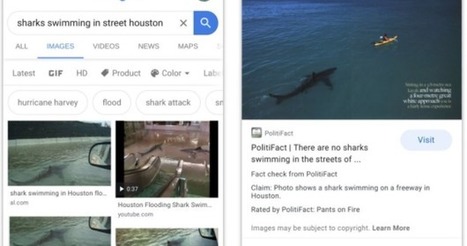
You Can Now Fact Check Visuals on Google Images via Educators' technology

You Can Now Fact Check Visuals on Google Images via Educators' technology | Distance Learning, mLearning, Digital Education, Technology | Scoop.it
Free resource of educational web tools, 21st century skills, tips and tutorials on how teachers and students integrate technology into education

Via Dr. Tom D'Amico (@TDOttawa)
No comment yet.
Rescooped by Dennis Swender from iGeneration - Humane Use of Technology in an AI world (Pedagogy & Digital Innovation)
June 26, 2020 2:14 AM
Scoop.it!

Sharing vs. Publishing Google Docs via @rmbyrne 

Sharing vs. Publishing Google Docs via @rmbyrne  | Distance Learning, mLearning, Digital Education, Technology | Scoop.it
I have published more than 1,000 tutorials on my YouTube channel over the last ten years. Some of those videos feature older versions o

Via Dr. Tom D'Amico (@TDOttawa)
No comment yet.
Rescooped by Dennis Swender from Digital Delights for Learners
June 26, 2020 2:11 AM
Scoop.it!

team.video | Video collaboration for remote meetings

team.video | Video collaboration for remote meetings | Distance Learning, mLearning, Digital Education, Technology | Scoop.it
Work better together, when you’re far apart

Via Ana Cristina Pratas
golden's curator insight, October 30, 2021 3:31 AM


https://mikabirdsfarm.co.uk/product/cockatoo-for-sale-uk/

https://mikabirdsfarm.co.uk/product/hyacinth-macaw-for-sale-uk/

https://mikabirdsfarm.co.uk/product/african-grey-parrot/

https://mikabirdsfarm.co.uk/product/african-grey-parrot/

https://mikabirdsfarm.co.uk/product-category/african-greys-parrot/

https://mikabirdsfarm.co.uk/

https://mikabirdsfarm.co.uk/product/cockatoo-for-sale-uk/

https://mikabirdsfarm.co.uk/product/hyacinth-macaw-for-sale-uk/

https://mikabirdsfarm.co.uk/product/african-grey-parrot/

https://mikabirdsfarm.co.uk/product/african-grey-parrot/

https://mikabirdsfarm.co.uk/product-category/african-greys-parrot/

https://mikabirdsfarm.co.uk/


https://mikabirdsfarm.co.uk/product/hyacinth-macaw-for-sale-uk/

https://mikabirdsfarm.co.uk/product/hyacinth-macaw-for-sale-uk/

https://mikabirdsfarm.co.uk/product/buy-dusky-headed-parakeet/

https://mikabirdsfarm.co.uk/product/black-palm-cockatoos/

https://mikabirdsfarm.co.uk/product/black-palm-cockatoos/

 baby parrots for sale uk, Blue and Gold Macaw eggs, blue

https://mikabirdsfarm.co.uk/product/cockatoo-for-sale-uk/

https://mikabirdsfarm.co.uk/product/hyacinth-macaw-for-sale-uk/

https://mikabirdsfarm.co.uk/product/african-grey-parrot/

https://mikabirdsfarm.co.uk/product/african-grey-parrot/

https://mikabirdsfarm.co.uk/product-category/african-greys-parrot/

https://mikabirdsfarm.co.uk/

https://goldenretrieverwelpen.xyz/

https://nationalboxerpuppiesrescue.com/

https://mikabirdsfarm.co.uk/

https://goldenretrieverwelpen.xyz/

https://goldenretrieverwelpen.xyz/

https://mikabirdsfarm.co.uk/

https://mikabirdsfarm.co.uk/product/hyacinth-macaw-for-sale-uk/

https://mikabirdsfarm.co.uk/product/cockatoo-for-sale-uk/

https://mikabirdsfarm.co.uk/product/hyacinth-macaw-for-sale-uk/

https://mikabirdsfarm.co.uk/product/african-grey-parrot/

https://mikabirdsfarm.co.uk/product/african-grey-parrot/

https://mikabirdsfarm.co.uk/product/african-grey-parrot/

https://mikabirdsfarm.co.uk/product/cockatoo-for-sale-uk/

https://mikabirdsfarm.co.uk/product/african-grey-parrot/

https://mikabirdsfarm.co.uk/product/african-grey-parrot/

https://mikabirdsfarm.co.uk/product/african-grey-parrot/

https://mikabirdsfarm.co.uk/product/african-grey-parrot/

https://mikabirdsfarm.co.uk/product/african-grey-parrot/

https://mikabirdsfarm.co.uk/product/cockatoo-for-sale-uk/

https://mikabirdsfarm.co.uk/product/buy-dusky-headed-parakeet/

https://mikabirdsfarm.co.uk/product/black-palm-cockatoos/

https://mikabirdsfarm.co.uk/product/black-palm-cockatoos/


https://mikabirdsfarm.co.uk/

https://mikabirdsfarm.co.uk/product/black-palm-cockatoos/

https://mikabirdsfarm.co.uk/product/buy-dusky-headed-parakeet/

https://mikabirdsfarm.co.uk/product/caparrotua-cockatoo/

https://mikabirdsfarm.co.uk/product/cockatoo-for-sale-uk/

https://mikabirdsfarm.co.uk/product/eclectus-parrot-for-sale-uk/

https://mikabirdsfarm.co.uk/product/green-winged-macaw/

https://mikabirdsfarm.co.uk/product/hyacinth-macaw/

https://mikabirdsfarm.co.uk/product/african-grey-parrot/

https://mikabirdsfarm.co.uk/

https://mikabirdsfarm.co.uk/product/african-grey-parrot/

https://mikabirdsfarm.co.uk/product/african-grey-parrot/

https://megabirdstore.com/bird/buy-african-grey/

https://dalgonashihpoopuppies.com/available-puppies/ ;

https://dalgonashihpoopuppies.com/available-puppies/ ;

https://mikabirdsfarm.co.uk/product/buy-dusky-headed-parakeet/

https://mikabirdsfarm.co.uk/product/caparrotua-cockatoo/

https://mikabirdsfarmonline.blogspot.com/

https://mikabirdsfarmonline.blogspot.com/

Scooped by Dennis Swender
June 22, 2020 1:09 PM
Scoop.it!

iPhone Not Ringing? Here’s Why & The Fix!

Two Apple experts explain why your iPhone is not ringing and show you how to fix the problem for good.

The first thing to do is check your iPhone’s Ring / Silent switch. If the switch is set to Silent, your iPhone won’t ring.

Next, turn up your ringer volume all the way. It's possible the ringer is set to silent!

Make sure Do Not Disturb isn’t turned on. Do Not Disturb is a feature that will silence all calls, texts, and other notifications.

If Do Not Disturb is off, it’s possible that your iPhone is stuck in headphones mode, or there could be damage to one of its speakers.

Learn more about why your iPhone won't ring: https://www.payetteforward.com/my-iphone-wont-ring-heres-the-real-reason-why/

What to do if your iPhone is stuck in headphones mode: https://www.payetteforward.com/iphone-stuck-headphone-mode-fix/

Get your iPhone repaired by Puls, an on-demand repair company: https://www.payetteforward.com/yt/puls

Set up an appointment at your local Apple Store: https://getsupport.apple.com

For awesome iPhone fixes and tips, check out our website, Payette Forward: https://www.payetteforward.com

Compare every cell phone, every plan, and every carrier on UpPhone: https://www.upphone.com

Get Social With PF!
On Facebook: https://www.facebook.com/payetteforwardinc
On Twitter: https://twitter.com/payetteforward
No comment yet.
Scooped by Dennis Swender
June 22, 2020 1:07 PM
Scoop.it!

7 iPhone Settings You Need To Turn Off Now

Apple experts David and David tell you about the seven #iPhone #settings you should turn off immediately.

Here are the seven settings to change:

0:12 iPhone Analytics: Turning this off will improve your iPhone’s battery life and give you more privacy.

0:44 iCloud Analytics: Like iPhone analytics, turning this off will improve your iPhone’s battery life and give you more privacy.

0:52 Significant Locations: This setting tracks the places you visit most often and saves them onto your iPhone. Turning it off will improve your battery life and help you maintain your privacy.

2:02 Almost Everything in System Services: These unnecessary System Services are constantly running in the background of your iPhone and draining its battery.

3:26 Limit Ad Tracking: This will prevent advertisers from collecting more detailed information about you.

4:17 Fetch New Data: Changing your Settings from Push to Fetch will help you save battery life.

5:30 Background App Refresh for certain apps: This will prevent apps from constantly running in the background of your iPhone and draining its battery life.

For awesome iPhone fixes and tips, check out our website, Payette Forward: https://www.payetteforward.com

Compare every cell phone, every plan, and every carrier on UpPhone: https://www.upphone.com

Get Social With Payette Forward:
On Facebook: https://www.facebook.com/payetteforwardinc
On Twitter: https://twitter.com/payetteforward
No comment yet.
Scooped by Dennis Swender
June 22, 2020 1:05 PM
Scoop.it!

What is a VPN? How it works and why you should get one

What is a VPN? This visual explanation will help demystify the confusion of a virtual private network, show you how it works and why you should consider buying one. Read more about what a VPN is here: https://www.allthingssecured.com/vpn/faq/what-is-vpn/

Need help installing a VPN on your computer? Check out this tutorial: https://www.youtube.com/watch?v=6pcUEOSpWb0

 ���VPN Recommendations (with discounts)���

✅ ExpressVPN (get 3 months FREE using this link):
https://www.allthingssecured.com/expressvpn-vpn

✅ NordVPN (get 70% off!):
https://www.allthingssecured.com/discount/nordvpn

✅ Surfshark (get 25% off!)
https://www.allthingssecured.com/yt/surfshark-vpn

*********************
Video Timestamps
*********************
0:00 - Introduction to VPNs
0:52 - Why Use a VPN?
1:45 - What is a VPN?
3:20 - How to Use a VPN
4:00 - Why NOT to Use a VPN
5:00 - Final Thoughts on Security

*********************

**What is a VPN?**

What is a VPN? A VPN is a means to encrypt, or secure, your data to keep it safe and add a layer of privacy to protect your identity. Before we dive into what it is, exactly, let's look at why you might need one and how it works.

*Why a VPN?*

It seems like almost every week there’s a front-page news story about somebody’s email getting hacked, identities stolen or privacy exploited.

Get used to it: this is our new reality. It’s more important for us to secure our computers nowadays than it is for us to lock our front doors. If you’ve known anybody who has had their identity stolen, you know that it’s not a simple wipe and replace. It takes years, sometimes more than a decade to recover from an identity theft.

So, what can you do to protect yourself? There are a number of measures you can take, but one of the easiest things you can do today is start using a VPN. It’s not foolproof and despite the marketing, I don’t believe we’re ever completely anonymous or totally safe on the internet, but it is the best step you can take to secure yourself online.

*How does a VPN Work?*

Without going into too much boring detail, here’s one way you can visualize a VPN. Imagine that you're on your computer and the cloud is the internet. Normally, your computer accesses the internet directly to the cloud ("internet") via your internet service provider. While this connection may be fast, it’s rarely secured and it’s very easily traced back to you.

When you access the internet via a VPN, imagine that your connection is routed through the internet via a secure tunnel through the cloud to a server in another location – sometimes in a different city, sometimes in a different country. At this point, the server accesses the internet on your behalf. The benefit here is that not only are you keeping your data safe, you’re also masking your location by making the internet think that you’re located where the server is, not your actual home or office.

Initially, VPNs were developed for corporations that needed to protect their sensitive data being sent over public and private networks, but ever since Wikileaks became a household name, the personal VPN market has rightly grown by leaps and bounds.

*How to Use a VPN?*

Now, in the real world, what does it look like to use a VPN? With a VPN, you can jump on the internet at your favorite coffee shop and be confident that all the passwords you’re typing or the websites you’re visiting can’t be intercepted by a hacker sipping a latte in the corner. A VPN can also spoof, or trick the internet into thinking you’re in a different location.

For instance, I may be logging on to my computer in Bangkok, Thailand but with a VPN I can spoof my location to Chicago or Paris.

*Any Reasons to NOT Use a VPN?*

Great question! There are a few reasons why many people don't use VPNs.

#1 Most people don’t realize that something as simple as using a public Wi-Fi network outside their home puts your security at serious risk. I’m not being an alarmist here. It’s scary easy to snoop on computers over a public Wi-Fi network.

#2 Some people don’t like using a VPN because it naturally slows down your internet speeds. When you begin encrypting and rerouting your internet traffic, there’s just no way to get around a loss in speed.

#3 Personal VPNs cost money. Sure, there are free VPNs out there but as they say, nothing is really “free”. These free VPNs, they either display tons of ads or sell your information, which is exactly the opposite purpose of using a VPN! The paid services aren’t crazy expensive, but for some reason it’s been a deterrent for people.

Allow me to conclude this explanation of a VPN with these thoughts:

1) VPN is not a connection to the internet. It is a secure way to access the internet.
2) Good news! A VPN is often very easy to use, even if you don’t consider yourself “tech-savvy”.
3) If you use public Wi-Fi, you should seriously consider a VPN.
No comment yet.
Scooped by Dennis Swender
June 22, 2020 1:03 PM
Scoop.it!

Uncover Windows 10 Most Useful Features Today

The first 500 people who click the link will get 2 free months of Skillshare Premium: https://skl.sh/xelplus9

In this video I'll share my favorite Windows 10 tips and tricks to make the most of Microsoft Windows. Some of these are what I consider hidden Windows features and they make a big difference in my daily work. Below is a quick summary:

00:00 Top 10 Tips and Tricks for Windows 10
00:56 Clipboard History: Enjoy next level pasting that's not limited to the last copied item
03:15 Sandbox: Safely test applications and websites in a separate virtual testing environment
05:35 Virtual Desktop. Keep business and private separate with virtual desktop
07:18 Hide Desktop Icons: Clean up and hide your desktop icons with one click
07:53 Focus Assist: Eliminate distractions and get in the zone
09:30 Quick Assist: Easily give and get assistance by creating a remote connection
10:47 Aero Shake: Quickly minimize opened windows except the one you want to focus on
11:34 Snap Your Windows: Look at multiple windows with split screen
12:26 Night Light: Improve your sleep by reducing blue light
13:32 Snip and Sketch: Capture your screen in various ways and add annotations

⯆ Read the full Windows 10 top tips and tricks Article here: https://www.xelplus.com/windows-10-top-tips-tricks

Many thanks to Skillshare for sponsoring this video.

★ My Online Excel Courses ► https://www.xelplus.com/courses/

✉ Not sure which of my Excel courses fits best for you? Take the quiz: https://www.xelplus.com/course-quiz/

EXCEL RESOURCES I Recommend: https://www.xelplus.com/resources/

Get Office 365: https://microsoft.msafflnk.net/15OEg
Microsoft Surface: https://microsoft.msafflnk.net/c/1327040/451518/7593

GEAR
Screen recorder: http://techsmith.pxf.io/c/1252781/347799/5161
Main Camera: https://amzn.to/3a5ldBs
Backup Camera: https://amzn.to/2FLiFho
Main Lens: https://amzn.to/39apgeD
Zoom Lens: https://amzn.to/3bd5pN7
Audio Recorder: https://amzn.to/2Uo5rLm
Microphone: https://amzn.to/2xYy9em
Lights: http://amzn.to/2eJKg1U

More resources on my Amazon page: https://www.amazon.com/shop/leilagharani

Let’s connect on social:
Instagram: https://www.instagram.com/lgharani
Twitter: https://twitter.com/leilagharani
LinkedIn: https://at.linkedin.com/in/leilagharani

Note: This description contains affiliate links, which means at no additional cost to you, we will receive a small commission if you make a purchase using the links. This helps support the channel and allows us to continue to make videos like this. Thank you for your support!

#windows10 #Office365
No comment yet.
Rescooped by Dennis Swender from eTEL
June 26, 2020 7:44 PM
Scoop.it!

What Works in Online Distance Teaching and Learning

What Works in Online Distance Teaching and Learning | Distance Learning, mLearning, Digital Education, Technology | Scoop.it

Via Ana Cristina Pratas, T@T lab
No comment yet.
Rescooped by Dennis Swender from Educational Technology News
June 26, 2020 7:40 PM
Scoop.it!

2020 EDUCAUSE Horizon Report™ | Teaching and Learning Edition

2020 EDUCAUSE Horizon Report™ | Teaching and Learning Edition | Distance Learning, mLearning, Digital Education, Technology | Scoop.it

"This report profiles key trends and emerging technologies and practices shaping the future of teaching and learning and envisions a number of scenarios and implications for that future. It is based on the perspectives and expertise of a global panel of leaders from across the higher education landscape."


Via EDTECH@UTRGV
EDTECH@UTRGV's curator insight, March 3, 2020 11:28 AM

I always look forward to the publication of the Horizon Report. :-)

Rescooped by Dennis Swender from iGeneration - Humane Use of Technology in an AI world (Pedagogy & Digital Innovation)
June 26, 2020 7:39 PM
Scoop.it!

An Easy Way to Create Your Own Online Jigsaw Puzzles via @rmbyrne

An Easy Way to Create Your Own Online Jigsaw Puzzles via @rmbyrne | Distance Learning, mLearning, Digital Education, Technology | Scoop.it
Jigsaw Explorer is a free site that hosts tons of online jigsaw puzzles. It also offers a free tool for creating your own online jigsa

Via Dr. Tom D'Amico (@TDOttawa)
No comment yet.
Rescooped by Dennis Swender from Tools for Teachers & Learners
June 26, 2020 7:35 PM
Scoop.it!

Mixaba - Remote Networking

Mixaba - Remote Networking | Distance Learning, mLearning, Digital Education, Technology | Scoop.it

Mixaba is a a new, free, way to attend remote social events that periodically breaks people out into small groups at random


Via Nik Peachey
Nik Peachey's curator insight, June 23, 2020 12:16 PM

This looks useful.

Rescooped by Dennis Swender from iGeneration - Humane Use of Technology in an AI world (Pedagogy & Digital Innovation)
June 26, 2020 7:31 PM
Scoop.it!

Remote Learning Resources for School Closures via @ShakeUpLearning- time to breath and reflect 

Remote Learning Resources for School Closures via @ShakeUpLearning- time to breath and reflect  | Distance Learning, mLearning, Digital Education, Technology | Scoop.it

Via Dr. Tom D'Amico (@TDOttawa)
No comment yet.
Rescooped by Dennis Swender from iGeneration - Humane Use of Technology in an AI world (Pedagogy & Digital Innovation)
June 26, 2020 7:31 PM
Scoop.it!

Google Chrome Quick Tip: Using Icons in the Bookmarks Bar

Ever wonder how you can have a pretty row of Chrome bookmarks that are all icons? It's super easy! The Chrome bookmarks bar is a great place for your favorite websites.

Simply click-and-drag to add a bookmark to the bookmarks bar. Then, right-click on the bookmark to edit the text and delete it to take it down to just the icon or favicon.


Via Dr. Tom D'Amico (@TDOttawa)
No comment yet.
Rescooped by Dennis Swender from Technology in the classroom
June 26, 2020 2:16 AM
Scoop.it!

How to Create Virtual Class Pictures With Pixton EDU via @rmbyrne

How to Create Virtual Class Pictures With Pixton EDU via @rmbyrne | Distance Learning, mLearning, Digital Education, Technology | Scoop.it
A couple of weeks ago I wrote about using Pixton EDU to create a virtual class photograph for the end of the school year. When

Via Dr. Tom D'Amico (@TDOttawa) , Gwen Hilliard
KaySummers's curator insight, June 24, 2020 1:28 PM
1
Great end of semester gift for your students
Rescooped by Dennis Swender from Education 2.0 & 3.0
June 26, 2020 2:14 AM
Scoop.it!

Using Social Media to Retain and Connect with Students in the Shift to Online Education

Using Social Media to Retain and Connect with Students in the Shift to Online Education | Distance Learning, mLearning, Digital Education, Technology | Scoop.it
The use of social media in online education presents a great opportunity for educators to connect with their students and recreate social connections.

Via EDTECH@UTRGV, Yashy Tohsaku
Jacqueline Elizondo's curator insight, February 5, 2022 5:51 PM
This sight provides information as to how an educator can move to incorporate social media in the classroom . And how one of the first steps is to learn how to choose one and stick to it. 
Scooped by Dennis Swender
June 22, 2020 1:11 PM
Scoop.it!

iPhone 7 – Complete Beginners Guide

This iPhone 7 Beginners Guide covers Everything about the iPhone 7 and iPhone 7 Plus, from 3D Touch to iOS 10, this 16 Chapter Video Guide has Everything you need to become an iPhone 7 Expert.
*** Chapter Guide Below***

iBotta – Save Money on Groceries & Shopping Trips!
Download the App: http://bit.ly/getibotta
Claim your $10 Bonus with Code: ikew

Best iPhone 7 Apps (Complete List): https://youtu.be/5xg65jvHj8A

Chapter Guide:

Chapter 1, Physical Features: 1:15
Chapter 2, Cables & Headphones: 7:52
Chapter 3, Power Off/On Your iPhone: 11:20
Chapter 4, Backup & Update your iPhone: 15:28
Chapter 5, Lockscreen & Wallpaper: 18:25
Chapter 6, Touch ID & Passcode: 23:27
Chapter 7, Notification Center: 31:48
Chapter 8, Control Center: 38:23
Chapter 9, Siri: 49:09
Chapter 10, 3D Touch: 54:38
Chapter 11, iMessage (All Features): 57:47
Chapter 12, Download Apps: 1:07:51
Chapter 13, Move & Delete Apps: 1:17:08
Chapter 14, Customize Widgets: 1:17:51
Chapter 15, Stock Applications: 1:20:33
Chapter 16, Settings 1:37:17
Video Summary: 1:44:32

Thanks for watching & enjoy your new iPhone 7!

More iPhone 7 & iOS 10 Videos:
iOS 10 Hidden Features Top 10 List: https://youtu.be/A_jEgO2R6BY
iPhone 7 Tips, Tricks & Hidden Features TOP 25 LIST: https://youtu.be/J7OYwrBQXeo
iPhone 7 New & Hidden Features: https://youtu.be/RIbJNMjATpE
How to Save Battery Life on iOS 10: https://youtu.be/n6W4d7DgJtw

Subscribe to see more iOS 10 & iPhone 7 Videos!
http://bit.ly/appfind-subscribe

App Spotlight
“Shines the Spotlight on the Best Mobile Games Every Week”
More Episodes: http://bit.ly/AppSpotlight

---

Stay Up To Date with AppFind!

Sign up for AppFind VIP (Email Newsletter): http://appfindvip.com

Subscribe on YouTube: http://bit.ly/appfind-subscribe

Like on Facebook: http://facebook.com/AppFind

Join on Google+ https://plus.google.com/+AppFind

Follow on Twitter: http://twitter.com/AppFindOfficial

Send us your Apps to Review: AppFind@gmail.com

Request a Sponsorship: AppFind@gmail.com (Include “Sponsor” in Email Subject)

---

A portion of this video contains an affiliate link for a service that viewers are not required to use. Everything is of my own opinion and creation.

Content Claim: All Video Clips and Sound have been either produced or licensed by AppFind. I use my own video clips and audio clips along with royalty free video clips bought from video hive, and royalty free sound from Adobe. I show off the Best Apps this Week in this Video. Everything else in the video is my own work.
No comment yet.
Scooped by Dennis Swender
June 22, 2020 1:08 PM
Scoop.it!

5 iPhone Mistakes You Need To Stop Making Now

Two Apple experts tell you about five mistakes that most iPhone users commonly make.

0:11 Not cleaning out your iPhone's ports, speakers, and microphones
1:07 Leaving all your apps open
2:26 Leaving Background App Refresh on for too many apps
3:41 Not offloading or deleting unused apps
5:08 Forgetting to delete your subscriptions

Purchase an anti-static brush: https://www.payetteforward.com/az/antistatic-brush

For awesome iPhone fixes and tips, check out our website, Payette Forward: https://www.payetteforward.com

Compare every cell phone, every plan, and every carrier on UpPhone: https://www.upphone.com

Get Social With Payette Forward:
On Facebook: https://www.facebook.com/payetteforwardinc
On Twitter: https://twitter.com/payetteforward

#iPhone #UpPhone
No comment yet.
Scooped by Dennis Swender
June 22, 2020 1:06 PM
Scoop.it!

15 Clear Signs Your Phone Was Hacked

How to Know if You've Been Hacked? If you think your smartphone is your private zone, you may be very wrong. So far, there is no such device that can’t be hacked.

We often see our smartphones as our secure digital havens. We use them to keep our most personal information: from pictures to credit card details. Some people even save their passwords in Notes. That’s a bit too much, right? You probably have all your text and email communication, including work stuff, based or synchronized on your phone.

To reduce the potential risks, we figured out three things: the ways your phone can be hacked, how to recognize them, and how to protect your phone from hackers.

TIMESTAMPS
You find new apps on your phone (you didn't install them) 3:45
Some apps stop working like they used to 4:20
Your phone has suddenly started to run out of juice very quickly. 4:37
Your smartphone seems slower than it used to be. 5:01
Your phone gets warm. 5:31
Your phone reboots itself, switches off, dials numbers, or starts applications. 5:56
Unknown phone numbers appear in your "Recent calls," and it costs you. 6:20
You cannot switch off your device 6:47
There are noises or echo during calls 7:12
You notice an increased use of mobile data 7:28
"Pop-ups" start appearing on your device out of nowhere 8:49
Emails sent from your phone are blocked by spam filters 9:15
You can’t make calls, or they are being dropped 9:38

#phonesecrets #onlinesafety

SUMMARY
What should you if you see any of these signs on your phone?
Try running mobile anti-malware software, delete all the apps you have not installed, and unreliable apps eating too much traffic. If it is possible, you can also reset your phone and go back to original settings. If that does not seem enough to you, consult a professional.

How can anyone steal your personal data?
- The easiest way is by taking possession of your phone for a few minutes and installing spy apps such as Spy Phone App, Spyzie, or Spyera. These apps are basically mobile trackers that record the incoming and outgoing phone calls and text messages. They can track GPS location, online activity and communication going on Whatsapp, Facebook, Viber, and Skype.
- Via an unprotected Wi-Fi network in a cafe or airport. The means of public Wi-Fi, you share all your traffic with everyone around you. Think of it next time you want to “Check in” somewhere exotic.
- When charging your phone via an unknown USB (even in an airplane or a car), there is a risk that all your data will be revealed and transferred. That’s a lot of information that can be used against you.
- SMS phishing. This happens when you receive a message with a link saying that it is, for example, your bank statement, a money transfer, or your photos. So you click it, download the file, and then reveal all your phone contents to hackers.
- With the help of the Signalling System SS7, used by the majority of telephone stations all over the world, hackers can read your text messages, listen to your phone calls, and track your cell phone locations. But if you are not a celebrity, there is nothing to worry about.

Subscribe to Bright Side : https://goo.gl/rQTJZz

----------------------------------------------------------------------------------------
Our Social Media:

Facebook: https://www.facebook.com/brightside/

Instagram: https://www.instagram.com/brightgram/

SMART Youtube: https://goo.gl/JTfP6L

5-Minute Crafts Youtube: https://www.goo.gl/8JVmuC

----------------------------------------------------------------------------------------
For more videos and articles visit:
http://www.brightside.me/
No comment yet.
Scooped by Dennis Swender
June 22, 2020 1:04 PM
Scoop.it!

Operating System : Windows 10 Tutorial for Beginners

Windows 10 - Tutorials & Basics
-----------------------------------------------------------------------------------------------------------
Windows 10 Tutorial for Beginners - Learn Windows 10 in simple and easy steps starting from basic to advanced concepts with examples including Overview, Installation, Getting Started, GUI Basics, Navigation, Start Menu, Taskbar, Tablet Mode, File Explorer, Cortana, Notifications, Quick Actions, Cloud, Universal Apps etc..
No comment yet.