


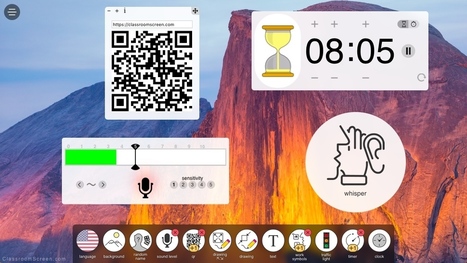
Quickly get a timer, textbox, noise meter, drawing tool, name picker, work symbols and more. Completely free.
Via Ana Cristina Pratas

 Your new post is loading...
 Scoop.it! Quickly get a timer, textbox, noise meter, drawing tool, name picker, work symbols and more. Completely free. Via Ana Cristina Pratas
Scoop.it!

As our schools modernize, educators are looking at digital transformation trends to incorporate tech into lessons & reach their students on a deeper level.
Scoop.it!

The latest data on the nation’s college and university enrollment shows that online is steadily climbing its way up to more than a third of th Via EDTECH@UTRGV
Scoop.it!
"ABCya Animate is a fun tool from ABCya that enables students to create animated GIFs containing up to 100 frames. On ABCya Animate ..." Via Leona Ungerer
Scoop.it!
How can we make the most of open practices in research, education and skills? The third in a series of reports to emerge from our horizon scanning project Via Elizabeth E Charles, Mark E. Deschaine, PhD
Scoop.it!

See how to avoid the biggest content curation mistakes so you can get more leads, traffic, and sales from this oh-so-effective tactic.
Scoop.it!

It can be so inspiring to take a look at other class blogs. We have put together a showcase of ten great blogs powered by Edublogs, CampusPress, or WordPress. Do you have any to add? Via Marta Torán
Scoop.it!
Scoop.it!

The top 5 challenges and top 5 benefits of online teaching. Teach effectively using the tools of the future. | Bright Classroom Ideas Via Nik Peachey
Scoop.it!

With now more than 1000 add-ons available for Google Sheets, Docs, Forms and Slides, it can be hard to discover new useful ones. Here’s the list of the 44 new add-ons published last month with a highlight on 5 add-ons we have found particularly interesting. Via Dr. Tom D'Amico (@TDOttawa)
Scoop.it!

Google Slides has a lot of capabilities that often go overlooked. One of those capabilities is the option to link slides so that viewers don't have to necessarily see them in a chronological sequence. Via Elizabeth E Charles |
Scoop.it!

From
uncubed

New technologies are uncovering cheaters in school, sport, finance, and love.
Scoop.it!
Scoop.it!

Last month I shared a blog post about the new Pear Deck add-on for Google Slides (as part of my " 12 Days of Tech-Mas " series o Via Dr. Tom D'Amico (@TDOttawa)
Scoop.it!

Researchers are investigating whether social media addiction constitutes a mental disorder. Is this a moral panic or food for thought? Via David M
Scoop.it!

Ronnie Burt, Sue Waters and Kathleen Morris write: "Want your students to write more in your class? Looking for prompts or ideas for student blog posts? You are in luck! This post aims to get your creative juices flowing with over 100 ideas and examples..." Via Mary Reilley Clark, Elizabeth E Charles 
Mary Reilley Clark's curator insight,
January 19, 2018 9:50 PM
Ah, the power of blogging! I read over 100 blogs thanks to the Feedly app. Right after I read this article, a teacher emailed me to ask if I could help her students create blogs--and figure out a reason for them to use them! Didn't I look like a genius when I suggested we use the types of blog posts from Ronnie, Sue and Kathleen's article and write blogs about the novel her students were reading?
This project has since morphed into a grade-level one. All 7th graders are reading the novel Tangerine as part of our new language arts curriculum. Each blog post students write has to relate to something in the novel. (There's something for everyone in this book--bullying, environmental issues, inequity in education, prejudice, sports, etc.) So, everyone is blogging and everyone is reading and commenting on other students' blogs. Most students are used to sharing work with their classmates, but now they will share with all students in their grade!
I used this presentation to introduce the types of posts they'd be writing. I encouraged teachers to customize: give students a choice of 6-8 types of posts, limit post length, etc. I was able to get them brainstorming by asking for examples from Hatchet, a novel most of them had read in 6th grade. They were very enthusiastic! A journal post from the perspective of the moose Brian encounters? Or a sales post for a plane, slightly used and maybe moldy? A curation post on how to determine which foods in the wilderness are safe to eat? We also looked at blogs on topics that might interest them and talked about how to find and follow them.
After the presentation all students signed up for Blogger and created their blogs. We wanted a standard format for the blog addresses, so one student demonstrated on our interactive board as everyone followed along. Next up, they write, they customize their theme, they find images that are free to use and share, etc. I can't wait to see the results! And I am happy to say that several students immediately thought of ideas for personal blogs. And all this happened because I read blogs:)
Scoop.it!

By leveraging artificial intelligence, Hawkeye monitors, analyzes and understands content from all over the web to help marketers create better content and measure its impact.
Scoop.it!

Here's how you can integrate Scoop.it with Sociabble to boost your employee advocacy and social selling initiatives!
Scoop.it!

You’re just starting instructional design. Are you ready to go? Before you do anything, have you answered these 10 questions? Via Marta Torán 
Marta Torán's curator insight,
January 9, 2018 2:13 PM
Marc Rosenberg cree que es necesario que el diseñador instruccional se haga 10 preguntas antes de empezar a trabajar.
Scoop.it!

We rank the best courses on the internet and allow you to filter through them based on price, difficulty, certificate quality, and more. Via Nik Peachey
Scoop.it!

For a long time, teaching was teacher-centered: the teacher dispensed information through lecture, handouts, or presentations; the students absorbed the information by listening and taking notes. It was repetitive, could become monotonous, and left little room for student exploration or creativity. It was also detrimental to students who couldn’t keep pace with the teacher’s lessons or students who learned in way different from the teacher’s presentation The past ten years have seen a surge in student-centered learning, and the integration of technology into the classroom makes it increasingly easy to create engaging lessons that reach a variety of learners in …
http://www.thetechedvocate.org/edtech-change-way-teachers-teach/ Via manuel area, Carlos Fosca
Scoop.it!

Google Chrome extensions can save you time and open up new options in the classroom! Here are 50+ extensions you can check out. Via Dr. Tom D'Amico (@TDOttawa)
Scoop.it!

Paul A. Kirschner OK; I’ve covered taking notes with or without laptops and whether people learn better if they read from paper or screen. This is the third blog in an apparent, unplanned, trilogy. Disclaimer: Let’s sketch/frame the situation so there are no misunderstandings. Yes, I know that using a computer (e.g., laptop, tablet, smartphone)… Via Ana Cristina Pratas |







Everything Teachers need on one screen. No more juggling from tab to tab.