


|
Rescooped by
Dennis Swender
from All digital
October 18, 2017 10:19 AM
|

No comment yet.
Sign up to comment

 Your new post is loading...
 Scoop.it! No comment yet.
Sign up to comment
Scoop.it!

Have you thought about teaching an online course or simply supplementing your face-to-face course with an online component? Whether you’re considering sharing your expertise via a completely online course or creating a hybrid, you now have a universe of options available for online teaching platforms to you. Here are some of the best online learning sites available. Via Nik Peachey 
Nik Peachey's curator insight,
October 18, 2017 12:57 AM
Some useful platforms and tips if you want to start developing your own courses.
Scoop.it!

Color enhances learning. Color can reduce the cognitive effort required to understand content because it adds another dimension to sense-making. Via Marta Torán
Scoop.it!

Managing documents in your Google Drive account can be problematic, especially if your district and your staff use Google Docs, Google Slides, or Google Sheets a great deal. What do so that you can access those documents you need to use the most? How can you organize those documents that are shared with you continuously? I think I have found a system that works, at least for me. Via Jim Lerman, Ines Bieler
Scoop.it!

Free resource of educational web tools, 21st century skills, tips and tutorials on how teachers and students integrate technology into education Via Dr. Tom D'Amico (@TDOttawa) , Ines Bieler 
Sara Astros Rojas's curator insight,
October 11, 2017 11:52 PM
Google forms are usually used by teacher since it can be a tool to gather infomation about their interest, to arrange appointments and even for self-assessmente. The fact that google added some new features thinking in the used given by the teachers, raise awarenesabout how much technology impact eduation
Scoop.it!

Every day, you face countless interruptions from apps, emails, and social media. Learn how to maximize your productivity and minimize distractions. Via Nik Peachey
Scoop.it!
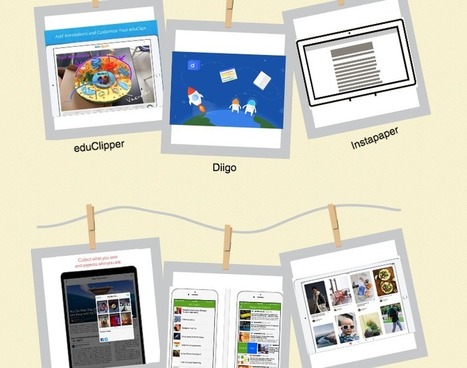
Free resource of educational web tools, 21st century skills, tips and tutorials on how teachers and students integrate technology into education Via Dr. Tom D'Amico (@TDOttawa) , Elke Höfler 
Margaret Annen's curator insight,
October 22, 2017 12:35 AM
Out of this article, I have used about 5 of the Bookmarking tools and from experience I find them to be of great interest in asking myself, in what sort of form do I wish to express my ideas and who is my audience? It is important to ask these questions whenever you are creating anything for both inside and outside of the classroom. With reference to my project, obviously DE and AP Spanish instructors will have to expose themselves to this technology and then create their pieces. In doing this, they will ask themselves, what is best for my student?, and which medium will allow them to internalize and connect to the information?
Scoop.it!

From
qz

This is the last in The Vanishing University, a four-part series exploring the tech-driven future of higher education in America. Here are parts one, two, and three. "Not enough people are innovating enough in higher education," gripes Larry Summers, the economist who served for five years as president of Harvard. "General Electric looks nothing like it looked in 1975. Harvard, Yale, Princeton Via Marc Wachtfogel, Ph.D.
Scoop.it!
"Since 2011 Banned Books Week has included a day to recognize banned websites. This year, on September 27, 2017, the American Association of School Librarians made a point to encourage their members to raise awareness about “overly restrictive blocking of legitimate, educational websites and academically useful social networking tools in schools and school libraries.”" Via EDTECH@UTRGV
Scoop.it!

Click here to read all the pieces in this series. By Matthew Lynch In the first three parts of my five-part series, I discussed technologies and education concepts that every teacher should know about. Today I want to continue that conversation today and look at several more technology features. Screen readers. This technology is slightly different from text-to-speech. It simply informs students of what is on a screen. A student who is blind or visually impaired can benefit from the audio interface screen readers provide. Students who otherwise struggle to glean information from a computer screen can learn more easily …
Scoop.it!

As well as sharing links to websites, the link sharing feature allows you to share links to videos from the web and collaborate on Google Docs, Google Slides or Google Spreadsheets. This takes Webroom beyond the usual presentation and chat type class and enables teachers to do work on writing skills too. Via Nik Peachey
Nik Peachey's curator insight,
October 13, 2017 2:40 AM
A really great platform for creating synchronous virtual learning. 
Juanita Amiel Townsend's curator insight,
October 13, 2017 4:41 PM
A really great platform for creating synchronous virtual learning.
Scoop.it!

"Thankfully today technology provides us with more tools for students to participate in class, share their ideas, and ask questions. One great option is to use Google Forms." Via EDTECH@UTRGV
Scoop.it!

You’re a grownup. You know how to use a computer and a phone. So when it’s time to show off some portion of your screen, don’t try to take a photo of it—that’s kid’s stuff, and it looks like junk anyway. Just about every modern operating system has some method of saving what’s on your screen, and most of them make it pretty easy. Keep this simple guide bookmarked for every method you’ll ever need. Via Becky Roehrs, Elizabeth E Charles 
Becky Roehrs's curator insight,
September 25, 2017 4:26 PM
Yep, it's time to learn how to take a screenshot on all of your devices.. |
Scoop.it!

Public health professionals are using Twitter to spread patient education and informative messages, leveraging the platform to communicate with an otherwise hard-to-reach audience, according to data published in the Journal of Medical Internet Research. Twitter has emerged as a popular tool for public health professionals because it helps drum up energy around a certain health issue, the research team from the University of Florida wrote. “Through microblogging, individuals not only share personal mementos, opinions, political information, and news but also promote products and information, thereby raising awareness for causes or charities,” the research team said. “Research shows that microblogging is powerful in convincing/rallying other individuals because of immediacy, its far reach to individuals around the world, and is seen as credible because it appears in a print format,” researchers continued. The average Twitter user is fairly young, between ages 18 and 29, the researchers reported. Racial demographics skew slightly toward the majority being African American or Hispanic. Most users also live in urban areas. READ MORE: How Social Media Can Improve Public Health, Patient Education
Those patient demographics are notoriously difficult to reach, the research team explained. Twitter presents an opportunity to contact those patients where the patients already are. “Local health departments often tweet information about tobacco cessation resources, events, frequently asked questions about immunizations, and other popular health-related topics,” the team stated. “Twitter has also been used as a means to provide sex education and to promote the use of condoms by tweeting facts on sexual health and information about local clinics that provide free condoms.” Twitter also holds promise because of its search and reply functions, the team said. Through search, public health officials can look at different regions with high mentions of a certain disease, such as the flu. If one county has a high frequency of flu mentions, the public health official may determine that the county needs more flu shot education next season. The reply section allows individuals to ask specific questions to public health professionals, and for those professionals to reply back. Those inquiries should be about broad public health topics, and not specific patient queries containing PHI. An analysis of Twitter use among public health professionals revealed that these experts are using their platforms to disseminate health information. READ MORE: How Providers Can Address Online Physician Reviews, Social Media
The research team looked through Twitter accounts using the search filters “public health practitioner,” “MHP” (master’s in public health), “public health,” and “APHA” (American Public Health Association). Weeding out inauthentic accounts, official public health institutions, and those with fewer than 300 followers, the team had 15,236 tweets to analyze. Between those over 15,000 tweets, 23 categories emerged. Health nutrition, conferences, Ebola, the Affordable Care Act, and social justice were the most common categories. Four content themes also emerged, including educating and informing, monitoring health statuses and trends, social justice, and professional development. The educating and informing category appeared the most useful and most prevalent, the team said. Public health officials use their platform to explain health concepts and educate patients using lay terms. “Similar to public health organizations, public health professionals are also using Twitter to inform and educate the public,” the researchers pointed out. “These results are not surprising, as one of the main tenets of public health is to ‘educate and inform.’” READ MORE: 4 Patient Education Strategies that Drive Patient Activation
Additionally, public health professionals are using their platforms to ensure audiences are properly informed, dispelling misinformation and tackling common public health myths. “As social media has become a main resource of knowledge for many, so has misinformation,” the researchers lamented. “With the credibility seen in microblogging, it is important for public health professionals with credentials/authority to dispel this misinformation among the public.” For example, public health professionals were instrumental in combatting misinformation with regard to the Ebola virus. In addition to general education attempts, public health professionals used their Twitter profiles to offer updates on specific health condition trends in a specific area. “This also allows public health professionals to take technical research and translate it into 140 characters, or lay terms, for the public to understand and disseminate among their social groups,” the team said. The researchers also noted the benefit of using embedded links, allowing patients to access more expanded information on a health agency’s website, for example. The analysis also shed light on public health’s core tenet of social justice. While social justice messages were not effective in driving patient engagement, and did not arm patients with knowledge necessary to better their health, the researchers said it indicated action for health equity. Twitter offers support for patient education, helping patients to better navigate the healthcare industry and to understand broad-reaching healthcare issues. Additionally, the tool presents an opportunity for public health professionals to advocate for health equity and equal access to treatment. “Unlike the majority of health organizations, public health professionals’ individual Twitter accounts outside organizations are not monitored by the government, and they are able to disseminate important information to colleagues and the lay population, such as how climate change affects public health, that organizations may not be able to disseminate, despite how critical that information is to the overall public health in the United States,” the researchers concluded. The team advised that offices lift any social media filters from their computer systems, allowing experts to deliver patient education messages outside the confines of their leisure time. It should also be noted that social media in healthcare can be a tricky area to navigate. All healthcare professionals should prohibit any inclusion of PHI in any form of social media use, including private direct messages. Via Plus91
Scoop.it!

So the question is, what kind of cultural values do you want to have implicit in what you teach? We need to think of this - it’s a chance to break away from institutional cultures, which are not always good things. Via Nik Peachey
Scoop.it!

Computers and smartphones have changed video, from analog-based to “creation on the fly.” Take a look at the future of dynamic interactive video. Via Marta Torán 
Marta Torán's curator insight,
October 16, 2017 5:44 PM
Vídeo interactivo, realidad virtual, simuladores a gran escala... el futuro del Aprendizaje
Scoop.it!
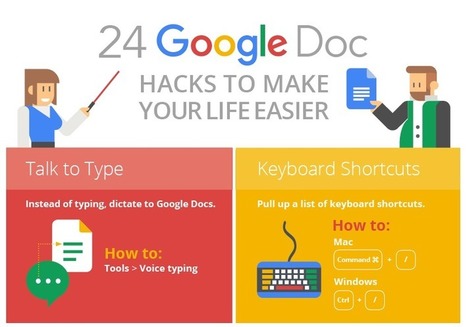
Google Docs is a powerful tool that makes working with people both near and far a breeze, but do you know how to use it to its full capacity? Via Dr. Tom D'Amico (@TDOttawa) , Ines Bieler 
Viljenka Savli (http://www2.arnes.si/~sopvsavl/)'s curator insight,
September 11, 2017 4:03 AM
useful tips and tricks for Google users 
Jenny's curator insight,
September 17, 2017 11:56 AM
Google Docs is one of the great apps I have explored during my learning experience. I remember that when I was at school, most of my teachers suggested us to start using it since it is very easy to use and manage. However, I did not have a computer and I did not like the idea of doing homeworks by the computer. To me, homeworks were better at hand, but through the years, I started becoming aware about the advantages of using this app.
In my school, there was an attempt to develop and enhance cooperative work since most of the parents were arguing that they did not want their children to do homeworks in others friends` houses, for them, it was better to start using the computer as a way to perform tasks with no moving from their home in their free time. I really love this app because it facilitates the development of tasks , optimizes time and enhances the cooperation among partners . It is significant to recognize that this great app is now taking place in different settings due to the features it provides. It is a powerful tool in academic scenarios because it promotes autonomy, cooperative work and responsibility. Some years ago, it just provided the feature of sharing documents and editing some aspects of the text, but now that technology has settled into many contexts,google docs provide more features to correct, align and adjust the document.
Scoop.it!

Barcelona, 2015. As I queue to visit Casa Batlló, one of the houses designed by Antoni Gaudí, I’m given not an audio-guide but a much heavier and chunky video one. It instantly sparks my curiosity… Via Stephania Savva, Ph.D
Scoop.it!

Just about every AI advance you’ve heard of depends on a breakthrough that’s three decades old. Keeping up the pace of progress will require confronting AI’s serious limitations. Via Marc Wachtfogel, Ph.D.
Scoop.it!
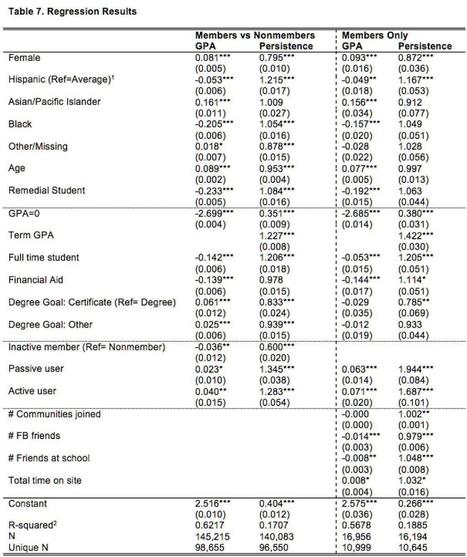
Content and resources for the education researcher
Scoop.it!

Despite Growth, Scientific Networking Sites Are Likely to Complement, Not Replace Open Access Repositories Via Mark E. Deschaine, PhD
Scoop.it!

A curated directory of resources & tools to help you build your Startup Via Andreas Christodoulou, THE OFFICIAL ANDREASCY 
Andreas Christodoulou's curator insight,
October 13, 2017 8:36 AM
Are you a startup founder? Here's a good list of resources and tools to help you kick off! A curated directory from A to Z!
Scoop.it!

In this video, I will give you an overview of each of the five options for Google Certification as well as give you additional resources, links, and infographics to help you dig deeper. Whether you are just getting started with Google Certified Educator Level 1 and Level 2, or you are looking at going further and become a Google Certified Trainer, Google Certified Innovator, or Google Certified Administrator, I got your back! Via Dr. Tom D'Amico (@TDOttawa)
Scoop.it!
This video list of insights comes from experts in the field of online teaching. Here is a collection of 8 lessons that might improve your online course Via Dr. Susan Bainbridge 
Shenaz Shaffee's curator insight,
October 22, 2017 3:32 PM
Teaching to learn and learning to teach in the digital classroom. |





