Your new post is loading...

|
Scooped by
Dennis Swender
February 9, 2018 1:09 PM
|
Apple Classroom was released in March 2016, but from things I read online, or hear when talking to other educators, I feel that it still gets mistakenly compared to Google Classroom. I can absolutely see why that happens. Both products have very similar names, and both were created to help solve technology problems in the classroom. However, the truth is, these two products could not be more different. So, in this post, I wanted to take some time to run through everything that Apple Classroom can do, and compare that to Google Classroom, in order to give you some ideas on how you can use these useful tech tools at your school.
|
|
Scooped by
Dennis Swender
February 9, 2018 1:07 PM
|
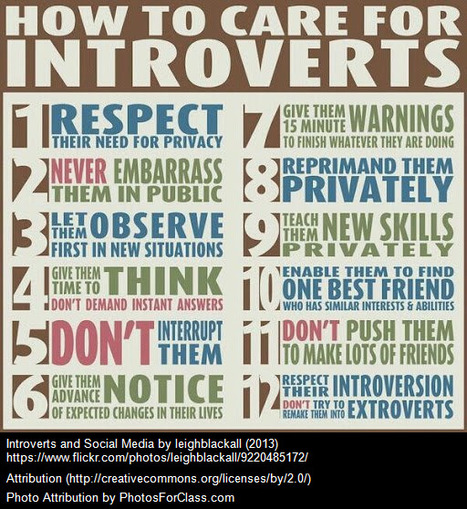
Joe told me that after his high school graduation, he’d put off college because of his fears of the classroom environment. He’d decided to enroll in this, one class at his local community college, because he had the option to take his courses online. Joe loved the online environment, and rather than feeling like it was his second-best option or that he was a second-best learner, he was empowered and eager. I imagined him pursuing his degree while maturity had a chance to do its job, gaining confidence in his ideas in written form first so that he could begin to take more extroverted baby steps in the future.
|
|
Rescooped by
Dennis Swender
from Educational Technology News
February 9, 2018 5:29 AM
|
Here are a few facts pointed out to display the worth and benefits of E Learning.
Via EDTECH@UTRGV
|
|
Rescooped by
Dennis Swender
from STEM Education
February 9, 2018 5:27 AM
|
|
|
Rescooped by
Dennis Swender
from All About Website
February 9, 2018 4:45 AM
|
As more and more devices adopt high-definition screens, font icons are becoming the popular choice to adopt. It is resizeable without compromizing quality and customizeable through CSS.
Via Fitri Ani
|
|
Rescooped by
Dennis Swender
from All About Website
February 9, 2018 4:44 AM
|
Learn to Code HTML and CSS: Develop and Style Websites PDF Free Download, Reviews, Read Online, ISBN: 0321940520, By Shay Howe
Via Fox eBook, Fitri Ani
|
|
Rescooped by
Dennis Swender
from All About Website
February 9, 2018 4:43 AM
|
Chrome has become a popular choice for many web developers and designers due to its robust inbuilt Developer tools. However, one can add essential extensions from the Chrome web store for an increa...
Via Fitri Ani
|
|
Scooped by
Dennis Swender
February 8, 2018 12:02 PM
|
If not used carefully, new technology for social assistance can further disconnect the poor—undermining needs and rehashing old narratives.
"Annotating is a great way to capture and record your thoughts as you interact with a reading material which can be a text document, a web page, a PDF, an image or even a video. It offers you a deeper level of engagement with text and is one of the efficient strategies for close and critical reading. Annotating, as Porter-O’Donnell (2004) stated, is “a writing-to-learn strategy for use while reading or re-reading…[It] helps readers reach a deeper level of engagement and promotes active reading. It makes the reader’s “dialogue with the text” (Probst) a visible record of the thoughts that emerge while making sense of the reading” (p. 82)."
Via John Evans
|
|
Rescooped by
Dennis Swender
from Photography in Esl-Efl
February 5, 2018 10:09 AM
|
The mobile phone and the death of real-life conversation by Babycakes Romero
Via Anna Costikoglou
|
|
Rescooped by
Dennis Swender
from Educating teachers in Esl-Efl
February 5, 2018 10:07 AM
|
instructions to delete Skype, Facebook, Windows Live, Yahoo, Twitter, MSN and other accounts
Via Anna Costikoglou
|
|
Rescooped by
Dennis Swender
from Educating teachers in Esl-Efl
February 5, 2018 10:05 AM
|
|
|
Rescooped by
Dennis Swender
from Educating teachers in Esl-Efl
February 5, 2018 10:03 AM
|
|
|
|
Scooped by
Dennis Swender
February 9, 2018 1:08 PM
|
It’s terribly confusing, but perhaps no coincidence, that three of the world’s most prominent consumer technology companies—Apple, Google, Microsoft—each boast a “Classroom” tool aimed at K-12 educators and students. After all, what better way to secure a foothold in the market than impressing one’s brand to future consumers at a young age?
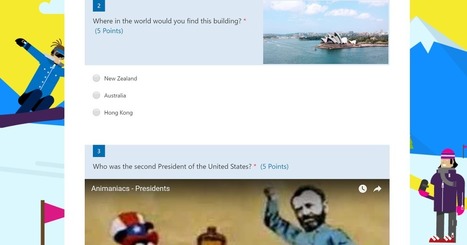
Microsoft Forms offers a good way for Office 365 users to create multimedia quizzes. The quizzes that you create in Microsoft Forms can be automatically graded for you. One of the features of Microsoft Forms that I actually prefer to Google Forms is the layout of images used as part of question prompt.
Via Elizabeth E Charles
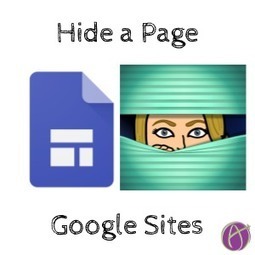
Use the new Google Sites in G Suite to create a tutorial and hide the page from navigation. This allows you to use the same site for all your tutorials.
Via Dr. Tom D'Amico (@TDOttawa)
Google Slides is already a powerful tool for student creation and collaboration. You can see a wide range of educational uses on my Googl
Via Ana Cristina Pratas
|
|
Rescooped by
Dennis Swender
from All About Website
February 9, 2018 4:44 AM
|
HTML5, JavaScript, and jQuery 24-Hour Trainer PDF Free Download, Reviews, Read Online, ISBN: 1119001161, By Dane Cameron
Via Fox eBook, Fitri Ani
|
|
Rescooped by
Dennis Swender
from All About Website
February 9, 2018 4:43 AM
|
Beginning JavaScript, 5th Edition PDF Free Download, Reviews, Read Online, ISBN: 1118903331, By Jeremy McPeak
Via Fox eBook, Fitri Ani
|
|
Rescooped by
Dennis Swender
from All About Website
February 9, 2018 4:42 AM
|
Principles of Web Design: The Web Warrior Series, 6th Edition PDF Free Download, Reviews, Read Online, ISBN: 1285852648, By Joel Sklar
Via Fitri Ani
Over the years, many of us have personally experienced the growth of technology in today’s classrooms.
Instead of taking notes, students are now occupied by surfing the Internet, scrolling through Facebook, and messaging their friends on their smart phones, tablets, and laptops. Instead of focusing on the instruction, teachers are constantly required to interrupt class in order to remind those students again and again, that class time is for learning, not texting. However, as today’s students are using more technological devices, it is imperative that teachers have access to the resources to keep pace with the growing tech culture.
The use of smart phones, tablets, and other tech items in the classroom do not necessarily have to have a negative impact on student achievement. On the contrary, the increasing accessibility and growth of technology presents teachers with the unique opportunity to take advantage of those once distracting gadgets, and use them to facilitate academic achievement in new and innovative ways. In this capacity, teachers do not need to be constantly fighting for student attention, but can freely accept it, by introducing a new educational environment that will automatically encourage student participation.
Below are some resources that teachers may find useful when attempting to implement technology into their classrooms, separated by 5 common areas that are increasingly important for teachers, and for an effective learning environment—Organization, Project Based Learning, Class Management, Presentations, and Assessment.
Via John Evans
|
|
Rescooped by
Dennis Swender
from Photography in Esl-Efl
February 5, 2018 11:49 AM
|
This daily dose of satellite photos helps you appreciate the beauty and intricacy of the things humans have constructed--as well as the devastating...
Via Petra Pollum, Anna Costikoglou
|
|
Rescooped by
Dennis Swender
from Educating teachers in Esl-Efl
February 5, 2018 10:07 AM
|
|
|
Rescooped by
Dennis Swender
from Educating teachers in Esl-Efl
February 5, 2018 10:05 AM
|
|
|
Rescooped by
Dennis Swender
from Educating teachers in Esl-Efl
February 5, 2018 10:04 AM
|
How often do you use Google to find something on the internet? If like a lot of people you use Google every day you’ll be astounded by the number of hidden tips and tricks their search facility offers. Find 46 of them featured in this infographic.
Via Lauren Moss, KB...Konnected, Anna Costikoglou
|