Distance Learning, mLearning, Digital Education, Technology
16.5K views | +0 today
Distance Learning, mLearning, Digital Education, Technology
Your new post is loading...
Rescooped by Dennis Swender from iPads in EdTech
July 6, 2017 10:02 AM
Scoop.it!

How to Use Split View Multitasking on iPad -OSXDaily

How to Use Split View Multitasking on iPad -OSXDaily | Distance Learning, mLearning, Digital Education, Technology | Scoop.it
The latest versions of iOS for iPad include a great multitasking feature called Split View, which, much as it sounds, allows users to split the screen on the iPad between two active apps side-by-side. iPad and iPad Pro users can adjust the size of each app panel or have them take up an equal amount of space, enabling users to essentially use two apps at the same time.

Via John Evans, Chris Carter
mrsjgarcia's curator insight, December 8, 2015 9:21 AM

I am still trying to get this to work. I must be doing something wrong.

Chad Lewis's curator insight, January 16, 2016 2:46 AM

Been waiting for this for a long time.

It's really a game changer when having the digital textbook conversation.

Scooped by Dennis Swender
July 6, 2017 9:56 AM
Scoop.it!

7 Open Source Image Sites for Great Project Pics

7 Open Source Image Sites for Great Project Pics | Distance Learning, mLearning, Digital Education, Technology | Scoop.it
Some of the best of the best in open source image sites are listed in this article, as well as great guidelines for ethical searches and Creative Commons
No comment yet.
Rescooped by Dennis Swender from Project-based Learning in the Flipped Classroom
July 5, 2017 12:29 AM
Scoop.it!

25 Best Sites for Free Educational Videos

25 Best Sites for Free Educational Videos | Distance Learning, mLearning, Digital Education, Technology | Scoop.it
Directory of the Web's best educational video resources. Includes 5min, Academic Earth, BrainPOP, Brightstorm, iTunes U, YouTube EDU, and many more sites.

Via Maggie Rouman
Rosemary Tyrrell, Ed.D.'s curator insight, June 26, 2017 12:42 PM
Excellent resource. Lots of great stuff out there. 
 
António Leça Domingues's curator insight, June 27, 2017 5:13 AM
Sítios internet para vídeos educativos gratuitos.
magnus sandberg's curator insight, June 27, 2017 9:16 AM
A great list of free video sites
Scooped by Dennis Swender
July 4, 2017 1:55 PM
Scoop.it!

Add Bookmarks to Video Clips in PowerPoint 2016 for Windows

Learn how to add Bookmarks to video clips in PowerPoint 2016 for Windows.
No comment yet.
Scooped by Dennis Swender
July 4, 2017 1:55 PM
Scoop.it!

Reset Options for Videos in PowerPoint 2016 for Windows

Reset Options for Videos in PowerPoint 2016 for Windows | Distance Learning, mLearning, Digital Education, Technology | Scoop.it
Learn how to reset your video clips in PowerPoint 2016 for Windows.
No comment yet.
Rescooped by Dennis Swender from iGeneration - Humane Use of Technology in an AI world (Pedagogy & Digital Innovation)
July 4, 2017 1:54 PM
Scoop.it!

How to Add Images to Google Slides via @rmbyrne

How to Add Images to Google Slides via @rmbyrne | Distance Learning, mLearning, Digital Education, Technology | Scoop.it
On Friday I received an email from a reader who was asking about how to add images to Google Slides. I made the following video to provid

Via Dr. Tom D'Amico (@TDOttawa)
No comment yet.
Rescooped by Dennis Swender from Daily Magazine
July 3, 2017 3:21 AM
Scoop.it!

Google updates its mobile Test My Site tool with more competitive analysis

Google updates its mobile Test My Site tool with more competitive analysis | Distance Learning, mLearning, Digital Education, Technology | Scoop.it
Google's site speed tool now compares your site to your competitors' and tells you how many visitors your site is losing because of your load time.

Via THE OFFICIAL ANDREASCY
No comment yet.
Rescooped by Dennis Swender from Daily Magazine
July 3, 2017 3:19 AM
Scoop.it!

Scredible - A single, simple app for a more connected digital life

Scredible - A single, simple app for a more connected digital life | Distance Learning, mLearning, Digital Education, Technology | Scoop.it
Scredible uses advances in AI to help you make the most of social media.

Via THE OFFICIAL ANDREASCY
No comment yet.
Rescooped by Dennis Swender from Social Media and Healthcare
June 30, 2017 10:36 AM
Scoop.it!

This Is How Patients Choose New Doctors (and How to Use It to Your Advantage) 

This Is How Patients Choose New Doctors (and How to Use It to Your Advantage)  | Distance Learning, mLearning, Digital Education, Technology | Scoop.it

Finding a new doctor is more than just a snap decision, and while your digital marketing efforts should aim to streamline the decision process, it’s still just that—a process.

This blog article aims to give you a glimpse into the decision-making process of patients as well as how to use this process to your digital marketing advantage.

This Is How Patients Choose New Doctors (and How to Use It to Your Advantage)CLICK TO TWEET

How Do Patients Choose a New Doctor?

The first thing you should know is that it isn’t a quick sell.

There are steps in the buying cycle:

AwarenessResearch and ConsiderationThe BuyAdvocacy


Awareness

Awareness for medical practices can come in so many forms. A friend could tell a consumer about a new office. They might see an ad. Or, maybe they have a need for your services, so they perform an online search.

They could ask for a recommendation on Facebook. While this may seem unlikely, I’ve seen it happen in my Facebook feed. And, 41 percent of patients said that information they found on social media has influenced their choice of doctor.

Research and Consideration

During the research and consideration stages, people either engage with your business online or find content about you that helps them determine if they should choose you.

For example, a prospective patient might call in to check if you take their insurance or are accepting new patients.

Or, they might read online reviews of your practice. Don’t underestimate the power of reviews. Eighty-four percent of patients said they use online reviews to evaluate physicians.

Since 88 percent of insured Americans say that whether a provider accepts their insurance is an important factor in their choice of doctor, this is a huge part of the decision-making process.

The Buy

This happens when a prospect makes an appointment. The appointment is crucial not only because they are in the office and you are taking care of the patient, but because their experience is going to shape whether they come back or not.

Advocacy

The next step is advocacy. A new patient has experienced your office and becomes an advocate by telling others about their experience. This can be through contact with friends and family or leaving online reviews.


Why Is the Patient Decision-Making Process Important for Your Marketing Strategy?

If you make sure your medical practice is in front of consumers through every stage of the decision process, you will increase revenue by creating long-term patients who will become loyal patients and advocate for your business.

How can you get your medical practice in front of consumers through every stage of the buying cycle?

You first need to be found online. This includes working on your ranking in local search results and making sure your online presence is accurate (and that it gives consumers a positive view of your business).Depending on your budget, a comprehensive digital marketing strategy that includes online advertising, local search marketing and review marketing can help you do this. Building your local search presence and creating online ads will ensure that your practice shows up when patients are looking for a doctor while review marketing allows you to highlight what’s great about your practice through patient reviews.You need to ensure your patients have a stellar experience in every communication and engagement point in time (from making the appointment to checking in and verifying insurance and co-payment to the experience with the doctor, checking out and even the billing process). This is important because patients will talk about your practice online and to their friends.Bonus: Tips to Build a Better Doctor Marketing Strategy

Give Video Marketing a Try

Video marketing can easily convert to traffic and leads. It also gets your point across effectively and humanizes your marketing as well as giving prospective patients a better idea of the benefits of your facility.

And since YouTube traffic to hospital websites has increased 119 percent year-over-year, you should have a YouTube channel that links to your website.

What types of videos should doctors create? Video content such as interviews, patient stories and behind-the-scenes looks at your facility and equipment should do the trick. These will answer questions prospective patients have during the research process.


Don’t Forget About Millennials

Millennials are a diverse group. They range from 18-34 years old, which makes it difficult to market to the entire generation. Still, Millennials have a lot of buying power.

Millennials share one important commonality with other generations: they value attentive doctors who listen well.

Consider what one respondent told Nuance in a study.

When I needed to find a new physician, I looked for a doctor within my insurance network and then turned to online reviews. Based on the comments, I ruled out several doctors, including one I was originally considering because someone mentioned they felt rushed and treated like a paycheck during their appointment.

More than half of this generation will Google health information before seeing a doctor, according to the report.

So, to be there for Millennials when they are searching for physicians, you’ll need to have a review marketing strategy that helps you get new positive reviews on a regular basis. You’ll also need to make sure you provide a pleasant patient experience and that your practice is showing up in online searches.


Via Plus91
No comment yet.
Rescooped by Dennis Swender from Edumorfosis.it
June 30, 2017 10:33 AM
Scoop.it!

5 ways to support faculty who teach with emerging technologies

5 ways to support faculty who teach with emerging technologies | Distance Learning, mLearning, Digital Education, Technology | Scoop.it
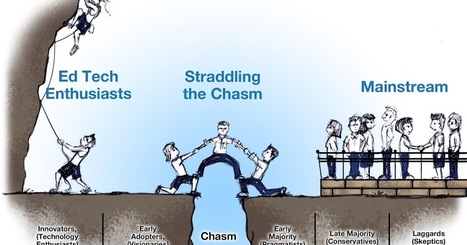
As online and blended learning reshapes the landscape of teaching and learning in higher education, the need to encourage and support faculty to move from delivering passive, teacher-centered experiences to designing active, student-centered learning increases. Our new social era is rich with simple, free to low-cost emerging technologies that are increasing experimentation and discovery in the scholarship of teaching and learning. While the literature about Web 2.0 tools are impacting teaching and learning is increasing, there is a lack of knowledge about how the adoption of these technologies is impacting the support needs of higher education faculty. This knowledge is essential to develop new, sustainable faculty support solutions.

Driven by my own experiences as a full-time and part-time faculty and early adopter of VoiceThread -- a Web 2.0 tool that fosters asynchronous voice, video, and text conversations around media -- I designed my dissertation research study to investigate the how the use of Web 2.0 tools is impacting the support needs of higher education faculty. I performed this action research study in collaboration with the VoiceThread organization with the purpose of improving the support needs of their higher education users.

The study's sample included 50 higher education faculty members, comprised of a mix of part-time and full-time faculty from 2-year and 4-year institutions in the United States with a VoiceThread account (free, an individual Higher Ed account, or a site license). The interview and reflection data revealed unique support needs of faculty who teach with emerging technologies, a growing demographic. These include:

Via Edumorfosis
No comment yet.
Scooped by Dennis Swender
June 29, 2017 10:37 PM
Scoop.it!

A Beginning List Of The Best Resources For Learning About Google Classroom

A Beginning List Of The Best Resources For Learning About Google Classroom | Distance Learning, mLearning, Digital Education, Technology | Scoop.it
Our district is taking baby steps towards using Google Classroom, and I thought it would be a good time to begin a related “Best” list. You might also be interested in: The Best Resourc…
No comment yet.
Rescooped by Dennis Swender from Learning & Technology News
June 29, 2017 10:37 PM
Scoop.it!

14 Smart Ways to Use Smartphone Cameras in the Classroom

14 Smart Ways to Use Smartphone Cameras in the Classroom | Distance Learning, mLearning, Digital Education, Technology | Scoop.it
Check out these 14 great ways students can use their amazingly powerful smartphone cameras for all kinds of classroom applications.

Via Nik Peachey
a-virtual - Claudia M Pagano's curator insight, September 22, 2016 7:35 AM

Some useful ideas.

Ely Córdoba's curator insight, September 28, 2016 10:33 AM
Over the years, smartphones takes an important part in the people, and more in younger people. In the classroom is very common the use of them, students use them to chatting, to read, to listen to music, and to use the camera in order to make photos or videos, and the last one has been very popular. However, stadistics show that the use of camera changes during the years; for example, today is less used in contrast with 2010, but this is not the point, the real point in this article is the motivation to implement this kind of tool in the different classes. All students have a smartphone, and as a teacher we can implement the use of the camera to change the teaching and give them dynamic activities. Some activities involve make videos, or stories with pictures, portfolios, collages, tutorial, presentations or different documents. These activities are atractive to students in order to change the way to learn and the applied activities in the process.
Marta Ger And's curator insight, November 26, 2016 3:26 AM
La buena utilización de un móvil en el aula. Las prohibiciones no deberían existir, educar para el buen uso.
Rescooped by Dennis Swender from Tech Help for Teachers
June 29, 2017 10:34 PM
Scoop.it!

How to Take a Screenshot of an Entire Webpage

How to Take a Screenshot of an Entire Webpage | Distance Learning, mLearning, Digital Education, Technology | Scoop.it
A simple screenshot is great for capturing what’s immediately visible on your monitor, but what if you need to capture an entire webpage? Here are three simple ways you can capture a long web page as one continuous image and, in the process, preserve it exactly as it appears to the viewer.

Via Arnie Rotenberg
No comment yet.
Rescooped by Dennis Swender from Digital Presentations in Education
July 6, 2017 10:01 AM
Scoop.it!

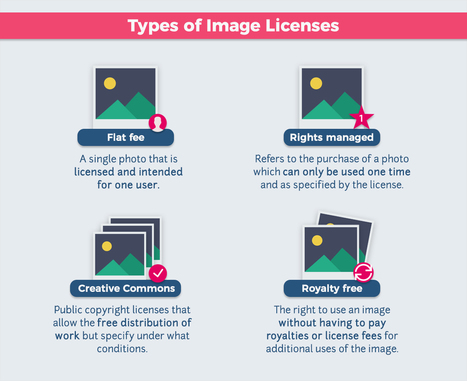
Can I Use That Picture? How to Legally Use Copyrighted Images [Infographic]

Can I Use That Picture? How to Legally Use Copyrighted Images [Infographic] | Distance Learning, mLearning, Digital Education, Technology | Scoop.it
A visual, easy-to-understand explanation of public domain, including a flow chart to help you decide whether you can legally use an online image or not.

Via Baiba Svenca
Oskar Almazan's curator insight, June 9, 2017 5:01 AM
What was once a web filled with code and scrolling text, the Internet is now the world’s largest conglomerate of images. And as visual content continues to rule, the number of images available online will only grow. But just because you can Google an image — and technically copy or save it — doesn’t mean the web is a free-for-all of visual data. Photographers and designers need to put food on the table. If every online image was available for free, there would be a lot more starving artists. Fortunately for them, copyrights apply in cyberspace just as in print. And anyone using an image without appropriate rights and permissions can find themselves in plenty of hot water. Understanding the ins and outs of image licensing and usage can save digital marketers, web designers and other content curators from unnecessary penalties, ranging from cease and desist notices to lawsuits and financial demands. Want to be sure you properly use images in your online content? An ounce of prevention is worth a pound of cure. Just follow our five simple steps, and you just might save yourself a load of legal trouble. 
 
Martin Debattista's curator insight, June 19, 2017 2:42 AM
Creative Commons remains the best licensing system that promotes creative work and its appreciated.
Rescooped by Dennis Swender from Learning & Technology News
July 6, 2017 9:24 AM
Scoop.it!

Students Say They Are Not as Tech Savvy as Educators Assume

Students Say They Are Not as Tech Savvy as Educators Assume | Distance Learning, mLearning, Digital Education, Technology | Scoop.it

Students say that in order for high schools and colleges to better serve them, it is important to challenge the assumption that students are digital natives. This starts with educating professors about the technological diversity in their classrooms and providing students with workshops and engaging videos to help them learn without shame.


Via Nik Peachey
Nik Peachey's curator insight, June 26, 2017 3:43 AM

Well worth considering. Particularly when it comes to using tech for study purposes, I think many teenagers really need some help.

Llandrillo Library's curator insight, June 27, 2017 5:06 AM
The idea of being a digital native has been unsubstantiated for a while but the myth still persists - this dispels some of that. Remember it's more likely to be digitally confident not competent  
Rescooped by Dennis Swender from Social Media and Healthcare
July 4, 2017 6:29 PM
Scoop.it!

Social Media and Healthcare Professionals

Healthcare employees’ personal use of social media can have serious implications when it comes to HIPAA violations. red balloon CEO Jennifer Maggiore share

Via Plus91
No comment yet.
Scooped by Dennis Swender
July 4, 2017 1:55 PM
Scoop.it!

Resize, Rotate, and Flip Videos in PowerPoint 2016 for Windows

Resize, Rotate, and Flip Videos in PowerPoint 2016 for Windows | Distance Learning, mLearning, Digital Education, Technology | Scoop.it
Learn how you can Resize, Rotate, and Flip video clips in PowerPoint 2016 for Windows.
No comment yet.
Rescooped by Dennis Swender from Social Media and Healthcare
July 4, 2017 1:54 PM
Scoop.it!

A Perfect Twitter Storm: Why Is the ADA So Anti–Social Media?

A Perfect Twitter Storm: Why Is the ADA So Anti–Social Media? | Distance Learning, mLearning, Digital Education, Technology | Scoop.it

Meeting attendees are pushing back against the enforcement of severe restrictions on social media posts that discuss the American Diabetes Association (ADA) 2017 Scientific Sessions taking place here this week.

Since the meeting began on Friday, June 9, many of the attendees' Twitter posts, including photographs from sessions, have been met by a polite yet firm appeal from the ADA asking them to delete their tweet.

"Thanks for joining us at #2017ADA! Photography isn't allowed during presentations — we'd appreciate it if you would delete this tweet," reads a typical Twitter response from the ADA's official handle, @AmDiabetesAssn.

Twitter users immediately began expressing anger and frustration over the seemingly draconian attempts to limit social media conversations at the association's scientific sessions. Many say they see it as an unethical attempt to maintain a monopoly on data and educational effort.

"Those in power are counting on you to NOT speak up & to comply. Stop deleting, Start tweeting, Don't be thanked for ur compliance," C Michael Gibson, MD, an interventional cardiologist at Beth Israel Deaconess Medical Center, Boston, Massachusetts, tweeted several times to his more than 300,000 Twitter followers. One prompted a long string of replies in agreement, as well as 150 likes and 90 retweets. Similar posts are also receiving brisk engagement.

At times, the flood of negative reaction has dominated conversations about the conference on Twitter. The phrases "Freethetweet," "ludditeofthemonth," and "freedomoftweech" were just as often associated with the conference's official hashtag, #2017ADA, as phrases like "insulin," "mortality," and "changingdiabetes," according to the Twitter analytics site, keyhole.co.

"The refusal of the American Diabetes Association to allow sharing of publicly presented content is out of step with the policy of other medical societies that have embraced social media to the benefit of both patients and healthcare providers alike," Dr Gibson told Medscape Medical News.

"In the interest of speeding the transformation of diabetic care, patients and healthcare providers should call upon the ADA to reverse its policy to restrict the sharing of photos and slides from the meeting," he added.

Tweeting From a Meeting "Not Considered Prior Publication," Says NEJM

Even those not in attendance but still following the meeting on Twitter chimed in. Dr Kevin Campbell, a cardiologist and medical expert who makes frequent media appearances, posted more than a dozen tweets to his 137,000 followers, admonishing the ADA. In his view, the restrictions are an archaic form of censorship that only serves to stifle discussion and creativity.

"All societies go out of their way to promote interaction and sharing on social," Dr Campbell told Medscape Medical News. "If we do not share data and information, we will only make slow advancements. Real-time interaction provided by SoMe [social media] allows us to make real progress much faster."

Another highly prolific physician tweeter who blogs for theheart.org on Medscape, Dr John Mandrola, agrees. He said he finds the policy nonsense and largely unenforceable, a viewpoint he tweeted out several times to his nearly 20,000 followers.

Sample of tweets at ADA [click here for a larger image]

"This is the beginning of the end of the 'closed' or 'hierarchical' model of medicine," he told Medscape Medical News, adding that influential publications such as the New England Journal of Medicine (NEJM) encourage tweeting from medical conventions.

In fact, NEJM guidelines state: "Online posting of an audio or video recording of an oral presentation at a medical meeting, with selected slides from the presentation, is not considered prior publication."

More than a dozen people tweeted out a screen shot of the journal's policy.

ADA Says "It's a Copyright Issue"

But the ADA said it views the tweets as a copyright issue.

"The association understands and appreciates the desire to publicly share photos of research slides and posters presented at Scientific Sessions, especially considering today's technology and the prevalence of instant communication via social media.

"However, all research slides and posters are the legal property of each of the research authors and their study team, not the association," said Linda Cann, the association's senior vice president of professional services and education, in a written statement provided to Medscape Medical News.

"Many presentations include unpublished data, and while researchers are eager to share it with their peers through their presentation at Scientific Sessions, they maintain legal ownership of their research work (intellectual property)."

Ms Cann further asserted that the association is legally obligated to protect the legal rights of the study authors who submit their work for presentation.

When registering, all attendees agree to the meeting policies and to follow all local and federal laws, including those related to the intellectual property rights of all parties, she pointed out. Reversing the policy could unwittingly dismantle the long-standing discourse and engagement of medical and scientific research meetings around the world and lead to a restriction of published medical research, she said.

The majority of the feedback on Twitter does not agree with the ADA's point of view, however.

And at times, the controversy has spilled out into the conference itself. While some presenters told participants it was fine to tweet about their poster or session, others said they couldn't.

Many attendees took pictures and tweeted out their thoughts regardless. A growing number have defiantly ignored deletion requests.

And some users expressed frustration that all the noise surrounding this was interfering with the legitimate purpose of most people trying to use social media at the meeting. For example, @RenzaS tweeted: "Impossible to follow the #2017ADA feed with all the discussion about photo ban."

The association will be reevaluating the policy after the meeting is over, Ms Cann said. However, it seems too late to stem the digital ire surrounding this year's event.

An official slide of the top 10 Twitter influencers at the conference, created by the ADA, was dominated by its most vocal critics, including Gibson and Campbell. And one tweeter, MZ Khalil, who was clearly miffed at the restrictions, summed it up by posting a picture of a large, empty conference room.

"#2017ADA is this OK?" he asked. "Does this comply?"

Liz Neporent is social media editor of Medscape. Follow her on Twitter: @Lizzyfit. For more diabetes and endocrinology news, follow us on Twitter and on Facebook.


Via Plus91
No comment yet.
Rescooped by Dennis Swender from Mastering Facebook, Google+, Twitter
July 3, 2017 4:11 AM
Scoop.it!

The Beginner’s Guide to Facebook Audiences and Targeting

The Beginner’s Guide to Facebook Audiences and Targeting | Distance Learning, mLearning, Digital Education, Technology | Scoop.it
In this chapter you'll learn all the tips for a perfect Facebook Ad Targeting. Displaying your Ads to the right demographic audience is key to succeed!

Via massimo facchinetti
Diana Amaya's curator insight, June 26, 2017 7:34 PM

Social media tips

Jeff Domansky's curator insight, July 3, 2017 2:34 PM

Basic Facebook marketing tips.

Rescooped by Dennis Swender from Daily Magazine
July 3, 2017 3:20 AM
Scoop.it!

Are We Innovating, or Just Digitizing Traditional Teaching?

Are We Innovating, or Just Digitizing Traditional Teaching? | Distance Learning, mLearning, Digital Education, Technology | Scoop.it
Blended learning has the potential to transform the way teachers teach and students learn—if we take advantage of all that it offers

Via Ana Cristina Pratas, THE OFFICIAL ANDREASCY
No comment yet.
Scooped by Dennis Swender
June 30, 2017 10:47 AM
Scoop.it!

Synchronous Online Classes: 10 Tips for Engaging Students

Synchronous Online Classes: 10 Tips for Engaging Students | Distance Learning, mLearning, Digital Education, Technology | Scoop.it
Online courses are increasingly holding synchronous sessions. Here's how to increase engagement, participation, and accountability during virtual meetings.
No comment yet.
Rescooped by Dennis Swender from Web design- promoting your Website
June 30, 2017 10:35 AM
Scoop.it!

Got a WordPress Website? 50+ Essential WordPress Maintenance Tips [Infographic] - Red Website Design Blog

Got a WordPress Website? 50+ Essential WordPress Maintenance Tips [Infographic] - Red Website Design Blog | Distance Learning, mLearning, Digital Education, Technology | Scoop.it
Was your business website built on WordPress? Want to know how to maintain it to ensure maximum speed and security?

Via imaginetsa
No comment yet.
Scooped by Dennis Swender
June 29, 2017 10:40 PM
Scoop.it!

5 Awesome TED Talks On How Technology Is Changing Education

5 Awesome TED Talks On How Technology Is Changing Education | Distance Learning, mLearning, Digital Education, Technology | Scoop.it
In the last ten years, technology has changed the way we work and communicate with others — and it’s also changed how we interact in the classroom. In fact, some educators argue that technology can improve the classroom by eliminating the need for a physical one, and allow students to learn remotely, from wherever they do their best work. While it’s still too early to know if this is the most effective way to teach, it’s important to stay-to-update on these innovations in education and see what we can learn from them. In these TED talks, students and educators share their …
No comment yet.
Rescooped by Dennis Swender from All digital
June 29, 2017 10:37 PM
Scoop.it!

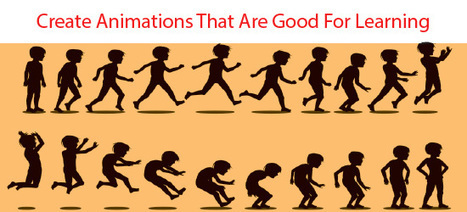
Create Animations That Are Good For Learning

Create Animations That Are Good For Learning | Distance Learning, mLearning, Digital Education, Technology | Scoop.it
Newer technologies make animations easier to create at a reasonable cost, making the format a viable choice for instruction. With educational researchers piecing together the data on its effectiveness for learning, a set of design principles based on evidence is emerging. It is important to consider the research before choosing to use the animation format. Then animations will be able to meet their potential for learning.

Via elearning hoje, Jim Lerman, Mark E. Deschaine, PhD, Stephania Savva, Ph.D
No comment yet.
Rescooped by Dennis Swender from MiniTool Software Solution
June 29, 2017 10:36 PM
Scoop.it!

How do I recover my browser history?

How do I recover my browser history? | Distance Learning, mLearning, Digital Education, Technology | Scoop.it
Solution 1: Use DNS Cache to recover deleted Chrome browsing history
Please connect your computer to the internet and do not shut down or restart your computer if you need to recover lost Chrome history. Follow next steps to find deleted Chrome browsing history by using DNS now:
1. Press Windows + R, type cmd and click OK. Or you can also type cmd in Windows search bar.
2. Open Command Prompt, type ipcongif /displaydns and click Enter.


Solution 2: Use data recovery software to recover deleted history on Chrome
When you deleted Chrome history files and bookmarks on internet, you can still follow next path to find backup files in your computer:
Google Chrome: C:\Users\(username)\AppData\Local\Google\Chrome\User Data\Default\local storage(or Bookmarks).
But if you also lost the backup files on your computer, you’ll need professional data recovery software for help:https://www.powerdatarecovery.com/

Via MiniTool Software
No comment yet.