"“Well, at least teachers don’t have to spend as much of their own money on school supplies this year if they’re teaching online,” mused a pair of ladies waiting for their Starbucks orders. Unfortunately, that couldn’t be farther from the truth for many teachers. Teacher expenses are higher than ever due to remote teaching. Teachers are used to spending their own money on supplies, but technology expenses add up in a whole new way. On top of the extra expenses, many teachers are bringing home less money due to education budget cuts."
The eLearning market is growing more and more every year because of its convenience. Due to this, many students have decided to convert from face-to-face schooling to an online course – this creates a huge opportunity for educators.
We will be discussing how you can turn your face-to-face education system into a successful online course.
Our online icebreaker games work with any video conference software and are ridiculously fun! They are perfect for loosening everybody before your remote meetings!
May2021 Q2: Biobags, 'out of body gestation' & the barbarism of pregnancy: pushing the ethical boundaries of science in order to advance knowledge beyond simple change...
Sal Khan, a pioneer of online learning, says virtual instruction can't replace the real thing. With many schools going virtual this fall, he says building in one-on-one interaction will go a long way.
Image: Sarah Tew/CNET Just a few years ago Apple Pay was a vague hope, a chance for Apple to diversify its burgeoning Services business, which was app and iTunes heavy. Today, according to new surv…
"If you are using Google Meet or Zoom or WebEx or other video chat platform you may have an issue with people who speak different languages. When they type in the chat... if you don't know the language, this could be an issue. A teacher told me she has several kids in her class that speak different languages. So I created a SPREADSHEET that the kids can use for the chat. They can put their chat comments into column B of the spreadsheet and students can reply in column B. Each in their own native language. Column C automatically translates whatever is in Column B... no matter the language... to English. The spreadsheet also translates to ALL other supported languages. This spreadsheet has NO code and thus no authorization required. Enjoy!"
Jim Lerman's Insight:
Outstanding resource from Alice Keeler by way of Tom D'Amico.
This is automatic translation from nearly any typed language to nearly any other typed language. Just fantastic! Five stars!
I’m fascinated by hyperdocs so I created this notebook template with tabs as a simple packaging for them. As usual, if you want to use it for something else, you can edit the titles of the tabs by clicking on Edit > Find and Replace. Colors are editable within the master, go to Slide > Edit Master and change the theme colors.Do not delete or add slides, duplicate the existing ones so you don’t have to add the links again.
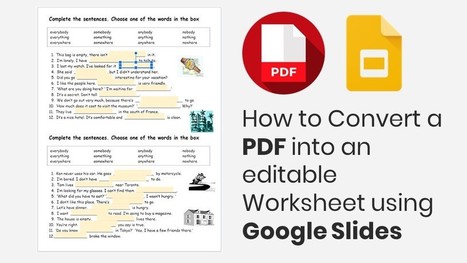
Sometimes we receive worksheets in PDF from our daughter's teachers for her to work on. Our printer doesn’t work very well, and I know some of the families don't have a printer at home, so in order to make the PDF editable for her and her classmates to complete using a computer, I use Google Slides..
This article has a short video taking you step by step on how to convert a PDF worksheet into an editable worksheet. This feature on Google Slides can be used in the classroom or as a homework assignment. Remember to make a copy before you send it.
Learn how to use Google Jamboard, an online interactive whiteboard, for remote teaching. In this week's education technology tutorial, edtech enthusiast Sam Kary shows different ideas for how to create interactive remote lessons using Google Jamboard.
Google Jamboard can be used for synchronous or asynchronous remote teaching, and of course can be a useful tool for promoting interactivity in the classroom as well.
Register now for Sam’s 21st Century Classroom online course! Registration is open through Wednesday, Sept. 16th, 2020 at 11:59pm PST www.21centuryclass.com
Click here to visit The New EdTech Classroom for tips, ideas, and resources for how to use education technology to increase engagement, rigor, and creativity in your classroom: https://www.newedtechclassroom.com
Interested in the software I use to create my videos? Check out the affiliate links below! Many of these products offer a free trial to start and just clicking on the link helps to support The New EdTech Classroom and this channel!
Screenflow is a dynamic, intuitive video editing software that I use to create all of my YouTube videos. They're currently offering a free trial! Get more details here: https://telestream.8bx6ag.net/c/2242743/352742/4900
Elementor is a powerful tool that helps with clean visual design for your website as well as marketing to further your website's influence. More details here: https://elementor.com/?ref=11213
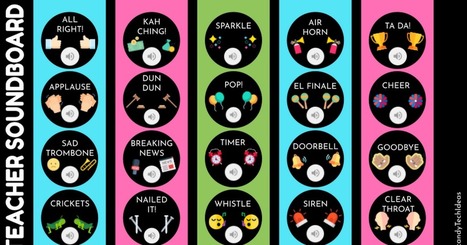
This article provides sounds on Google Slides. You can add some sounds to your google slides presentation to keep your students engaged. Select the sound that interests you.
This is a very simple tool but at the same time it can bring a lot of fun to children. It can perhaps be integrated into a listening and vocabulary activity or it can simply be used to get children's attention. Use your imagination! Here is the link:
To get content containing either thought or leadership enter:
To get content containing both thought and leadership enter:
To get content containing the expression thought leadership enter:
You can enter several keywords and you can refine them whenever you want. Our suggestion engine uses more signals but entering a few keywords here will rapidly give you great content to curate.


 Your new post is loading...













Teachers, what's your experience with this?