


If you want to be really great at eLearning design, you need to know more than how to come up with an attractive look and content that gets attention. What’s the secret? Becoming savvy about psychology and behavior.

 Your new post is loading...
 Scoop.it! If you want to be really great at eLearning design, you need to know more than how to come up with an attractive look and content that gets attention. What’s the secret? Becoming savvy about psychology and behavior. No comment yet.
Sign up to comment
Scoop.it!

The hidden and little-known tricks, features, and tools that will make you a power user of Google+. Via B.L. Ochman, Dawn Jensen, robosheauk 
Michelle Gilstrap's curator insight,
October 6, 2014 12:48 PM
Google + is still with us and it is a unique circle of users that many of us are using. Check out these tips 
THE OFFICIAL ANDREASCY's curator insight,
October 21, 2014 8:53 PM
Expand your social network! Here are some great Google+ page recommendations to follow. MUST READ: Four phenomenal SEO tips about Google+, that will increase your authority and boost your rankings
Scoop.it!

Too often, instructors get caught up in seeing forums as a quantitative measure of how much a student has learned, gauging understanding by replying with prompts that are, frankly, as boring or as tedious as some of the material students have been asked to read.
These conversations between students have more depth and more personality because they are creating, building, having fun and interacting. They are not just replying to a prompt. They are using their imaginations. The process brings an energy and passion that engages them.
Scoop.it!

Free Camtasia Studio 8 Video Tutorials: 9 Free Camtasia Studio 8 Video Tutorials To Get Started. Camtasia Studio 8 is among the Top eLearning Tools. Via Ana Cristina Pratas, Jim Lerman
Scoop.it!

SITE, the Society for Information Technology & Teacher Education, is an international association of teacher educators (and affiliated organizations) who create and disseminate knowledge about the use of information technology in teacher education and faculty/staff development. SITE promotes research, scholarship, collaboration, exchange, and support among its membership.
Scoop.it!

The entrance to GitHub is the most Instagram-able lobby in tech. It's a recreation of the Oval Office, and the mimicry is spot-on---except for the rug. Instead of the arrow-clutching American eagle that graces Obama's office rug, it shows the code-sharing site's Octocat mascot gazing into the digital future, just above the motto: "In Collaboration We Trust." Via EDTECH@UTRGV
Scoop.it!
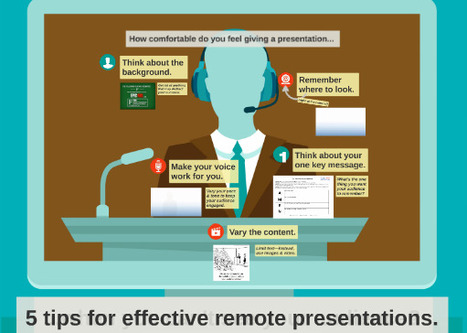
Giving a webinar or remote presentation? These tips will help you engage your audience even w... Via Baiba Svenca 
Elena Perrouin's curator insight,
July 11, 2014 4:11 AM
In today's connected world we're more and more often brought to communicate "virtually", a few tips how to make it a bit more engaging 
Juanita Amiel Townsend's curator insight,
June 25, 2017 6:30 PM
This is a solution to a common presentation problem.
Scoop.it!
Having a nice design slide for a presentation is one thing that so many presenters want to have. Adding the page with unique element such as moving image, transition, is a good idea. Via Baiba Svenca 
Vera Weber's curator insight,
July 12, 2014 11:09 AM
These look like very useful tools for making presentations that are engaging. 
Steve Whitmore's curator insight,
July 14, 2014 8:10 AM
Something to put in your presentation tool box.
Scoop.it!

If you are tired of looking for great alternatives to Prezi – look no further, because I have the ultimate comprehensive list of PowerPoint alternatives right here. No more boring presentations. With this list you can pick the perfect presentation tool or software for your presentation (be it on stage in-front of an audience or online for sharing). Via Baiba Svenca 
Mayra.Loves.Books's curator insight,
September 7, 2014 8:36 AM
This is pretty much an ad for emaze, but it's good to know what is available commercially in terms of presentations. 
Ness Crouch's curator insight,
April 5, 2015 12:59 AM
Interesting list. Worth checking out some of these tools to see if I like them better than Prezi :)
Scoop.it!

Exploring the Digital Vaults is easy. You can browse through the hundreds of photographs, documents, and film clips and discover the connection between some of the National Archives' most treasured records. Via Baiba Svenca 
Baiba Svenca's curator insight,
July 29, 2014 11:22 AM
The National Archives offer a very interesting tool for students who study American history. They can create a poster or a movie based on thousands of files that can be found in the Digital Vaults. The final product can be shared digitally or printed. Great for history projects or presentations. 
Heidi Hutchison's curator insight,
July 30, 2014 7:28 AM
I can't help thinking how great of a resource this wIll be for my students to use to create a Glogster poster On the American Revolution. 
Willemijn Schmitz's curator insight,
July 30, 2014 1:43 PM
Wel Flash nodig, dus niet geschikt voor op de iPad
Scoop.it!

If you’re a user of Google Drive, then no doubt you have also heard of and likely used Google Presentations (Google’s version of PowerPoint). It’s a great tool to create slick presentations in the cloud, especially after its most recent overhaul. However, Google Presentations is also a handy tool for doing some great projects with … Via Alfredo Corell, Baiba Svenca 
Alfredo Corell's curator insight,
August 5, 2014 3:27 PM
Sometimes, the unexpected uses of a given tool are more useful than the expected one. Some ways to use google presentations, other than presentations:
Baiba Svenca's curator insight,
August 6, 2014 12:01 PM
The post suggests 5 ways of using Google presentations for other purposes, not just presentations. Great ideas for education!
Scoop.it!

We've been compiling a list of top presentation resources that will help you become a master presenter. Check out the resources below nicely divided into categories of articles, infographics, Quora and videos. There's something for every presenter! Via Baiba Svenca 
wanderingsalsero's curator insight,
August 18, 2014 2:19 AM
Back before the digital age it was Dale Carnegie and Toastmasters. While those are both still very valuable resources, the digital environment adds a slightly different nuance to it. That's why I think this compilation of resources is valuable. 
Benjamin Labarthe-Piol's curator insight,
August 19, 2014 12:22 AM
Good and exhaustive ressources, many things to look at.
Scoop.it!
Make any video your lesson. Edit a video by cropping it, adding your voice or embedding questions. Then, track your students with powerful hassle-free analytics.
Via Baiba Svenca 
Rosemary Tyrrell, Ed.D.'s curator insight,
August 26, 2014 8:00 PM
This sounds like a wonderful tool for turning videos into lessons! I can't wait to try it! 
Miguel Paul Trijaud Calderón's curator insight,
September 1, 2014 6:04 AM
Edpuzzle -> Add voice or embed questions to ease your students understanding. |
Scoop.it!
Rosemary Tyrrell, Ed.D.'s curator insight,
October 4, 2014 12:55 PM
A PDF with tons of great insights.
Scoop.it!

Two examples of how connected educators can make a huge difference in schools.
Scoop.it!

Easy and efficient way to organize, structure and keep track of notes the way you want. Keep it simple or take it to the next level - advanced data management with unique type, tagging, templating and filtering features. Via Nik Peachey
Alfredo Corell's curator insight,
October 1, 2014 5:51 PM
Boards and lists
More natural way for managing related notes like to-do lists or project tasks. Lists are set of tags that act as filters. By drag notes across lists notes will change their tags accordingly. 
emilioet's curator insight,
October 7, 2014 5:03 AM
Interessante ma non ci sono metodi di condivisione.
Scoop.it!

Infinit lets you easily transfer unlimited files of any size, and to anyone through a free application for Mac OS X and Windows. Via Nik Peachey 
Nik Peachey's curator insight,
September 29, 2014 4:07 AM
This looks like a useful service for quickly sharing files and media. 
Marshall Gass's curator insight,
October 3, 2014 2:22 PM
This app seems the best way to manage those bulky manuscripts without it getting lost in transit. Perhaps, you add a copyright digital signature to each document ( which covers the entire Ms) and you are away. Its a much better way to organise the volume of work that piles up on a writers hard drive and clutters your thinking. Check it out.
Scoop.it!

"A majority of research on the predictors of student success in online learning focus on traditional four-year institutions; a fact the community college community finds troubling, since most community college students [a growing number!] are also going online. But are there any differences in the predictors of success? Researchers say ‘yes,’ which could also impact traditional institutions’ online learners, too." Via EDTECH@UTRGV 
Deb Haasch's curator insight,
April 3, 2016 7:54 PM
This article discusses results of a survey from community college students taking one course online versys face-to-face for comparison of success. The findings reveal some interesting suggestions about counseling and online orientation.
Scoop.it!

"According to recent polls and surveys among college and universities that are either in the final stages, or have fully implemented, online learning courses and platforms, there are a number of common, well-defined challenges and trends experienced by IT departments and faculty. The good news is: there are also scalable tips." Via EDTECH@UTRGV
Scoop.it!

Presentain helps speakers engage and grow their audiences. You use smartphone as a clicker and audience can connect to your presentation using their devices. They can ask you questions, participate in polls, send you follow-up requests, share your slides and more. While you present Presentain records your voice so when the presentation is over you can publish the slidecast (presentation slides with voice-over) and start growing your online audience. Via Baiba Svenca
Alfredo Corell's curator insight,
July 23, 2014 2:06 PM
New version of Presentain. This service helps for audience engagement. If students use their tablets or smartphones at lectures, is a really good choice. Initial free pack (5 presentations, 7 slidecasts, 3 polls).
Scoop.it!

As cool as it is, there is such a thing as too much Prezi zoom. If you’ve ever sat through a presentation that felt more like a rollercoaster ride than a speech, you know what we mean. That 180º flip may feel from the stage, but you don’t want to send your audience running for motion sickness bags... Via Baiba Svenca 
Sarah Ogden's curator insight,
August 12, 2014 11:37 AM
As one who gets motion sick at some Prezis, as well as the intro roller coaster intro at the movie theater, this is great :}
Scoop.it!
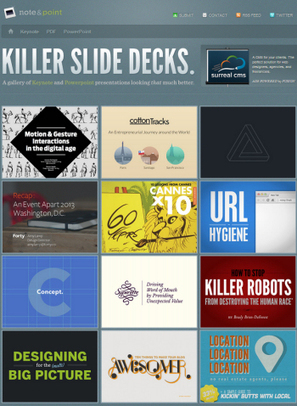
Tired of the same-old presentations? These five free tools can help you add visual oomph to your PowerPoint slides. Via Baiba Svenca 
Athena Catedral's curator insight,
August 6, 2014 3:52 AM
Because a good idea will go to waste if you can't present it right. 
becool's curator insight,
August 21, 2014 7:51 AM
Voor wie nog graag ppt presentaties maakt, kan dit een manier zijn om er meer variatie in te integreren. Leve Prezi :)
Scoop.it!
Baiba Svenca's curator insight,
July 29, 2014 11:03 AM
Beautifully designed slide presentation with 10 cool tips for your next visual project.
Scoop.it!
We decided to build a list of our favourite presentation resources divided by categories. This is a great place to start before creating your first slide. Via Baiba Svenca
Scoop.it!

Whether they have more experience facing an audience or sitting in one, most people have str... Via Baiba Svenca
Baiba Svenca's curator insight,
August 17, 2014 2:45 AM
5 typical mistakes we make when presenting. Read the truth about these myths.
wanderingsalsero's curator insight,
August 18, 2014 2:22 AM
I'm not sure if this is similar content but it's worth looking through. Presentations are the new discussions nowadays. Style is so much more critical today. |






