


Check out the Compilation of proven tips, techniques, and best practices that can help you create Killer Presentations.
Via Baiba Svenca

 Your new post is loading...
 Scoop.it! Check out the Compilation of proven tips, techniques, and best practices that can help you create Killer Presentations. Via Baiba Svenca
Scoop.it!

127 releases, 4 language versions, 920,376 study resources & 1 owl later, we're announcing the official launch of ExamTime! See our journey here.
Via Baiba Svenca 
Character Minutes's curator insight,
August 21, 2014 10:45 AM
looks like a great way to work with numerous groups as well as develop resources for the groups to use. 
Rosemary Tyrrell, Ed.D.'s curator insight,
August 22, 2014 10:47 AM
Great app for creating flashcards, quizzes and other study aids. 
Alfredo Corell's curator insight,
September 1, 2014 7:09 PM
Engage your students by using quizzes, mind maps, and other visual learning content. Now the official launch
Scoop.it!
Welcome to the the Tech Educator Podcast hosted by Jeff Bradbury, Sam Patterson, Jeff Herb and Christopher Nesi. The Tech Educator Podcast is a weekly round ...
Via Baiba Svenca 
Baiba Svenca's curator insight,
August 25, 2014 4:05 PM
A great Teachercast video focusing on Google presentations and other Google tools. Read the podcast notes on http://www.teachercast.net/tep64/
Scoop.it!

Spundge is an end-to-end content platform for professionals that makes it easy to create, distribute, and monetize your content.
Via Baiba Svenca
Baiba Svenca's curator insight,
September 1, 2014 9:40 AM
Spundge is a cool new tool for creating visual presentations from the web or with your own content. Though it is aimed at business professionals , it can be used by teachers (aren't they professionals?) for creating educational presentations and for storytelling. Spundge is free of charge. 
Päivi Palosaari-Aubry's curator insight,
September 2, 2014 5:23 AM
Learning & creativity - Visual presentation with storytelling.
Scoop.it!
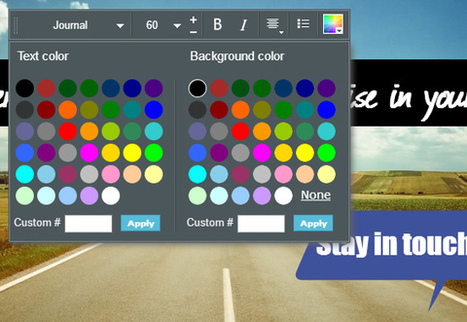
Visme, the faster, more stable all around awesome version has arrived that allows everyone to create professional Presentations and infographics online.
Via Baiba Svenca 
Sue Alexander's curator insight,
September 13, 2014 9:04 AM
always on the lookout for free and easy...great when you find out it's also good
Scoop.it!

How many times have you sat through a presentation that was just one, boring PowerPoint slide after another? Better yet, how many times have you gotten motion sickness from a Prezi? Instead of going with the norm, try Tackk as a simple tool that...
Via Baiba Svenca 
Plan3t_t3ch's curator insight,
September 14, 2014 7:38 AM
A great glogster like tool for High School.
Scoop.it!
Regardless of what industry you’re in - if you have to make a presentation, you might as well make it an awesome one. And creating an awesome presentation ta...
Via Baiba Svenca
Baiba Svenca's curator insight,
September 21, 2014 1:17 PM
Crispy Presentations YouTube channel each week offers you a series of 60 Sec. PowerPoint ProTip that focuses on small but important details in presentation design. Crispy Presentations blog provides readers with expert advice, tips and how-tos http://crispypresentations.com/blog/
Scoop.it!

Tired of sending out the same old static PDFs, spreadsheets or links from Google Docs?
Via Baiba Svenca
Baiba Svenca's curator insight,
September 29, 2014 1:51 PM
Silk is a cool tool for publishing your data online and make them interactive. Upload images, tables, videos, maps, spreadsheets, and create visualizations that can be embedded on other sites. Silk lets you collaborate with others. At present Silk account, either individual or team, is free. 
Miguel Paul Trijaud Calderón's curator insight,
October 1, 2014 1:31 AM
Silk - Present your KPIS and figures. Export the data from your spreadsheet automatically.
Scoop.it!

How An Animated Character Can Rapidly Grow Your Business & Brand - Kellogg's Billion Dollar Case Study - Animated Character. Here’s a challenge for you:
Scoop.it!

"SAMR model is a conceptual framework developed by Dr. Ruben Puentedura to help you better integrate technology in your instruction. SAMR stands for Substitution, Augmentation, Modification and Redefinition. Each of these four levels correspond with a set of tech-based activities and learning tasks. The strength of SAMR model is that it provides teachers with a robust method to gauge and assess the efficacy of the technology they and their students use in class. Check out this section for more resources on SAMR." Via John Evans
Alfredo Corell's curator insight,
September 28, 2014 8:51 AM
Substitution - Augmentation - Modification - Redefinition
Scoop.it!

by Saikat Basu
"Thankfully, when it comes to logic, the right tools can help simplify any process. Flowcharts are among those visual thinking tools that go grossly ignored for non-technical tasks.
"But they can be used for just about anything. Best of all, you can create them using a very easy and common tool available -- Microsoft Word." Via Jim Lerman
Scoop.it!

By now, most iPhone users take for granted that the contents of their iPhone is backed up wirelessly to their iCloud account, and they can restore that content if need be back on their iPhone or to an upgraded iPhone model (see this article about restoring from iCloud). But it is still useful to know how to restore your iPhone from iTunes. Via Jim Lerman
Scoop.it!

3-D Games and Social Networks Are Coming. 3-D Condos Are Here Now. |
Scoop.it!

Have you ever sat through a presentation that seemed to slog on and on? Presenters that are disorganized, dwell on trivial information and give long winded explanations that lead nowhere? Too many presentations are afflicted by poor planning and poor visuals. The audience who come to see these presentations, pay attention [...] Via Baiba Svenca 
Tim Brook's curator insight,
August 22, 2014 6:18 AM
There's loads of this kind of stuff out there but this one actually has some good advice!
Scoop.it!

Preventing and dealing with presentation challenges with PowerPoint and other visual tools, and how to recover from disasters.
Via Baiba Svenca 
Training in Business's curator insight,
August 29, 2014 5:12 AM
10 Tips to Preventing PowerPoint Pitfalls
Scoop.it!
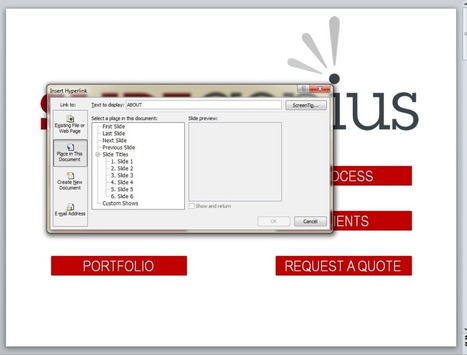
Trade shows are crucial. Give your booth something extra with an interactive deck. Learn how you can make one using PowerPoint hyperlinks. Via Baiba Svenca
Baiba Svenca's curator insight,
August 28, 2014 1:29 PM
A very useful piece of advice for PowerPoint users on how to put hyperlinks in your presentation that allow you to go to a specific slide directly.
Scoop.it!

In 33 chapters, each of which you can read in three minutes or less, David Beckett shares his 20 years of experience, based on hundreds of presentations given to thousands of people.
Via Baiba Svenca
Scoop.it!

Creedoo is new presentation software that enables users to easily create eye-catching presentations that are responsive to audience interaction. Creedoo brings you new unique set of features such as the ability to receive and react on audience response during presentations, split presentations to alternative flows when presenting and more.
Via Baiba Svenca
Scoop.it!
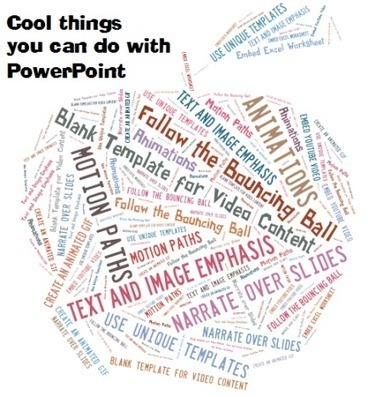
When Used With Tact, These Techniques can Help to Make Your Presentations Fun and Engaging It'd easy to bash PowerPoint, especially given the poor uses we see Via Baiba Svenca
Baiba Svenca's curator insight,
September 16, 2014 11:56 AM
Do you know what you can do with the good old PowerPoint? Perhaps you do. But maybe your students don't. This post by Kelly Walsh will remind you of the ways how to use PowerPoint for making better presentations.
Training in Business's curator insight,
September 17, 2014 6:40 AM
10 Pretty Awesome Things You Can do With PowerPoint
Character Minutes's curator insight,
September 17, 2014 7:26 PM
Contains a few new ways to use PowerPoint
Scoop.it!
Bad PowerPoint design may be just as detrimental to your presentation as smelling like a horse. When you have poorly designed slides, a few things happen: your professionalism is questioned (because you essentially tell the people looking at your PowerPoint that you don't know how to create professional work); your audience members get distracted as they toggle between looking at your bad design and listen to what you're actually saying (and, in the end, they don't really ingest either); and you
Via PowerPoint & Keynote Solutions from Chillibreeze, Baiba Svenca 
PIRatE Lab's curator insight,
September 19, 2014 12:03 PM
Normally I hate "info graphics." This one is actually useful and good. Check this out. 
Angie Grace's curator insight,
September 19, 2014 3:34 PM
Make better PowerPoints by following these tips. 
Judih Weinstein Haggai's curator insight,
September 19, 2014 11:28 PM
very cool graphic. Helping us to stay in line!
Scoop.it!
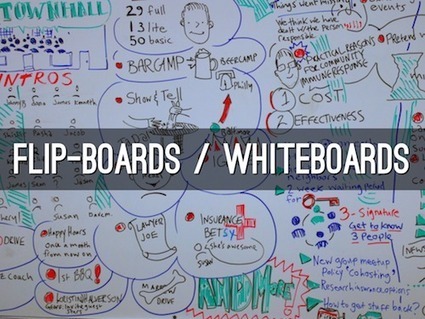
PowerPoint. Everyone’s used it, everyone’s heard of it, and a lot of people are pretty tired of it. Have you found yourself seeking an exciting new angle to approach your presentations from? If so, try these five fresh PowerPoint alternatives on for size.
Via Baiba Svenca
Alfredo Corell's curator insight,
September 28, 2014 8:38 AM
PowerPoint Alternative #1: Printed HandoutsPowerPoint Alternative #2: Flip-Boards / WhiteboardsPowerPoint Alternative #3: No SlidesPowerPoint Alternative #4: Mind MapsPowerPoint Alternative #5: Haiku Deck

Susan C. Freeman's curator insight,
October 16, 2014 3:42 PM
For those who fear death by PowerPoint (of whom I am not).
A GREAT PowerPoint is compelling, entertaining and memorable!
Scoop.it!

Mrs. Price hopes you’ll share the video with your network and inspire other teachers to experience the power of Edmodo for themselves. Though she considered herself technologically-challenged when she first got started, Mrs. Price now knows that Edmodo is so much more than a tool that helps teachers understand the digital language of today’s students; it also allows students to speak up for themselves and to each other. 
Anneke Smits's curator insight,
September 18, 2014 9:01 AM
De pedagogische factor is ook online essentieel. Soms kan online een veiliger plaats zijn dan de gewone klas.. 
Kate ferguson-patrick's curator insight,
September 18, 2014 11:26 PM
very powerful for small group work- which would encourage students to take risks in a risk free environment over time
Scoop.it!

Let start off with a question: Why would you share the most popular content from high traffic content sites that most people are already reading and sharing? Recently we found a new study released ...
Scoop.it!

"If you’re on the education technology fence, you probably can’t decide which device or app is the best one to really use. You aren’t sure if you want to jump into the edtech pool with Evernote, Moodle, an iPad, a Chromebook, or some other hot new product or service. That’s because there are an overwhelmingly large number of options out there." Via EDTECH@UTRGV
Scoop.it!

Yesterday, I published an article containing a list of easy tips to help you improve your Twitter profile. Well, guess what I found today? An infographic on profile optimization for Facebook, Twitt... |







12 proven tips for making better presentations. The slideshow is suitable for watching and discussing with students.
i love this clear, clean presentation, especially the slide about colours.