Digital literacies and digital game-based learning (DGBL) are both concepts that have emerged in the educational arena since digital technologies have become all pervasive in every aspect of society. With mobile technologies continuing to develop, games are being used more and more by people of all generations and schools are realising that there is some potential for adopting digital games into the formal setting for learning (Beavis, 2012; Arnab et al., 2012). Digital literacies have been recognised as necessary for successful participation in all aspects of life and are embedded throughout the Australian Curriculum / NSW Syllabuses for the Australian Curriculum within the General Capabilities and Cross-curriculum priorities. There are many similarities between digital literacies and digital game-based learning, yet, it would seem that very little research has been undertaken to make the link obvious between these two concepts.
Throughout this chapter, connections will be made between digital game-based learning and digital literacies to show that digital game-based learning is a powerful pedagogy that incorporates the elements of digital literacies. In showing the similarities, it will be seen that through the adoption of game-based learning, digital literacies can be taught in context. Digital literacies are the skills that connect the learning content (curriculum) and digital games are the platform that these digital literacies can be practised within a meaningful context.
With so much content out there it can be hard to ensure that your brand’s message does not get lost in the noise of the Internet. Particularly if that message is being presented in the standard blog f
What to do when making videos for flipping education. Many thanks to Ray Lu, Ken Bauer @ken_bauer, Audrey McLaren @a_mcsquared, and Nicole Avon @AvonPhysics for volunteering to be in this video!
Content Times: 0:12 Enjoy yourself. 0:45 Look at the Video Camera! 1:01 Collaborate. 2:12 Provide Lecture Notes. 2:34 Have a theme. 3:10 Use A Script. 3:42 Make Mistakes / Address Misconceptions. 4:45 Fast Forward when you can. 6:02 Be Creative. 6:20 Summary
Wideo is a neat service for creating animated, Common Craft style videos in your web browser. I've been using and talking about the service for a couple of years now. Recently, Wideo added a new feature that allows you to generate presentations from your videos.
Pinterest has the reputation of being the social network platform of women. There are hundreds of boards that fit the typical cliché of teenie girls with movie star crushes, women in their twenties...
“Whitespace,” or “negative space” is the space between elements in a composition. More specifically, the space between major elements in a composition is “macro whitespace.” Micro whitespace, is—yes, you’ve guessed it—the space between smaller elements: between list items, between a caption and an image, or between words and letters. The itty-bitty stuff.
This entry in the "3 Minute Teaching With Tech Tip" video series shows how easy it is to 'flip' any YouTube video with the structured tool set provided at ed.ted.com. These lessons can be public or private, and the easy to use tools let teachers add associated content, a brief quiz, and online discussions associate with the video that is the focus point of the lesson. TedEd is totally free, and teachers get summary feedback on lesson views, quiz results, discussions, etc.
Poverty effects a child's ability to learn. Poverty students NEED a caring adult to help build trust and open the path to academic achievement for them. They need instruction in relationship building, time management, study skills, resiliency, goal setting - many of the things that middle income children learn at home. With an increasing number of our children being born into poverty, our schools must become places that understand the consequences that poverty bears on our children and take intentional actions to mitigate its effects.
A free market needs competition. And that's sorely lacking, Federal Communications Commission officials say, when it comes to Internet service providers and broadband access.
Note: This is the first in a series of posts on the importance of taking your professional development in to your own hands via amazing online resources. Click here to read the introduction on why ...
Content curation is necessary for finding relevant information for your audience and sharing it through your communication channels. Whether you are a beginner or advanced, check out these tools to help you stay on top of your content.
Case in point: My group has just released a new preprint (get it here) that shows how the WiFi information routinely collected by your smartphone can easily be converted to precise information about your location. WiFi routers reveal where you live, work, and spend your leisure time.
While your phone may have told you that WiFi helps “improve location accuracy”, it may come as a surprise that:
A majority of apps in the store have access to the list of routers around you (scanned every 20 seconds).Your Android smartphone by default scans for WiFi routers even if you disable WiFi.
Case in point: My group has just released a new preprint (get it here) that shows how the WiFi information routinely collected by your smartphone can easily be converted to precise information about your location. WiFi routers reveal where you live, work, and spend your leisure time.
While your phone may have told you that WiFi helps “improve location accuracy”, it may come as a surprise that:
A majority of apps in the store have access to the list of routers around you (scanned every 20 seconds).
Your Android smartphone by default scans for WiFi routers even if you disable WiFi.
What NOT to do when making videos for flipping education.
Content Times: 0:12 Don’t use your built in microphone 0:44 Don’t ignore Audio Levels 1:29 Don’t be just a Talking Head 1:59 Don’t cut the video mid-sentence 2:15 Don’t overuse transitions and effects 2:38 Don’t go on at length without any visual change. 3:32 Don’t film outside (if you want to hear dialogue) 4:03 Don’t have continuous background music 4:30 Summary
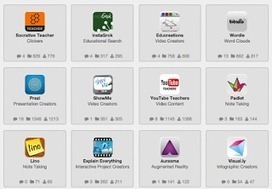
If a picture is worth a thousand words, then perhaps a lesson that engages a student's visual perception is worth a thousand lectures. Here are some tools to help craft visuals to augment your next lesson.
C'est intéressant de ne pas commettre les quelques erreurs. Surtout que cela m'est déjà arrivé. La solution est toujours de bien trier dans le contenu qu'on utilise.
Dennis's original goal when joining Scoop.it was to create a resource for his audience. He initially began using Scoop.it to "re-purpose years of blog content and … share his extensive reading lists." In doing so, he learned that Scoop.it could actually serve as his own social media dashboard, and was "immediately impressed" with the ability he had on Scoop.it to manage so many media outlets.
With this power, Dennis was able to begin curating content on the major themes of his expertise: writing, information fluency, e-learning, and online teaching. While creating these reading lists and collections of his previously published blog content, though, Dennis realized that his readers weren't the only ones benefitting from his curation. He knew that Scoop.it would be a great tool to organize and share his lists, but what he didn't expect was that there would be more people out there interested in what he was posting!
After using Scoop.it for some time, he has found that he can continue to build significant audiences for his topics. He has used Scoop.it as a tool to publish to three different Facebook pages, a WordPress blog, two Tumblr blogs, LinkedIn, Google+, Pinterest, and Stumbleupon.
By sharing his content to all of these different channels from the same place, Dennis is able to save time and expand his reach. He has become an increasingly influential figure in Information Fluency and E-Learning and continues to learn more about these topics each day as he curates and shares new information for his readers.
Teaching Information Fluency describes the skills and dispositions of information fluency adept searchers. Readers will receive in-depth information on what it takes to locate, evaluate, and ethically use digital information. The book realistically examines the abilities of Internet searchers today in terms of their efficiency and effectiveness in finding online information, evaluating it and using it ethically. Since the majority of people develop these skills on their own, rather than being taught, the strategies they invent may suffice for simple searches, but for more complex tasks, such as those required by academic and professional work, the average person’s performance is adequate only about 50% of the time. The book is laid out in five parts: an introduction to the problem and how search engine improvements are not sufficient to be of real help, speculative searching, investigative searching, ethical use and applications of information fluency. The intent of the book is to provide readers ways to improve their performance as consumers of digital information and to help teachers devise useful ways to integrate information fluency instruction into their teaching, since deliberate instruction is needed to develop fluency. Since it is unlikely that dedicated class time will be available for such instruction, the approach taken embeds information fluency activities into classroom instruction in language arts, history and science. Numerous model lessons and resources are woven into the fabric of the text, including think-alouds, individual and group search challenges, discussions, assessments and curation, all targeted to Common Core State Standards as well as information fluency competencies.
What is a green screen? In film and video, a green background can be placed behind subjects being filmed. This allows a separately-filmed background to be added to the final video. Using a green screen is a fun way to enhance any video project. Filming in front of a green screen allows any project to be virtually transported to a new location or setting.
Why use a green screen? There are many green-screen film projects that can enhance learning in the classroom. Using a green screen can make projects more fun, interesting, and effective. For example:
Back in the 90's I had a green screen system and video editing equipment in my middle school Language and Technology classroom at Kingsbury Middle School at Lake Tahoe. Thanks to a very generous 10 k grant from Bill Cosby I put together a video studio that mesmerized by students. We had great, pre-digital equipment. Teachers today can put together a better system than I had for a 1/10th the price. 8-) Thank you Moore's Law!
Back in the 90's I had a green screen system and video editing equipment in my middle school Language and Technology classroom at Kingsbury Middle School at Lake Tahoe. Thanks to a very generous 10 k grant from Bill Cosby I put together a video studio that mesmerized by students. We had great, pre-digital equipment. Teachers today can put together a better system than I had for a 1/10th the price. 8-) Thank you Moore's Law!
Back in the 90's I had a green screen system and video editing equipment in my middle school Language and Technology classroom at Kingsbury Middle School at Lake Tahoe. Thanks to a very generous 10 k grant from Bill Cosby I put together a video studio that mesmerized by students. We had great, pre-digital equipment. Teachers today can put together a better system than I had for a 1/10th the price. 8-) Thank you Moore's Law!
Transcription softwares can be costly and hard to operate. This is particularly the case with those pro tools employed to transcribe lengthy audio and video recordings. Researchers use them to transcribe their data into textual input for analytical purposes. Examples of such tools are provided in at the end of this post.
For teachers and educators looking for simple and easy to use transcription tools, we would suggest the following: automated speech to text apps or audio players designed for transcription works.
To get content containing either thought or leadership enter:
To get content containing both thought and leadership enter:
To get content containing the expression thought leadership enter:
You can enter several keywords and you can refine them whenever you want. Our suggestion engine uses more signals but entering a few keywords here will rapidly give you great content to curate.


 Your new post is loading...