
|
Rescooped by
Dennis Swender
from API's on the web
February 22, 2017 11:42 AM
|


No comment yet.
Sign up to comment

 Your new post is loading...
 Scoop.it! No comment yet.
Sign up to comment
Scoop.it!

After enhancing their Google+ profiles, the businesses increased the instances in which they ranked in the top seven local positions by 179 percent, in the top two positions by 399 percent, and in the third through fifth positions by 97 percent.
Condensed...
5 Proven Ways to Optimize A Brand's Google+ Local Profile 1. Craft Custom Business Descriptions for Each Location When building a business description for any business location, focus on keywords the target market would use while searching instead of an explanation of services, facilities, products, etc. that set your business apart from competitors.
2. Add Additional Information (Photos, Videos, etc.) While there are always fluctuations to the local algorithm, it is essential to monitor performance, because the number of photos a business adds may positively or negatively influence its rankings. Because a business' primary photo is the first one potential customers will see, ensure that photo is eye-catching.
3. Identify and Remove Duplicate Listings Duplicate listings are undesirable for any business, because they essentially pit that business against itself. Compounding the problem, one of the listings often contains incorrect information. Ultimately, a business' rankings suffer when reviews, click history, third party citations, etc. are split between two listings.
4. Identify Third Party Sites Where Adding Listing Information Can Improve Google Rankings Google uses many off-site ranking factors to determine local results. Not only does Google check to see if other sites are mentioning the business; it also looks to see if that website is reputable. Because of this, it is critical to identify the most influential third party sites and submit robust information.
5. Modify Each Listing to Rank for Both Long- and Short-Tail Search Terms on a Continual Basis As with almost any other digital marketing strategy, it is essential to keep tabs on Google business listings. The beginning of the optimization process requires the most maintenance.
__________________________________ ► NEW: iNeoMarketing makes content marketing easy with the new Q8 Content. Q8 fills your content pipeline daily with relevant articles that your audience wants to read. Learn more and sign up for the beta program: http://www.Q8content.com.
► Receive a FREE daily summary of The Marketing Technology Alert directly to your inbox. To subscribe, please go to http://ineomarketing.com/About_The_MAR_Sub.html (your privacy is protected). Via Joemktg, Feroze Babu 
Joemktg's curator insight,
November 7, 2013 9:01 PM
Scooped and summarized for those who are have to work with regional territories. Who said Google+ has little impact on SERP? 
Nigel Mark Dias's curator insight,
January 24, 2014 4:19 PM
Why Google+ matters. Boost your Local Search rankings by managing your Google+ Local profile.
Scoop.it!

Free resource of educational web tools, 21st century skills, tips and tutorials on how teachers and students integrate technology into education Via paul rayner
Scoop.it!

These 5 built-in Windows apps -- Mail, Calendar, Maps, People and OneNote -- were once denounced as inadequate, but have grown into highly useful tools.
Scoop.it!

If you try to google “Design Principles” you most likely run into some basic rules of graphic design: proximity, balance, contrast, space, etc. Things that good designers usually familiar with, or, most likely, know inside out. The next huge part is principles of a rational design process. It’s a set of concepts that makes you a true professional who’s able to provide an excellent design with great efficiency. Applying these principles to the whole team sets a bar of standards that new employees should match or reach in the short term. Via paul rayner 
paul rayner's curator insight,
February 20, 2017 8:48 PM
A good resource for design principles, with a number of case studies provided. A good discussion starter!
Scoop.it!

There are times when sequence and structure are the best approach. However, giving your online learners free roam of the eLearning course map offers a variety of benefits. In this article, I'll share 8 tips to promote Non-Linear eLearning Navigation.
Scoop.it!

Want to know why Traditional eLearning Is Dead and what can be done about it? Check how the learning solution of the future should be like. Via EDTECH@UTRGV 
Donna Farren's curator insight,
February 24, 2017 11:50 AM
Great reminders of what to include in relevant online learning.
Scoop.it!

Podcasting sparks imagination, creativity, and builds listening skills. Just about any teacher with a smartphone and an internet connection can have their students podcasting quickly!
Scoop.it!

Primary school children who belong to ethnic minorities are especially vulnerable to dropping out of school early. If teachers were better equipped to deal with multiculturalism, this could change.
Dennis Swender's insight:
Richard Lee's "Eating Christmas in the Kalahari" insights (1969) have some current additions.
Scoop.it!

A lot of words have been added to the dictionary over the past few decades thanks to social media, but few have become so widely used and accepted as "hashtag."
For a long time, the hashtag symbol (#) was known simply as the "pound" symbol. Now, I could swear that the only time I hear it referred to as a pound symbol is when I enter my PIN number to pay my cell phone bill. While hashtags were originally made famous by Twitter, they're now used on many major social networks, including Facebook and Instagram.
Let's explore what a hashtag is, why they're so great, and how they work on Twitter, Facebook, and Instagram.... Via Jeff Domansky 
Jeff Domansky's curator insight,
February 14, 2017 12:51 AM
Just the basics or a refresher. Learn what a hashtag is, why it works, and how it works on Twitter, Facebook, and Instagram.
Jeff Domansky's curator insight,
February 14, 2017 12:54 AM
Learn what a hashtag is, why it works, and how it works on Twitter, Facebook, and Instagram.
Scoop.it!

Want to know how to create meaningful and Engaging Learning Experiences? Check 6 ways to create meaningful and Engaging Learning Experiences. Via EDTECH@UTRGV 
Andrea Mejia Medina's curator insight,
February 19, 2017 11:39 AM
Learning is a continuous process in which the facilitator must to provide to students different learning experiences that allow them expand their knowledge and the chance to practice it in a real scenario in order to students retain information in a long term time. To reach the objective the teacher not only need to be clear on what he want students grasp, retain and apply successfully in the action field, but also need to recruit their interest, and find ways to make learning relevant, authentic, and valuable in students' lives. So that is helpful that the teacher connect what he are teaching to real life using specific every day examples that help students feel personally connected to what they're being taught and how they can apply the material in real life. The teacher can also use students' interests and fascinations, finding out what their students are passionate about and then use those interests as natural motivators to increase engagement.
Scoop.it!

Keep things fresh by switching up your content balance. Here are 20 different offer formats to experiment with. Via Daniel Watson 
malek's curator insight,
November 13, 2016 7:46 AM
Hands up if you knew that there are at least 20 different types of content you can build in behind your landing pages, to help your business generate more leads. You might be surprised at how many of these you can probably easily implement for your key landing pages. If your online lead generation activity needs to see better results, a quick read of this article, may pay dividends for your business.
Scoop.it!

News that millions of students who took the PARCC exams on computers tended to score worse than those who took the tests on paper raises an important question: Via Jim Lerman |
Scoop.it!

A National Geographic photographer recommends his picks for top-performing small cameras. Via Feroze Babu
Scoop.it!
The Teaching Online Preparation Toolkit (TOPkit) website is a comprehensive resource that provides the postsecondary community with the essential elements required to ensure a very high quality online faculty development program. Via Nik Peachey
Scoop.it!

"Do you want to know my productivity tips and tricks? How about what I use for digital film class? The technology I use in my classroom everyday? Well, Happy Valentine’s Day! I’m showing love to my dear teacher friends by just sharing all the tools and tips that have me excited right now. I’ve included links below for you." Via Jim Lerman
Scoop.it!
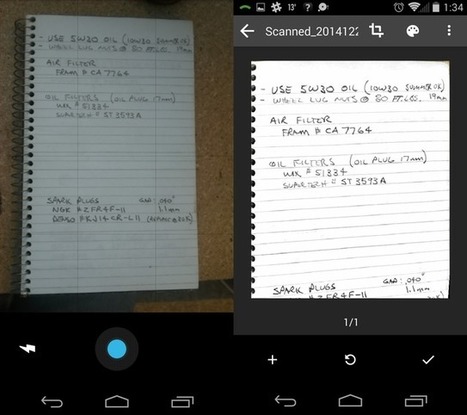
From managing your files to collaborating on Docs, Drive is a full-functioning office suite. What many people don't realize is its capability to do far more than only view PDFs. Via Ana Cristina Pratas, Evdokia Roka
Scoop.it!

Free resource of educational web tools, 21st century skills, tips and tutorials on how teachers and students integrate technology into education Via paul rayner
Scoop.it!

There's good failure and there's dumb failure. The dumb failure we see over and over again is just dumping technology into schools and hoping for magic to happen; not having a plan, thinking that things will happen automatically because kids are “digital natives,” a term that obscures as much as it illuminates; thinking that just because technology is there your problem is solved." Via Nik Peachey 
Ruth Reynolds's curator insight,
February 20, 2017 5:27 PM
This emphasises the importance of the teacher in any technology education. Some good follow up sections and blogs
Scoop.it!

Imagine this nightmare scenario: you’re on the verge of launching your newly redesigned website, and you’re already anticipating new leads and returning customers. You’ve spent countless hours working through every last detail before even considering unveiling your new creation to the world. The big day arrives, and you give the green light to launch. Via Jeff Domansky
Jeff Domansky's curator insight,
July 4, 2016 11:28 PM
Cautionary SEO tips to help you launch your redesigned website without losing your page rank.
Jeff Domansky's curator insight,
July 4, 2016 11:29 PM
Cautionary SEO tips to help you launch your redesigned website without losing your page rank.
Scoop.it!

Free resource of educational web tools, 21st century skills, tips and tutorials on how teachers and students integrate technology into education Via paul rayner
paul rayner's curator insight,
February 17, 2017 4:41 PM
This resource is not new - but with our new Technologies Curriculum it's a great helper for the Digital Technologies strand.
We've shared it on all our resources for Digital Technologies, but, in case you haven't seen it.....
Scoop.it!

Want to know what are the Advantages And Disadvantages Of eLearning? Check about the advantages and disadvantages of web-based learning. Via EDTECH@UTRGV 
Julian Diaz's curator insight,
February 21, 2017 9:13 AM
we already know all the advantages of e-learning, within these times it is very useful for people who don't have time to learn something new and plus, people should advance as technology advances as well since everything is changing and education is not an exception. But are you able to think in any disadvantage of e-learning process? I know it sounds ridiculous but in this article is shown some disadvantages that e-learning could cause.
Enjoy reading this interesting article.
Scoop.it!

Most professional fields require you to spend a major part of your day on your PC, and so the productivity of your PC directly affects your personal productivity. Via Daniel Watson 
Brett.Ashley.Crawford's curator insight,
January 10, 2017 9:05 AM
A nice list of options for Windows users. Rambox and RocketDock seem the most useful from my perspective, but some of the hardware organization systems and download operators seem very useful for high-volume users.
|