Your new post is loading...
An annual report by The Open University said the current key challenge for education specialists is to engage thousands of learners in productive discussions while learning in a collaborative, online environment.
The report, Innovating Pedagogy 2014, is the third annual report concerning technological trends that could revolutionize education. It suggests that the next step in the world of MOOCs is to introduce massive open social learning.
Via Kim Flintoff
Six years ago, inspired by a big idea to democratize higher education, the University of Michigan (U-M) became a founding partner of Coursera. Massive open online courses (MOOCs) were born. While the issuance of MOOC death certificates by skeptics is only rivaled in frequency by those filed by South Park writers for Kenny, MOOCs consistently find ways to survive and indeed thrive in nurturing environments.
With today’s announcement, we are now much closer to saying “all of the above”. MOOCs may have initially provided learners an opportunity to simply peer into the university. Now MOOCs and MOOC derivatives (e.g. Teach-Outs, specializations, MicroMasters, MasterTrack, etc.) are helping universities to expand how they think about engaging with the world. For U-M, this is entirely consistent with top institutional priorities around academic innovation, diversity, equity, and inclusion, and public engagement. We are the global, inclusive, public research university.
Via Kim Flintoff

|
Scooped by
Dennis Swender
March 23, 2018 2:19 PM
|
Need some sticky note alternatives? I know how you feel! Here are a few of my favorite tech tools for staying organized this school year!
|
|
Scooped by
Dennis Swender
March 22, 2018 2:33 PM
|
The Edublogger is a blog by the Edublogs team all about blogging and integrating technology in the classroom. Stay In Touch There are a few key ways you can keep up to date with the latest from Edu…
|
|
Rescooped by
Dennis Swender
from Power of Content Curation
March 22, 2018 2:23 PM
|
Content is King! Content is also EVERYWHERE... In your face with emails.. In your social streams, sponsored updates, every new app claims to be a "news feed"…
Via Brian Yanish - MarketingHits.com
|
|
Rescooped by
Dennis Swender
from WebsiteDesign
March 22, 2018 2:20 PM
|
Check out these creative style guides for some unique branding inspiration. When it comes to building a memorable brand, it's all about consistency. When you're shopping for your favorite cereal or coffee at the grocery store, you want to be able to spot it from a mile away. The best brands stick in our brains because their presence is defined by the repetition of the same logo, fonts, colors, and images. Once we see them enough, they become instantly recognizable, bringing us a clear sense of reliability and security.
Via Brian Yanish - MarketingHits.com
|
|
Rescooped by
Dennis Swender
from WebsiteDesign
March 22, 2018 2:19 PM
|
Before hiring a web designer or doing it yourself for designing your business website, a number of things need to be avoided at the onset.
Via Brian Yanish - MarketingHits.com
|
|
Rescooped by
Dennis Swender
from WebsiteDesign
March 22, 2018 2:18 PM
|
New Responsive HTML5 / CSS3 simple, clean and Professional Website designs. All websites comes with unique page style, awesome slideshows and beautiful color
Via Brian Yanish - MarketingHits.com
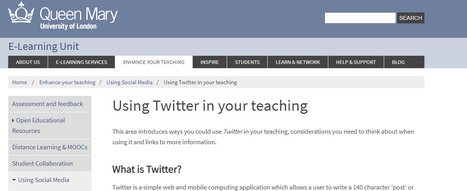
This area introduces ways you could use Twitter in your teaching, considerations you need to think about when using it and links to more information.
What is Twitter?
Twitter is a simple web and mobile computing application which allows a user to write a 140 character ‘post’ or ‘Tweet’ (including punctuation) on a page on the internet. These ‘tweets’ are like short blog posts, a list of which is called a ‘feed’. Twitter users can build a list of other users whose Tweets they ‘follow’. The tweets of all those you have chosen to follow are displayed on your home timeline.
Via Elizabeth E Charles
With the use of technology growing inside classrooms, educators must monitor and balance the amount of time students spend with digital devices.
Via Dr. Tom D'Amico (@TDOttawa)
|
|
Rescooped by
Dennis Swender
from Connected_Up
March 22, 2018 11:51 AM
|
Just a few years ago, virtual reality seemed to be a sci-fi concept for most people. Currently, virtual reality is playing an increasing role in reshaping such industries as medicine and real estate and educators started using VR in academic settings. A lot of people now believe that this technology is the future of education... Read more »
Via Connect-Up Support Services
Free resource of educational web tools, 21st century skills, tips and tutorials on how teachers and students integrate technology into education
Via Dr. Tom D'Amico (@TDOttawa)
|
Abstract
The potential influence of Massive Open Online Courses (MOOCs) on higher education institutions is much discussed and debated, with some arguing that MOOCs are a disruptive innovation that will radically change existing models of higher education. However, analyses of whether and how MOOCs might disrupt higher education models are relatively scarce. This paper analyses whether MOOCs should be considered a disruptive innovation according to the concept’s defining criteria. It compares characteristics of disruptive innovation with current developments in MOOCs, suggesting three perspectives – performance, benefits, and market – that can be used as a lens and analytic framework to explore and evaluate current practice. The findings indicate that MOOCs do not match all the characteristics of disruptive innovation as they are commonly identified in the literature. However, MOOCs may be a sustaining innovation that establishes new markets for learners who are not served by universities.
Via Kim Flintoff
|
|
Scooped by
Dennis Swender
March 23, 2018 2:21 PM
|
Richard Byrne, author of Free Technology for Teachers, was a history teacher. It shows. In today’s show, he talks about top free tech tools to try in social studies lessons. This is one to share with your history department. Sponsor: The STLinATL Conference will be at Woodward Academy in Atlanta July 26-27, 2018. I’ll be …
|
|
Scooped by
Dennis Swender
March 23, 2018 2:19 PM
|
Spread the loveMath has always been known as one of the less-glamorous subjects. Sure, some people love the rhythm and reason of mathematical concepts, but average Kindergartners won’t tell you that they want to be an engineer, or a mathematician, or even a computer scientist when they grow up. But if every Kindergartner grew up to be a fireman, or movie star, or race car driver, or pilot, our society would certainly suffer. So, how can teachers make learning math more interactive and more fun, especially for high school students? True, teachers can make up games to teach a math …
If you’re a new iPhone user, there are a few skills you should learn to get the most out of your new device. In time, you can move onto the cool hidden features, but grasping the basics first is vital. Here are a handful of iOS basics that all iPhone or iPad owners should know.
Via John Evans
|
|
Scooped by
Dennis Swender
March 22, 2018 2:31 PM
|
We interview teacher-librarian Julie Hembree to find out more about global collaboration and Skype in the Classroom. We’ve also prepared a 5 page PDF full of tips to get the most out of your …
|
|
Rescooped by
Dennis Swender
from Power of Content Curation
March 22, 2018 2:23 PM
|
Arrange your saved items into stunning collections called wakes. Wakes can be public or private and created on any topic - share a passion, promote your business, or gather research. You can also make your wakes personal by adding notes, reordering items, changing layouts and much more.
Via Nik Peachey, Brian Yanish - MarketingHits.com
|
|
Rescooped by
Dennis Swender
from WebsiteDesign
March 22, 2018 2:19 PM
|
The human brain is wired to see structure, logic, and patterns. It helps us make sense of the world. For example, what do you see when you look at this image? If you're like most people, you probably see a triangle. But in reality, what’s really there are three white “pac men.” We see the triangle because our brains take the ambiguous visual information and organize it into something that makes sense to us—something familiar, orderly, symmetrical, and that we understand. When this cognitive process kicks in, our minds make a leap from comprehending all of the elements as individual and
Via Brian Yanish - MarketingHits.com
|
|
Rescooped by
Dennis Swender
from WebsiteDesign
March 22, 2018 2:18 PM
|
You can create the most jaw dropping design in the world and it won’t succeed if it doesn’t satisfy usability. Everything from a toothpick to a commercial UX is short for user experience a web user acquires when surfing on a website and interacting with its elements and features. If the experience is choppy and mal sought, then the website is nothing by floating garbage on the internet no one will care about. UX can single handedly decide if a website can be used or sold hence making it count is imperative for the designer. In this article, we will share 10 cardinal rules regarding usability every web designer must know before taking the website to its final stages of completion.
Via Brian Yanish - MarketingHits.com
|
|
Rescooped by
Dennis Swender
from Edumorfosis.it
March 22, 2018 11:56 AM
|
Training teachers in how to design their courses is key to re-engaging individual students and holding back the tide of dropouts.
To do this, universities are investing in organisational infrastructure beyond architecturally bold lecture halls to build digital learning spaces and designing data analytics to improve student engagement.
These investments are paying off, generating an estimated A$140 billion each year in direct benefits to Australia’s GDP.
No doubt this is just the beginning, with digital learning featuring at the top of a number of universities’ strategic plans.
This investment in learning design has led to the creation of a variety of exciting new roles. These range from learning designers and engineers, curriculum developers and learning technology support to software developers, graphic designers and user experience experts.
Via Edumorfosis
Understanding how technology and social media play a part in the daily life of young people today can help you facilitate safe and healthy online behaviour.
Via Dr. Tom D'Amico (@TDOttawa)
|
|
Scooped by
Dennis Swender
March 22, 2018 11:51 AM
|
About the only time I show a full-length movie in class is when I’m going to be out and it’s the lesson plan for my sub. I’m seldom sick enough not to be in class, so most of the …
|
|
Rescooped by
Dennis Swender
from Into the Driver's Seat
March 22, 2018 11:50 AM
|
"It’s way at the bottom as a list of options, but a pretty darn cool trick! Add a chart to Google Sites.
The Answer is Always a Spreadsheet
What happens when you click on Charts? It offers you a filter of your spreadsheets. What? YES! Step 1 is to use Google Sheets to create the chart you want. Step 2 is to go to your Google Site and using the Insert tab choose “Charts” all the way at the bottom of things to insert. Select the spreadsheet that has a chart in it.
Pick the Chart
This could not be easier, Google Sites automatically shows what charts you have in the spreadsheet. Just click on it. Boom, it’s in your Google Site."
Via Jim Lerman
|