


|
Rescooped by
Dennis Swender
from The Student Voice
January 23, 2019 2:18 PM
|

No comment yet.
Sign up to comment

 Your new post is loading...
 Scoop.it! No comment yet.
Sign up to comment
Scoop.it!

Today, we’re excited to announce the release of micro:mag Issue 3! We’ve got an amazing Issue for you this time round, packed full of amazing articles by our awesome community. Here is a quick look at what we’ve got to offer this time round. Enjoy Issue 3! 10 Amazing micro:bit Projects! This issues Cover feature is “10 Amazing micro:bit Projects”. We’ve gathered together 10 of our favourite micro:bit projects we’ve seen doing the rounds of … Via Dr. Tom D'Amico (@TDOttawa)
Scoop.it!

The changing world of work is forcing organizations to adapt and upskill their employees. On top of this, a rapidly-evolving technology landscape has transformed what is both necessary and possible for learning departments. To help you better understand this time of change and take action in 2019 and beyond, we have outlined the biggest trends influencing e-learning. Via Edumorfosis
Scoop.it!

Accurate hit counter with the most appropriate visualization
Scoop.it!

Mont Criddle, therapist and founder of the Digital Recovery Program at Logan River Academy (UT) explained to Lon on April 11, 2018 that when it comes to computer screens, parents must be assertive in limiting screen time for both themselves and their children. He then described some ways to head off more serious screen obsession problems parents could use. Via Lon Woodbury 
Lon Woodbury's curator insight,
December 4, 2018 9:44 AM
A report from the front line of dealing with young people with obsessive screen use. -Lon
Scoop.it!

Like anything else, technology must be used in moderation—especially with children. Via Lon Woodbury
Lon Woodbury's curator insight,
January 11, 2019 3:43 PM
A decent rundown of signs kids are too attached to their digital device. -Lon
Scoop.it!

The most simple and common tasks done on laptops and PCs include Checking emails, surfing the internet, online shopping, getting knowledge on a particular content, playing games, chatting, checking updates on various social media platforms, document writing, watching movies, making a presentation and much more. These are the tasks which one performs commonly using their desktop PC or laptop. However one has to understand that all these tasks are simple and can be easily carried out with the help of iPad as well. We will make it clear for you that an iPad can replace your laptop or desktop PC in many ways. Just give a click on the link and lets begin the show. Via Jeremy Hill
Scoop.it!

You don't much in the way of free storage with iCloud (5GB), and if you're paying for storage, then you want to use it for the important stuff — not a ton of backups that you really don't need. Clear some cloud space and delete those unnecessary backups! Via Jeremy Hill
Scoop.it!

Technology progress influences the way kids learn, and it’s constantly changing. Internet, smartphones, and apps have connected people globally without caring about the distance. Within seconds you can communicate with anybody anywhere. Via John Evans, Carlos Fosca 
Carlos Fosca's curator insight,
January 21, 2019 8:12 PM
“The main benefit of virtual reality is providing experiences that would otherwise be impossible because of time, distance, and finances. In education, virtual reality simulations help kids learn by experimenting as if it is real“ 
Marco Bertolini's curator insight,
January 22, 2019 3:58 AM
18 apps for kids to learn with Virtual Reality
Marco Bertolini's curator insight,
January 28, 2019 2:48 AM
18 VR apps you can use in the classroom !
Scoop.it!

SSD VS HDD: what's the difference between them? Which one should you use in your PC? Read this post to look for the answers now! Via MiniTool Software, Digital Dental 
Sabrina Flores's curator insight,
January 24, 2019 8:24 AM
SSD VS HDD Diferencias y ¿ Como usar en PC ?
Scoop.it!

PhotoScissors lets you remove the background from any picture, not just selfies. This afternoon I used PhotoScissors to remove the background from a picture of my dog. I then used a picture of the White House's lawn in a Google Slide and layered the cutout of my dog on top of it. Watch this short video from my YouTube channel for an overview of how to use PhotoScissors. Via Gumersindo Fernández, Juergen Wagner
Scoop.it!
Google Similar Pages Google Mail Checker Google Calendar Google Keep Google Quick Create Google Translate Focus Mode Timer Strict Workflow Insert Learning EasyBib Cite This for Me Open Dyslexic Mercury Reader High Contrast Stay Focusd Move It G Suite Training Extension Manager Extensity Dyslexi Via Dr. Tom D'Amico (@TDOttawa) |
Scoop.it!

"Online learning can be more difficult for instructors as well as students. Not seeing students face to face makes it harder to gauge how they’re responding to the material, and there’s the additional hurdle of mastering the technology. But there are many strategies that instructors can use to help students succeed online, as well as approaches that institutions can employ to support faculty more effectively." Via EDTECH@UTRGV
Scoop.it!

From
e27

Education around the world is changing at an incredibly fast pace. Software and devices are as commonplace in classrooms and lecture theatres as whiteboards and overhead projectors once were. The new generation of student is born digital and they are fast adopters of new technologies. The revolution has begun. Via Nik Peachey
Scoop.it!

Global digital strategist, speaker and expert on digital engagement, open government, and civic technology. Via june holley
Scoop.it!

Patricio Humanante's curator insight,
January 23, 2019 10:41 PM
Lo que los expertos del aprendizaje dijeron sobre los desafíos claves para 2019
Scoop.it!

Administrators at the University of Virginia wanted more from their learning management system -- so they took steps to make improvements. Via EDTECH@UTRGV
Scoop.it!

60 Minutes goes inside a landmark government study of young minds to see if phones, tablets and other screens are impacting adolescent brain development Via Lon Woodbury
Scoop.it!

Not everyone agrees on how artificial intelligence will change the way we live. But it's not all doom and gloom either.
Scoop.it!
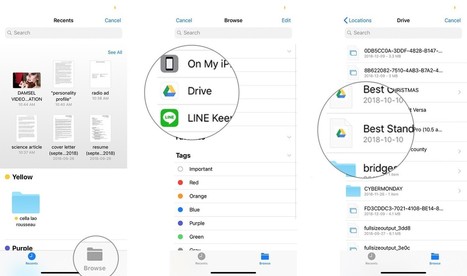
You're writing an email and need to attach a file to it, perhaps an office or iWork document, or maybe a PDF or text file. For security reasons, you can't go wandering through the file system, but you can attach any file into any email from any storage provider app, including the Files app, Dropbox, Google Drive, OneDrive, and more. Let’s find out how to send large email attachments on iPhone and iPad. Via Jeremy Hill
Scoop.it!

Apple's Mail app for iPhone has a ton of features you can invoke at a tap or swipe! Click in to find out the twelve gestures to speed up your iPhone email.
Via Jeremy Hill
Scoop.it!

"Are you new to Google Classroom and looking for more efficient ways to use the platform? Don’t worry; we have you covered. In today’s tip, we will discuss 150 smarter ways to use Google Classroom …" Via Leona Ungerer
Scoop.it!

There are several YouTube video editor alternatives on Windows, Mac, iOS, Android and online. Via MiniTool Software, massimo facchinetti 
Silvonei Rodrigues Soares's curator insight,
January 26, 2019 3:02 PM
agora vamos aprender a editar videos como profissional.
Scoop.it!

What advantages does rapid eLearning offer over custom eLearning? Is it just a strategy of producing ‘cheap’, low-quality eLearning? This blog dispels the six biggest misconceptions about rapid eLearning. Via CommLab India |






