Your new post is loading...

|
Rescooped by
Juergen Wagner
from E-Learning-Inclusivo (Mashup)
February 14, 2019 12:05 PM
|
So many faculty have approached me lately and said that they have been asked to teach an online or hybrid class. I love teaching—online, hybrid, in person—and I find that actually I use many of the same tools for each. Here is my list of go-to edtech tools, which are especially useful in the online/hybrid environment.
Remember: It’s all about engagement. If you just dump a ton of information into your course management site and don’t have a way for your students to interact with you, you’re wasting your hard work and their time. Our students will engage online if they feel that there is a real live person responding to them—whether that’s you or another student in the class. No matter who, it’s the connection that counts.
Via Edumorfosis, juandoming
|
|
Rescooped by
Juergen Wagner
from Education 2.0 & 3.0
February 14, 2019 7:48 AM
|
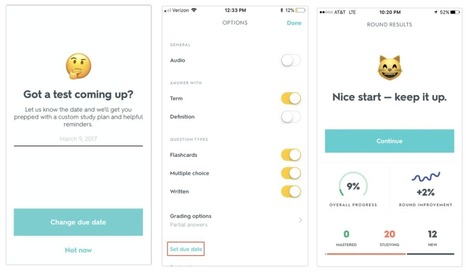
Quizlet is a great study aid that many of our students already know and love. It is one of those tools that students are using whether or not their teachers are assigning Quizlet in the classroom, which is amazing! If you aren’t familiar with Quizet, think of it as a website to create and study…
Via Dr. Tom D'Amico (@TDOttawa) , Yashy Tohsaku
|
|
Rescooped by
Juergen Wagner
from Education 2.0 & 3.0
February 14, 2019 7:47 AM
|
In his latest Teacher video, Greg Whitby speaks to Melanie Brown about the new approach to student leadership and learning that’s been implemented at her New South Wales primary school.
Via Yashy Tohsaku
|
|
Rescooped by
Juergen Wagner
from TIC & Educación
February 13, 2019 10:48 AM
|
Learning how to create a group email in Gmail will make your life easier. Start on your Gmail contacts list with these tips.
Via Gumersindo Fernández
|
|
Rescooped by
Juergen Wagner
from The efl teacher's tool box
February 13, 2019 10:46 AM
|
Mixkit is a curated gallery of high-quality videos and animation, made by some of the world’s most talented creators, with all content licensed for free.
Via Nik Peachey, Annie Gual-Arnoux Gwynn
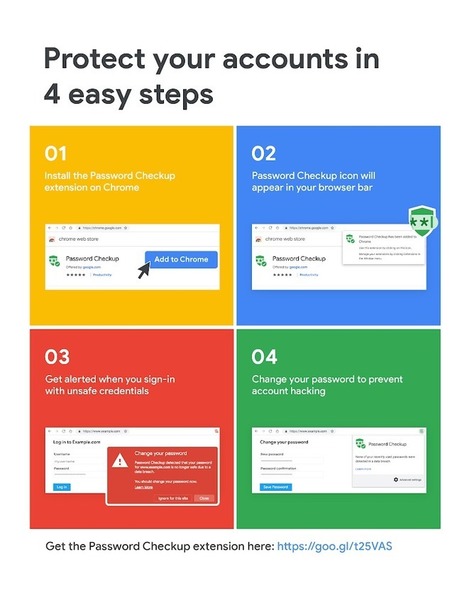
We’re rolling out two new features, Password Checkup and Cross Account Protection, to keep your information safe beyond Google’s sites and apps.
Via Dr. Tom D'Amico (@TDOttawa)
|
|
Rescooped by
Juergen Wagner
from E-Learning-Inclusivo (Mashup)
February 9, 2019 10:50 AM
|
Check all you need to know about eLearning In Continuing Vocational Training in the corporate world so as to discover the wondres of online training today.
Via juandoming
|
|
Rescooped by
Juergen Wagner
from Education 2.0 & 3.0
February 9, 2019 10:49 AM
|
Google Slides has lots of little hidden features and overlooked tools that students can use to make all kinds creative presentations. One of those overlooked features is linking slides to other slides. If used correctly and with a little planning students can create choose-your-own-adventure stories by using the slide linking feature in Google Slides.
Via Gumersindo Fernández, Yashy Tohsaku
Free resource of educational web tools, 21st century skills, tips and tutorials on how teachers and students integrate technology into education
Via Dr. Tom D'Amico (@TDOttawa)
|
|
Rescooped by
Juergen Wagner
from Education 2.0 & 3.0
February 9, 2019 3:40 AM
|
A new paper complicates the evidence on the advantages of taking notes by hand. But there’s more to consider in crafting your electronics policy.
Via Yashy Tohsaku
|
|
Rescooped by
Juergen Wagner
from Education 2.0 & 3.0
February 9, 2019 3:39 AM
|
I’m starting to see it with my own kids. I’ve got four, but two are in school right now (4th grade and 1st grade). It’s almost natural for them to start saying things like, “I’m not that good at…
Via Yashy Tohsaku
|
|
Rescooped by
Juergen Wagner
from Education 2.0 & 3.0
February 9, 2019 3:38 AM
|
|
|
Rescooped by
Juergen Wagner
from TIC & Educación
February 9, 2019 3:37 AM
|
Google Slides has lots of little hidden features and overlooked tools that students can use to make all kinds creative presentations. One of those overlooked features is linking slides to other slides. If used correctly and with a little planning students can create choose-your-own-adventure stories by using the slide linking feature in Google Slides.
Via Gumersindo Fernández
|
|
|
Rescooped by
Juergen Wagner
from Educational Technology News
February 14, 2019 7:49 AM
|
We know it’s not always easy to add another tool to your to-do list but Wakelet can help even the most skeptical educator, as teacher Brandi Reams explains
Via Dr. Tom D'Amico (@TDOttawa)
|
|
Rescooped by
Juergen Wagner
from Education 2.0 & 3.0
February 14, 2019 7:47 AM
|
Associate Professor Sharon Lierse discusses how the results of a research project helped her identify seven key characteristics of an outstanding teacher.
Via Yashy Tohsaku
|
|
Scooped by
Juergen Wagner
February 13, 2019 10:47 AM
|
This challenging game has all the elements of a classic escape the room puzzle. It takes a bit of time to load, but it’s well worth the wait!
|
|
Rescooped by
Juergen Wagner
from Medien – Unterrichtsideen
February 13, 2019 10:46 AM
|
Du möchtest kostenlose Bilder nutzen, weißt aber nicht, woher du sie bekommen kannst? Ich habe für dich 47 Seiten mit kostenfreien Bilder rausgesucht.
Via Guido Knaus
I've talked about the Art of the Shelfie before, but I had a recent rant I just wanted to share with you. I started with "Hey girl" as a nod to the "Hey girl" meme and my preoccupation with the hit book, "Girl, Wash Your Face" by @msrachelhollis. It was really just to get your attention, I know educator guys might benefit from this rant, too! I'm equal opportunity judgey.
You know what's great about having a professional Twitter & Instagram? You can just focus on the kids. (It should already be our focus, right?) But it's sometimes kinda comforting to hide behind the kids. Social Media shy? Take pics of your kids being awesome & post them. Not sure about photo consent? Take pics over their shoulders, they'll recognize their shoulders, hair, & hands!
To quote the wise Dalton in the cinematic Oeuvre that is the movie Roadhouse: Opinions vary. Of course it's OK to take a selfie now and then! But when the focus is off the kids, I question. Do you want kids to see that you're as self-obsessed as they can be or should you model a generous focus and an outward pointing lens?
Via John Evans
|
|
Rescooped by
Juergen Wagner
from Creative teaching and learning
February 9, 2019 10:49 AM
|
"We look at some teaching strategies to help you differentiate between fact and fake news ..."
Via Leona Ungerer
|
|
Rescooped by
Juergen Wagner
from Creative teaching and learning
February 9, 2019 3:43 AM
|
"What could he do to directly influence and enhance the characteristics in his students that would make them more employable and more productive..."
Via Leona Ungerer
|
|
Rescooped by
Juergen Wagner
from Medien – Unterrichtsideen
February 9, 2019 3:40 AM
|
Im digitalen Zeitalter wird man überschüttet mit Informationen. Wie kann es gelingen, dass Lernende eine sinnvolle Auswahl treffen und ihre Informationen in Wissen umgewandelt werden? Und zwar so, dass es im Langzeitgedächtnis bleibt? In Unterricht und Seminaren wende ich diese 7 Schritte an. Immer wieder merke ich, dass Lernende auch Tage und Wochen später noch über Inhalte verfügen können. Zusätzlich führt diese Methodik dazu, dass das Selbstbewusstsein der Lernenden wächst und sie mit mehr Mut und Freude an neue Herausforderungen herangehen.Empty description
Via Guido Knaus
|
|
Rescooped by
Juergen Wagner
from Education 2.0 & 3.0
February 9, 2019 3:40 AM
|
Having a blog can be like standing in a packed street corner with a megaphone. You can be as loud as you want to be, but usually, everyone is too busy to listen. With almost 2 million blog posts…
Via Yashy Tohsaku
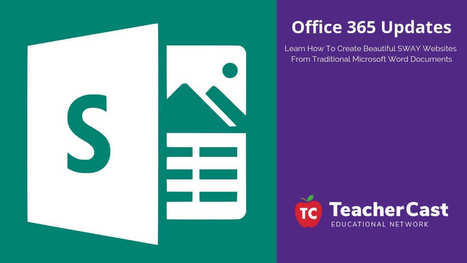
This week, Microsoft announced a brand new feature that allows users to easily transform any Word Doc into a beautiful website using SWAY. This process is pretty awesome and extremely to do and I highly recommend you try it out with your students today!
Via Dr. Tom D'Amico (@TDOttawa)
|
|
Rescooped by
Juergen Wagner
from Education 2.0 & 3.0
February 9, 2019 3:38 AM
|
Google Voice is a great communicational utility with huge educational potential. As a teacher, you can use Google Voice to obtain a phone number to use when communicating with students and parents without you revealing your personal phone number.
Via Gumersindo Fernández, Yashy Tohsaku
|