


Artificial intelligence has been in use in classrooms for some time, but a new RAND report raises questions about the overall effectiveness of the technology's current impact on education outcomes.
Via EDTECH@UTRGV

 Your new post is loading...
 Scoop.it! Artificial intelligence has been in use in classrooms for some time, but a new RAND report raises questions about the overall effectiveness of the technology's current impact on education outcomes. Via EDTECH@UTRGV
Scoop.it!

Augmented (AR) and Virtual Reality (VR) are becoming more commonly used in our classrooms, with many new tools being added that promote more authentic and immersive learning experiences for students. As educators, we should welcome these unique tools because they can help with designing more authentic and innovative learning spaces, and are a means to transform “how” students are learning. We can take students on virtual trips and really open a world of opportunities for them to explore. Via John Evans
Scoop.it!

"klicksafe to go" ist ein neues Format, in dem aktuelle, medienpädagogisch relevante Themen aufgegriffen und für Schule und Unterricht kompakt aufbereitet werden. Via Guido Knaus
Scoop.it!

Via The Scout Report
"StickyPassword is a password manager that also provides a secure vault for storing other sensitive information. Data is stored using industry standard AES-256 encryption. StickyPassword offers users a number of options to synchronize their data across devices, including cloud sync, local wifi, and manual offline synchronization. Users may also opt to skip synchronization across devices and instead store their data on a flash drive or memory card, physically moving the storage device among devices that need access to it. Rather than saving payment information on shopping sites, users can opt to store it in a StickyPassword vault and enter it at the time of purchase using StickyPassword's autofill feature. StickyPassword is available for Windows, macOS, Android, and iOS devices. It supports Google Chrome, Mozilla Firefox, Safari, Internet Explorer, Opera, and 11 other less common browsers."
Free and premium versions available. Highly rated by a number of reputable services. -JL Via Jim Lerman, Yashy Tohsaku
Scoop.it!

Here's how you can download just about anything you come across on the internet with free tricks and tools. Via Yashy Tohsaku
Scoop.it!

Use these five web apps and work with Docs, Sheets, Slides, and Photos to take your productivity up a few notches. Via Gumersindo Fernández
Scoop.it!

Download our smart test-taking tips to help students mentally prepare for tests and cut down on stress before it negatively affects their performance. Via Dr. Tom D'Amico (@TDOttawa)
Scoop.it!

Pexels offers free stock photos that you can use for personal and commercial projects. With our large variety of free images you will find the perfect photo for your website or blog post. Via Dr. Tom D'Amico (@TDOttawa) 
riverdalé's curator insight,
February 20, 2019 9:52 PM
Well, netizens nowadays, especially millennial people are very particular on capturing different beautiful spots and views and posting it on their social media accounts. In order to gain likes, comments and shares or to catch people's attention, we need to innovate those simple pictures into ostentatious photo by applying different filters. There are so many photo editor applications, such us; VSCO, Snapseed, Lightroom CC and so much more! One of those is this application, which is Pexels. Well, Pexels offers free stock photos that you can use for personal and commercial projects. With our large variety of free images you will find the perfect photo for your website or blog post. It helps us to improve our editing skills and it can also make our photo more creative and beautiful. One of the most important concepts to keep in mind when working with Photoshop's filters is Smart Filters. When you apply a filter to a pixel layer, that's it — the pixels are changed. ... Unlike adjustment layers, which are, in fact, separate layers in the image, Smart Filters work more like layer styles. Who would have thought that a simple picture can turn into a fabulous one. We just have to explore!
Scoop.it!
Scoop.it!

Scoop.it!

Scoop.it!

The education industry is changing with leaps and bounds with the technology onslaught and very new learning solutions. Here are the education trends you can expect in 2019.The value…... Via Yashy Tohsaku |
Scoop.it!

PowerPoint’s 3D experiences get more enhanced all the time. To begin with, the only way you could animate 3D models was by using the Morph transition effect. Next, you could use the 3D animat… Via Karen Loftus
Scoop.it!
Use Google Slides - Accessible Closed Captions to improve literacy for all learners via Lisa Nielsen
Scoop.it!

Find out how to use free online tools to make interactive content, quizzes, and worksheets for students. A high school teacher explains how she uses Flippity, H5P, Playbuzz, LearningApps, Quizizz, and Tinycards and provides examples. Via Gumersindo Fernández, Yashy Tohsaku
Scoop.it!
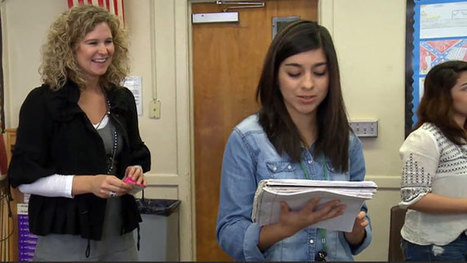
Sarah Brown Wessling uses the stand-up game to encourage active participation. She asks all the students in her classroom to stand up. They are only allowed to sit down once they have participated in the discussion or share out. Sarah says this game is great for engaging tired students. Via Dr. Tom D'Amico (@TDOttawa) 
Rachel Jang's curator insight,
June 3, 2019 1:46 AM
This is an awesome strategy to get the discussion flowing in the classroom. It also gets all of the class engaged because as we know, teens are not always willing to share their ideas freely so by having the option for them to share early so that they can sit down.
I also loved the idea of clicks for praise where the whole class joins in. That would be a real confidence booster for the students.
Scoop.it!

Drew Perkins talks with Barbara Condliffe, Research Associate at MDRC, about their recent research review publication “Project-Based Learning: A Promising Approach to Improving Student Outcomes”. Links & Resources Mentioned In This Episode: Don’t forget to subscribe to the show on iTunes to get automatic updates. READ TeachThought Podcast Ep. 98 Moving PBL From Surface To… Dec 19, 2017 TeachThought Podcast Ep. 97 Growing PBL With Mentorship Dec 18, 2017 Also available on Google Music for subscribers! Thank You For Listening! Thanks so much for joining us again. Have some feedback you’d like to share? Email us! If you enjoyed this episode, please share it. If you would like to support Drew Perkins and incentivize more podcast episodes from him you can do so by clicking the Patreon button below. Also, please leave an honest review for The TeachThought Podcast! Ratings and reviews are extremely helpful and greatly appreciated! They do matter in the rankings of the show, and we read each and every one of them. If you have any questions please email us at [email protected]! Via Yashy Tohsaku
Scoop.it!

This website provides a beginner’s checklist for staying safe on the internet. This website is the result of a conversation started during arecent episode of the Design Details Podcast and a subsequent tweet by Michael Knepprath. The code that powers this website is open source. Please contribute if you’d like to see additional resources added to this checklist. Via Frédéric DEBAILLEUL
Scoop.it!

Teach and learn practical digital skills using Google's free project-based video curriculum. Via Dr. Tom D'Amico (@TDOttawa) 
Pamela Alaniz's curator insight,
May 12, 2019 10:06 PM
This website offered a variety of tools to teach someone of the uses of Google. The videos were excellent and very informative, the resources in which you can go back and look over materials to help incorporate with the use of Google was useful and teachers would benefit if they take a little bit of time and look over some of the material. Having available resources on hot to teach digital skills to students will only further help your instruction be more student-centered as kids rely more on their own intuitions and act on their own initiatives when doing their assignments.
Scoop.it!

"Fed up with the traditional way of presenting through Keynote or Google Slides? The four tools below are definitely great alternatives to use to create engaging presentations to share with students ..."
Via Leona Ungerer
Scoop.it!

'If I don't grade it, students won't do it.' This reasoning leaves teachers with piles of work to grade, but I wonder how much of that time spent assigning points to student work results in improved student performance. I fell Via Dr. Tom D'Amico (@TDOttawa)
Scoop.it!

Temple Independent School District (ISD), which is located north of Austin and south of Waco, Texas, has a very diverse student population. More than 75 percent of our students are economically dis… Via EDTECH@UTRGV
Scoop.it!

One tool to help students with disabilities even in the face of a special education teacher shortage is assistive technology. Today, assistive technology can help students with certain disabilities learn more effectively. Ranging in sophistication from “low” technologies such as a graphic organizer worksheet to “high” technologies including cutting-edge software and smartphone apps, assistive technology is a growing and dynamic field. Several areas of assistive technology and sample products may be found in any given classroom, making a difference in how students of all abilities learn.
Scoop.it!

With so many Linux distros, choosing one can be difficult. Here are the best best Linux operating systems to consider. Via Juan Jesús Baño Egea |






I would love to have an AI assistant to help me deal with repetitive tasks, but I'm not quite ready to let an AI bot take over my class.
Artificial intelligence has been in use in classrooms for some time, but a new RAND report raises questions about the overall effectiveness of the technology's current impact on education outcomes.