


New technologies will destroy old jobs and create new ones. To survive, everyone will need to keep learning constantly, says Infosys president Ravi Kumar.
Via juandoming, Juergen Wagner, Mariano Fernandez S.

 Your new post is loading...
 Scoop.it! New technologies will destroy old jobs and create new ones. To survive, everyone will need to keep learning constantly, says Infosys president Ravi Kumar. Via juandoming, Juergen Wagner, Mariano Fernandez S. No comment yet.
Sign up to comment
Scoop.it!

Set up your screening interview by choosing questions you'd like your applicant to answer. Applicants will use our iOS/Android app to complete the screening interview, by recording responses for these questions. Via Nik Peachey 
Nik Peachey's curator insight,
July 5, 2019 12:46 AM
This is a great way to get your students practising their speaking skills. You can have one interview sequence and use it for up to 300 students for free.
Scoop.it!

A language arts and social studies teacher suggests curriculum directors maintain an open door policy so educators can bring new ideas to the floor. Via juandoming
Scoop.it!

Over the last few years, we have reviewed a number of interesting web tools and applications teachers and students can use to create digital magazines and newspapers. In today’s post we are bringing to your attention another important tool in this regard. Printing Press, from ReadWriteThink, is one of the most popular web tools for creating classroom newspapers, informational brochures and flyers to use in your instruction. Via Gumersindo Fernández
Scoop.it!

Let’s face it– classroom tech over the last decade has gone B.A.D. — that is, Bring A Device. I think a lot of outside observers, casually peering into their child’s classroom, might assume that classrooms are now filled with technology from floor to ceiling with iPads, Chromebooks, cellphones, Macbooks, and everything in between. Certainly, there’s … Via Dr. Tom D'Amico (@TDOttawa)
Scoop.it!

Are you a tech coach, instructional coach, or something in between? Maybe you dream of one day being a coach? Ready to learn the top 10 secrets of being an awesome tech coach? This episode is for YOU! Being a coach is no walk in the park, but I can help make it easier. It takes a strong foundation, experience, organization and lots of patience to be an effective coach. This episode will focus on my best-kept secrets, how to build relationships, organize your time, create meaningful PD and more!" Via EDTECH@UTRGV
Scoop.it!
20 Examples Of Good Digital Citizenship by TeachThought Staff What is good digital citizenship? Previously, we’ve offered a definition of digital citizenship in the past. Below, we offer some specific examples of good digital citizenship. From communicating with on social media with clarity and respect to respecting other’s privacy to thinking critically and carefully about … Via Dr. Tom D'Amico (@TDOttawa) 
Arlyna Garza's curator insight,
February 6, 2021 6:42 PM
This article gives examples of being a good digital citizenship. This can be helpful when you are teaching students on how to properly behave online. These examples can give them a better insight of digital citizenship. 
Cynthia Cuellar's curator insight,
June 12, 2022 6:36 PM
This article provides examples of what good citizenship should look like and how it can be addressed. One example that the article gives is critical thinking and how important this is to teaching digital citizenship. I believe that students as well as adults need to think about what they will be posting instead of automatically reacting to a situation. Monitoring is also great, in our school we have a platform that will allow the teachers to monitor our students web activity. Using this platform has increased our student awareness of digital citizenship.
Scoop.it!
New technologies will destroy old jobs and create new ones. To survive, everyone will need to keep learning constantly, says Infosys president Ravi Kumar. Via juandoming
Scoop.it!

Pinterest boasts more than 1,000 ideas about how students can self-evaluate their own learning. My Google search on the same topic offered six million results. Clearly, the resources are plentiful. But just because students can doesn’t mean they will. Via John Evans
Scoop.it!

The technologies on the list, which is curated by members of the Forum’s Expert Network, are selected against a number of criteria. In addition to promising major benefits to societies and economies, they must also be disruptive, attractive to investors and researchers, and expected to have achieved considerable scale within five years.
“From income inequality to climate change, technology will play a critical role in finding solutions to many of the challenges our world faces today. This year’s emerging technologies demonstrate the rapid pace of human innovation and offer a glimpse into what a sustainable, inclusive future will look like,” said Jeremy Jurgens, Chief Technology Officer at the World Economic Forum.
“Technologies that are emerging today will soon be shaping the world tomorrow and well into the future – with impacts to economies and to society at large. Now that we are well into the Fourth Industrial Revolution, it’s critical that we discuss and ensure that humanity is served by these new innovations so that we can continue to prosper,” said Mariette DiChristina, Editor-in-Chief of Scientific American, and chair of the Emerging Technologies Steering Committee. Via Edumorfosis, juandoming
Scoop.it!
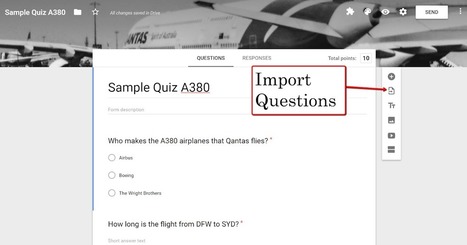
Yesterday I recapped the important Google products updates from June for teachers to note. July is starting out with another noteworthy update. That update is the ability to import questions from one Google Form into another without the use of any add-ons like Form Recycler. Via Gumersindo Fernández
Scoop.it!

Educators have adapted the already traditional Flipped Learning to meet the needs of different students. Let's explore the four types of Flipped Learning. Via EDTECH@UTRGV
Scoop.it!

What’s changing We’re adding the ability to import questions from your existing Google Forms and forms shared with you into a new form
Via Dr. Tom D'Amico (@TDOttawa) |
Scoop.it!

Pair & Compare: Find the best fonts and font-pairings for your next project easily and smoothly. Try all Google fonts (and more) on your text without the hassle, but with a click. Pair fonts easily. Compare fonts and font pairings on one page quickly. Control a lot of settings: background color, text width, font size, line height, etc. Via Ramon Aragon
Scoop.it!
Scoop.it!

Last month the eLearning Guild released its latest research report on asynchronous authoring tools. In addition to basic survey questions, the research methodology included open-text feedback from users and interviews with vendors. A challenge with gathering such qualitative information: interesting, thoughtful, myriad answers, with limited space to include them in the final product. Via juandoming
Scoop.it!
This week Google added a new "import questions" function to Google Forms. This is a native feature that lets you view your previously created Forms and then select questions to import into a new Form. Via Gumersindo Fernández
Scoop.it!

Ray Schroeder, a leading expert in online education shares how AI, virtual reality, blockchain, badges, and more are impacting the future of learning. Via EDTECH@UTRGV
Scoop.it!

Global and US trends show a growing interest in network infrastructure and collaboration tools. Via Dr. Tom D'Amico (@TDOttawa)
Scoop.it!

From
www

Google surveys its employees using this set of discerning questions.
Via Dr. Tom D'Amico (@TDOttawa) 
Deb Eisloeffel's curator insight,
July 18, 2019 4:21 PM
These are, of course, good questions for a manager to ask him/herself.

Gail Bray's comment,
July 21, 2019 4:54 PM
I love the comment about caring as much about your employees career as much as your own..
Scoop.it!

Use the Outline Pop Out in Google Docs I really love the outline tool in Google Docs. The only problem was it was a little out of sight out of mind that unless you knew to go to the menu and select to view the outline you may not have known this was a feature. …
Via Felix Jacomino
Scoop.it!

A middle school teacher/coach shares her guiding questions to selecting effective technology Via Yashy Tohsaku
Scoop.it!

Scoop.it!
A survey finds that the majority of participants struggle to identify fake news in a digital literacy quiz--here's how they stack up by age. Via EDTECH@UTRGV 
aidezg13@gmail.com's curator insight,
May 24, 2025 8:17 PM
This article really highlights something I’ve seen firsthand, which is just because someone has a college degree doesn’t mean they’re confident with digital literacy. It didn't really surprise me to read how many people (students and adults) struggle with evaluating websites, identifying fake information, or even using basic online tools. In higher ed, we expect students to navigate almost everything they need for classes online, but many don’t have the skills to do that effectively. I appreciate how this article backs that up with data, especially showing how younger adults often overestimate their digital abilities. It reinforces the need to teach these skills early and make digital literacy part of how we prepare students for college and beyond.
|






