


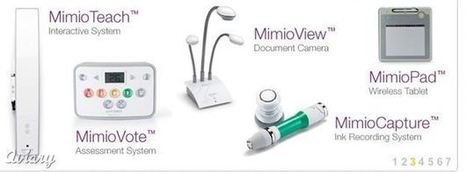
The modern classroom allows for terrific amounts of interactivity, but what are teachers’ best options for getting images and information up onto a screen for everyone to see? The Hitachi Digital Media Group think that they have the answer.

 Your new post is loading...
 Scoop.it! The modern classroom allows for terrific amounts of interactivity, but what are teachers’ best options for getting images and information up onto a screen for everyone to see? The Hitachi Digital Media Group think that they have the answer. No comment yet.
Sign up to comment
Scoop.it!
Here are some interactive whiteboard resources that I have collected. Via Shona Whyte
Scoop.it!

Great Resources On How to Use Blogs in Your Classroom ~ Educational Technology and Mobile Learning http://t.co/eslAjqstgg Via Consultants-E 
Consultants-E's curator insight,
January 18, 2015 1:42 PM
Setting up a new class or teaching blogg for 2015? Here's a good place to start.
Scoop.it!

Installer et configurer le Chromecast très facilement grâce à notre tutoriel complet pour maîtriser l'accessoire de Google ! Via Freewares&Tutos, Sophie Bocquet
Scoop.it!

By Andrew R. McIlvaine Having an effective mobile learning strategy does not include simply repurposing existing content, say experts. Via Adelina Moura, michel verstrepen
Scoop.it!

This post is the second post (the first one was Web 2.0 Tools For Beginning English Language Learners – “Phrase.It”) in a lengthy series where I will be sharing the Web 2.0 tools that I’m using with my Beginning English Language Learners, along... Via Yashy Tohsaku
Scoop.it!
Teaching about copyright, Creative Commons, and how to license your work can be a challenge. I’ve created a lesson to explain this simply. Via Yashy Tohsaku
Scoop.it!

When it comes to Moodle theme development, the first thing to do is find a base theme, but how do you do this? There are essentially two ways: you can either copy the standard theme and rename it, or you can use a parent theme (which will also be based on the standard theme). Via Miloš Bajčetić
Scoop.it!

A Selection of Quick, Easy Approaches to Interactive Classroom Collaboration Have you thought about trying some sort of technology for interactive, Via John Purificati |
Scoop.it!

Das IT-Cluster im MINT EC setzt die Reihe der Webinare zum Einsatz mobiler Geräte wie Notebooks, Tablets und Smartphones fort.
Scoop.it!

First-day jitters are not the exclusive domain of students. Teachers also worry about what to wear, how to act, how to make a good first impression, and how the school year will turn out. If you are a fresh face on the teaching scene — or even if you’re just looking for new ways to hone your teaching skills — the following resources will help you get going. Via John Evans, Tom Perran 
Tom Perran's curator insight,
January 19, 2015 7:08 AM
Not restricted to "technology on the classroom", this blog post contains resources for many areas of classroom management and instruction that are useful for new as well as experienced teachers. Topics covered include relationship-building with students, parents and colleagues; classroom management and lesson planning.
Scoop.it!
Scoop.it!

Windows 8 und 8.1 machen vieles gut, sind aber nicht perfekt. Diese Downloads machen die Microsoft-Programme zum perfekten Betriebssystem. Learn more: - http://www.scoop.it/t/best-freeware-software Via Gust MEES 
Gust MEES's curator insight,
January 18, 2015 10:13 AM
Windows 8 und 8.1 machen vieles gut, sind aber nicht perfekt. Diese Downloads machen die Microsoft-Programme zum perfekten Betriebssystem. Learn more: - http://www.scoop.it/t/best-freeware-software
Scoop.it!

Kinder heute wachsen mit Smartphones, Tablets und dem Internet auf. Und sicher lag auch bei dem ein oder anderen ein neues Smartphone unter dem Weihnachtsbaum. Via Klaus Meschede
Scoop.it!

The body of the email is able to be customized from within the language file; and is based upon the email based module of self-registration default. Email messages that are sent out to users can be edited via the language file or by utilizing the language editor within Moodle. Via Miloš Bajčetić
Scoop.it!

Marcus Green has once again posted a rendering of the Entity Relationship diagram of Moodle 2.8’s database tables.
Scoop.it!

Ammar Merhbi recently posted some modified Moodle 2 Interactive Tool Guide posters which teachers can use to learn about and see what Moodle activities and/or resources might fit their needs in a given course. This improvement to the Tool Guides enhances the usability by adding relevant video tutorials on how to add and use each of the module types of Moodle.
https://s3.amazonaws.com/Moodlenews/mdl2interactive1.html https://s3.amazonaws.com/Moodlenews/mdl2interactive2.html Via Miloš Bajčetić
Scoop.it!

Last weekend, I performed a clean install of Windows 10 on my laptop using a bootable USB drive. After completing Windows 10’s installation, I installed a bunch of free software, including a free antivirus software, before beginning to use the laptop for my work. Via Frédéric DEBAILLEUL
Scoop.it!

Last night during our Google Hangout about volunteer opportunities for the 2015 K-12 Online Conference, Karen Fasimpaur (@kfasimpaur) mentioned the possibility of using Vialogues or other websites ... Via Mª Jesús García S.M. 
Mª Jesús García S.M.'s curator insight,
January 14, 2015 2:17 AM
Flipping the classroom with video lessons
Scoop.it!

Moodle has constantly maintained its top spot among the LMS tools and has been ranked 11th overall among the top 100 tools for learning in 2013 . |






