


Moodle and Web 2.0
176.9K views |
+0 today
Filter by date
Tags
 Your new post is loading...
 Scoop.it! 
Moodle Mobile 1.10 was recently released and brought with it a few new features including new navigation, choices to sync only when you have a wifi connection (to keep Moodle-related data charges down) and plenty of fixes. The full list features, fixes and enhancements is available at http://goo.gl/iox935. Via Miloš Bajčetić
Scoop.it!
Discover how some teachers have creatively applied the flipped learning model to increase quality class time in PE, woodworking, dance education, and element... Via Marie-Hélène Fasquel-Erhart
Scoop.it!
Latest version of my slides. Feel free to join us for a free webinar tomorow at 7 pm CET!!!! :) Via Marie-Hélène Fasquel-Erhart, Juergen Wagner 
Marie-Hélène Fasquel-Erhart's curator insight,
January 11, 2015 2:21 PM
Experimenting with the flipped classroom Marie-Hélène Fasquel (This webinar is in English). Moderator: Russell Stannard 12. 01. 2015 - 19:00h - 20:30h to join: http://webconf.vc.dfn.de/flippedclassroom Info: http://v.gd/MHFflipped
Scoop.it!
Latest version of my slides. Feel free to join us for a free webinar tomorow at 7 pm CET!!!! :) Via Marie-Hélène Fasquel-Erhart
Marie-Hélène Fasquel-Erhart's curator insight,
January 11, 2015 2:21 PM
Experimenting with the flipped classroom Marie-Hélène Fasquel (This webinar is in English). Moderator: Russell Stannard 12. 01. 2015 - 19:00h - 20:30h to join: http://webconf.vc.dfn.de/flippedclassroom Info: http://v.gd/MHFflipped
Scoop.it!
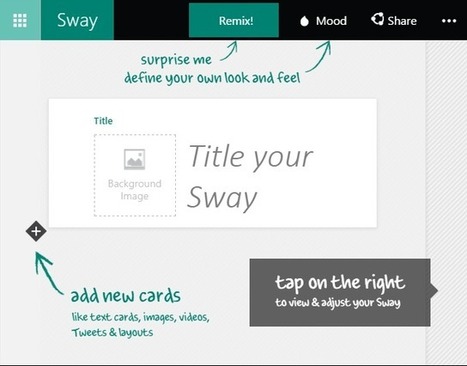
Sway is a novel tool for building cloud based presentations. Sway offers a rapid design experience, focusing on the collation of images, text, and video, sourced from the web or your computer. It's a canvas for your ideas, quick to create, and easy to share. Sway is still in closed preview, but we were lucky enough to have been pulled out… Via Baiba Svenca, Jim Lerman, michel verstrepen 
Alfredo Corell's curator insight,
January 18, 2015 2:56 PM
A new release of the new Microsoft presenting tool... Sway 
Mayra.Loves.Books's curator insight,
July 2, 2016 6:40 PM
I have used Sway for different presentations and I find it easy to use and intuitive. I still rather use other presentation apps but this one has its uses. I like it.
Scoop.it!

Create Online Courses with Moodle Join Moodle for Teachers (M4T) Electronic Village Online (EVO) for 2015 from January 12, 2015 for 5... Via Ramesh Sharma
Scoop.it!

by Jon Bergmann and Aaron Sams
"When the subject of the flipped class comes up, many educators see how it applies to academic subjects like math and science education, but don't realize that the methodology has applications in a wide array of other classes. According to a survey of 2358 teachers by the Flipped Learning Network and Sophia Learning (PDF, 1.2MB), 33 percent of those teachers who are flipping their classes are math teachers, 38 percent are science teachers, and 23 percent teach English language arts and social studies. But can you flip the other subjects? Can you flip an elementary classroom? The answer is a resounding yes. Via Jim Lerman, Marie-Hélène Fasquel-Erhart, Lyudmila Anikina 
Tony Guzman's curator insight,
December 9, 2014 3:10 PM
This article and video help instructors figure out how to best "flip" their course, regardless of subject matter or grade level. Any flippers out there care to share their experiences?
Scoop.it!

Get out of your own way and start offering more atta boys to your staff. If you don't because you think it's not your style, you're hurting yourself, your team and your company. Via Dr. Tom D'Amico (@TDOttawa) 
Prof. Hankell's curator insight,
February 10, 2015 8:43 PM
Less You + More Them = More Successful Leadership...
Scoop.it!

Have you ever tried explaining the early Internet to a young colleague? Mention Usenet and dial-up connections and you might as well be describing the era of main frames and punched cards …
Scoop.it!

Wie notiert man sich Wichtiges so, dass man sich am Besten daran erinnern kann? In den USA haben Forscher die Vor- und Nachteile elektronischer Notizen untersucht und Erstaunliches entdeckt: Der gute alte Stift hat Vorteile, die beim Schreiben am Bildschirm verloren gehen. Via Guido Knaus |
Scoop.it!

Over the last few years I've tried a bunch of tools for building flipped video lessons. As I do with most categories of ed tech tools, I gravitate to those that are easy to use and integrate with o... Via Marie-Hélène Fasquel-Erhart
Scoop.it!
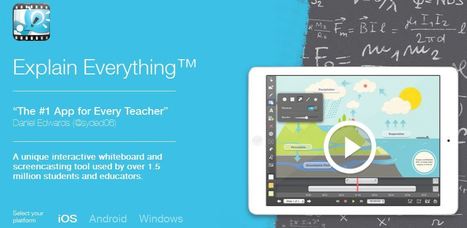
Explain Everything is a whiteboard and screencasting app that makes creating interactive lessons a simple proposition. Its full-featured editing options and its import/export functions allow it to stand apart from the other competitors Via Baiba Svenca, Norman René Trujillo Zapata 
Louise Robinson-Lay's curator insight,
November 21, 2014 3:44 PM
Screen casting is a great way to flip your classroom. Explain Everything helps you to create the videos you want for your lessons. It offers features like an interactive whiteboard so that you can annotate. 
Holly Doe's curator insight,
November 22, 2014 12:27 PM
Use this tool on an iPad to flip your classroom, whiteboard or just create awesome presentations.
Alfredo Corell's curator insight,
November 25, 2014 3:00 AM
Good Tips to use this popular app and prepare good digital presentations.
Scoop.it!

Last week I published a post about creating custom columns on Padlet walls. Creating custom columns allows you to use Padlet as a place for students to collaboratively create KWL charts and other graphic organizers. In the video embedded below I provide a demonstration of how I use Google Documents to build custom columns for Padlet walls. Via Gumersindo Fernández
Scoop.it!
This post is the first in a lengthy series where I will be sharing the Web 2.0 tools that I'm using with my Beginning English Language Learners, along with explaining how we're using and sharing mu... Via TeachingEnglish 
Kirsten Wilson's curator insight,
January 12, 2015 9:51 AM
Great curation of resources for supporting ELLs and educators. 
Alex Paradowski's curator insight,
March 9, 2015 11:23 AM
Good Breakdown of how these Web 2.0 tools can help us understand and explore new programs and use the internet for our benefit.

Mazin Ali's curator insight,
March 12, 2015 8:59 AM
These Web 2.0 tools are great for foreign exchange students and people trying to learn English.
Scoop.it!
Create Online Courses with Moodle Join Moodle for Teachers (M4T) Electronic Village Online (EVO) for 2015 from January 12, 2015 for 5... Via Ramesh Sharma, Juergen Wagner, Miloš Bajčetić
Scoop.it!

Got an HDMI port handy? Sure, you could plug in a Chromecast, Fire TV Stick or Roku Streaming Stick to get your Netflix fix. Or you could pay $150 to get a full Windows 8.1 PC in the same form factor. Via Kathleen Cercone
Scoop.it!

Let me introduce you to one of my new go-to tech tools: Padlet. It's free, it's easy-to-use, and it's awesome. Oh, and did I mention... no signup needed? Padlet is essentially a digital poster that... Via kathy pryor
Scoop.it!

Ever heard of flipping the classroom? Want to learn more about how teachers are using this innovative method to help students succeed academically? Join us for a free webinar lead by high school math teacher, Crystal Kirch, who has spent the past three years "fully flipping" her classroom. Hear more about her journey and learn the essential strategies to flip your classroom, including her own WSQ design. Via Dr. Tom D'Amico (@TDOttawa)
Scoop.it!

A brief guide of Youtube channels with helpful resources, ideal for Moodle users. Via Miloš Bajčetić
Scoop.it!

"If you’re thinking, “Nah, no way,” allow me to refresh your memory. Do you remember when we collected music CDs? How about cassettes? Eight tracks? Vinyl? Remember when going to a movie theater meant parting with a boatload of money—even before hitting the concession stand? With On Demand, Netflix and Amazon, we can watch a digital movie at home and save enough money to toast the occasion with a bottle of Dom Perignon. That’s progress." Via EDTECH@UTRGV |







The RECORDING of the Webinar
The presentation as a PDF