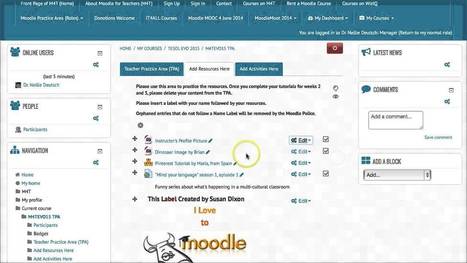
January 25, 2015
In today's post, I am sharing with you this step by step visual guide to help you connect your Google Drive to your Edmodo account. The benefits of establishing such a connection is...
Via Javier Sánchez Bolado

 Your new post is loading...
 Scoop.it! January 25, 2015 Via Javier Sánchez Bolado No comment yet.
Sign up to comment
Scoop.it!
My newest tutorial video about ways to make a cartoon of yourself in PowerPoint, including using CrazyTalk Animator, which is a separate software you can get... Via Baiba Svenca, Janet Bianchini 
David Swaddle's curator insight,
January 28, 2015 11:01 PM
CrazyTalk is so much fun! Here's a quick demo of what it can do.
Scoop.it!
Upcoming webinars for the next month or so. My money's on Leo Selivan's talk next weekend. He never disappoints. John Hughes, of critical thinking in ELT fame, will also be very interesting. 1. Pic... Via Shona Whyte
Scoop.it!

With Certificate Magic you can create your own printable personalized certificates for free, in seconds. Via Marie-Hélène Fasquel-Erhart
Scoop.it!

Moodle Mobile continues to impress, most recently with the release of 1.11 and Calendar Integration with reminders as local notifications.In addition to the calendar integration fixes also addressed issues with forum display, error messages and content saved for offline viewing. Via Miloš Bajčetić
Scoop.it!

January 22, 2015 Via Evdokia Roka, Javier Sánchez Bolado
Scoop.it!
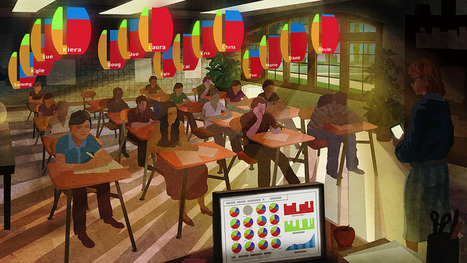
Dear Technology Integrator: Most modern teachers already use digital technology - yes, even the most technophobic ones: They email They surf the web for resources They use text messenging They cr... Via Becky Roehrs, Suvi Salo, juandoming 
Becky Roehrs's curator insight,
January 22, 2015 2:25 PM
Short and sweet-how to get teachers on board with technology.. 
rodrick rajive lal's curator insight,
January 23, 2015 12:48 AM
I guess, we will contninue to need to sell technology to even the most Technophobic teachers. Technology is no just about checking emails, surfing the web for quick fix solutions!
Scoop.it!
Juergen Wagner's insight:
Each month a new webinar is recorded and you can access them here. Hope that they're helpful - feel free to e-mail me and let me know what you think jo.gakonga@elt-training.com
Scoop.it!

Besides Google Drive, Dropbox is by far one of the most powerful cloud storage platforms out there. Dropbox offers new users up to 2GB of free storage space to start with and you can always upgrade for extra space. Two of the best Dropbox features for teachers and educators are: The ability to upload documents and PDFs and generate a shareable link to share with others who can access them without even having a Dropbox account. Also, most of the blogging services and website do not offer free hosting space that would enable you to upload documents, Dropbox is the ideal solution to this ( Google Sites is another alternative). The second important feature is the "shared folder". Similar to Google Drive's shared folder service, Dropbox allows you to create a folder, upload files and documents to it and share it with others who, upon granting them editorial privileges, can edit and upload stuff to it. Via Edumorfosis, Mariano Fernandez S.
Scoop.it!
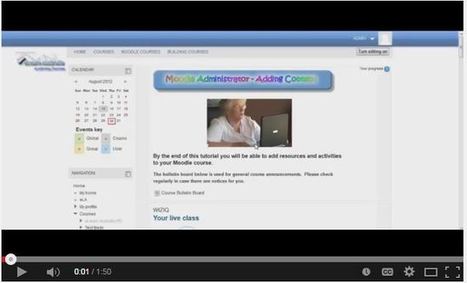
Here’s a quick video by Chris Sutton that highlights how new sections can be added to Moodle (and removed) just by using icons on your main course page. |
Scoop.it!

Yesterday I had the pleasure of listening to Sir Ken Robinson (now on Twitter) speak in person for the first time. Like many people I've watched him on YouTube videos, so this BETT2015 talk was a n... Via juandoming, María José Hernández, Javier Sánchez Bolado
Scoop.it!

Though I often talk about how the flipped classroom is not about the videos, most flipped class teachers do use videos. What are some tips on how to make good quality videos. Aaron Sams... Via Marie-Hélène Fasquel-Erhart 
Carmen Ramos's curator insight,
January 24, 2015 1:56 PM
Videos für die Lehre, eigentlich gar nicht so schwer.
Scoop.it!
Upcoming webinars for the next month or so. My money's on Leo Selivan's talk next weekend. He never disappoints. John Hughes, of critical thinking in ELT fame, will also be very interesting. 1. Pic... Via Shona Whyte
Scoop.it!

This is a simple Moodle filter which creates tabs in textfields.
To create tabs in textfields where the filter is activated, simply use the following syntax: {%:Tab title}Tab text{%} Via Miloš Bajčetić
Scoop.it!

But does a note in your handwriting done by a bot look like it's sent from uncanny valley? We test out letter-writing company Bond to see. Via Lynnette Van Dyke
Scoop.it!

There are so many good free tools for creating comics and cartoons on the web, as well as apps for tablets and smartphones. I’ve built out a list of fun tools I am looking forward to trying out over the upcoming holiday break. I can’t wait to brainstorm creative ways to leverage these in lessons! Via John Evans, Kelly Blair 
Willem Kuypers's curator insight,
January 27, 2015 3:38 PM
Ca m'a plu de faire un bd au cours avec les élèves. 
António Leça Domingues's curator insight,
November 20, 2016 9:51 AM
Utilização de cartoon em sala de aula.
Scoop.it!

These videos give you a basic introduction into using the image and screen capture tool SnagIT. The videos go through different examples using SnagIT as wellas creating your first recording Via Elke Höfler
Scoop.it!
Scoop.it!

DocBiodiv's curator insight,
January 23, 2015 6:17 AM
En image et en chiffres qui apportent au débat.
Willem Kuypers's curator insight,
January 27, 2015 3:43 PM
L'opposition est un peu blanc/noir. N'empêche en pratiquant l'e-learning, il est indéniable qu'on est passé dans un autre paradigme d'apprentissage, une autre relation avec l'étudiant.
Scoop.it!
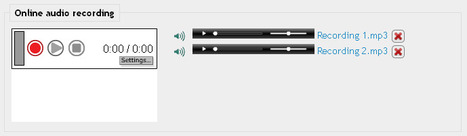
Audio recorder (Flash 10.1+) submission method. Records locally and uploads via HTTP POST, so there's no need for a streaming server!
Finally putting an end to the need for a streaming server (or a Java applet) to allow students to record audio clips for Moodle assignments, the Online Audio Recording assignment uses Flash (10.1+) to record audio from a microphone, convert it to MP3 format and upload it to Moodle via HTTP POST. Via Miloš Bajčetić, michel verstrepen |