|
Rescooped by
Juergen Wagner
from TIC, TICE et IA mais... en français
January 31, 2015 1:12 PM
|


No comment yet.
Sign up to comment

 Your new post is loading...
 Scoop.it! No comment yet.
Sign up to comment
Scoop.it!
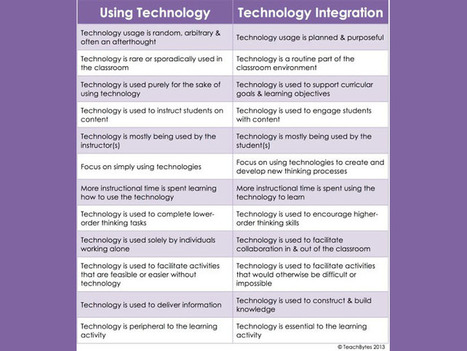
The Difference Between Technology Use And Technology Integration Via Ana Cristina Pratas, Miloš Bajčetić, CECI Jean-François 
Armando's curator insight,
February 1, 2015 6:14 AM
The Difference Between Technology Use And Technology Integration 
Laura Roth's curator insight,
February 1, 2015 5:38 PM
I always feel like defining "using technology" and "technology integration" is good for constant reflection to ensure technology integration is being utilized properly in the classroom. Especially for those who are just starting out. 
Bernard VULLIERME's curator insight,
February 2, 2015 1:11 PM
… pour vérifier ses (bons) choix en faveur du e:learning …
Scoop.it!

Students love it when teachers provide class notes—the more complete the set, the better. Students want the teacher’s notes online because it’s convenient, they’re readable, well organized, and relieve the student of having to expend much effort during class. A lot of students need the teacher’s notes because they aren’t very good note-takers themselves. They practice stenography rather than note-taking, trying to get down the teacher’s words exactly. That way, even if they don’t understand, the Via Dr. Tom D'Amico (@TDOttawa)
Scoop.it!

News4teachers Via Klaus Meschede
Scoop.it!
Scoop.it!
Doktor Allwissend erklärt, warum Facebook süchtig macht und warum alle so like-geil sind. Mehr: http://bit.ly/mehrDoktor Politische Hangout-Show ist vorbei. ... Via Elke Höfler
Scoop.it!

You have a few minutes to go before the bell goes, and you’ve managed to get everything done. What next? Teacher and #PedagooCurator Rachel Jones gives her top 20 tips on what to do with this time. Via Dr. Tom D'Amico (@TDOttawa) , Carla Arena 
RebeccaMoore's curator insight,
January 28, 2015 3:15 PM
I really like some of these ideas for little short tasks to have students do at the end of a class to ensure there is learning happening the whole time. Exit slips are quick and easy ways to check for understanding and to hold students accountable for their learning.
Scoop.it!

Kelly's curator insight,
January 28, 2015 8:14 PM
Practical and easy ways to use YouTube's standard editing features to insert spotlights, text bubbles, clickable links, etc. at specific time-markers in an uploaded video thereby expanding available options and scope of learning.

Kristie's curator insight,
January 29, 2015 9:55 PM
Always looking for new ways to create interactivity. I had no idea you could do this with Youtube.
Scoop.it!

Moodlerooms has released Flexpage for Moodle 2.7 this week. Flexpage is an innovative set of Moodle plugins which provides you the ability to create a course more like a webpage. Each topic could b... Via Donna Thompson, michel verstrepen 
benoit tostain's curator insight,
January 31, 2015 11:40 AM
#Flexpage : la mise à jour attendue des connaisseurs d'un format de cours sur #Moodle
Scoop.it!

Create Online Courses with Moodle Join Moodle for Teachers (M4T) Electronic Village Online (EVO) for 2015 from January 12, 2015 for 5...
Scoop.it!
Scoop.it!

Get CliffsNotes Study Guides: The Hunger Games, Of Mice and Men, Incidents in the Life of a Slave Girl, Divine Comedy Inferno, Night, Gulliver's Travels, The Prince and the Pauper, Heart of Darkness, One Flew Over the Cuckoo's Nest, A Separate Peace, and more on the App Store. See screenshots and ratings, and read customer reviews. Via Dr. Tom D'Amico (@TDOttawa) |
Scoop.it!

Butcher paper and Post-it notes can help students understand the collaborative thinking that takes place on a shared Google Doc. Via Louise Robinson-Lay
Scoop.it!
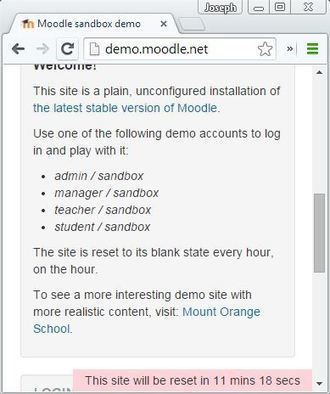
If you’re selling enrollment to courses using Moodle or showcasing a demo of a new Moodle plugin or feature, giving potential customers a chance to review the materials/functionality before they commit to purchasing might help increase conversions and sales overall. Just like the reset feature on Demo.Moodle.Net which resets the courses to a base stat every hour, the Sandbox plugin for Moodle 2.x allows you to set a course up and systematically/automatically reset the course so that even the same users will get a fresh experience every X duration. Via Miloš Bajčetić
Scoop.it!

ETT: What is the market segment your company is in and who are your core customers?
ETT: What it is that you’re doing differently than your competitors? And do you expect to develop other differentiators in the future?
Moodle will continue to be an open source learning platform and to try and take open source to new heights. Unlike many .com companies in the edtech sector who may be driven to produce profit for investors, our main drive is to provide free tools for educators to use as they wish. Even though we do have a range of commercial services via our Moodle Partners (see moodle.com) all of these are designed to help pay developers to produce our free software. Via Miloš Bajčetić
Scoop.it!
Alle Videos von der Learntec: http://www.youtube.com/user/LEARNTECkarlsruhe Alle Informationen zur Learntec: http://learntec.de Via Klaus Meschede
Scoop.it!

The slides and references for my keynote at #learntec are here http://t.co/dqY6hihw5z
Scoop.it!
This is "What is Moodle?" by HowToMoodle on Vimeo, the home for high quality videos and the people who love them. Via Patric Lougheed
Scoop.it!

Mediennutzung aus Schülersicht Via Elke Höfler
Scoop.it!

Creating a mesmerizing presentation is more than stitching slides together, sure, but a good presentation tool certainly helps keep your audience's attention. Some of the best are on the web and easy to use, too, and don't require you download a pricey app to use. This week, we want to know which ones you think are the best. Via Baiba Svenca, Elke Höfler
Scoop.it!

Carmen Ramos's curator insight,
January 26, 2015 10:10 AM
Tolles Tool zum Erstellen von Word Clouds! 
Kim Spencer's curator insight,
January 29, 2015 4:44 PM
A great tool to use to introduce keywords to students.My students love it for all sorts of projects. |