Into the Driver's Seat
486.8K views | +3 today
Into the Driver's Seat
Building learners' independence through thoughtful technology use
Curated by Jim Lerman
Your new post is loading...
Scooped by Jim Lerman
September 19, 2013 2:19 PM
Scoop.it!

The Beginner's Guide To The iPad And iOS 7 - Edudemic

The Beginner's Guide To The iPad And iOS 7 - Edudemic | Into the Driver's Seat | Scoop.it

by Jeff Dunn


"In the following videos, I attempted to build a guide to the iPad that walks you through how the iPad works using the not-yet-available operating system iOS 7. I’m using a developer beta version and there are still a few bugs. Regardless, the look and feel will likely be the same once iOS 7 is officially released."

No comment yet.
Rescooped by Jim Lerman from AI and the workforce
September 19, 2013 2:13 PM
Scoop.it!

Infographic: Teachers Embrace Digital Resources | Atomic Learning Blogs

Infographic: Teachers Embrace Digital Resources | Atomic Learning Blogs | Into the Driver's Seat | Scoop.it
Are teachers using digital resources to enhance learning? According to this infographic found on teachbytes looking at how educators are using technology. Want to help teachers in your district fully utilize technology?

Via Melissa Vee Rentchler
No comment yet.
Rescooped by Jim Lerman from Digital Literacy and Digital Citizenship
September 19, 2013 12:37 PM
Scoop.it!

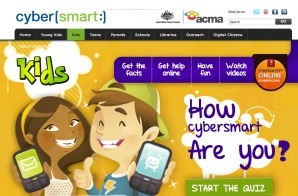
6 Days and 78 Resources for Digital Literacy Internet Safety

6 Days and 78 Resources for Digital Literacy Internet Safety | Into the Driver's Seat | Scoop.it

"Internet Safety and Digital Citizenship are important topics ... it is so integral to what our kids do while they are at school.  Whether or not you have a 1:1 program, these are topics that shouldn’t be overlooked!  Don’t assume that because your students are fairly savvy when it comes to learning technology, that they will automatically pick up on digital literacy...it is essential that parents learn about digital literacy so that they can echo and enforce good technology use at home"


Via Beth Dichter, Fishtree Education
David Cook's curator insight, August 7, 2014 10:26 PM

Looks better for K - 8 teachers than high school (myself).  I do like the week plan of 5 days of focus on digital literacy!

Melissa Marshall's curator insight, October 25, 2014 10:46 AM

This is an excellent collection of resources, split into age groups and a suggested order of activities. It is an American site, but I like how they have picked up on the cybersmart resource put out by the Australian Government. I would add another one to the list: the resources made by CommonSense Media. These are great too, and Prendiville's digital citizenship unit is based on them. 

Lamia Saad's curator insight, March 9, 2021 9:53 PM
It’s great resource including  different resources to teach children about online Identity, digital footprint, cyber bullying and online Privacy.These references can be use by parents and teachers.
Scooped by Jim Lerman
September 19, 2013 9:48 AM
Scoop.it!

Amplifying Student Learning: Using Mobile Apps to Create, Share and Connect - edWeb

Amplifying Student Learning: Using Mobile Apps to Create, Share and Connect - edWeb | Into the Driver's Seat | Scoop.it

FREE WEBINAR - THURSDAY, SEPT. 26, 2013

5-6 PM (EASTERN)


Presented by Carolyn Skibba, Technology Coordinator and Apple Distinguished Educator


"One of the most compelling benefits of classroom technology is that it enables students to share their ideas and knowledge in powerful new ways. Effective, thoughtful integration of mobile apps can empower students to create quality, meaningful work for a worldwide audience. Ultimately, this leads to true engagement that transforms how students see themselves and their learning. Through this webinar, you will learn how to integrate some of the best apps for student creativity and publishing. You will also gain practical tips that will support you and your students in creating authentic content and sharing it easily with others."


No comment yet.
Scooped by Jim Lerman
September 18, 2013 6:44 PM
Scoop.it!

10 Ways To Make The Most Of Google Groups

10 Ways To Make The Most Of Google Groups | Into the Driver's Seat | Scoop.it
Once upon a time Google Groups was on the cutting edge of online social interactions. Today, social media is the elite. With an upgrade earlier this year, Google Groups has come out to create an identity of its own.
Bonnie Bracey Sutton's comment, September 19, 2013 9:25 AM
Thank you...
Rescooped by Jim Lerman from Digital Delights - Digital Tribes
September 18, 2013 6:42 PM
Scoop.it!

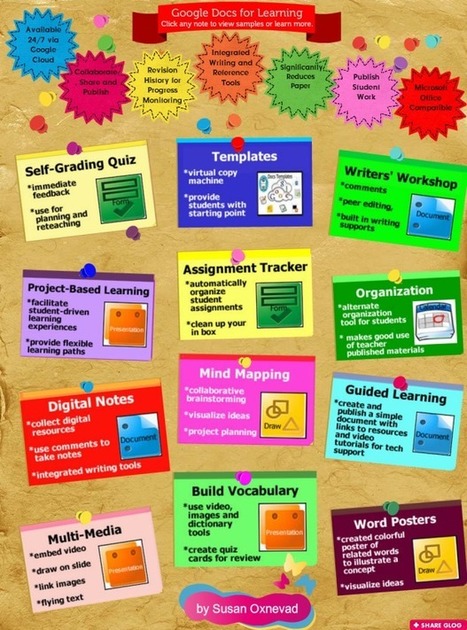
12 Effective Ways To Use Google Drive In Education - a Visual

12 Effective Ways To Use Google Drive In Education - a Visual | Into the Driver's Seat | Scoop.it
You probably already have a Google Drive account. Why not figure out the best ways teachers are using Google Drive in education right now?

Via Ana Cristina Pratas
Debbie Kemp-Jackson's curator insight, September 25, 2013 1:07 PM

Love Google Drive- works well with writing class. Fewer papers to take home.

Dorian Love's curator insight, November 8, 2013 10:10 AM

what a colourful graphic!

Cecilia Bullough's curator insight, February 26, 2014 12:15 PM

Ways to use Google Drive

Rescooped by Jim Lerman from Eclectic Technology
September 17, 2013 10:54 PM
Scoop.it!

4 Ways To Make Digital Portfolios With Students - Edudemic

4 Ways To Make Digital Portfolios With Students - Edudemic | Into the Driver's Seat | Scoop.it
There are a slew of free ways to make digital portfolios with students and for students. These are some of our favorites!

Via Beth Dichter
Beth Dichter's curator insight, September 17, 2013 10:50 PM

Have you considered having your students create a digital portfolio? As we move more and more to digital technology the ability to do this becomes easier, and the reasons you might do so seem to increase.A few of the reasons you might consider digital portfolio:

* students are able to  see their progress over time;

* it helps you as a teacher be able to track student progress more easily;

* it is easy to share with other teachers as students matriculate;

* they provide a tool for teacher and student to communicate.

One issue that has often stopped folks is how to save these portfolios. This post share four resources that you might consider using to do this: Evernote, Google Sites, WordPress and Edublogs. Each has a short explanation, oftem providing pros and cons.

Rescooped by Jim Lerman from :: The 4th Era ::
September 17, 2013 9:48 PM
Scoop.it!

40 Things to Do with a Text ~ Teacher Training Unplugged

40 Things to Do with a Text ~ Teacher Training Unplugged | Into the Driver's Seat | Scoop.it

by Dominic Braham and Anthony Gaughan 


"Most of the following list of ideas for text exploitation was brainstormed in not much more than five minutes while we were planning sessions to form part of our Certificate in Teaching English for Business (CertTEB) course in Berlin. Seven of the ideas were contributed by CertTEB course participants and we would like to acknowledge and thank Louise Mc Cloy, Mark Giddings, Paul Milkaitis and Jessica Abraham for their ideas.


"The ideas are presented in the order they came to us, so there is a kind of logic to the list but it certainly isn’t in order of effectiveness. We would simply like to present them here with a little commentary on each.


"None of the ideas is anything new; the fun is in seeing them all together and realising how much more we can (and sometimes actually) do with texts in the classroom. Neither is the list exhaustive, we are sure that you will have come up with ideas that we do not mention here. If you do, we would love to hear about them so please drop us a line at the email address at the end of this article."


No comment yet.
Rescooped by Jim Lerman from :: The 4th Era ::
September 17, 2013 4:32 PM
Scoop.it!

Field Notes for 21st Century Literacies ~ HASTAC

Field Notes for 21st Century Literacies ~ HASTAC | Into the Driver's Seat | Scoop.it
Field Notes for 21st Century Literacies:A Guide to New Theories, Methods, and Practices for Open Peer Teaching and Learning 
Jim Lerman's insight:

Cathy Davidson, Professor at Duke University, wrote this about this ebook in the NY Times on 9;17/13: "... last spring, in one of my graduate digital literacy classes (face-to-face with students from Duke, the University of North Carolina and North Carolina State University), my students proposed, in lieu of traditional term papers, to write a book together on open learning. They have published it online, and I recommend it to anyone interested in peer learning."

Jim Lerman's curator insight, September 17, 2013 4:31 PM

Cathy Davidson, Professor at Duke University, wrote this about this ebook in the NY Times on 9;17/13: "... last spring, in one of my graduate digital literacy classes (face-to-face with students from Duke, the University of North Carolina and North Carolina State University), my students proposed, in lieu of traditional term papers, to write a book together on open learning. They have published it online, and I recommend it to anyone interested in peer learning."

Jim Lerman's curator insight, September 17, 2013 4:32 PM

Cathy Davidson, Professor at Duke University, wrote this about this ebook in the NY Times on 9;17/13: "... last spring, in one of my graduate digital literacy classes (face-to-face with students from Duke, the University of North Carolina and North Carolina State University), my students proposed, in lieu of traditional term papers, to write a book together on open learning. They have published it online, and I recommend it to anyone interested in peer learning."

Kenneth Mikkelsen's comment, September 17, 2013 5:04 PM
Thanks for sharing Lynnette. :-)
Rescooped by Jim Lerman from Voices in the Feminine - Digital Delights
September 17, 2013 2:50 PM
Scoop.it!

4 New Ways to Use a Google Docs Forms with Students

4 New Ways to Use a Google Docs Forms with Students | Into the Driver's Seat | Scoop.it
Now you can embed live YouTube video right into a form to create a guided video lesson for students. Consider using this type of activity as a homework assignment to provide students with a common starting point for learning in the classroom.

Via Ana Cristina Pratas
No comment yet.
Rescooped by Jim Lerman from iPads, MakerEd and More in Education
September 17, 2013 2:40 PM
Scoop.it!

Apple now offering older iOS device owners 'last compatible version' of apps

Apple now offering older iOS device owners 'last compatible version' of apps | Into the Driver's Seat | Scoop.it

"Apple has begun offering owners of older iOS devices the "last compatible version" of apps which will run on their device, as noticed by Reddit members. For example, if an iPhone 3G owner tries to download the latest Twitter app, a dialog box will pop up alerting them that the most recent version of the app is not compatible with their device, but they can opt to download the last version that will run."


Via John Evans
No comment yet.
Rescooped by Jim Lerman from iPads in Education Daily
September 17, 2013 2:36 PM
Scoop.it!

5 Brilliant iPad Educational Apps For Design Learning ~ TeachThought

5 Brilliant iPad Educational Apps For Design Learning ~ TeachThought | Into the Driver's Seat | Scoop.it

by Brenna Loury


"As design-related degrees and professions become increasingly necessary in today’s digital job market, it is more important than ever to inspire both those imparting and obtaining an education to integrate more design material, apps, and activities into their daily routines. With these five applications available for iPad, introducing beautiful design and inspiring creativity among students of all ages is something any educator can do."


Via Jon Samuelson
No comment yet.
Scooped by Jim Lerman
September 17, 2013 2:19 PM
Scoop.it!

Google Alerts regains RSS delivery option it lost after Google Reader’s demise

Google Alerts regains RSS delivery option it lost after Google Reader’s demise | Into the Driver's Seat | Scoop.it
Google has quietly added back a Feed delivery option to its Google Alerts service. The return of the feature means you can once again receive alerts for Web search results via RSS, ...
No comment yet.
Rescooped by Jim Lerman from AI and the workforce
September 19, 2013 2:17 PM
Scoop.it!

A Step-By-Step Guide To Keeping Students Focused While Using Technology - Edudemic

A Step-By-Step Guide To Keeping Students Focused While Using Technology - Edudemic | Into the Driver's Seat | Scoop.it
Technology can be quite distracting for teachers and students alike. Here's a guide to keeping students focused while diving into technology.

Via Melissa Vee Rentchler
No comment yet.
Rescooped by Jim Lerman from AI and the workforce
September 19, 2013 2:09 PM
Scoop.it!

Kahoot! | Game-based blended learning platform & audience response system

Kahoot! | Game-based blended learning platform & audience response system | Into the Driver's Seat | Scoop.it
Kahoot! is a blended learning platform which creates an engaging learning space, through a game-based digital pedagogy. Kahoot!

Via Melissa Vee Rentchler
Jim Lerman's insight:

This looks like a potentially quite powerful tool, enabling students to use any internet device as a response system and instructors to easily and quickly set up quizzes, polls, and feedback scenarios -- all for FREE. A smartboard is not needed, instructor can use a computer connected to a simple projector or a large-screen TV. Game-like competitive elements add motivation to participate.


Perhaps not a killer app, but certainly one that many classrooms can put to effective use...and the price is right.


Some interesting demo videos and user interviews are located here:

http://blog.getkahoot.com/tagged/NTNU

Jamie Brooker's comment, September 23, 2013 1:25 PM
Thanks Jim! It's very early days for us at Kahoot! but what we can promise is there's a lot more to come. Quizzing is just the very beginning - so please join us on our journey :)

The future of Kahoot! lies in the power of 100s of students and their smart devices connected in one space, simulating the real world with social exchanges, discussions, challenges, collaborations, democratic processes, computing real life problems and ethical dilemmas - simultaneously with millions of other students and classes across the globe.
merileri's curator insight, January 30, 2017 5:53 AM

Kahoot

Rescooped by Jim Lerman from Educational Leadership and Technology
September 19, 2013 12:32 PM
Scoop.it!

How to Cite Social Media in Scholarly Writing

How to Cite Social Media in Scholarly Writing | Into the Driver's Seat | Scoop.it

“ By, Camille Gamboa, PR, SAGE US While it may have taken some time for many in academe to take seriously the informal, unpredictable, and undiscriminating world of social media, sites like Twitter, Facebook, WordPress, Tumblr, YouTube, Instagram, and...”


Via Dr. Heidi Maston, Ivon Prefontaine, PhD
Pam Colburn Harland's curator insight, September 28, 2013 8:45 AM

I love this! cite a tweet Accurately!

Scooped by Jim Lerman
September 18, 2013 7:06 PM
Scoop.it!

8 Creativity Lessons from a Pixar Animator : zenhabits

8 Creativity Lessons from a Pixar Animator : zenhabits | Into the Driver's Seat | Scoop.it

by Leo Babauta


"Bernhard Haux is a “character technical director”, which in his case means he models characters and works on their internal motions (I think — I didn’t fully grasp the lingo). Which means he is just a small piece in the larger Pixar machine, but a piece that’s aware of what everyone else is doing too. He’s worked on major movies such as Up, Brave, Monsters U and others in the last 6 years.


"Bernhard was gracious enough to show us around the Pixar campus, and while we couldn’t really dig into their super-secret process, we did get a few glimpses of the magic.


"And as a result of these small glimpses, I learned some surprising things.


"I’d like to share them here, in hopes that they’ll inspire others as they inspired me."

No comment yet.
Rescooped by Jim Lerman from Digital Delights
September 18, 2013 6:44 PM
Scoop.it!

Edu Punk Atlas

Edu Punk Atlas | Into the Driver's Seat | Scoop.it

Quite a creative guide to hacking formal education.


Via Ana Cristina Pratas
María Dolores Díaz Noguera's curator insight, September 20, 2013 1:34 PM

Very nice sharing. Thanks

Karen Hochberg's curator insight, April 1, 2014 10:11 AM

Great resource database for finding courses.  Website excellent resource for developing individual learning plans.

Rescooped by Jim Lerman from Education Technology - theory & practice
September 18, 2013 6:40 PM
Scoop.it!

Apps in Education: Video Conferencing on the iPad

Apps in Education: Video Conferencing on the iPad | Into the Driver's Seat | Scoop.it

Video Conferencing is an excellent addition to any teacher's set of classroom tools. Video Conferencing allows you to bring an expert into your class. It lets your students collaborate with students from around the world and it gives you the opportunity to participate in virtual excursions. Video Conferencing also lets your students connect with other schools to discuss issues relevant to them, things like social justice, sustainability projects or even outreach programs. So here is a list of apps that allow you to tap into the positive benefits of Video Conferencing and connecting to the world outside your classroom

http://appsineducation.blogspot.fr/2012/03/video-conferencing-on-ipad.html


Via Cyndi Danner-Kuhn, Timo Ilomäki
No comment yet.
Rescooped by Jim Lerman from Digital Delights - Digital Tribes
September 17, 2013 10:53 PM
Scoop.it!

How To Start Using iTunes U In The Classroom

How To Start Using iTunes U In The Classroom | Into the Driver's Seat | Scoop.it
Ready to take the plunge and start using iTunes U in the classroom? It's not as scary as you think - and many aren't yet using the tool!

Via Ana Cristina Pratas
No comment yet.
Rescooped by Jim Lerman from iGeneration - Humane Use of Technology in an AI world (Pedagogy & Digital Innovation)
September 17, 2013 8:47 PM
Scoop.it!

4 Video Apps To Create a Parent/Classroom Connection

4 Video Apps To Create a Parent/Classroom Connection | Into the Driver's Seat | Scoop.it
Videos can be a great way to connect and capture moments, don't be afraid to use that camera app to your advantage!

Via Dr. Tom D'Amico (@TDOttawa)
No comment yet.
Scooped by Jim Lerman
September 17, 2013 3:40 PM
Scoop.it!

Global STEMx Education Conference - Free online, Sept. 19-21, 2013

Global STEMx Education Conference - Free online, Sept. 19-21, 2013 | Into the Driver's Seat | Scoop.it

"Welcome to the Global 2013 STEMx Education Conference, the world’s first massively open online conference for educators focusing on Science, Technology, Engineering, Math, and more. The conference is being held over the course of three days, September 19-21, 2013, and is free to attend!


"STEMxCon is a highly inclusive event designed to engage students and educators around the globe and we encourage primary, secondary, and tertiary (K-16) educators around the world to share and learn about innovative approaches to STEMx learning and teaching."

Jim Lerman's insight:

Register for the conference; all presentations will be archived online for future viewing.

No comment yet.
Rescooped by Jim Lerman from Digital Delights for Learners
September 17, 2013 2:43 PM
Scoop.it!

Cartoons for the Classroom :: AAEC - Association of American Editorial Cartoonists

Cartoons for the Classroom :: AAEC - Association of American Editorial Cartoonists | Into the Driver's Seat | Scoop.it
Cartoons for the Classroom. Cartoons and lesson plans based on cartoons by members of the Association of American Editorial Cartoonists (AAEC).

Via Ana Cristina Pratas
Vannessa MissoVeness's curator insight, September 21, 2013 7:13 AM

Who doesn't like a witty cartoon.

Rescooped by Jim Lerman from Digital Presentations in Education
September 17, 2013 2:39 PM
Scoop.it!

Control Presentations, Videos And Music With Gestures Using Flutter

Control Presentations, Videos And Music With Gestures Using Flutter | Into the Driver's Seat | Scoop.it
Flutter is an application for Windows and Mac which can be used to control videos, music and presentations using hand gestures before your webcam.

Via Baiba Svenca
Patti Griffiths Bryant's curator insight, September 18, 2013 12:05 PM

I like this for sure.

Melanie Holcombe's curator insight, September 20, 2013 4:48 AM

Must try this!


Alfredo Corell's curator insight, September 22, 2013 1:23 PM

A new app in gesture control... flutter

Scooped by Jim Lerman
September 17, 2013 2:20 PM
Scoop.it!

Google+ Photo Editor Redesigned With New, Advanced Features and Filters | Google Plus Daily

Google+ Photo Editor Redesigned With New, Advanced Features and Filters | Google Plus Daily | Into the Driver's Seat | Scoop.it
The photo editing tool in Google+ for desktop has been completely revamped to include a ton of new features and advanced customization options.
No comment yet.