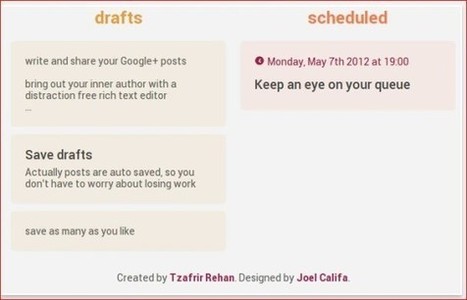
"Do Share is a Chrome extension that lets you update your Google+ profile / page(s), and Communities from any tab in your browser.
Posts can be scheduled or sent right away, saved as drafts, or deleted. The tool supports links, Hashtag autocomplete, mentions, reshares, and photo uploads.
"Do Share also comes with a basic text editor, and several other features. For example, you can create polls, and share comments and updates directly from your Google+ stream and notifications panel.
"And the icing on the cake: The extension works offline!"
Teachers and parents are using Minecraft, a video game popular with children, to help teach science, history, languages and ethics.
by Nick Bolton
"A study by S.R.I. International, a Silicon Valley research group that specializes in technology, found that game-based play could raise cognitive learning for students by as much as 12 percent and improve hand-eye coordination, problem-solving ability and memory.
"Games like Minecraft also encourage what researchers call “parallel play,” where children are engrossed in their game but are still connected through a server or are sharing the same screen. And children who play games could even become better doctors. No joke. Neuroscientists performed a study at Iowa State University that found that surgeons performed better, and were more accurate on the operating table, when they regularly played video games.
“Minecraft extends kids’ spatial reasoning skills, construction skills and understanding of planning,” said Eric Klopfer, a professor and the director of the Massachusetts Institute of Technology’s Scheller Teacher Education Program. “In many ways, it’s like a digital version of Lego.”
Presented by Shannon Holden, Assistant Principal, Republic Middle School, MO
"Many teachers are using digital content in their lessons, but how do we get students to present what they have learned in an engaging way? Glogster.EDU is a free TechTool that enables students to create digital posters containing text, video, audio, pictures, and graphics to demonstrate their knowledge of a particular subject. Join Shannon Holden as he shows all of the powerful, easy-to-use features of this online platform."
Tom Whitby, whose blog I follow regularly, posted this account of a Twitter exchange he had with Arne Duncan about engaging 100 connected eductors with the Secretary. Whitby also provides his view of the education "reform" landscape, its influence on Duncan, hope for how the 100 connected educators might interact with Duncan, and a copy of his 100 list.
It all makes for some interesting reading and for some interesting personal fantasies about what could come next from this. Way to go Tom.
"Includes strategies for topic selection, expository, persuasive, and narrative essays, effective beginnings and endings, adding descriptive detail, beating writer's block, and more. Easy-to-teach techniques for teachers up and down the grade levels and across the curriculum."
"Tellagami, a free iOS app that lets you create short animated movies called "Gamis," is one of my new favorite animation apps to explore. Although the site promotes the app as a way to send greetings and messages for use within social media, I see it as a great tool in the classroom. "
The free comprehensive index and social analysis tool, searches keywords, hashtags and @ signs from minutes ago or from across a span of years, retrieving your social needles from millions of haystacks of billions of tweets.
Topsy is a way to instantly discover breaking news and just released press-releases and track current conversations and just posted media."
During the 2012 U.S. Presidential election, Topsy and Twitter created the Twitter Political Index (or Twindex), which provided a daily gauge of voters’ sentiment for each candidate as expressed on Twitter. Using mentions of their last name or direct @mentions of their Twitter handle, the Twindex tracked sentiment for Obama and Romney from May 1 until Election day, showing when each gained momentum in the race.
How Twitter used Topsy APIs
Twitter used Topsy’s content and metrics API data to create a custom dashboard to help capture the nuance of public opinion.
Live tracking of sentiment to produce the Twindex. Additional, minute-level analysis during convention speeches and debatesMention counts on a wide array of topic areas—including the economy, foreign policy, and immigration—on a minute, hourly, and daily basisHistorical comparative analysis between the Gallup poll for presidential approval between 2010-2012 and Topsy sentiment for Obama, demonstrating a strong correlation between the two (and strongest when Topsy sentiment led the Gallup numbers by a few days)
Para buscar información en twitter desde 2007. Para explorar temas al instante. Prueba #viacatalana, por ejemplo. Veras los twitts del último dia, la ultima semana, el último més 413.000. Las fotos, los links. Un invento!
Great tool to gain data / intelligence / trend / emotions from Twitter . The social analytics section is a great tool to compare keywords and concepts.
"Jen Roberts gives tips on how to add voice comments to Google Docs. If you're writing in Google Docs, this is a great technique as voice always gives you a closer connection, particularly for struggling readers. They can also hear your voice and know the intent of your words."
Feedolu is in public BETA from September 5th. It is an RSS feed reader that makes it easily to read, organize and share content.
Excerpt from review article by Shelly Kramer on V3 Blog: "Feedolu uses advanced feed reading technology and combines that with social features commonly used on sites like Facebook, Twitter and Pinterest.
Feedolu users will have a public profile with their own URL (feedolu.com/username). You can customize your background, create a bio and attach a link to a website (like Twitter) and website RSS feed as well. When a user attaches an RSS feed to their profile, other users can then go and subscribe to that RSS feed, giving that user the opportunity of increased website traffic via subscriptions.
Here are key features: - User Following; - SEO; - Unlimited Feeds and Feed Walls; - Back-End Processing.
"What if you could create beautiful visual notes to explain various concepts quickly and without much fuss? It would be rather useful and such a thing is possible with Classmint. This application allows users to create interactive study notes with annotations, audio content, and images explaining everything from ecology to Euclidean geometry. Visitors can check out the tutorial, then create a login and go ahead and get started. This version is compatible with all operating systems."
Browser based presentation platforms are quickly gaining ground as HTML5 has made it possible to create robust presentations online without the need for applications like PowerPoint or Keynote.
You probably know Byrne as one of the web's best sources of suggestions for teachers. Here's one more reason why: a nice collection of photo apps, each decribed briefly.
Presented by Shannon Holden, Assistant Principal, Republic Middle School, MO
"One of the simplest and most powerful TechTools teachers can use to engage students online is the Wikispace. This gives teachers and students the ability to work on projects together online with varying levels of security and communication. Join Shannon Holden as he gives teachers a thorough tour of Wikispaces, and shares many ideas to utilize this platform in an educational setting."
Presented by Shannon Holden, Assistant Principal, Republic Middle School, MO
"One resource that educators frequently overlook is the YouTube video editor. YouTube has really beefed up its video editor with tons of great features – and it’s all FREE. Teachers can add polls, quizzes, and other interactive features to their videos to help them flip their lessons, link to other relevant digital content, or simply to increase student engagement. Join Shannon Holden as he explores all of the awesome features embedded in the YouTube video editor"
Next figuring out how to add a Call To Action and subscription code. BTW, Unbounce charges $700 a year to host landing pages :).
Also works on DropBox.
The Free Alternative The interesting question is could you create a web marketing business with NO money for websites or blogs? Yes is the answer to that question. By using free tools such as Google Drive, Scoop.it and Blogger or WordPress you could create a business without paying anything to web development.
You might find that business is limited in scale, but so what. Your cost is limited to your sweat equity to create a revenue stream and THEN buy the website improvements you need to go to the next level. I just build a MagentoGo store (Story of Cancer Store: http://storyofcancer.gostorego.com/ ;) and the same thing is ALMOST true for Ecom.
Between Storify, Volusion and Magento you can create a store for sweat equity + $500 (give or take). My little store has already made $130 inside of its first month so well on its way to paying for its serving costs.
The ultimate lesson of crowdfunding and crowdsourcing is DO NOTHING until it is worth the investment to do so :).
IntuiFace is the next generation of presentation programs. Build interactive experiences for multi-touch displays, remote gesture devices like Microsoft Kinect and Leap Motion,
IntuiFace is an amazing innovative platform with multi-touch, gesture recognition features for creating interactive presentations. There are examples and tutorials to help you get started.
Incredible but there is a free version which lets you explore the software and see if it is right for you.
Use your voice to give students feedback about their papers in Google Docs. I've only played with this a little bit so far, but I'm really excited to be able to use Kaizena to give my students feedback this year. Being able to add links to resources and reuse those links for other students is so helpful. If you have questions I'm on twitter @JenRoberts1 and the guys who make kaizena are @kaizenaFB if you have feedback for them, or email founders@kaizena.com
I think this has the potential to be of great use with English Language Learners, especially since they tend to understand the spoken word better than the written.
"Together with a whole network of media researchers, creators and students we will: - learn storytelling basics such as antagonist/protagonist relationships, narrative/narrated time, ... - have a look at exciting current media projects - analyze how they are designed and executed based on aforementioned basics - and discuss how (and if) new online tools and formats change the way stories are told and perceived.
The 8-chapter course starts on October 25th, 2013 and ends on December 20th, 2013.
It will offer weekly video material, lessons, interviews and tasks on the following topics (not necessarily in this order): - storytelling basics - serial formats (on the TV, web and beyond) - storytelling in role-playing games - interactive storytelling in video games - transmedia storytelling - alternate-reality gaming - augmented reality and location-based storytelling - the role of tools, interfaces and information architectures in current storytelling.
Our first Storytelling-MOOC will focus on fictional formats.
"Our goal is to inspire and help understand. To broaden our horizon of what is and might be possible and what has already been attempted, and what has succeeded or even failed - and why. In several little tasks you'll analyze and practice storytelling on your own and in teams."
"By simply double pressing the iPad's home button, or swiping up the screen with four fingers, then swiping the task manager to the right, the AirPlay screen mirroring options are displayed. From this menu you can send a live stream of your iPad's screen to an Apple TV or software that supports AirPlay."
"fileee is an intelligent, personal assistant for the automatic organisation of all paper- and digital documents in one system. It’s the whole and complete filing cabinet of the future, including personal assistance that recognises the structures and information itself."
To get content containing either thought or leadership enter:
To get content containing both thought and leadership enter:
To get content containing the expression thought leadership enter:
You can enter several keywords and you can refine them whenever you want. Our suggestion engine uses more signals but entering a few keywords here will rapidly give you great content to curate.


 Your new post is loading...