DIGITAL LEARNING
20.7K views | +0 today
DIGITAL LEARNING
Learn and teach in a digital world I  EN
Your new post is loading...
Rescooped by Bhushan Thapliyal from Android and iPad apps for language teachers
June 19, 2014 10:03 AM
Scoop.it!

45 Powerful Tools To Create Polls And Quizzes In The Classroom - Edudemic

45 Powerful Tools To Create Polls And Quizzes In The Classroom - Edudemic | DIGITAL LEARNING | Scoop.it
Using polling tools in the classroom is probably old hat by now. There are a ton of different tools available to teachers – many of them free- and they’re being put to use in a variety of different ways. From simply polling your class to get information and opinions to taking quizzes and having your …

Via Yuly Asencion, Juergen Wagner
No comment yet.
Rescooped by Bhushan Thapliyal from iGeneration - Humane Use of Technology in an AI world (Pedagogy & Digital Innovation)
June 18, 2014 3:57 AM
Scoop.it!

Instant Music Plays Popular Songs from Chrome's Toolbar

Instant Music Plays Popular Songs from Chrome's Toolbar | DIGITAL LEARNING | Scoop.it
Chrome: If you're looking for some new music to play, but don't feel like thinking too much about it, Instant Music is an extension that sits in your toolbar and plays through popular songs in different genres.

Via Dr. Tom D'Amico (@TDOttawa)
No comment yet.
Rescooped by Bhushan Thapliyal from Content Curation World
June 17, 2014 3:30 AM
Scoop.it!

Collect, Capture and Organize Your Favorite Files and Web Pages with Zimilate

Collect, Capture and Organize Your Favorite Files and Web Pages with Zimilate | DIGITAL LEARNING | Scoop.it

Via Robin Good
Robin Good's curator insight, June 16, 2014 5:31 PM


Zimilate is a new content collection and organizing tool that allows you to create Pinterest-like boards containing files of any kind, documents, PDFs, newly created text notes as well as images and full web pages that can be easily captured with a dedicated bookmarklet/extension.


Content items can be tagged, manually ordered and collected into "spheres", which can be set to be "private" or public.


It's very easy to drag and drop items from one collection to another and to re-order items in any way you want.


Team collaborators can be invited to contribute content to any of your collections.


All contents collected in Zimilate are fully searchable.


Zimilate is a powerful content curation app, similar to Pinterest but with added functionalties (more content types supported and powerful web page capturing) and more flexibility (reordering of items in a collection) which make it a potentially valuable alternative. At the same time, since it is so new, it lacks Pinterest core feature that allows you to easily select any image from a web page and to pin it to a board. With Zimilate, for now you need to click and save the image and then import it.


Free to use.


Try it out now: https://www.zimilate.com/ 


Check this review: http://www.ilovefreesoftware.com/14/webware/zimilate-free-website-save-organize-web-content-notes-images.html 


Added to Content Curation Tools directory.


Thanks to Francesco Guglielmino for finding it.


FrancoisMagnan's curator insight, June 17, 2014 2:11 AM

En attendant de le tester,  voici un outil de curation qui a l'air alléchant au vu de son descriptif.

Henrik Safegaard - Cloneartist's curator insight, June 17, 2014 4:30 AM

It's maybe look a bit like Pinterest but it's not. It's seems a lot better and if you think a bit creative i'm sure you will spot that it's very usefully. You both have a public and a Private sphere and you can have collaborators, students, friends, co. workers or maybe even a closed membership site where you can share files, webpages and whatever you like. 

Click and check it out. It sure looks good to me.


" TAKE CONTROL OF WHAT YOU KNOW

Save information and research about important topics in one place, so you can find what you need fast. Zimilate lets you stop searching through bookmarks, file sharing, documents on your computer, scribbled notes, and links you’ve emailed to yourself. All your knowledge is just a click away and accessible on your desktop, phone, and tablet."

Rescooped by Bhushan Thapliyal from Education 2.0 & 3.0
June 15, 2014 11:16 AM
Scoop.it!

20 Apps For Writing On The iPad

20 Apps For Writing On The iPad | DIGITAL LEARNING | Scoop.it
20 Apps For Writing On The iPad Though the tablet, in form, tends towards consumption, the iPad can also serve as a capable word processor. How capable depends on how demanding you are about your...

Via Yashy Tohsaku
No comment yet.
Rescooped by Bhushan Thapliyal from Teaching with Tablets
June 13, 2014 4:13 AM
Scoop.it!

84 iPad Apps to Share With K-12 Teachers and Students - iPad Apps for School

84 iPad Apps to Share With K-12 Teachers and Students - iPad Apps for School | DIGITAL LEARNING | Scoop.it

"Each day this week I shared sets of 21 iPad apps for various grade levels. To wrap-up the week I have put all four of those sets in this post. Please feel free to make copies of these slidedecks and share them with your colleagues. To make copies click the gear icon at the bottom of the slides then open the editor and choose “make copy” from the file menu. (You will need to be signed into a Google Account to make the copy)."


21 Great iPad Apps for Pre_K - 2nd Grade Students http://bit.ly/1jhE4rm


21 Great iPad Apps for 3rd - 5th Grade Students http://bit.ly/1lk9jpS


21 Great iPad Apps for Middle School Students http://bit.ly/1jhEcHg


21 Great iPad Apps for High School Students http://bit.ly/1mBwWHo


Via John Evans, WebTeachers
No comment yet.
Rescooped by Bhushan Thapliyal from iGeneration - Humane Use of Technology in an AI world (Pedagogy & Digital Innovation)
June 12, 2014 3:05 AM
Scoop.it!

The Best 50 Free iPad Apps for Preschoolers

The Best 50 Free iPad Apps for Preschoolers | DIGITAL LEARNING | Scoop.it

Via Dr. Tom D'Amico (@TDOttawa)
No comment yet.
Rescooped by Bhushan Thapliyal from iPads, MakerEd and More in Education
June 11, 2014 3:11 AM
Scoop.it!

8 End-of-Year Questions To Ask Students About iPads - Mind/Shift

8 End-of-Year Questions To Ask Students About iPads - Mind/Shift | DIGITAL LEARNING | Scoop.it

"As the school year heads into the final days and weeks, now’s the perfect opportunity to gather feedback from students about their use of iPads. Taking the time to construct a thoughtful survey that will elicit helpful feedback can help set the stage for professional development, program enhancements, and more thoughtful steps into using the devices.


Here are eight key questions to ask:"


Via John Evans
Monty Bell's curator insight, June 11, 2014 10:36 AM

Great question about creation or consumption. 

Rocio Watkins's curator insight, June 11, 2014 11:44 AM

Student input is one of the best qualitative voices in schools.  Great questions.

Paula Jamieson's curator insight, August 5, 2014 4:54 PM

This got me thinking as I am constantly gathering feedback from teachers but not capturing student voice as often. 

Rescooped by Bhushan Thapliyal from APRENDIZAJE
June 8, 2014 5:13 AM
Scoop.it!

8 New Educational Web Tools for Teachers ~ Educational Technology and Mobile Learning

8 New Educational Web Tools for Teachers ~ Educational Technology and Mobile Learning | DIGITAL LEARNING | Scoop.it

Via Marta Torán
Marta Torán's curator insight, June 8, 2014 5:10 AM

8 herramientas edtech que a lo mejor todavía no conoces ;-)

Rescooped by Bhushan Thapliyal from Eclectic Technology
June 6, 2014 1:09 AM
Scoop.it!

What do you want to do with the iPad in education?

What do you want to do with the iPad in education? | DIGITAL LEARNING | Scoop.it

"Below I have outlined a number of tasks, for use with the iPad in the classroom. I believe that if you understand these 5 tasks from beginning to end, you will have an excellent foundation to build any engaging classroom activities."


Via Beth Dichter
Beth Dichter's curator insight, June 5, 2014 9:51 PM

This post discusses the need to define the outcome you expect before you design your project (understanding by design where you begin at the end product and work backwards). The focus is on the iPad, but the questions he proposes for students to answer should work with most digital apps or online tools we use in our classrooms. Within the post you will find five projects that are designed with Bloom's taxonomy in mind. The projects are:

* Create a movie

* Create a podcast

* Create an interactive book

* Create a presentation

* Create a PDF

Of more interest (to me) are the steps he suggests you follow as you create the workflow that students will need to follow.

Clearly define the outcome providing an explanation that the students will understand and also define the context, providing sufficient information that the student know what they will need to accomplish.

When you click through to the post, you will see that each of the projects includes five areas that students work through. In each project students will begin with a clear concept of what they need to remember. They then move up (Bloom's taxonomy) to understanding, with another task to complete. From there they look at applying and analyzing, with additional questions and specified work to be accomplished. This is followed by analyzing and creating, and as a final component collaboration comes into play. In each of these areas there are one or more iPad apps recommended.

Kimberly House's curator insight, June 15, 2014 1:36 PM

Fantastic breakdown of basic iPad tasks. Perfect to use with my teachers who are new to our iPad programme.

Rescooped by Bhushan Thapliyal from iGeneration - Humane Use of Technology in an AI world (Pedagogy & Digital Innovation)
June 4, 2014 11:07 AM
Scoop.it!

5 Best Apps Photo Editing Apps for Iphone and Ipad

5 Best Apps Photo Editing Apps for Iphone and Ipad | DIGITAL LEARNING | Scoop.it
  This time we selected the best photo editing apps for you iOS devices. Whether you’re really into your photography or just an occasional enthusiast we’re sure you’ll find something interesti...

Via Dr. Tom D'Amico (@TDOttawa)
No comment yet.
Rescooped by Bhushan Thapliyal from iEduc@rt
June 3, 2014 10:44 AM
Scoop.it!

Curation as a tool for teaching and learning (with images) · hbailie

CuraA digital essay completed by Heather Bailie as part of the assessment requirements of #INF530 Concepts & Practices for a Digital Age.


Via LGA, Marta Torán, Javier Sánchez Bolado, Reucover
Marta Torán's curator insight, June 3, 2014 6:16 AM

"Curar" para Aprender

Rescooped by Bhushan Thapliyal from iPads for Languages
June 2, 2014 2:23 AM
Scoop.it!

My vision of an 'iPad' lesson - iPad Teacher

Now to start you have to know there is no such thing as an iPad lesson, I just needed a title. In fact this is...


Via AgileBelma
Viljenka Savli (http://www2.arnes.si/~sopvsavl/)'s curator insight, June 3, 2014 1:49 PM

an example of how to use the iPad at the lesson

Rescooped by Bhushan Thapliyal from TICE et pédagogie
May 31, 2014 12:38 PM
Scoop.it!

The Future of E-Ducation: The Impact of Technology and Analytics on the Education Industry

This groundbreaking EdTech study examines the way that modern technology is bringing remarkable innovation into the educational sector; a field which has historically remained fairly fixed and traditional for centuries. The report analyses the degree to which education is being made into a universally accessible, innovative, personalized, and adaptive experience, and finds that the these changes will be pivotal for achieving the United Nations’ goal of universal education by 2015.

Via Nik Peachey, Priscille
Marta Torán's curator insight, May 31, 2014 8:33 AM

Un documento sobre el Futuro de la Educación y cómo la Tecnología impacta en la industria educativa. Muy interesante

Julie Bourguignon's curator insight, June 2, 2014 5:25 AM

Food for thought

Ricard Garcia's curator insight, June 17, 2014 2:10 AM

For those who really want to know what needs to be done in the future.

Rescooped by Bhushan Thapliyal from Computer Science in Middle and High Schools
June 19, 2014 5:06 AM
Scoop.it!

Modio - Design 3D Robots for Printing - iPad Apps for School

Modio - Design 3D Robots for Printing - iPad Apps for School | DIGITAL LEARNING | Scoop.it

"Modio is a new and free iPad app that anyone can use to design model robots for 3D printing. The app features a large collection of robot parts that you snap together to design your 3D robot model. You can mix and match parts to heart’s content. Modio provides a visualization screen that will reveal the dimensions of your model before you print it. Included with those dimensions is an estimate of the time it will take to print the model."


Via John Evans, Jenny Smith
No comment yet.
Scooped by Bhushan Thapliyal
June 18, 2014 3:43 AM
Scoop.it!

Recherche et pratiques pédagogiques en langues de spécialité - Cahiers de l'Apliut

Recherche et pratiques pédagogiques en langues de spécialité - Cahiers de l'Apliut | DIGITAL LEARNING | Scoop.it
Revue qui diffuse les résultats de recherches liées à l'enseignement et l'apprentissage des langues de spécialité, notamment en IUT
No comment yet.
Rescooped by Bhushan Thapliyal from ICT
June 16, 2014 3:04 AM
Scoop.it!

How to track your lost iPhone or iPad without a tracking app

How to track your lost iPhone or iPad without a tracking app | DIGITAL LEARNING | Scoop.it
If you're reading this, I assume that you lost your beloved iPhone or iPad or, even worse, someone stole it. Thankfully, there's a way to track it down, lock it or wipe its data.

Via Suvi Salo
No comment yet.
Rescooped by Bhushan Thapliyal from iPads, MakerEd and More in Education
June 14, 2014 2:15 AM
Scoop.it!

Texting 'can improve spelling' - BBC News

Texting 'can improve spelling' - BBC News | DIGITAL LEARNING | Scoop.it

"Children's unorthodox spelling and grammar while texting does not stop them learning the rules of formal English, suggests research.

Just over 160 children, aged between eight and 16, from the West Midlands, took part in the snapshot study.


The researchers compared spelling and grammar in formal tests and in text messages, at the start of the project and again after a year.


The results showed the most creative texters were among the best spellers.


The children were asked to copy out all their text messages over a two-day period."


Via John Evans
No comment yet.
Rescooped by Bhushan Thapliyal from Android and iPad apps for language teachers
June 12, 2014 3:09 AM
Scoop.it!

Using SAMR and Bloom's Taxonomy to integrate iPads into the classroom

Using SAMR and Bloom's Taxonomy to integrate iPads into the classroom | DIGITAL LEARNING | Scoop.it

Via Dr. Tom D'Amico (@TDOttawa) , Juergen Wagner
The Rice Process's curator insight, June 11, 2014 2:14 PM

The SAMR approach helps teachers to reflect on their technology practices and provides the structure to expand and develop new instructional practices.


Dean Mantz's curator insight, June 21, 2014 9:12 PM

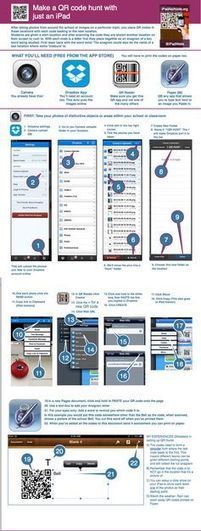
This is one of the best tutorial guides I have seen designed for QR code creation and how it is based on the SAMR framework. 

Sang Lee's curator insight, June 24, 2014 1:38 AM

iPad into the classroom

Rescooped by Bhushan Thapliyal from iPads, MakerEd and More in Education
June 11, 2014 3:11 AM
Scoop.it!

Why tablets are a key learning tool in special education - TabTimes

Why tablets are a key learning tool in special education - TabTimes | DIGITAL LEARNING | Scoop.it
Educators dealing with children with disabilities like autism rely more and more on tablets as part of assistive technologies.

Via John Evans
No comment yet.
Rescooped by Bhushan Thapliyal from APRENDIZAJE
June 8, 2014 5:13 AM
Scoop.it!

EdPuzzle: A Piece of the Blended Solution - Getting Smart by John Hardison - blended, edchat, EdTech

EdPuzzle: A Piece of the Blended Solution - Getting Smart by John Hardison - blended, edchat, EdTech | DIGITAL LEARNING | Scoop.it
Looking for edtech tools to help with creating blended/flipped videos? Take a look at EdPuzzle. It may just be a piece of the solution.

Via Marta Torán
Marta Torán's curator insight, June 8, 2014 4:59 AM

Una herramienta para aprovechar al máximo el potencial

educativo del vídeo.

Rescooped by Bhushan Thapliyal from Teaching with Tablets
June 7, 2014 5:02 AM
Scoop.it!

23 Things Every Teacher Should Be Able To Do With An iPad

23 Things Every Teacher Should Be Able To Do With An iPad | DIGITAL LEARNING | Scoop.it
What should a teacher be able to do with an iPad? Here's a list of 23+ items and growing.

Via WebTeachers
No comment yet.
Rescooped by Bhushan Thapliyal from Digital Delights for Learners
June 4, 2014 12:58 PM
Scoop.it!

Zaption - Interact With Video

Zaption - Interact With Video | DIGITAL LEARNING | Scoop.it

Via Ana Cristina Pratas
Ana Cristina Pratas's curator insight, June 4, 2014 2:39 AM

Other alternatives are Educanon and EdPuzzle. 

Jose Cabanas's curator insight, June 4, 2014 4:32 AM

Available a "Basic Author" free version (not checked yet)

Rescooped by Bhushan Thapliyal from iPads, MakerEd and More in Education
June 3, 2014 11:07 AM
Scoop.it!

3 Good iPad Apps for Creating Citations and Bibliographies ~ Educational Technology and Mobile Learning

3 Good iPad Apps for Creating Citations and Bibliographies ~ Educational Technology and Mobile Learning | DIGITAL LEARNING | Scoop.it

"I just received an email from one of  the readers of Educational Technology and Mobile Learning asking about some good iPad apps for creating citations and bibliographies. I have gone through my archive and compiled the short list below. Enjoy"


Via John Evans
María Dolores Díaz Noguera's curator insight, June 3, 2014 8:30 AM

3 Good iPad Apps for Creating Citations and Bibliographies

Rescooped by Bhushan Thapliyal from iPads for Languages
June 2, 2014 2:23 AM
Scoop.it!

How to Use Your iPad: A Checklist of Skills

How to Use Your iPad: A Checklist of Skills | DIGITAL LEARNING | Scoop.it

Want to go from iPad noob to iPad ninja in just a few days? Use this checklist to guide your development, grasshopper. Click here to download the PDF version: iPad Skills Checklist or click 'R...


Via AgileBelma
Melissa Marshall's curator insight, June 1, 2014 9:02 PM

How far down this amusing list can you get - indeed how far can the students in your class get, and how does it compare? Do you know? It might be worth taking a few minutes to find where you sit on this list. Click for PDF version. 

Carmenne Kalyaniwala's curator insight, June 2, 2014 2:49 AM

Nice!

Rescooped by Bhushan Thapliyal from Keeping up with Ed Tech
June 1, 2014 4:55 AM
Scoop.it!

All The Resources Teachers Need to Start Using Edmodo in Class

All The Resources Teachers Need to Start Using Edmodo in Class | DIGITAL LEARNING | Scoop.it
May 29, 2014
Edmodo is one of my favourite free learning platforms that I have been recommending for teachers and students over the last couple of years. The potential of Edmodo in education is huge...

Via John Evans, WebTeachers
Lisa Purvin Oliner's curator insight, May 30, 2014 12:26 PM

With this link, you will have everything you need to know about the platform. 

Ness Crouch's curator insight, June 6, 2014 11:24 PM

I like Edmodo as a tool for younger students but I'm not sure I want to introduce this into my classroom at the moment. I'm happy with how my learners are interacting and progressing in the online world. 

Anna Davis's curator insight, September 9, 2014 8:10 AM

I love Edmodo and have used it with my students.  I can easily upload documents, pictures, videos and share them with my students.