DIGITAL LEARNING
20.7K views | +0 today
DIGITAL LEARNING
Learn and teach in a digital world I  EN
Your new post is loading...
Rescooped by Bhushan Thapliyal from ICT
April 5, 2016 1:11 PM
Scoop.it!

4 simple note-taking extensions for Chrome

4 simple note-taking extensions for Chrome | DIGITAL LEARNING | Scoop.it
Looking for a simple way to jot down notes while using Chrome? Look no further.

Via Suvi Salo
No comment yet.
Rescooped by Bhushan Thapliyal from Information and digital literacy in education via the digital path
April 3, 2016 6:08 AM
Scoop.it!

Getting Smart on Digital Learning: 11 of the Best Resources, Tools, and Apps for Teachers

Getting Smart on Digital Learning: 11 of the Best Resources, Tools, and Apps for Teachers | DIGITAL LEARNING | Scoop.it
List of online tools that teachers can use to enhance their experience in the classroom, and they can help students..

Via Elizabeth E Charles
No comment yet.
Rescooped by Bhushan Thapliyal from Tools for Teachers & Learners
April 2, 2016 2:29 AM
Scoop.it!

Social Online Video Editor

Social Online Video Editor | DIGITAL LEARNING | Scoop.it
Easy and free online video editor. Edit videos and photos to make great home movies.

Via Nik Peachey
Bhushan Thapliyal's insight:

Nice to see a move to mobile for ShotClip.

Ana Ovando's curator insight, April 4, 2016 3:57 AM

Nice to see a move to mobile for ShotClip.

Raquel 's curator insight, April 4, 2016 5:36 AM

Nice to see a move to mobile for ShotClip.

Meg Basilio's curator insight, April 5, 2016 7:21 AM

Nice to see a move to mobile for ShotClip.

Rescooped by Bhushan Thapliyal from 21st century Teaching Tools
April 1, 2016 1:13 AM
Scoop.it!

3 of The Best Apps for Creating Short Educational Movies to Use in Class ~ Educational Technology and Mobile Learning

3 of The Best Apps for Creating Short Educational Movies to Use in Class ~ Educational Technology and Mobile Learning | DIGITAL LEARNING | Scoop.it

Via Alexandra Duarte
Maryori Giraldo 's curator insight, May 30, 2016 3:39 PM
Herramientas digitales para el maestro
Rescooped by Bhushan Thapliyal from Purposeful Pedagogy
March 30, 2016 1:46 PM
Scoop.it!

4 Keys To Designing A Project-Based Learning Classroom -

4 Keys To Designing A Project-Based Learning Classroom - | DIGITAL LEARNING | Scoop.it
What are the keys designing a project-based learning classroom? It starts with the teacher.
Via Dean J. Fusto
No comment yet.
Rescooped by Bhushan Thapliyal from Technology and language learning
March 28, 2016 2:53 AM
Scoop.it!

5 ways to use infographics in language class

5 ways to use infographics in language class | DIGITAL LEARNING | Scoop.it

"Here are five ways I use infographics when I develop curriculum and lesson plans."


Via Todoele, Yuly Asencion
No comment yet.
Rescooped by Bhushan Thapliyal from Technology and language learning
March 24, 2016 2:09 AM
Scoop.it!

An Easy Tool to Create Worksheets to Use in Class ~ Educational Technology and Mobile Learning

An Easy Tool to Create Worksheets to Use in Class ~ Educational Technology and Mobile Learning | DIGITAL LEARNING | Scoop.it

Via Yuly Asencion
No comment yet.
Rescooped by Bhushan Thapliyal from Web 2.0 Tools in the EFL Classroom
March 23, 2016 1:58 PM
Scoop.it!

My top 10 apps for a Primary School iPad

My top 10 apps for a Primary School iPad | DIGITAL LEARNING | Scoop.it
Follow @theteachgeek Whenever you speak to teachers about integrating technology into learning experiences, the first question is usually, "Which apps should we be using".
Via Connect-Up Support Services, Susan
Bhushan Thapliyal's insight:

10 Apps for primary...

Connect-Up Support Services's curator insight, March 23, 2016 7:58 AM

10 Apps for primary...

Susan's curator insight, March 23, 2016 9:24 AM

10 Apps for primary...

Rescooped by Bhushan Thapliyal from Edumorfosis.it
March 22, 2016 2:09 PM
Scoop.it!

6 ways for teachers to expand their Personal Learning Network

6 ways for teachers to expand their Personal Learning Network | DIGITAL LEARNING | Scoop.it

If you’re an educator of any level, you know the importance of a great personal learning network. It’s your professional lifeline in the digital age. It doesn’t matter if you’re a teacher, administrator, or any other form of educator. A personal learning network sustains and nurtures you in many ways.

"Developing your own personal learning network gives you flexibility to get information on your own terms".

You’re no longer only limited to professional opportunities that your school provides. Social media and other online tools have broken down the barriers to learning. This is just as true for teachers as students. You have much more control in your own professional development nowadays. So what are some of the best tools that can help you?


Via Edumorfosis
No comment yet.
Rescooped by Bhushan Thapliyal from E-Learning-Inclusivo (Mashup)
March 20, 2016 1:47 PM
Scoop.it!

100+ iOS Apps and ideas for the classroom

100+ iOS Apps and ideas for the classroom | DIGITAL LEARNING | Scoop.it
100+ iOS Apps and ideas for the classroom

Via Suvi Salo, juandoming
Bhushan Thapliyal's insight:
via @Ilotimo
juandoming's curator insight, March 20, 2016 1:25 PM
via @Ilotimo
Juergen Wagner's curator insight, March 20, 2016 2:08 PM
via @Ilotimo
Claudi Serra's curator insight, March 20, 2016 2:11 PM
via @Ilotimo
Rescooped by Bhushan Thapliyal from E-Learning-Inclusivo (Mashup)
March 18, 2016 4:24 AM
Scoop.it!

Using technology to provide feedback on learning strategies

Feedback is problematic, and in higher education the situation is degrading quickly due to pressures to cater to massive cohorts while maintaining effectivenes…

Via juandoming
No comment yet.
Rescooped by Bhushan Thapliyal from Digital Presentations in Education
March 15, 2016 5:06 PM
Scoop.it!

Adobe Voice Makes Basic Multimedia Presentations Accessable To All Ages

Adobe Voice Makes Basic Multimedia Presentations Accessable To All Ages | DIGITAL LEARNING | Scoop.it

I can’t believe I have not reviewed this app already. It is one of my goto apps and all time favorites. Adobe Voice is a dead simple media creation app that lets student...


Via Baiba Svenca
Bhushan Thapliyal's insight:

This is a nice article sharing experience of using Adobe Voice with students.

Baiba Svenca's curator insight, March 15, 2016 4:05 PM

This is a nice article sharing experience of using Adobe Voice with students.

Rescooped by Bhushan Thapliyal from iGeneration - Humane Use of Technology in an AI world (Pedagogy & Digital Innovation)
March 14, 2016 1:59 PM
Scoop.it!

22 Digital Tools You Must Have in Your Classroom via @AskATechTeacher

22 Digital Tools You Must Have in Your Classroom via @AskATechTeacher | DIGITAL LEARNING | Scoop.it
If you don’t have children, you may not have noticed the massive changes going on in the local schoolhouse. Those geeky tech tools that we adults like to avoid are taking over the classroom. Every …

Via Dr. Tom D'Amico (@TDOttawa)
RESENTICE's curator insight, March 15, 2016 5:56 AM

Une liste assez exhaustive d' outils numériques pouvant être utilisés en classe et classés par niveau d'enseignement

Rescooped by Bhushan Thapliyal from E-Learning-Inclusivo (Mashup)
April 5, 2016 12:59 PM
Scoop.it!

80% of US schools use e-books or digital textbooks

80% of US schools use e-books or digital textbooks | DIGITAL LEARNING | Scoop.it

Via LGA, juandoming
No comment yet.
Rescooped by Bhushan Thapliyal from E-learning
April 3, 2016 5:57 AM
Scoop.it!

Why banning technology is not the answer

Why banning technology is not the answer | DIGITAL LEARNING | Scoop.it

There is something about human nature that draws us towards dichotomous patterns of thought; an all or nothing, us or them style of thinking in which an option is either good or it is bad. In such a model complexity and subtle nuance with multiple possible outcomes and routes towards a goal are ignored. The field of educational technology is one where such a pattern is
evident and recent ban on technology by a Sydney school shows how this style of analysis can have a significant impact on student learning.


Via paul rayner
No comment yet.
Rescooped by Bhushan Thapliyal from Keeping up with Ed Tech
April 1, 2016 1:18 AM
Scoop.it!

Resources for Using iPads in Grades K-2

Resources for Using iPads in Grades K-2 | DIGITAL LEARNING | Scoop.it
Looking for advice on integrating iPads in K-2 classrooms? In this curated guide, we've compiled resources to help you find apps, learn about best practices, and explore ideas for engaging activities.

Via John Evans, WebTeachers
No comment yet.
Rescooped by Bhushan Thapliyal from Content Creation, Curation, Management
April 1, 2016 1:12 AM
Scoop.it!

Where to Learn Excel: The 10 Best Resources on the Internet

Where to Learn Excel: The 10 Best Resources on the Internet | DIGITAL LEARNING | Scoop.it
Check out this list of the best online resources for learning Excel.
Via TechinBiz, massimo facchinetti
Riley Willis's curator insight, April 2, 2016 4:10 PM
A great overview that explains potential internet resources for use in the classroom and beyond.
Rescooped by Bhushan Thapliyal from EdTech Evolution - Mapping the Intersection of tech, innovation, and instruction
March 28, 2016 2:54 AM
Scoop.it!

50 of the best Free Apps for teachers

50 of the best Free Apps for teachers | DIGITAL LEARNING | Scoop.it
That’s a pretty general and subjective idea. The best for them as human beings–health, finances, and entertainment? The best for them in the classroom? To connect with other educators? To stay on top of emerging tools and trends in education? To use with students?

For iOS, Android, or Windows Phone? Can we assume there’s WiFi access? Is data use an issue? What about data privacy? And what do we mean by “free” Truly free? Are in-app purchases available? Necessary? Is it a free version that has hideous banners everywhere?

To say that there is a lot to consider is an understatement.

That said, we’ve taken a wide-lens view of the modern teacher and taken a stab at what might be considered 50 of the best really, truly actually free apps available for iOS. They may have some paid options, but they’re each entirely useful without spending a penny.

While we do look at music, health tracking apps, and other teachers-as-a-human-being apps, we focus mostly on the kinds of digital content that will help you teach more effectively to a wider range of students in more compelling and dynamic ways than ever before. All free.

Via Edumorfosis, Dean J. Fusto
Willem Kuypers's curator insight, October 15, 2015 1:19 AM

Cela vaut la peine de parcourir les 50 applications. Certaines très connues, d'autres à découvrir.

Carlos Silva's curator insight, October 18, 2015 12:24 PM

añada su visión ...

Rescooped by Bhushan Thapliyal from E-learning
March 27, 2016 6:25 AM
Scoop.it!

Free Technology for Teachers: 3 Tools for Creating Comics on iPads

Free Technology for Teachers: 3 Tools for Creating Comics on iPads | DIGITAL LEARNING | Scoop.it
This morning I received an email from a reader who was looking for suggestions for tools that her students can use to create comics on their iPads. I recommended some paid and free apps to her. The free tools that I recommend are featured below.

Via John Evans, paul rayner
No comment yet.
Rescooped by Bhushan Thapliyal from Learning & Technology News
March 24, 2016 2:05 AM
Scoop.it!

From Books to MOOCs? Emerging Models of Learning and Teaching in Higher Education

From Books to MOOCs? Emerging Models of Learning and Teaching in Higher Education | DIGITAL LEARNING | Scoop.it

In this volume, researchers in the field of educational technology, MOOC developers and users critically analyse and discuss the current state-of-the-art from different perspectives. In addition, the volume presents views on possible future developments and influences of open and flexible digital learning and teaching.


Via Nik Peachey
Bhushan Thapliyal's insight:

An interesting free download for anyone interested in MOOCs. You can download each chapter individually.

Елена Гончарова's curator insight, March 29, 2016 2:06 PM

An interesting free download for anyone interested in MOOCs. You can download each chapter individually.

João José Paiva Monteiro's curator insight, April 2, 2016 6:43 PM

An interesting free download for anyone interested in MOOCs. You can download each chapter individually.

Mark Cottee's curator insight, April 3, 2016 9:19 PM

An interesting free download for anyone interested in MOOCs. You can download each chapter individually.

Rescooped by Bhushan Thapliyal from Des pratiques pédagogiques avec le numérique
March 22, 2016 2:19 PM
Scoop.it!

Free Technology for Teachers: Three Tips for Planning Video Projects

Free Technology for Teachers: Three Tips for Planning Video Projects | DIGITAL LEARNING | Scoop.it

Via Dr. Tom D'Amico (@TDOttawa) , RESENTICE
Bhushan Thapliyal's insight:

Des conseils aux enseignants pou rmener à bien un projet vidéo en classe.

Juan Gimenez Sanchis's curator insight, March 21, 2016 12:11 PM

Estar al dia con la tecnologia es nuestro reto 

RESENTICE's curator insight, March 22, 2016 6:32 AM

Des conseils aux enseignants pou rmener à bien un projet vidéo en classe.

Tony Guzman's curator insight, March 22, 2016 5:40 PM
This article provides three quick tips to keep in mind if you plan on introducing video projects in your classroom.
Rescooped by Bhushan Thapliyal from Edumorfosis.it
March 22, 2016 2:08 PM
Scoop.it!

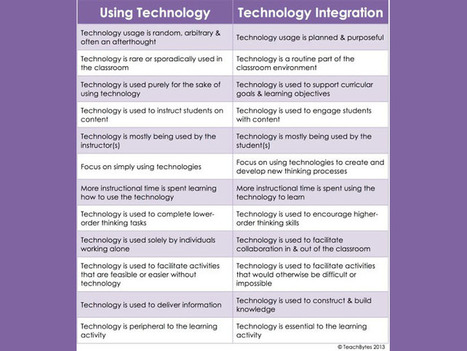
The difference between Technology Use and Technology Integration

The difference between Technology Use and Technology Integration | DIGITAL LEARNING | Scoop.it
Using technology for learning makes sense. Technology creates access, transparency, and opportunity. Any smartphone or tablet is media incarnate–video, animation, eBooks, essays, blog posts, messages, music, games. The modalities of light, color, and sound all arranged just so to communicate a message or create an experience.

But there is a difference, claims this graphic from teachbytes, between using technology and integrating it deeply into the learning experiences of students. This is, of course, what models like the SAMR model are based on–that idea of mere use to automate, to redefining what’s possible.

This is not a new idea, but what makes this graphic useful is the indicators offered that clarify Dos and Don’ts–kind of like an educator’s Goofus and Gallant.

Via Edumorfosis
No comment yet.
Rescooped by Bhushan Thapliyal from Edumorfosis.it
March 19, 2016 3:31 AM
Scoop.it!

6 Ed Tech tools to try in 2016

6 Ed Tech tools to try in 2016 | DIGITAL LEARNING | Scoop.it
About a year ago, I published an e-book called the Teacher’s Guide to Tech. Over the last month, I have been updating it for 2016, adding over 30 new tools and refreshing the information I had about the original ones. I have to say, the 2015 version was excellent, but now it’s SO MUCH BETTER. (To take a peek at the guide, scroll to the bottom of this post.)

In the process, I discovered some tools that I absolutely fell in love with, and I wanted to share them with you here. Each of these tools can make your teaching more efficient and effective, and your students’ learning deeper and more engaging.

Let’s take a look.

Via Edumorfosis
Mjpa Educación's curator insight, March 19, 2016 9:45 AM
Share your insight
Kathy Lynch's curator insight, March 20, 2016 12:05 PM
Thx Edumorpfosis. Noisli.com is one I will try for my class during independent work time to help increase focus. 
Rescooped by Bhushan Thapliyal from Information and digital literacy in education via the digital path
March 16, 2016 2:22 PM
Scoop.it!

Flipping With Interactive Video Through TED-Ed | Instructional Development Center Blog

Flipping With Interactive Video Through TED-Ed | Instructional Development Center Blog | DIGITAL LEARNING | Scoop.it
Flipping the classroom requires students to gather information outside of class, generally through reading or watching recorded lectures.
Via Elizabeth E Charles
No comment yet.
Rescooped by Bhushan Thapliyal from ICT Nieuws
March 14, 2016 2:15 PM
Scoop.it!

5 Steps to Successful Green Screening - Eduspire

5 Steps to Successful Green Screening - Eduspire | DIGITAL LEARNING | Scoop.it
Have you ever wanted to try green screening but didn’t know where to start?  Start with the $2.99 iPad app Green Screen by Do Ink!  It’s simple, easy and fun to use!  There is no account to create.  Just install the app and follow these 5 steps:

Via John Evans, Jeroen Rougoor