




2016 is the year of storytelling. Croud Australia takes a look six new and underused tools for content marketers. To improve your SEO and content results, call us on 1300 806 953.
Via José Carlos

 Your new post is loading...
 Scoop.it! 2016 is the year of storytelling. Croud Australia takes a look six new and underused tools for content marketers. To improve your SEO and content results, call us on 1300 806 953. Via José Carlos 
No comment yet.
Sign up to comment
Scoop.it!

IThe Resource for Education Technology Leaders focusing on K-12 educators. Site contains a Software Reviews Database, articles from Technology & Learning Magazine, articles from Educators in Educators' eZine, Event and Contest listings, Reader suggested Web sites, and weekly news updates on education technology leaders." /> Via Becky Roehrs
Bhushan Thapliyal's insight:
I've been meaning to try out this app-now I have ideas for using it as well!

Becky Roehrs's curator insight,
March 3, 2016 3:06 PM
I've been meaning to try out this app-now I have ideas for using it as well!
Scoop.it!
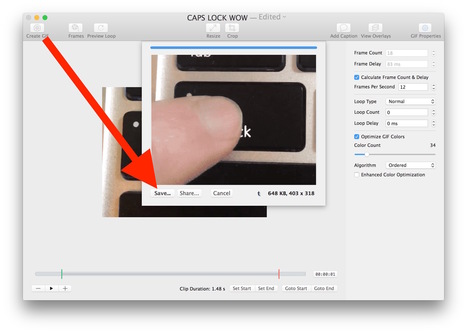
If you have ever wanted to convert a movie into an animated GIF, you likely have found a variety of lower quality apps or web based solutions. You can skip those though, because Mac users have an excellent option for creating animated GIFs from a video called GifBrewery. Gif Brewery is a full featured GIF creation suite, able to create animated GIFs from just about anything, whether it’s converting an existing video file like we’ll show you here, using a series of images, or even capturing video or an iOS device screen. This really is a great app for gif production, so let’s walk through how to use Gif Brewery to create an animated GIF using a video file as a source. Via John Evans

GwynethJones's curator insight,
March 6, 2016 11:04 AM
So much has changed since making GIF's the old hard way!
Just like you don't need DREAMWEAVER anymore with so many great WYSIWYG's out there! This makes it easy.
Scoop.it!

Download royalty free music for use in films, YouTube, and other projects, with no copyright restrictions. Via Dr. Tom D'Amico (@TDOttawa)

Emily Lee's curator insight,
March 31, 2016 8:15 PM
This is very interesting to know that the royalty music does not have copyright restrictions.

Tykee Sanders's curator insight,
November 17, 2019 10:30 PM
This article I really related to considering I was in any type of music program/course that I could get my hands on. I felt a need to have to comment on this article. Now, once the link is opened, it initally takes you to a webpage that allows one to get music for free basically. You can explore the website, and it will also provide information about different areas of music that can be downloaded. From the first look at the link, you can tell that this is a good source to use. For one, it ends in ".org" which means that has been established by an organization. So, professionals, teachers, students, etc can safely seek the information that they need from this source.
Scoop.it!

Seriously, kids have it so easy these days. Not only do they have smartphones to be able to communicate with their friends after school's out, but they also probably have more knowledge when it comes to using computers than their parents. While this could be a great thing — they are the future, you know — it can also be very bad if they start searching for or accidentally pulling up things they aren't supposed to see. Via John Evans
Scoop.it!

February, 2016 Below is a collection of some very good apps and tools to help teachers with classroom management. Via Ressources pour les cours d'anglais
Scoop.it!

Audio books have become increasingly popular in recent years (see Google Tends), but some people believe that listening to a good book is not as legitimate as reading one. In fact many authors, such as Dickens, wrote their books to be read out aloud. You can make the case that listening to Dickens’ books is more authentic than reading them. Via Nik Peachey

Nik Peachey's curator insight,
February 22, 2016 12:49 PM
Nice collection of stories with text and audio. 
Malachy Scullion's curator insight,
February 24, 2016 3:10 AM
Great free site with a variety of stories suiting a variety of students. The stories are read in a variery of accents depending in the reader. For me, this makes it quite useful.
Scoop.it!

"How can I improve my pronunciation?" How many times have we heard this question! Native speakers of French for instance seem to suffer from a complex so deep-rooted that no amount of pep talk can change that! So, here are a few things to think about when you are convinced that your pronunciation sucks… Via Carmenne Kalyaniwala
Scoop.it!

New EdTech Tools is a section we created in our blog to share with our readers new educational web tools and mobile apps and keep them updated about the latest releases in the world of educational technology. For today's post we are featuring 7 good applications we think might be of some interest to you as teachers and educators. We invite you to check them out and share with your colleagues. Via Edumorfosis
Scoop.it!

What if you want to search for an image similar to one you see? Or, what if you want to quickly locate an image based on a word or phrase on a page? Via Dr. Tom D'Amico (@TDOttawa)
Scoop.it!

I have been making printed versions of books made with Book Creator on an iPad for many years. The app produces a really decent file for hard copy printing. Via John Evans

Claudia Estrada's curator insight,
February 16, 2016 2:29 PM
If we are giving the students the skills for their future jobs, this might be a tool to consider. It has been out there for a while but using it on an iPad could be exciting for children and teens.
Scoop.it!

Collaborative Software With Social Functionality can be a Powerful Asset in the Classroom Teachers who have taken the dive into education technology have infinite teaching and learning possibilities at their fingertips.
|
Scoop.it!

Since the 1950s, virtual reality (VR) has been hovering on the periphery of technology without achieving accepted mainstream application or commercial.. Via ColinHickie, Peter Mellow
Bhushan Thapliyal's insight:
Thanks to Peter Mellow.
Scoop.it!

We are here to give you the know-how necessary to continue to learn about new free tech tools for your classroom. Via WebTeachers
Scoop.it!

Web technologies have reshaped many key traditional tasks we used to do by pen and paper (e,g note taking). They have also provided us with way more sophisticated options to develop such practices. Today we are touching on journaling as an example of a literate practice that has been revolutionized by the use of digital technologies. Anyone now can easily create a digital journal hosted in the cloud and accessible from anywhere with Internet connection. Unlike traditional journals, digital journals make room for a variety of multimedia materials including images, hyperlinked text, video clips and many more. Journaling can also be done on the go through the use of mobile apps designed specifically to help you capture and record your ideas and thoughts as they occur. In the collection below, we have curated for you some of the best journaling apps you can use on you iOS-operated devices. Via John Evans
Scoop.it!

Thanks to Larry Ferlazzo this morning learned about a new program that will provide Title I schools with access to thousands of free e-books. Via Becky Roehrs
Bhushan Thapliyal's insight:
Awesome!
Scoop.it!

Automatically generate a story plot for film or paperback and using key words of your choice. Select from a variety of styles and either publish them online or destroy them forever. Via Nik Peachey, WebTeachers
Scoop.it!
Scoop.it!

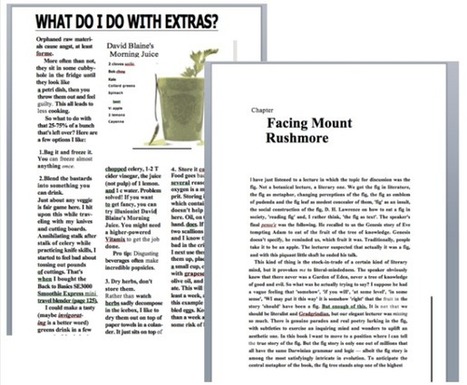
Below is a collection of some very good web tools you can use with your students to create educational posters,flyers, brochures, and newspapers.The tools are simple and easy to use and do not require any advanced technology knowledge. They provide a variety of pre-made templates that you can appropriate according to your teaching purposes. Check them out below and as always share with us your feedback. Enjoy Via John Evans, massimo facchinetti
Scoop.it!


Craig Van Ham's curator insight,
March 24, 2016 8:31 PM
Great tool for creating interactive worksheets with embeded multimedia. 
Jeroen Rougoor's curator insight,
March 29, 2016 2:10 AM
Great tool for creating interactive worksheets with embeded multimedia. 
Tessa van Zadelhoff's curator insight,
March 31, 2016 3:21 AM
Great tool for creating interactive worksheets with embeded multimedia.
Scoop.it!

From tuning into worldwide radio to experimenting with augmented reality, here are the best ways to use tablets in class for education and entertainment Via David Miller, WebTeachers

Kirsten Kruk's curator insight,
April 12, 2016 4:44 PM
There are many different ideas in here that could be used in a health education classroom.
Scoop.it!
Practise your English listening skills and learn about world history, current events and different cultures at the same time. Browse a wide range of free English activities and comprehension tests for IELTS, ESL and EFL students and young learners. Explore our site for hundreds more free quizzes, games and activities including listening, reading, & writing, songs to learn English, videos, grammar and vocabulary, plus printable worksheets and free lesson materials for English language teachers. Via Yuly Asencion
Scoop.it!
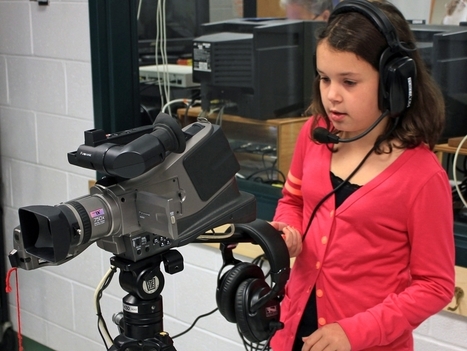
Not only is the idea of telling stories with video really engaging for many kids, filmmaking is ripe with opportunities to connect to almost every academic subject area. As the technology to shoot and edit films becomes more ubiquitous, where is a teacher with no experience in video production to begin? I've shared some resources below to help you and your students get started on making blockbusters of your own. Explore classroom filmmaking with this playlist of resources for teachers and students. Via paul rayner
|






