Your new post is loading...

|
Rescooped by
Bhushan Thapliyal
from Moodle and Web 2.0
November 4, 2016 6:52 AM
|
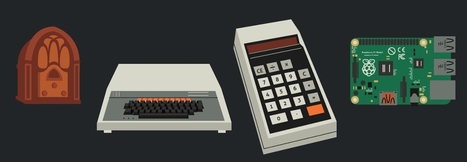
"An infographic dives into the technologies, from 1860 to the modern day, that have helped shape the classroom experience ..."
Via Leona Ungerer, Juergen Wagner
|
|
Rescooped by
Bhushan Thapliyal
from E-learning
November 1, 2016 5:20 AM
|
“ There are several strategies for gamifying your classwork, and they’re not mutually exclusive—you can combine them.”
Via paul rayner
|
|
Rescooped by
Bhushan Thapliyal
from E-learning
November 1, 2016 5:17 AM
|
Infographics. You have probably seen them before. They are a visual way to represent just about any sort of data set you want to. Sometimes they are great for getting at the heart of data, while others, well they are what some would call clickbait. Either way they catch our eye and draw our attention. There are so many different types of infographics out there on a wide variety of topics. Here are just a few. (Click the images to see more):
Via paul rayner
|
|
Rescooped by
Bhushan Thapliyal
from Purposeful Pedagogy
October 30, 2016 7:30 AM
|
|
|
Rescooped by
Bhushan Thapliyal
from Keeping up with Ed Tech
October 29, 2016 5:41 AM
|
“ Collaborating to create multimedia books can be a good way to get students excited about writing stories. Students can collaborate wit”
Via WebTeachers
|
|
Rescooped by
Bhushan Thapliyal
from Vie numérique à l'école
October 29, 2016 5:37 AM
|
“ Write your name in graffiti style!” Graffiti Creator est une application Flash gratuite et en ligne, qui vous permet de créer des grafittis (votre pseudonyme ou votre logo par exemple). Commencez par choisir votre police de caractères (Kodiak, la police par défaut et la dernière de la liste, est une des plus lisibles). Il y en a 10, et chacune possède ses propresoptions graphiques (donc si vous changez de police en cours de route, vous perdez tout le travail effectué). Puis entrez votre texte, et modifiez la couleur des options graphiques, qui sont nombreuses et variées, et qui peuvent elles-mêmes comporter plusieurs paramètres (transparence, flou, lueur externe ou ombre). Certaines polices proposent un thème par défaut, ou un choix des couleurs aléatoire, et même une image de fond. Vous pouvez aussi sélectionner les lettres sur lesquelles vous souhaitez travailler. Quand vous êtes satisfait du résultat, vous pouvez sauvegarder l’image. (texte http://www.olivier-penant.com)
Via Murielle Godement, Michèle Drechsler
|
|
Rescooped by
Bhushan Thapliyal
from Easy MOOC
October 26, 2016 3:31 PM
|
...The impulse to share knowledge in a free environment also is not new. In many ways MOOCs and Open Courseware and Wikipedia and Creative Commons and Google/YouTube are all part of the same project – envisioned by visionaries such as Richard Stallman, media producers behind the start of public broadcasting here and abroad, much earlier, even, by publishers active centuries ago in the Enlightenment, and even earlier, in ancient Alexandria under the Ptolemaic kings. The vision? ... http://www.scoop.it/t/easy-mooc
Via Lucas Gruez
|
|
Rescooped by
Bhushan Thapliyal
from Education 2.0 & 3.0
October 26, 2016 1:50 PM
|
The New Media Consortium (NMC) has released Digital Literacy: An NMC Horizon Project Strategic Brief in conjunction with the 2016 EDUCAUSE Annual Conference. Commissioned by Adobe, the special report explores the advancement of digital literacy, which is sparking new thinking in higher education about how to best prepare students for the demands of the global technological economy. This project was launched because there is a lack of consensus across the field about how to define digital literacy and implement effective programs. A survey was disseminated throughout the NMC community of higher education leaders and practitioners to understand how digital literacy initiatives are impacting their campuses. The NMC’s research examines the current landscape to illuminate multiple models of digital literacy — universal literacy, creative literacy, and literacy across disciplines — around which dedicated programs can proliferate a spectrum of skills and competencies. These initiatives have the potential to generate more excitement around learning for students, especially as their growing fluency enables deeper connections with others and equips them with a new lens to critically evaluate the world around them. In analyzing the progress and gaps in this area, the NMC’s report has identified a need for higher education leaders and technology companies to prioritize students as makers, learning through the act of content creation rather than mere consumption. Additionally, the publication recommends that colleges and universities establish productive collaborations with industry, government, and libraries to provide students with access to the latest technologies and tools. All four recommendations are summarized below.
Via Edumorfosis, Yashy Tohsaku
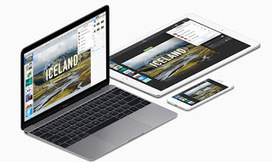
Most computers come with some form of preloaded software that includes a package for creating presentations. There are however a range of alternatives and online apps available that have made an attempt to change, update or enhance the presentation format. As well as the standard tools I’ve included a range of alternatives here for you to explore.
Via Nik Peachey
|
|
Rescooped by
Bhushan Thapliyal
from Moodle and Web 2.0
September 26, 2016 3:47 PM
|
"Create Top Notch Graphics With Ease, for Little or no Cost (fun for Students too!) This 3 Minute TOOL-torial introduces Canva, a mostly free* app that makes it a breeze to create graphic images combining images and text ..."
Via Leona Ungerer, Juergen Wagner
|
|
Rescooped by
Bhushan Thapliyal
from Rapid eLearning
September 13, 2016 2:48 AM
|
Quality microphones and free recording software can get your personal audio show rolling for less money than you might think.
Via Jim Lerman, michel verstrepen
This post continues the series by providing an overview of The Flipped Classroom: The Full Picture using mobile devices. Each phase of the model has suggestions and ideas for mobile-driven learning activities which can be implemented on most devices. This supports Bring Your Own Devices programs and increases the chances students will use similar learning activities on their own devices outside of the classroom environment.
Via JackieGerstein Ed.D., Marie-Hélène Fasquel-Erhart, Peggy George
|
It’s Tuesday again and time for me to unleash another tech-isode in my “Tech It Up Tuesday” series in which I share an edtech tool, app, site or other resource that can be utilized in the educational setting. This week’s geeky goodness is about to get started right here, right now with some info regarding the selection of apps for use in the classroom. With a myriad of tools available to teachers, it’s sometimes mind-boggling trying to identify which are the most effective.
Via Jamie Forshey, Juergen Wagner
|
|
Scooped by
Bhushan Thapliyal
November 1, 2016 5:18 AM
|
“Engage kids and have fun with this powerful instruction tool.”
“ PinterestVirtual Reality in the Classroom – Part 2 *This post is sponsored by Samsung. All thoughts and opinions are my own.* Virtual Reality has the power to transform the future of learning. By giving students an interactive, three-dimensional learning environment, we have the potential to reach learners in ways previously never conceived. For a closer …”
Via Dr. Tom D'Amico (@TDOttawa)
|
|
Scooped by
Bhushan Thapliyal
October 29, 2016 5:47 AM
|
“ H5P empowers everyone to create, share and reuse interactive content - all you need is a web browser and a web site that supports H5P.”
|
|
Rescooped by
Bhushan Thapliyal
from E-learning
October 29, 2016 5:40 AM
|
“ Over the last 6 years I have had the privilege of working with several new podcasters to help them create the shows of their dreams. Here is some advice for anyone wishing to create their first podcast.”
Via paul rayner
|
|
Rescooped by
Bhushan Thapliyal
from iPads in High School
October 28, 2016 2:58 PM
|
“ Free resource of educational web tools, 21st century skills, tips and tutorials on how teachers and students integrate technology into education”
Via Educatorstechnology, Timo Ilomäki
“Last year I published a free PDF handout that highlights great Add-ons for Google Docs, Forms, and Sheets. The handout also included”
Via Dr. Tom D'Amico (@TDOttawa)
|
|
Rescooped by
Bhushan Thapliyal
from Education 2.0 & 3.0
October 26, 2016 1:48 PM
|
“ Free plagiarism checker for avoiding plagiarism, best anti plagiarism detection tool for detecting plagiarism online.”
Via Nik Peachey, Yashy Tohsaku
|
|
Rescooped by
Bhushan Thapliyal
from iPads in High School
October 12, 2016 9:50 AM
|
|
|
Rescooped by
Bhushan Thapliyal
from Learning technologies for EFL
September 26, 2016 4:10 PM
|
Learn about and improve your spoken English with free pronunciation downloads. There are videos, audio examples, quizzes and other activities to help you study.
Via Shona Whyte
|
|
Rescooped by
Bhushan Thapliyal
from E-learning
September 13, 2016 1:45 AM
|
In my classroom, my students jump out of their seats when they get a chance to work on HyperDocs.
Via paul rayner
|