


This article examines how connectivism is useful for academic advising as a theory that links previous information to current information
Via Dr. Susan Bainbridge

 Your new post is loading...
 Scoop.it! This article examines how connectivism is useful for academic advising as a theory that links previous information to current information Via Dr. Susan Bainbridge 
No comment yet.
Sign up to comment
Scoop.it!
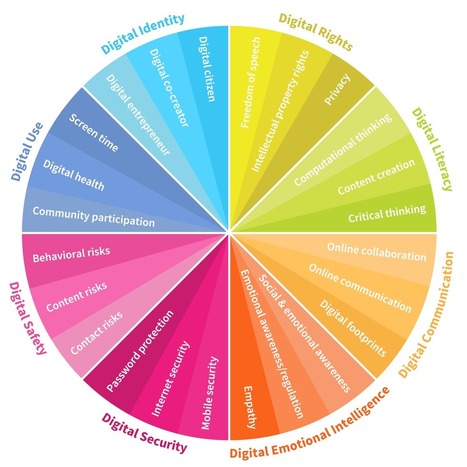
Digital intelligence or “DQ” is the set of social, emotional and cognitive abilities that enable individuals to face the challenges and adapt to the demands of digital life. These abilities can broadly be broken down into eight interconnected areas. Via Nik Peachey, Manuel Pinto

Stephen Dale's curator insight,
September 1, 2016 7:06 AM
Digital skills - as important as speech in today's technology driven environment.

Mayra.Loves.Books's curator insight,
September 3, 2016 8:55 AM
Well put together. An article to share with staff.

Derek Thomas's curator insight,
April 2, 2017 7:23 AM
Also useful for the continuing education and professional development sectors
Scoop.it!
Use Screencastify to create a video, upload to YouTube and then embed in a Google Presentation. Via paul rayner

karlosena's curator insight,
October 23, 2016 1:40 PM
Google Drive-ko aurkezpenetan audioa berez ezin da txertatu, baina bideo honetan erakusten digute hori lortzeko trikimailua.
Scoop.it!

I am currently on the last day of my summer holiday and have started thinking about new technology I can use in the upcoming year. I have found 18 apps / websites that I am definitely going to try.
Via Dean J. Fusto
Scoop.it!

Google's new Art Recognizer tool turns your museum visit into a multimedia experience.
Scoop.it!

Blended Learning 101 Infographic The term “blended learning” seems to be infiltrating the education industry—and, for good reason. Blended learning, when done right, has the potential to infinitely expand student learning and engagement, while reshaping the role of the teacher in exciting ways.... http://elearninginfographics.com/blended-learning-101-infographic/
Via elearninginfographic, Dean J. Fusto, Suvi Salo
Scoop.it!


Nik Peachey's curator insight,
August 6, 2016 12:56 AM
Great tool for developing vocabulary. Can also find pronunciations, word families and lots more. 
Lilydale High School's curator insight,
August 8, 2016 5:26 PM
More than an online dictionary - pronunciations too.
Scoop.it!

Think you know Google’s online productivity suite back to front? Whether you’ve been using Google Drive for five minutes or five years, there’s always more to learn, and in that spirit we present 10 valuable tips and tricks for mastering the service.

Mitchell Kearsley's curator insight,
August 4, 2016 6:27 AM
Take a peek. You'll be surprised what you learn. (I was!)
Scoop.it!
Scoop.it!
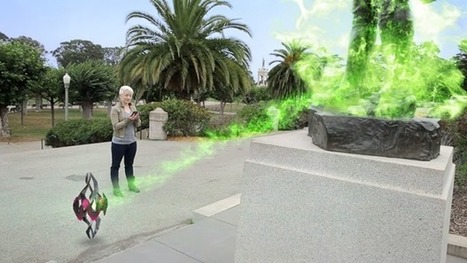
Pokemon GO isn't the only app that seamlessly blends virtual objects into the real world.
Learn more / En savoir plus / Mehr erfahren:
http://www.scoop.it/t/la-realite-augmentee-augmented-reality-ar
Via Peter Mellow, Jim Lerman, Gust MEES

Tony Guzman's curator insight,
August 1, 2016 8:25 PM
While Pokémon GO has became a cultural phenomenon, it is not the first, nor the last, augmented reality application.

Elaine Weseman's curator insight,
September 17, 2023 8:13 PM
"Pokémon Go!" When I saw this headline, my interest was piqued. What other apps use augmented reality as seamlessly as Pokémon Go? Turns out, quite a few. Most are game-related but others involve shopping. All of them involve socially interacting with others. Social interaction is exactly what the world needs more of -- interaction with people. After COVID, we are still learning how to socialize with others in a less fearful stance, and games like these can help to calm our anxieties about hanging out with people.
Scoop.it!

My Simpleshow is a free tool for creating Common Craft style explanatory videos. The best aspect of My Simpleshow is the emphasis that the developers have placed on storyline planing and development. Via Elizabeth E Charles
Scoop.it!

By making lengthy links more shareable, QR codes help teachers distribute educational resources, student work and parent surveys.
Scoop.it!

Screencasts—digital video recordings of computer screens, often with audio narration or added video of an instructor—have Via Peggy George
|
Scoop.it!

Periscope, Twitter’s live video streaming app, is taking the education world by storm. Since its debut in early 2015, teachers and administrators are trying to figure out how to use Periscope for education and not just as a way for students to stream silly human tricks on live video to their friends. Via John Evans, Yuly Asencion

mrsjgarcia's curator insight,
September 5, 2016 9:29 AM
I find myself in the same situation. It is really cool but how to make the best use of it with students.
Scoop.it!

A group of tech-savvy librarians offer up a list of their favorite education apps this year. Via Ana Cristina Pratas

António Leça Domingues's curator insight,
August 30, 2016 6:03 AM
Aplicações para potenciar a criação e a criatividade.
Scoop.it!

Scoop.it!

While the potential is great, in short a QR Code is a physical link that can be scanned by smartphones or tablets in mobile learning circumstances. The following list from listly user Marianna Talei offers a huge variety of QR resources, from QR code generators to attaching images and hosting QR code treasure hunts. Via John Evans, paul rayner
Scoop.it!

EdTechTeacher has been leading iPad professional development at many of these schools and we’ve seen firsthand how they approach iPad integration.
Scoop.it!

Collective Digital Storytelling: An Activity-theoretical Analysis of Second Language Learning and Teaching | Les histoires numériques collectives : une analyse systémique de l’activité d’apprentissage-enseignement d’une langue seconde
Scoop.it!
Scoop.it!

Some stats reflecting the studies of universities, surveys, and practices on use of iPad in education. Via EdTechReview (@etr_in)
Scoop.it!
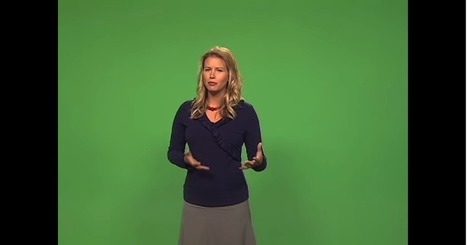
Green screen is a cinematographic technique that allows video editors to add a variety of visual effects to their videos. These effects include : adding virtual backgrounds, superimposing subjects over animated backdrops, placing a subject on another shot and many more. Green screen technology has been widely used in weather and movie industry. But now with the emergence of apps such as the ones below, everyone can use this technology to create engaging clips and presentations. As Do Ink explained “
Green screen technology is used in the movies to make it look like the actors have landed on an alien planet, and it's used on TV to make it look like your local news announcer is standing in front of an animated weather map. The green screen effect works by combining images from multiple sources into a single video. These images can come from photos or videos in your camera roll, or from the live video camera. “ere to edit the content.
Via Educatorstechnology, Gust MEES

Gust MEES's curator insight,
July 31, 2016 11:50 AM
Green screen is a cinematographic technique that allows video editors to add a variety of visual effects to their videos. These effects include : adding virtual backgrounds, superimposing subjects over animated backdrops, placing a subject on another shot and many more. Green screen technology has been widely used in weather and movie industry. But now with the emergence of apps such as the ones below, everyone can use this technology to create engaging clips and presentations. As Do Ink explained “
Green screen technology is used in the movies to make it look like the actors have landed on an alien planet, and it's used on TV to make it look like your local news announcer is standing in front of an animated weather map. The green screen effect works by combining images from multiple sources into a single video. These images can come from photos or videos in your camera roll, or from the live video camera. “ere to edit the content.
Scoop.it!

2-page PDF handout explaining important points about flipped classrooms by EduCause
Via Peggy George
Scoop.it!
|






