"FileMaker: Complete Platform to Create, Deploy, and Manage Custom iPad and iPhone Apps for Business” is the subject of a new white paper by FileMaker, Inc. (pdf and video)
The new white paper describes how innovative businesses are developing custom iOS apps to reap benefits such as increased productivity, cost savings and enhanced customer satisfaction.
It also highlights how custom iOS apps differ significantly from consumer-facing apps: they are data-driven, shared by employee workgroups, integrate with existing business systems and require strict security.
The white paper explains the lifecycle for custom iOS apps and how the complete FileMaker Platform makes it easy to design, build, integrate, deploy, manage and secure the apps. The Platform also offers uniquely easy ways to instantly update apps as business needs change, without requiring users to download new versions of the app.
Real-world examples of custom business apps and their benefits are also discussed
While database entry is generally an on-screen operation, what if you have to print your database?
It's always been easy to create a straightforward database in FileMaker Pro, and with the enhancements in FileMaker Pro 11, even a newbie can start entering data immediately. But it's more challenging to figure out how to create useable printed reports. Here are a few tips that will help you design attractive and useful printed reports in FileMaker Pro. (Using Bento instead? We’ll cover Bento in a separate article.)
The Key to Securing Your Apps – Covers best practices for configuring security options in FileMaker Pro and FileMaker Server. This informative guide will walk you through the steps of securing your apps using the FileMaker Platform’s built-in security.
Key topics include:
• Defining security within the file using FileMaker Pro or FileMaker Pro Advanced • Configuring a secure environment using FileMaker Server or FileMaker Server Advanced
Be sure to download these informative new documents designed to expand your knowledge and expertise with FileMaker software.
It appears that this document is currently only available for TechNet Members. Consider joining Technet for this and many other incredible resources or contact your local FileMaker consultant for assistance.
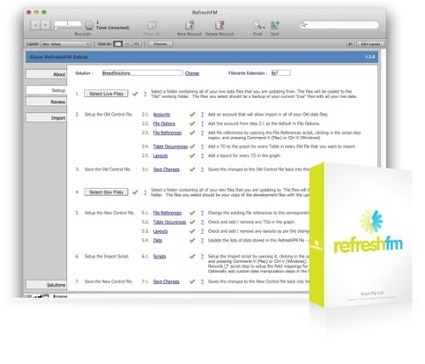
RefreshFM is an importing automation tool for FileMaker developers. It streamlines and automates the import of a live data solution into an empty "Development" version of the same solution. Because it's automated and comprehensively error checked you know in advance that you won't miss any steps and that you can guarantee the process performs as expected.
RefreshFM can be used on any FileMaker solution, and it doesn't require that you make any changes at all to your solution.
We've all been there: You're going through an existing FileMaker solution, updating data infrastructure to align with the current project's goals and you realize you can't change the '˜Service' table occurrence name to '˜Order' because you've statically referenced the '˜Service' table occurrence name in various scripts and calculations using the built-in FileMaker function Get(LayoutTableName). "Oh well," you say, "I can still change these Service layout names!" Except that you've also statically referenced the layout names with another FileMaker function, Get(LayoutName). Fortunately for you, there's a reliable way to reroute these references:
1] Run an HTML Database Design Report (DDR, for short) of the current solution in a copy of FileMaker Pro Advanced.
2] Open up the resulting HTML file in a browser of your choice.
3] Use the browser's find function to isolate all instances of the word—in your case, 'Service'—and change these instances to use 'Order' if they're the partner-in-crime of a Get(LayoutTableName) or Get(LayoutName) statement (e.g. "Get(LayoutTableName) = "Service"").
Learn the differences between BaseTables, Tables, Source Tables, and Table Occurrences
With FileMaker® Pro 7 a new file structure was introduced. The most obvious change was the ability to put more Tables into one file, as opposed to FileMaker 6 and earlier, where for every record set an extra file was required.
Indirection in FileMaker refers to the ability to reference an object by it's name, rather than by it's internal id. For example, when you setup a perform script step, and choose a script to perform, FileMaker stores the id of that script you're performing and saves that. That way, you can alter the name, or move the script within your file, and it will always still work. The same applies to fields used in calculations, FileMaker breaks the calculation into it's various parts and keeps all of the field, table, and custom function id's so that you can also rename those without breaking your calculation.
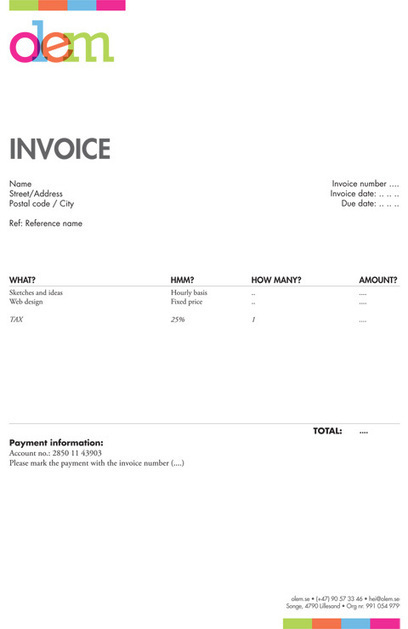
Here are some general guidelines, best practices and examples that will help you make sure your invoices are up to spec.
Your invoice should be prim and proper, so that you can get paid by your clients efficiently. While invoicing is not a fun task, it’s a necessary one: by keeping clients informed of your expectations, you will get paid punctually and reinforce your professionalism. After going over some best practices for creating invoices, we’ll review some great (and not so great) online invoicing tools, so that you can spend less time creating invoices and more time doing the things you love!
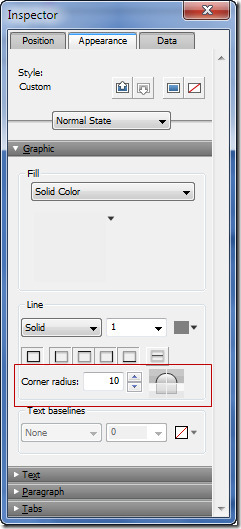
Filemaker 12 provides the graphic tools to create round corners and gradients eliminating the need to past an object that was created in Photoshop or another graphics program. Filemaker 12 makes an...
Even with the Classic theme, the following FileMaker Pro 12 features are not supported for Instant Web Publishing:
Object states: Instant Web Publishing supports style attributes for the Normal display state only. Instant Web Publishing ignores style attributes associated with the In-Focus, Hover, and Pressed display states. Opacity: Instant Web Publishing does not support the opacity value selected using the Opacity slider. Any fill or line color that you specify is rendered as 100% opaque (solid), regardless of the opacity setting’s value. Even if you specify the opacity to be 0%, the color is rendered as 100% opaque. Gradient fill: Instant Web Publishing does not support gradient fills. If you specify a gradient fill for an object on an Instant Web Publishing layout, the object is treated as if the fill were set to None (transparent) instead .Image fill: Instant Web Publishing does not support image fills. If you specify an image fill for an object on an Instant Web Publishing layout, the object is treated as if the fill were set to None (transparent) instead. The only exception is for converted layout objects that contained pattern fills. These converted layout objects show the solid fill colors used in FileMaker 11 instead of displaying as transparent. Chart fill colors: FileMaker Pro 12 supports fill colors for charts, but Instant Web Publishing does not support fill colors for charts. Dotted and dashed lines: Instant Web Publishing does not support dotted and dashed lines. If you specify dotted or dashed lines on an Instant Web Publishing layout with FileMaker 12, they are displayed as solid lines, just as patterned lines were displayed as solid lines for Instant Web Publishing with FileMaker 11. Corner radius: Instant Web Publishing does not support the Corner radius feature for layout objects. In Instant Web Publishing, object corners continue to render square, just as they did for Instant Web Publishing with FileMaker 11.
July 11, 2012 at 10:00am FileMaker, Inc. announces the release of their updated FileMaker Server Configuration Guide for use with FileMaker 12. The guide covers best practices for choosing hardware, configuring operating systems and maintaining FileMaker Server.
Key topics include:
• Hardware considerations
• Operating System optimization
• Software configurations
• Backup and disaster recovery options
• Monitoring tools
It appears that this document is currently only available for TechNet Members. Consider joining Technet for this and many other incredible resources or contact your local FileMaker consultant for assistance.
Join FileMaker for "Working with Layouts," the first in a three part webinar series based on the new FileMaker Training Series for FileMaker 12.
In this hour-long event, led by Tim Jones from Accelerate Computer Training, you'll discover tools and techniques for creating layouts in FileMaker Pro 12, including layout themes, object states, the Inspector tool palette, conditional formatting, auto-resize, Web Viewers, portals, and tab controls.
Learn how to organize layouts into groups and how the new features in FileMaker Pro 12 make it easy to create stunning layouts.
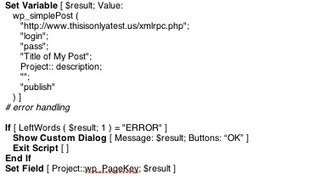
WordPress FileMaker Sync is a FileMaker plug-in that utilizes the WordPress API. If you can write a calculation or script in FileMaker, you can automate sending your FileMaker data to the web. Using simple calculations, you can create posts, page, comments, upload files and more. These pages can also be password protected.
…
The code on the right shows the simplicity of creating a new post in WordPress within a script. The first parameter, xmlrpc, is the location of your site’s xmlrpc.php file; typically just yoursite.com/xmlrpc.php. To enable use of the WordPress API, only one checkbox is required in WordPress. The second two parameters are your WordPress username and password. The next two are the post’s title and description. In the example, we do not pass a category. The last parameter allows you to either publish or save the post as a draft. wp_newPost is the same function with more options including adding password protection, tags and more.
There are advantages and disadvantages to renaming FileMaker objects.
Advantages include: * simplifying code, thereby increasing readability and maintainability * standardizing to a naming convention * increasing developer productivity on systems where there will be ongoing development
Another filemaker Pro 12 tutorial. How to make a conditional value list. And we even add a twist. The question was: We want to be able to select a person to ...
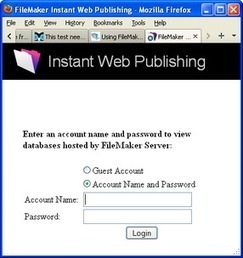
Filemaker Pro, Filemaker Advanced, and Filemaker Server Advanced have a simple web server builtin.
When you turn Instant Web Publishing on, the web server is activated.
If you have a database open and set to be iWP'ed, FMP calculates the webpages needed to display the database in a browser.
When you turn on IWP the default Port address is 80 - this is the default port for almost all web servers. Port 591 is the port defined as a Filemaker IWP port by those that decide those things.
This means that any computer on your LAN (Local Area Network - http://en.wikipedia.org/wiki/Local_area_network) can access the database. The IP address in the turn on IWP in filemaker will likely be a 192.168.xxx.xxx IP address - this is your local IP address on your LAN.
If someone outside your network types your LAN IP address in a browser, they will get an error or connect to a computer on THEIR LAN.
Your computer does not care what that WAN IP Address is, your router and / or ISP cable / DSL box take care of connections to the internet.
If someone types http://yourWANIPaddress:591, the request goes to your ISP box andor router. The router has to be told which computer to send the FMP IWP request to, even if only one computer is on the LAN. http://portforward.com has instructions for most routers to setup portforwarding.
TEST 1 - IF you have FMP running AND IWP is turned on (with Port 80), you can test it by entering http://127.0.01 in a browser. This is a local loopback IP address and will connect to your computer. http://en.wikipedia.org/wiki/Localhost If you do not have a database open and set to view with IWP, there will be no databases to select in the IWP login page displayed.
TEST 1A - if all the above, you can enter your LAN IP address in your browser http://192.168.0.xxx if IWP is set to Port 80. http://192.168.0.xxx:591 if IWP is set to Port 591
FMPS and FMPSA Update 12.0.2.232 Posted: August 2012
Software Description The installer software installs FileMaker® Server 12.0v2 for OS X and Windows. The updater software updates version 12.0v1 of FileMaker Server to version 12.0v2.
To get content containing either thought or leadership enter:
To get content containing both thought and leadership enter:
To get content containing the expression thought leadership enter:
You can enter several keywords and you can refine them whenever you want. Our suggestion engine uses more signals but entering a few keywords here will rapidly give you great content to curate.


 Your new post is loading...