Your new post is loading...

|
Scooped by
David Anders
August 22, 2012 12:09 PM
|
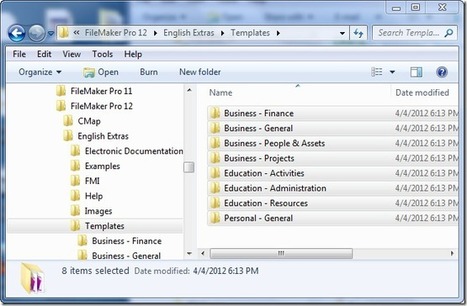
Organize Templates Filemaker12 This is a guide for lazy Filemaker guys who want to open the templates included with Filemaker 12, for free. It’s a drag to open each file using the File:New From Starter Solution… menu option, at least for me. So what I did is:
|
|
Scooped by
David Anders
August 22, 2012 11:25 AM
|
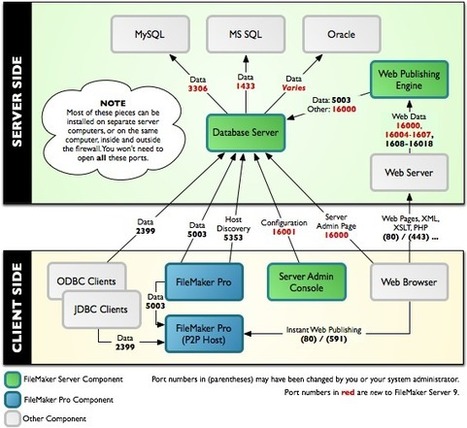
Good diagram for explaining FileMaker port usage.
|
|
Scooped by
David Anders
August 19, 2012 2:22 PM
|
Solutions A script needs to be created that knows the current sort state. Using Filemaker 10 and earlier you must create a field to handle the sort arrow graphics. There are a number of solutions to do this, for example here. If you are using FileMaker 11 or later, then you don’t need to create these display fields or fields to store the current sort state. This can all be handled by a combination of Unicode characters and global variable merge fields. Read on for details…..
|
|
Scooped by
David Anders
August 15, 2012 11:22 AM
|
Macintosh & Windows 1] To add spacing and separators within a field formatted as check boxes, radio buttons or as a pop-up list; or to add a separator to the scripts/layouts menu:
Add a blank line between check boxes or radio buttons in a field, add a blank line between each value in the value list. To add a separator (a line of dashes) between two script names in the Scripts menu, or between check boxes or radio buttons, type a single hyphen as a script name or value list item. To add a separator between Layouts, create a blank layout, reorder it to the desired position, then change the name of the Layout to a dash character. 2] To select multiple entries in a field formatted as a pop-up menu or radio buttons:
Hold the shift key as you click the radio buttons or make choices from a pop-up menu. You can then select multiple radio button items, or deselect any previously selected item. 3] To change a field on a layout to a different field:
Double-clicking a field on a layout brings up the New Field dialog box and allows redefinition of a field. This changes the field but retains the formatting. 4] Exporting a printed file (such as a report):
FileMaker Pro supports copying a previewed page to the clipboard by using "Copy" in the Preview mode. This places a graphic of the current page on the clipboard which can be pasted into another program. 5] Coloring layout parts.
FileMaker allows you to fill an entire layout part with a background color. To fill a layout part, go to the Layout mode, click once on the part label to select it, then choose a fill color from the fill palette. 6] Formatting Popup menu.
Control-click on a field (Mac) or right-click on a field (Windows) to display a popup menu to select various options from the Format menu. Macintosh only 1] For dual screen users, to force a window to resize to the main screen (menu bar screen) instead of the current screen:
Hold down the option key when clicking the resize box. The window will be fully resized to fit in the menu bar screen.
|
|
Scooped by
David Anders
August 14, 2012 2:46 PM
|
This is clearer explanation of Date Comparison
http://sixfriedrice.com/wp/comparing-dates-in-filemaker/ FMP ver 11 Functions Reference PDF 252 pages
http://www.filemaker.com/support/product/docs/fmp/fmp11_functions_ref.pdf FMP ver 11 Scripts Reference PDF 165 pages
http://www.filemaker.com/support/product/docs/fmp/fmp11_scripts_reference.pdf Google "date calculations site:help.filemaker.com" https://www.google.com/search?q=date+calculations+site%3Ahelp.filemaker.com Calculate the difference between dates in FileMaker
Answer ID: 5544 Last Updated: Sep 20, 2011
http://help.filemaker.com/app/answers/detail/a_id/5544/~/calculating-the-differences-between-dates-in-filemaker-pro Calculate a Finish Date given a Starting Date and the Number of Work Days
Answer ID: 3926 Last Updated: Sep 20, 2011
http://help.filemaker.com/app/answers/detail/a_id/3926/~/calculating-a-finish-date-given-a-starting-date-and-the-number-of-work-days Elapsed Time Calculation Sampler
Answer ID: 4251 Last Updated: Oct 31, 2007
http://help.filemaker.com/app/answers/detail/a_id/4251/~/elapsed-time-calculation-sampler Calculating a Weekday Date
Answer ID: 5053 Last Updated: Dec 03, 2011
http://help.filemaker.com/app/answers/detail/a_id/5053/~/calculating-a-weekday-date Calculate the number of weekdays (work days) between dates
Answer ID: 5281 Last Updated: Nov 11, 2011
http://help.filemaker.com/app/answers/detail/a_id/5281/~/calculating-number-of-weekdays-%28work-days%29-between-dates Calculating Elapsed Time Between Two Dates Broken Into Year, Month, And Day
Answer ID: 870 Last Updated: Feb 27, 2012
http://help.filemaker.com/app/answers/detail/a_id/870/~/calculating-elapsed-time-between-two-dates-broken-into-year,-month,-and-day Calculating Due Dates Specific to Each Record in the Database
Answer ID: 4129 Last Updated: Oct 20, 2011
http://help.filemaker.com/app/answers/detail/a_id/4129/~/calculating-due-dates-specific-to-each-record-in-the-database Finding a Range of Dates Using ScriptMaker in FileMaker Pro
Answer ID: 5765 Last Updated: Sep 20, 2011
http://help.filemaker.com/app/answers/detail/a_id/5765/~/finding-a-range-of-dates-using-scriptmaker-in-filemaker-pro How to Write a Script that Finds a Range of Dates in FileMaker Pro
Answer ID: 5912 Last Updated: Jul 20, 2012
http://help.filemaker.com/app/answers/detail/a_id/5912/~/how-to-write-a-script-that-finds-a-range-of-dates-in-filemaker-pro Calculate the Age of a Person in Years, Months and Days
Answer ID: 5532 Last Updated: Oct 04, 2011
http://help.filemaker.com/app/answers/detail/a_id/5532/~/calculate-the-age-of-a-person-in-years,-months-and-days Calculating the Last Day of the Month
Answer ID: 4577 Last Updated: Feb 27, 2012
http://help.filemaker.com/app/answers/detail/a_id/4577/~/calculating-the-last-day-of-the-month Calculation for Elapsed Months
Answer ID: 5139 Last Updated: Feb 27, 2012
http://help.filemaker.com/app/answers/detail/a_id/5139/~/calculation-for-elapsed-months Calculating Week's Beginning or Ending Date
Answer ID: 4292 Last Updated: Apr 07, 2008
http://help.filemaker.com/app/answers/detail/a_id/4292/~/calculating-week%27s-beginning-or-ending-date Calculation to Return Specific Days of the Week
Answer ID: 5039 Last Updated: Dec 03, 2011
http://help.filemaker.com/app/answers/detail/a_id/5039/~/calculation-to-return-specific-days-of-the-week
|
|
Scooped by
David Anders
August 14, 2012 11:51 AM
|
Home » Tips » Filemaker » Date Calculations in Filemaker In one of my Filemaker project I needed to make some date calculations to find out different dates for the single reporting need of the company. Below I present some of the calculations used for the purpose. All the calculations for date fields below are based on the current date. 1. Current Date gToday=Get(Current Date) Based on this dates the other calculations for the dates will be done.
|
|
Scooped by
David Anders
August 13, 2012 1:45 PM
|
Posts - Using FileMaker Pro . Forum . FileMaker Forums http://forums.filemaker.com/hives/12f66388aa/posts? Does anyone know where I can find any free and good Filemaker templates (Other than the ones that come with filemaker) to build a CRM system around?
|
|
Scooped by
David Anders
August 13, 2012 1:11 PM
|
Portal Row Conditional Value List Checkbox Display... . Report an ... http://forums.filemaker.com/posts/c8f9b6a284 When a portal row field displays a conditional value list as a checkbox set all rows display the checkboxes of the first portal row until the field is ...
|
|
Scooped by
David Anders
August 13, 2012 12:32 PM
|
I am new in File Maker Pro 11. I wanted to print a receipt with my thermal Printer. The info i wanted to print is Sale Id and it's line item from it. I don't know how to print them? (53 Comments)
|
|
Scooped by
David Anders
August 12, 2012 10:18 PM
|
You may already know that merging FileMaker Pro database files can be a tedious and challenging process. After copying, you could spend hours fixing broken links, missing fields, remapping buttons, etc. For this reason, many people simply choose to maintain multiple files even when that may not be the ideal or preferred setup. With the method outlined below, you can merge databases with a minimal amount of broken links. There may still be some tedious grunt work to do, but by following these steps in the order given, you can significantly reduce the time and tedious tasks involved. Note: This article is based on FileMaker Pro 11 Advanced. If you have an older version of FileMaker or do not have the Advanced version, you may need to work a little harder.
|
|
Scooped by
David Anders
August 12, 2012 6:29 PM
|
As an Internet marketer I am always on the hunt for new content marketing tools that can increase my efficiencies and improve engagement with my audience. . . . A few of the things in the post about Scoop.it that caught my eye were the ability to use an unlimited amount of sources (websites, RSS feeds, specific social media accounts, etc.). The ability to us RSS feeds is important because I’m a big fan of Google Reader and already have a number of feeds I could use for some of my Scoop.it topics.
|
|
Scooped by
David Anders
August 12, 2012 2:12 PM
|
Instant Web Publishing, also commonly referred to as IWP, is a fast and easy way of publishing your data to the Internet without having to create web pages or worry about configuring a web server by allowing your copy of FileMaker Pro to act as a “mini” web server. IWP automatically converts all the layouts in your FileMaker Pro file into web pages. FileMaker Pro supports up to five concurrent IWP users. This article provides information on troubleshooting web sharing in FileMaker Pro. If you are having issues becoming the host of a FileMaker Pro file OR connecting to a FileMaker Pro file that is shared using IWP, consult the following suggestions:
|
|
Scooped by
David Anders
August 12, 2012 1:12 PM
|
Hi. I'm the adviser for a high school newspaper, and I've spent some time this summer designing a database that will facilitate communication between students on the newspaper staff about the articles they're working on. I'm using Filemaker 12 Pro. I've got three tables in the database: One is Staff Members, which holds various information about the students, incluing full name, position, and the account name that they use to log into the database. The second table is Articles, which holds information about each article including the section of the paper the article will run in, an abstract, possible sources, multimedia ideas, etc. And the third table is Tasks, which joins Staff Members and Articles in a many-to-many relationship, and also records fields like duedates and completion status. Each table automatically creates a unique record ID for every record in the table.
|
|
|
Scooped by
David Anders
August 22, 2012 11:28 AM
|
On the FileMaker Forum... To Download a free FileMaker database version of this list: https://www.dropbox.com/s/jt09b82i0xijbu3/FMP%20Bugs.zip There is also a Known Bug List for Filemaker GO: http://forums.filemaker.com/posts/1ebde0f441 This thread is intended to help developers avoid the unnecessary effort of posting a report for a bug that has already been reported and acknowledged. It should also help developers more easily research the details of known issues by using the posted links to quickly drill down to the actual thread where the issue was reported, investigated and acknowledged. Lastly, I intend to update these posts to indicate if/when a bug fix or version release by Filemaker Inc. corrects the problem.
|
|
Scooped by
David Anders
August 20, 2012 3:05 PM
|
FMLayoutMode.com Cool tips for your FileMaker layouts. Field control styles #6: Drop-down calendar\ Field control styles #5: Radio button set
Field control styles #4: Checkbox set Field control styles #3: Pop-up menu Field control styles #2: Drop-down list Field control styles: Edit box
|
|
Scooped by
David Anders
August 19, 2012 1:48 PM
|
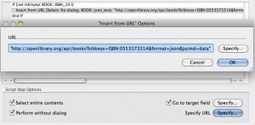
In previous versions of FileMaker Pro, interacting with web sites to pull data required a method called web scraping. This usually meant loading a web page in the web viewer, using the function GetLayoutObjectAttribute inside a script to pull the HTML source (after waiting to make sure the page loaded all the way in the web viewer), and then parsing the HTML with text functions. If you wanted to get XML from web pages, such as geolocation from Google or Yahoo pages, I discovered that the web viewers and XML were not ideal for cross-platform solutions, as it generally failed to provide the XML in a Windows environment. In one instance where I needed geolocation information using Google’s KML, I had to resort to importing XML from a URL and parsing it with XSLT, a method that no longer works in FileMaker Pro 12.
|
|
Scooped by
David Anders
August 15, 2012 11:08 AM
|
FileMaker Pro - Cool Tips and Tricks FileMaker Knowledge Base Here are a few "undocumented" features you can use in FileMaker Pro versions 8 through 12. Learn More ► "Advanced Scripting and Calculations" featured web seminar When it comes to FileMaker Pro, calculations and scripts are your tools to "make stuff happen." In this webinar, based on The Support Group's Advanced Scripting and Calculations class, we will explore some techniques for building robust, feature-rich databases with complex calculations, powerful scripted automation, and elegant user interfaces. The Let() function and script variables allow you to make intricate code easier to understand, modify, and reuse. Script parameters and results make it possible to create dynamic scripts that can be used in multiple contexts. And we'll see how designing scripts and calculations to enable "indirection" allows you to write code that can be easily copied from place to place – even from one file to another -- and have it work immediately!
|
|
Scooped by
David Anders
August 14, 2012 2:18 PM
|
NightWing Enterprises - FileMaker developer resources...
FileMaker Pro v12 includes 272 native calculation functions, however only 207 of these work in all versions of FileMaker since v7. The following list provides a quick reference to all the native functions, indicating which version where they first became available, and (where applicable) when they ceased to be available.
|
|
Scooped by
David Anders
August 13, 2012 6:37 PM
|
Here's a 'secret' that might help in many cases... Use a Blank page. You can create a layout named Blank tablename and delete all of the fields. It helps, I assume, to use the basic layout in 12. Filemaker has been hiding many layout choice by using a selection dialog designed for a cell phone instead of a modern computer so you can also use the down arrow (what a waste of time, huh) to locate the Blank layout option. I've found using an empty layout has saved a lot of time in various script steps, especially ones with related fields but the file is not available. Other times instead of using a Form field with tons of portals to loop through records, the blank layout zips right through while I can still use some functions such as GTTR as the table is related to this table, not the layout.
|
|
Scooped by
David Anders
August 13, 2012 1:15 PM
|
Merging two databases . FileMaker Forums http://forums.filemaker.com/posts/f5a31159f9 8 posts - 6 authors - Apr 20, 2009 Is it possible to combine two (complex) databases into one single ... Warning: the more complex the two databases you want to merge, the more ...
|
|
Scooped by
David Anders
August 13, 2012 1:08 PM
|
IWP - Portforwarding - remote access to... . Using FileMaker Pro ... forums.filemaker.com/comment/131184 - – Hi. I've read a number of posts regarding issues surrounding remote access to databases through IWP but unfortuantely none of them have ... IWP Outside of Network . Using FileMaker Pro . Forum . FileMaker ... forums.filemaker.com/comment/21386 - – Is there a way to go about accessing the database through IWP when not ... Here is a video on port forwarding if you are not familiar with it. Problem with Instant Web Publishing . Using FileMaker Pro . Forum ... forums.filemaker.com/posts/103741bbcc - will return the threads on this site with directions. https://www.google.com/search?q=iwp+portforward+site%3Aforums.filemaker.com. Be the first ... IWP . Using FileMaker Pro . Forum . FileMaker Forums forums.filemaker.com/posts/4bd1c48688 Instructions for this can be found here http://portforward.com. FROM FILEMAKER HELP The TCP/IP address in the Instant Web Publishing ...
|
|
Scooped by
David Anders
August 12, 2012 10:30 PM
|
|
|
Scooped by
David Anders
August 12, 2012 10:08 PM
|
When I was introduced to Scoop.it a year ago, it was still beta and invite only. The last thing I wanted to learn was yet another tool that took up my time. However, I can’t afford to ignore a potential tool; the one I ignore could be the one that would have made all the difference to my business, as well as to my clients’ businesses. As an SEO and content development company, we’re always brainstorming to find new ways of building our reputation, generating interest and, of course, driving traffic to our site and blog. As people who appreciate good content and would love to write stories and ideas all day long, the inability to do so can be somewhat frustrating. I don’t have time; our writers don’t have time, so the next best thing is to find an awesome editor who knows how to curate.
|
|
Scooped by
David Anders
August 12, 2012 6:09 PM
|
|
|
Scooped by
David Anders
August 12, 2012 1:25 PM
|
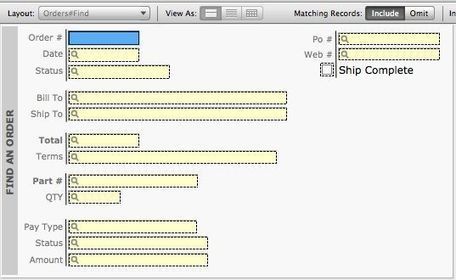
There is a pretty good amount of information being laid out for my users on this particular screen. Really they only ever search in about eight of these fields. The rest is just clutter when it comes to finds. So, I want to give them only what they need to see when they run a find. http://sixfriedrice.com
|