Your new post is loading...

|
Scooped by
David Anders
December 17, 2012 1:02 PM
|
Consider the humble button. Since the very first moments of FileMaker cosmos, the button has been an essential element of our platform.
It’s… Alive!
So why does the button get so little attention? Perhaps its utter simplicity infers that it’s just too trivial for our consideration. Maybe since we FileMaker developers are data developers, the unassuming button flies beneath our data-driven radar. Or perhaps we carry impressions and practices from the earlier history of our platform, when the button was limited to being a visually passive, static object in a world where users increasingly were expecting real time interaction.
But the times, they’ve been a-changin’. As we know, the release of FileMaker 12 has brought a quiet revolution to the platform’s interface structure and capabilities. The new CSS-driven Design Surface introduced what I’ll term “interactive formatting”, enabling objects to visually interact with users in real time. This behavior comes for free with every modern CSS-based theme in FileMaker 12, and can, of course, be readily tuned and extended to add further expressive depth and nuance.
No element in the FileMaker universe experienced a more profound upgrade in FileMaker 12 than the button, which was suddenly transformed into a visually active — and interactive — element. Its new ability to give users direct visual feedback as they hovered, tapped, and clicked, gave the button greatly expanded powers of expression. The invigorated button could now communicate information much more directly and succinctly. In response, buttons everywhere rolled over and popped up in celebration. Huzzah!
|
|
Scooped by
David Anders
December 16, 2012 5:37 PM
|
FileMaker Instant Web Publishing, Part I: Is IWP Right For You?
Posted by donovan 04/15/2011 at 11:55PM
FileMaker's Instant Web Publishing, a.k.a. "IWP", essentially converts your FileMaker layouts into basic web pages and forms. Yes, your FileMaker database could be accessible through a web browser!
This post is the first in a two-part series designed tol guide you through the process of choosing and implementing FileMaker Instant Web Publishing. Here, in Part I, I'll cover why and when to consider using IWP. Stay tuned for Part II, which will dig deeper into IWP implementation.
|
|
Scooped by
David Anders
December 16, 2012 2:52 PM
|
When isolating issues and/or troubleshooting software issues in OS X, you might want to use a different user account. Learn how to use this technique to narrow down the cause of an issue.
Symptoms
When isolating issues and/or troubleshooting software issues in OS X, you might want to use a different user account. Learn how to use this technique to narrow down the cause of an issue.
Resolution
The issue at hand may simply be caused by a bad preference setting or user-specific data file. With proper isolation, you can avoid time-consuming and inappropriate troubleshooting methods.
About user accounts and troubleshooting
When you first set up a Mac, you go through the Setup Assistant to create a default administrator account for you, configured to automatically log in to the computer. You can later add additional user accounts via System Preferences. Each account has its own desktop, user-specific preference settings, and account-specific folders (described below).
In OS X, almost all the changes you make to settings for application as well as other data you create and modify are stored in your user account's Home folder ( /Users/your_account_name, also represented as ~/ ).
Here are some of the things that are stored in your user account's Home folder:
All the files on your desktop.
All the files in your Documents, Downloads, Movies, Music, Pictures, Public and Sites folders.
Any custom settings you have for applications such as Mail, Safari, Calendar (or iCal in OS X Lion and earlier), Finder, System Preferences, and other application settings you have modified, as well as third-party software settings.
Mail data, iTunes data (music, books, movies, apps), Contacts (or Address Book in OS X Lion and earlier) contacts and groups, Safari bookmarks, Calendar (or iCal) calendars and events, iPhoto photos and movies, iMovie projects, third-party application data, and most files that you interact with.
|
|
Scooped by
David Anders
December 16, 2012 3:16 AM
|
The following are scenarios that FileMaker has investigated concerning FileMaker files and Time Machine:
FileMaker Pro has a file open first and Time Machine tries to execute on it:
Time Machine ignores the open FileMaker Pro file but sets its next run time (attempted to back up) sometime sooner than one (1) hour. This will not be a performance problem since Time Machine does not have to scan the system for changes. Instead it gets notified when files get changed and maintains a list. It will continue to try (and fail) during its next attempt if the file is still active.
Time Machine is backing up a large FileMaker Pro file (~ 1GB) and FileMaker Pro tries to open the file:
The FileMaker Pro file can be opened and can be modified by FileMaker Pro without a problem. After Time Machine finishes, the Time Machine backup of that backup might be corrupted.
Recommendation:
You can exclude FileMaker files or folders from Time Machine in Mac System Preferences if need be. If you do not want to exclude FileMaker Pro files from being backed up by Time Machine, there is a small chance that the Time Machine backup file might be corrupt if you happen to open a FileMaker Pro file while Time Machine has the same file open first and is backing up the file.
FileMaker Server:
Time Machine, like other third party backup utilities, should be configured to exclude the FileMaker Server folder. As with FileMaker Pro, Time Machine backups may be corrupted if FileMaker Server attempts to open a large file that Time Machine is currently backing up.
To exclude FileMaker Server from the Time Machine backup list:
1. Open Time Machine from within System Preferences.
2. Click Options. Click the "+" button underneath the "Do not back up" list.
3. Navigate to [hard disk]/library/FileMaker Server/
4. Click Exclude. Click Done.
|
|
Scooped by
David Anders
December 15, 2012 11:08 AM
|
|
|
Scooped by
David Anders
December 14, 2012 11:26 AM
|
Database management with FileMaker Pro. Organize projects, tasks, and more. Download a trial.
|
|
Scooped by
David Anders
December 14, 2012 8:59 AM
|
iPad Mini Wireframe Template Update
POSTED Tue Oct.23.2012 UNDER Asides
iPad Mini Design Template
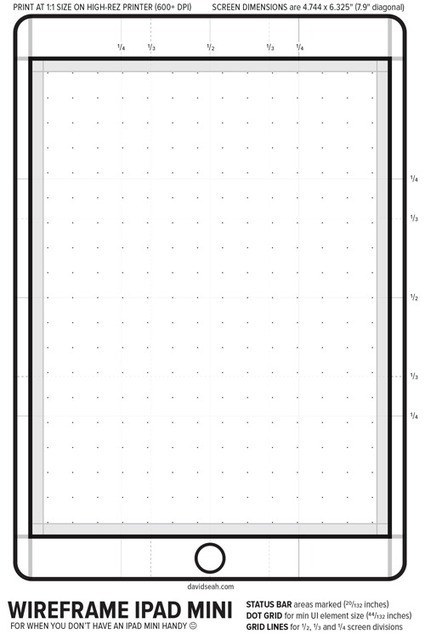
After seeing the announcement of the new iPad Mini, I wanted to get a sense of how much information I could pack on a smaller screen. It’s about 80% of the size of a full-sized iPad, but the minimum physical size of a hit target (around 44 points according to Apple’s Guidelines) is the same. That has ramifications for UI design.
To visualize this, I just made an update to my iPad Wireframe Template PDF to include the new Mini dimensions. Download the PDF then print it out at 1:1 scale on your printer by turning-off “scale to fit”, and you can get a sense of how big things on the iPad Mini screen will be.
|
|
Scooped by
David Anders
December 12, 2012 2:03 PM
|
Layout designs for use within FileMaker Pro. Designed and provided by the Theme Studio from ISO Productions, Inc.
|
|
Scooped by
David Anders
December 12, 2012 11:56 AM
|
At first glance, FileMaker 10 is mostly about a new interface and a new toolbar. But FileMaker 10 also introduces outstanding improvements for developers. Download these examples and see how the new features will change the way you develop. Radically.
These files were presented at the Paris FM Conférence 2009. by Fabrice Nordmann, founder of 1-more-thing.
They were improved in order to be more easily portable to your solutions.
Type Ahead shows how a user can dynamically filter data while typing, whether data is displayed in a portal or in a list view.
Field Length Control demonstrates the ability to control the authorised input length in a field. The user doesn’t need to exit the field in order to get feed-back.
Password Style Field shows how you can now use a simple field for password input, without using a custom dialog.
Tab Control illustrates how script triggers allow you to control tabs elegantly (joke inside).
Field As Button allows you to use a field as a button. Thanks to script triggers, you can shorten the script parameters and avoid the ’video inverse’ effect.
Single Value List or how to simplify value lists management with FileMaker 10. In this example you’ll see how with one defined value list, you can display as many as you want, including conditional lists!
Field Name Calculations is the first of a serie about ’working with field names’. Here is how your calculations can become proper functions, of which result will vary depending on the field that contains them.
Interdependent Fields shows how hard-coding has become unnecessary in your calculations. Here we do a simple unit conversion (inches/centimeters) with 3 different techniques to illustrate the improvements.
Save/Restore Finds. Add the ability to store and restore a find to your solutions. Beyond the new native FileMaker 10 feature called Saved Finds, this technique shows how you can create a record for each saved find. Would you like to share a find with another user, or control precisely in which context you want to see a find... this technique is for you. It is comparable to Mac OS X/Mail.app/iTunes Smart Folders: do a find once, redo it as many times as you like.
Field Map. Finally, the best one. Work-around issues related to import orders in FileMaker. This technique allows you to map the field import using... the relationship graph!
|
|
Scooped by
David Anders
December 12, 2012 11:46 AM
|
Here are some techniques presented during the 2010 FileMaker Conference in Paris (Session 21 : FileMaker 11 for developers)
Charts as a design tool
Embellish your layouts with gradients, using a chart object and a calculated field.
New script triggers
Process your data before it’s rejected by field validation options (e.g. make it easy to enter a date)
Prevent closing of a window without a specific custom menu set.
Dynamic menus
FileMaker Pro Advanced 11 hidden feature ! You can now add real dynamic menus to the interface.
Quick Filter
An improvement of our Type-Ahead technique presented at FMConf 2009. Optimized for all datatype and takes benefit of FileMaker 11 QuickFind.
|
|
Scooped by
David Anders
December 9, 2012 1:36 AM
|
Title: Multiple Pins in Web Viewer Post: I have a solution that uses the web viewer to display the location of properties. I've been using it one at a time. Now they want to see all properties that are managed and assigned to a particular office. There are several offices. The Web Viewer setup page ( I am using Google) allows me to insert fields and that works fine for "one at a time" viewing. It also gives me the option to insert a calculated field for each parameter. Tech Support suggests the following syntax: "http://local.google.com/maps?" & "q=" & /*Address=*/ Untitled::Address & "," & /*City=*/ Untitled::City & "," & /*State=*/ Untitled::State & "," & Untitled::Address 1 & "," & Untitled::City_1 & "," & Untitled::State_1 This produces a starting point and and a pin (a green arrow and a red pin). Map Quest is also supported on the setup page with the same parameters. Since these properties will change without notice, both in number and in location, I would like to use something that will calculate automatically as the file changes. I guess I could build it with a script but it sounds very slow. Any suggestions? RESPONSE Sorry if this doesn't scan correctly. We have other steps before and after these steps that check, for example, if GoogleMaps can handle the total number of destinations, or whether it needs to be split into two sections. (If it needs 3 sections we reckon they'll get lost after 56 different destinations...) So I had to try and extract just the part that builds the journey. (For PostCode read ZipCode if you are in the US.) # #Now build the first batch destination list # Sort Records [ Specified Sort Order: [Call the field you want to sort the destination sequence by]; ascending ] [ Restore; No dialog ] # #Build the first two addresses Go to Record/Request/Page [ First ] Set Variable [ $GoogleDirections; Value:"http://maps.google.co.uk/maps?f=d&hl=en&saddr=" & //Initial AddressClientAddressNumber & "+" & ClientAddressLine1 & "+" & ClientAddressPostCodeFull & "&daddr=" ] Go to Record/Request/Page [ Next ] Set Variable [ $GoogleDirections; Value:$GoogleDirections & //Destination Address ClientAddressNumber & "+" & ClientAddressLine1 & "+" & ClientAddressPostCodeFull ] # #If more than two records, build rest of list by a loop If [ Get ( FoundCount ) > 2 ] Loop Go to Record/Request/Page [ Next; Exit after last ] Set Variable [ $GoogleDirections; Value:$GoogleDirections & "+to:" & //Next Destination Address ClientAddressNumber & "+" & ClientAddressLine1 & "+" & ClientAddressPostCodeFull ] End Loop End If # # #Trap the first destination list Set Field [ ROTA::gGoogleDirections; $GoogleDirections ] # #
|
|
Scooped by
David Anders
December 7, 2012 1:13 PM
|
The problem with genealogy is that people are defined in relation to other people, and those definitions change from person to person in the database. What I mean is, if you have a product database with 27,000 items, the product type (aspirin, razor, toothpaste) is the same no matter where you are in the store. But if you have a man in a family tree, he's variously a brother, husband, grandfather, son, first cousin twice removed, etc., depending on whose record you're viewing him from. That means that if you've got a hundred people in your family tree, you'd need to generate a hundred join records for each individual to specify the nature of the relationship, which means 10,000 new records. With 27,000 people (all of them related, no matter how distantly) that's 729,000,000 records. And every time you add a new person, you have to add 27,000 join records to show how he's related to everyone and another 27,000 records to show everyone how they're related to him (note that kin relationships are often asymmetrical, e.g., uncle/nephew; mother/daughter).
|
|
Scooped by
David Anders
December 7, 2012 11:55 AM
|
The Outlook Manipulator plug-in provides two-way data exchange between Windows FileMaker Pro, Microsoft Outlook and Microsoft Exchange. The Outlook Manipulator plug-in allows FileMaker Pro to exchange data with Microsoft Outlook Contacts, Calendar, Tasks, Mail, Notes and Journal for the "user’s" default folder, public and shared folders within the Exchange Environment. By using this plug-in your users can become more efficient through the elimination of double entry. As information gets entered into your FileMaker database during the day your users Outlook folders are updated. This allows your users the ability to synchronize with their mobile devices such as a Blackberry or iPhone. System Requirements Application: FileMaker Pro 8 - 12
Outlook 2003, 2007 or 2010 32-bit Platform: Windows® XP/VISTA/7 Version: 5.0.2.3 Pricing Single User: $99.95 5 User: $449.78
|
|
|
Scooped by
David Anders
December 16, 2012 5:53 PM
|
FileMaker Instant Web Publishing, Part II: Five Top Tips for Success
Posted by donovan 04/22/2011 at 07:54PM
Part I of this series introduced Instant Web Publishing (IWP) as an alternative to the traditional client-server deployment (FileMaker Server to FileMaker Pro). We noted that it is very easy to get started with IWP, and also very easy to get hung up on its limitations. But you can use IWP successfully if you learn to work within its constraints. Here are my top 5 tips for successfully implementing IWP:
|
|
Scooped by
David Anders
December 16, 2012 5:27 PM
|
Describes tricks and tips for deploying FileMaker Instant Web Publishing (IWP) on the internet Link to FileMaker's IWP documentation. (see chapters 3 and 4) http://www.filemaker-hosting.co.uk/Documents/fm11_instant_web_publish_en.pdfTools and techniques to help you connect to our servers using IWP A standard link (takes you away from this page, can be sent in an email) http:/195.242.214.173/fmi/iwp/cgi?-db=LoginDemo&-startsession This is a link to an IWP database called LoginDemo - don't expect anything sophisticated it just has one field and a calculation to use the text you enter. Login using the name 'demo' and password 'letmein'. Then enter your name and press the 'Update' button. Once you have seen the result press 'Close". You will notice IWP does not close the page. Instead we have changed things so that the system bounces you to a blank page with a request to close it. You would also be sent to this page if you try to use your IWP page after the timeout period (20 mins). If your file name has spaces in it each will need to be replaced in the URL by a %20 ie 'Login IWP demo file' would be entered as 'Login%20IWP%20demo%20file' It is likely that the database will have looked visually unbalanced as it is not possible to control the page size of window it is displayed in (it will be the size that you last set your window to). Another problem with this technique is that the user is free to press the back button (which causes IWP to malfunction). A standard link with login (takes you away from this page, can be sent in an email) http://195.242.214.173/fmi/iwp/cgi?dbpath=%2Ffmi%2Fiwp%2Fcgi%3F-db%3DLoginDemo%26-startsession&acct=account&name=demo&password=letmein&login=Login&-authdbThis is very similar to the previous example but auto logs in with an account name and password built into the link (as before account 'demo' and password 'letmein'). Obviously this is a waste of time if it is left in a public place but can be useful if kept a private link - for instance the link is emailed to all participants. Again the window size is not controlled and the users can still press the back buttons and so run into trouble. A webpage link that creates a window of a controlled size and removes the back button Link here. Modify the source of the page linked here to match your needs such as size. You will need to put this link on a public or private webpage. Using this method you can set the page size to match your design and remove the back button. In addition if you script the close or if a timeout occurs the window will close itself on the users next action A webpage link that creates a window of a controlled size and removes the back button and auto logs in Link here. This is the full monty with auto logon and a controlled window with supressed navigation.
|
|
Scooped by
David Anders
December 16, 2012 3:40 AM
|
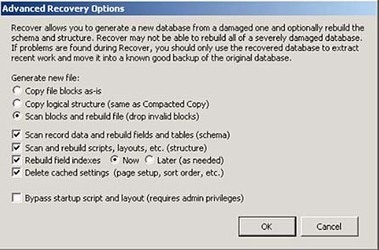
Damaged Files and Hidden Corruption in FileMaker Pro (A Guide to "Recover")
FileMaker Recover ... Posted 10/13/2003 ... Updated 10/14/2012
Gregory Durniak
The following information is based on my experience as a FileMaker developer, FileMaker's TechInfo Knowledge Base, and on numerous discussions with FileMaker Tech Support, and FileMaker's Engineers. I strongly recommend the product. It just needs better utilities.
|
|
Scooped by
David Anders
December 16, 2012 2:56 AM
|
Can someone explain the architecture of FM 12 Pro - Starter...
Title: Can someone explain the architecture of FM 12 Pro - Starter Solutions
Post: I am new to FM. I've been going through the "Starter Solutions" given to create a new system.
Each of the start solutions that has more than one table is using a similar architecture which I understand in concept but not in implementation.
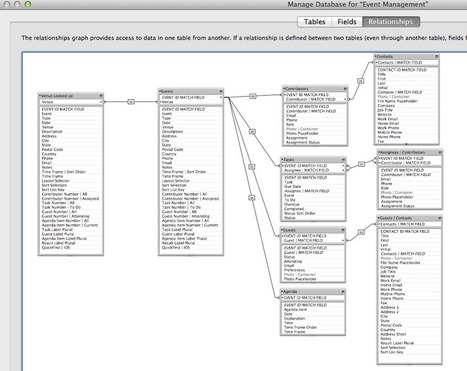
The each make use of a primary key called "XXX ID MATCH FIELD" in the main table of that particular app. For instance:
In the"Event Management" starter solution, this field is "EVENT ID MATCH FIELD". This field is used to match records from associated files like "Contributors", Tasks", "Guests", "Agenda". Each of these associated tables (1-to-many) has it's own primary key but is each connected through a many-to-1 relationship with the "Event" table. This allows the user to see all the "Agenda" items for a particular event, all the Tasks items for a particular event.
The relationship is fairly easy to understand if a record for an associated table (Agenda for instance) is created using a portal. The foreign key ("EVENT ID MATCH FIELD") get filled in automatically. Where I'm a little confused is this:
Let's use the "Agenda" table for this example: The "EVENT ID MATCH FIELD" is set to Auto-Enter as a calculated value which refers to a global variable called $$CURRENT_EVENT_ID. This is where I get lost. I'm know that global variables are set via scripts but how, when, where.
WHAT I NEED: I need to understand how to manage these global variables. How do I set them? When do I set them? Where do I set them from?
The script is very simple but when and how do I call it. I'd assume that I call it when a new "Event" record is created (trigger off the layout triggers - OnRecordLoad, OnLayoutEnter???). I expected the OnRecordLoad to set the global variable $$CURRENT_EVENT_ID, but it doesn't. Why not? When does it get set?
Is this is the only place I'd set the global variable? Would I tie the trigger to a button that created a new "Event" as opposed to using a portal?
The scripts used for each of starter solutions also use a global variable called $$SCRIPT_TRIGGER. What's it's function?
This question is already too long. What I'm trying to understand is how to manage a global variable that ties different tables together.
Thanks!
|
|
Scooped by
David Anders
December 14, 2012 11:33 AM
|
FileMaker Training Series Sampler Kit
Join FileMaker TechNet and get free self-paced training
|
|
Scooped by
David Anders
December 14, 2012 9:03 AM
|
Wireframe Template for iPad Screen Design POSTED Tue Jun.26.2012 UNDER Product Making TAGGED design "Wireframe iPad Template" UPDATED 10-23-2012: PDF now includes second iPad Mini dimensions. I’ve been wanting to get some iPad versions of the Printable CEO tools out there, but this requires a bit of design rethinking. For one thing, touch interfaces require a minimum button size, and that affects all the proportions of the layout. Ordinarily, I would do this kind of interface thinking on a computer screen using one of the Adobe Creative Suite programs: Flash – Easy design and placement of graphics elements, interactivity and animation features built-in for prototyping. Illustrator – Strong drawing support, ok text layout, vector-based for clean output at any resolution. http://davidseah.com/blog/2012/06/wireframe-template-for-ipad-screen-design/ InDesign – Strong and fast text layout for wordy layouts. Photoshop – My least favorite, but it works at the pixel level. I hear CS6 fixes a lot of the stupid UI bugs that have crept in over the years. Each of them has their pros and cons, but all of them lack the essential size and scale experience, which is important for a touch device. That’s something you need to hold in your hand to feel. I hunted around the Internet for an existing iPad template I could print out, but didn’t find one I liked. I also didn’t think they captured the feel of the frame. So I made one. The frame is a thick outline, which I think is better than being solid-filled to keep from distracting your eye too much when looking at your sketch at a distance. http://davidseah.com/pub/downloads/ipad/dseah-ipad-template-v2.pdf
|
|
Scooped by
David Anders
December 14, 2012 8:08 AM
|
Even Cooler InLine Labels
December 14, 2012 By Daniel
Introduction
One of the cool things that conditional formatting has allowed us to do ever since its introduction in FileMaker 9 is to build inline field labels that become hidden when the field contains text. With the introduction of field state formatting in FileMaker 12, we can take these inline labels even further and make them even more awesome.
The Conventional Label
Below is an example of a typical setup of an inline label.
Typical label
Here the label is 'Category'. The label is simply placed underneath a transparent field, and conditional formatting is applied to the field itself:
|
|
Scooped by
David Anders
December 12, 2012 2:01 PM
|
Apple subsidiary FileMaker is an unusual, often overlooked part of the Mac maker’s empire, one that has been around almost as long as Apple Computer itself. The database management software hasn’t been cooling its heels, however; it has consistently been improving upon its mobile native iOS apps since the iPhone version’s introduction in 2010, and that has resulted in impressive user growth: to date, over 500,000 iOS device owners have downloaded FileMaker Go.
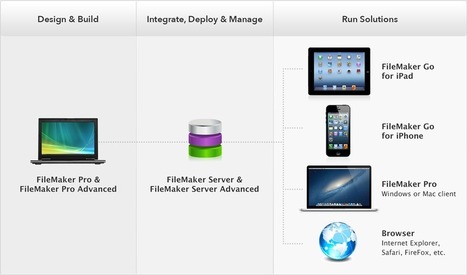
For the uninitiated, FileMaker is a tool that lets users create management systems for sales information and leads, medical records, inventory, project management and more. It’s a highly customizable database management system, that allows businesses to basically build their own solutions relatively quickly, starting either from templates or from their own data stored via Excel spreadsheets. With FileMaker Go, the company initially brought a means for its users to access all of that stored information on mobile devices; now, FileMaker VP of Marketing and Services Ryan Rosenberg says the vision has expanded, and is much more about showing businesses it’s possible not just to access pre-set productivity tools on the iPad and iPhone, but also to build their own, tailor-made for their own specific needs.
“With FileMaker, since it’s a platform for creating solutions, we find commonly people have multiple solutions with FileMaker [unlike with single-purpose apps],” he explained in an interview. “And so people will deploy it for one thing, and then they’ll start layering other solutions on top of that, because we’re a tool for creating solutions, we’re not a solution in and of ourselves.”
FileMaker essentially makes it possible for companies to go beyond using the iPad or iPhone as a way to simply access desktop content in a format that’s fit for mobile consumption. Instead, Rosenberg says that businesses are now just beginning to realize that they can create something totally unique on iPad that’s designed just for their business – a canvassing system for door-to-door surveys, for instance, or a sales tracking tool made for floor staff at a retail outlet, with fields created on a per-location or per-region basis.
“We’re very excited because we think this is just the beginning”, he said. “We know from when we talk to our customers that they’re very excited about taking the use of these devices beyond simply personal productivity, to creating custom solutions for them. We think we’re at the beginning of the curve of creating these custom solutions for organizations, and we want to help them do that.”
FileMaker has been around almost as long as Apple has, but just like Apple, the company isn’t content to stand still, and its mobile success is a reflection of that. I agree that businesses are still at a very early stage in terms of how they implement and use mobile devices, and FileMaker’s flexibility definitely puts it at the experimental forefront of what we might see next in terms of how businesses use iPads and iPhones in the field.
|
|
Scooped by
David Anders
December 12, 2012 11:51 AM
|
Two easy techniques to improve user experience.
If a user wants to easily create related records, a portal based on a relationship set to allow creation is obviously appropriate.
Nevertheless, this built-in technique has some cons:
the user needs to scroll to the first empty row before being able to create new records.
he must know that only the first empty row allows creation.
some interface elements are displayed on this empty row, while they make no sense (i.e. a deletion button, useless because there is yet no related record to delete)
This sample file presents two easy techniques that allow creation from a field placed above the portal.
The first one, the easiest as well, has been available since FileMaker 7 (although the auto enter calculation would require a little adaptation, because it’s making use of Self function, a FileMaker 9 feature)
The second one uses filtered portals, a FileMaker 11 feature.
|
|
Scooped by
David Anders
December 10, 2012 11:40 AM
|
|
|
Scooped by
David Anders
December 8, 2012 12:44 PM
|
|
|
Scooped by
David Anders
December 7, 2012 11:56 AM
|
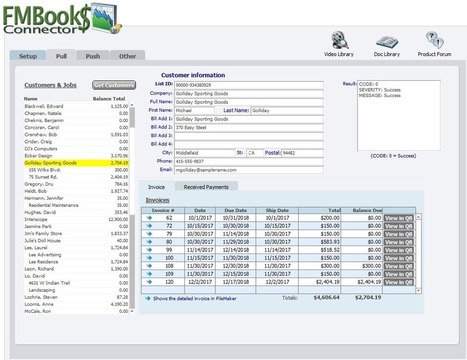
The FMBooks Connector plugin provides a bidirectional data exchange between QuickBooks and FileMaker Pro using only a handful of script steps that do not require any knowledge of XML! This FileMaker Accounting plug-in opens up the Intuit QuickBooks® application like never before. By using the plug-in you can save time and energy by eliminating double entry of contacts, invoices or sales transactions. You can provide financial data to your staff without having multiple people accessing your sensitive QuickBooks company file(s). With the use of this FileMaker plug-in you can streamline your work flow giving your staff the information they need while protecting your critical financial data. System Requirements Application: FileMaker Pro 8 - 12 For use with QuickBooks® US Versions: QuickBooks Simple Start, Pro, Premier/Accountant and Enterprise 2008 - 2013 For use with QuickBooks® UK, Canadian, and Australian Versions:
QuickBooks Pro, Premier/Accountant and Enterprise 2008 -2013 For use with QuickBooks Online Edition (QBOE) Platform: Windows® XP/VISTA/7 Version: 5.0.1.0 Pricing Single User: $199.95 5 User: $899.78
|