Your new post is loading...

|
Scooped by
David Anders
December 7, 2012 11:53 AM
|
The Outlook Manipulator for Mac plug-in provides a two-way data exchange between FileMaker Pro and Microsoft Outlook for Mac. The Outlook Manipulator for Mac plug-in allows FileMaker Pro to exchange data with Microsoft Outlook Contacts, Mail, Calendar, Tasks, and Notes with Exchange and IMAP email accounts. By using this plug-in your users can become more efficient through the elimination of double entry. As information gets entered into your FileMaker database during the day your users' Outlook folders are updated. This allows your users the ability to synchronize with their mobile devices such as iPhone, Droid, or Blackberry. System Requirements Application: FileMaker Pro 8 - 12
Microsoft Outlook 2011 for Mac Platform: Mac OS X 10.7 (Lion) Version: 1.0.2.0 Pricing Single User: $99.95 5 User: $449.78
|
|
Scooped by
David Anders
December 6, 2012 4:42 PM
|
Portals and portal filters. Eldest (among all the grandchildren) Youngest (among all the grandchildren) Eldest (among the children of the eldest child) Youngest (among the children of the eldest child) Eldest (among the children of the youngest child) Youngest (among the children of the youngest child) Middle (among all the grandchildren) Middle (among the children of the middle child)
|
|
Scooped by
David Anders
December 5, 2012 7:44 PM
|
BaseElements-Plugin - FileMaker Pro plugin used for BaseElements to provide file, dialog and XSLT functions. — Read more http://www.goya.com.au/baseelements/plugin README ==========Building The following notes describe the process for building the the plugin and the third-party libraries used. The instructions are supplied "as is" in the hope they may be of assistance.Notes:- these instructions apply to version 1.3.2 of the BaseElements Plugin- the instructions contain some full paths and also paths containing version numbers that will likely need to be changed
|
|
Scooped by
David Anders
December 5, 2012 1:08 PM
|
The Official Dilbert Website featuring Scott Adams Dilbert strips, animation, mashups and more starring Dilbert, Dogbert, Wally, The Pointy Haired Boss, Alice, Asok, Dogbert's New Ruling Class and more.
|
|
Scooped by
David Anders
December 3, 2012 5:06 PM
|
|
|
Scooped by
David Anders
December 2, 2012 3:11 AM
|
A snapshot link captures and saves information about the file you are working in, including which layout you are viewing, the current found set, the sort order, the view state, a current record, and toolbar visibility state. The resulting file can be sent to another user, and when it is opened, it will automatically launch the corresponding file, navigate to the layout specified and display the found set of records captured when the Snapshot was initially created. To save records as a snapshot link file: Find the records that you want to save as a snapshot link. If you don’t perform a find, all the records in the current table will be included in the FPSL (FileMaker Pro Snapshot Link) file.In Browse, Layout, or Preview mode, choose File menu > Save/Send Records As > Snapshot Link. In the Save Records As Snapshot Link dialog box, accept the default filename (the name of the database file with the .fpsl filename extension), or enter a different name. For Save, choose Records being browsed to save the entire found set of records. Or choose Current record to save only the current record. (in this case, the found set is not stored, but the current record and all other states, such as the layout, view, and sort order, are stored)If you want to email the snapshot link, for After saving, select Create email with file as attachment.Click Save. If you chose to email the snapshot link, a blank email message opens in your default email application, with the FPSL file attached. Complete the header information and send the message. To open a snapshot link file:
You can use any method of opening FileMaker Pro files to open a snapshot link file.
|
|
Scooped by
David Anders
December 1, 2012 9:51 AM
|
REPLY ONE Here is what you should have for your relationships: Doctors---<Patients------<Exams----<Starts Doctors::__pkDoctorID = Patients::_fkDoctorID
Patients::__pkPatientID = Exams::_fkPatientID
Exams::__pkExamID = Starts::_fkExamID If this notation is unfamiliar, see: http://forums.filemaker.com/posts/246c1d6f67 Given your description of "doing this all from the Doctors layout", I am not at all sure this is what you actually have. FileMaker won't know which exam links to a given record in Starts unless you first do something that puts a value in a field in the start record that matches to the primary key for a selected record in exams. The simplest solution is to use a layout based on exams to fill in information on each "start", but this is not the only way to do this. You can use supplementary relationships to the current record in Doctors with scripts and script triggers or buttons to enter this information for you from the Doctors layout. Here's one way: Define some global fields in Doctors: gSelectedPatient and gSelectedExam. add two more relationships to new occurrences of Exams and Starts SelectedStarts>-------Doctors-----<SelectedExams Doctors::gSelectedPatient = SelectedExams::_fkPatientID
Doctors::gSelectedExam = SelectedStarts::_fkExamID You can then put portals to SelectedExams and a portal to SelectedStarts on your Doctors layout in place of any portals to Exams and Starts. The trick is to use script trigger performed scripts to update the values in the two global fields. Here's an example for "synching" the gSelectedPatient field: Select the OnObjectExit trigger for the portal to Patients and have it perform this script: Set Field [Doctors::gSelectedPatient ; Patients::__pkPatientID] Then, you can click into any row in the portal to Patients and the portal to Exams will update to show all Exam records for that patient and you can add new Exam records for that patient directly in the portal. You can use the same method to synch a portal to SelectedStarts each time you interact with the portal to SelectedExams. To add a new table occurrence: In Manage | Database | relationships, make a new table occurrence of YourTable by clicking it and then clicking the duplicate button (2 green plus signs). You can double click the new occurrence box to get a dialog to appear where you can rename the new occurrence box. We have not duplicated a table. Instead, this is a new reference to the same table already present in your database.
|
|
Scooped by
David Anders
December 1, 2012 8:55 AM
|
The previous "Insert ..." layout symbol Menu Item commands (like "::" for Insert current time symbol) now paste in a different symbol, based on the “Get( flagname )” convention that is used in the calculation dialog. This new “symbol” uses a similar syntax to Merge Fields/Variables, in that there is double braces "{{" and "}}" around the item. For example, “::” is now “{{CurrentTime}}” Optionally, users can place any of the flagnames from the Get() function in between {{}}’s. examples are:
{{CurrentTime}}
{{UserName}}
{{PageNumber}}
{{RecordNumber}} Conversion: Any old-style symbols are converted to the new style. When converting solutions, a “::” sequence is converted even if you did not intend it to be a time symbol. This is unavoidable as not doing any conversion would break solutions and make it hard for you to migrate.
|
|
Scooped by
David Anders
November 28, 2012 8:46 PM
|
Title: Layout View makes me crash Post: I have a database that has been in perfect working order for over a decade, and the combination of FM Pro 10 Advanced and Windows 7 was a fine partnership. Upon migrating to Windows 8, however, every single time I switch to Layout view, I crash. Every single layout, every single time. Does anyone here know what might be going on? Many thanks... REPLY 6 It's rare, but not unheard of for an OS update such as from W7 to W8, to reveal hidden issues with a file. The damage was there for an unknown period of time but created no noticeable issues until the update, then you get a crash or other obvious behavior. It's also rare, but not unheard of for damage to a file to not be detected by recover or is detected, but not fully repaired. This may be the case here. You might try the 3rd party produced FmDiff application to see if it spots any issues that recover missed. I really hate to say this, but if you can't find a back up copy that doesn't crash on you, you may have to rebuild the file manually and import the data into it. This can be a very labor intensive process. Before you go that route look over this list of suggestions that I frequently post when someone reports crashes or "hangs" and see if any are things that you haven't investigated. They may be long shots, but if one of the "scores", you've saved yourself a lot of work. Figuring out why FileMaker is crashing can require some sleuthing to rule out possible issues. Basic diagnostic tests to perform when you get frequent crashes or “hangs”: Does the crash only occur with a specific file?
Test by creating a small sample file and see if opening it and working with it also generates a crash. If it crashes too, the problem likely lies with the computer or it's installation of FileMaker. If it does not crash, it becomes more likely that there is a problem with the file. To check for possible problems on a specific computer, you may want to run a utility to check out the hard drive and also to check out the user accounts on that computer for possible problems. To rule out some other issues with your specific computer on Windows systems, Select Run from the start menu and type in: msconfig Then, under the Services tab, you can stop all non-Microsoft services. If this solves the issue, then you need to look at what services you stopped and see which is one is the culprit. What is reported when you recover the file?
The file could be damaged. Not only can file damage cause crashes, but the crashes (or forced quits after a "hang") can damage your file. You may need to test a recovered copy to see if it works without crashing. Things to keep in mind about Recover: 1] Recover does not detect all problems 2] Recover doesn't always fix all problems correctly 3] Best Practice is to never put a recovered copy back into regular use or development. Instead, replace the damaged file with an undamaged back up copy if this is at all possible. You may have to save a clone of the back up copy and import all data from your recovered copy to get a working copy with the most up to date information possible. Does it always crash when you are doing the same thing with your file?
That may point to a specific layout, script, operation that interacts with your Operating system or other applications...
|
|
Scooped by
David Anders
November 27, 2012 1:50 PM
|
Modal Windows/Revert Record One of the many great new features in FileMaker Pro 12 is modal windows. In this screencast I demonstrate how to use a modal window to add and edit a record. The same layout is used for adding and editing a record and the technique requires two scripts. There is a caveat to this technique and this is the real purpose of the screencast. The second script uses the Revert Record script step which will delete a newly created record as well as undo any changes to an existing record. However, if the user commits the record then the record cannot be reverted. Fortunately, this is easy to solve. FMP 12 File http://newleafdata.com/downloads/Event_Management.fmp12.zip Using a Grid to Design Layouts in FileMaker 12 FileMaker Pro 12's new grid tool allows developers to create layouts similar to using a CSS framework such as 960 Grid. John Mathewson of Kyo Logic, LLC does an excellent job of demonstrating the new grid tool in his FileMaker Academy webinar "Layout Mode Enhancements". This file is meant to compliment the grid demonstration in that webinar. FMP 12 File http://newleafdata.com/downloads/Grids.fmp12.zip Normalizaing a Flat File in FMP 11 As FileMaker Pro developers we are often required to take a flat file and normalize it. Here are the steps that I take to normalize a database in FileMaker Pro 11. FMP 11 File
http://newleafdata.com/downloads/Normalizing.fp7.zip
|
|
Scooped by
David Anders
November 27, 2012 12:54 AM
|
Introduction The char() function, introduced in FileMaker Pro 10, is a rarely used tool that not only can make certain tasks easier, but can also help developers extend the out-of-the-box capabilities of FileMaker Pro. This function takes a single numeric parameter representing a Unicode decimal point. So it allows developers to easily and natively represent any characters in the Unicode character set in our FileMaker calculations. For example, Char(10003) will return a checkmark ✓. Char(9664) and Char(9654), respectively, return a left-pointing triangle ◀ and a right-pointing triangle ▶. These characters can be generated anywhere the FileMaker Pro calculation engine is available, and because they are just characters, they can be formatted using the formatting tools available in FileMaker Pro, including conditional formatting and the text formatting calculation functions.
|
|
Scooped by
David Anders
November 26, 2012 11:12 PM
|
This implementation assumes you have a basic concept of relational database theory, in particular the use of primary and foreign keys in tables. As a brief catchup, a primary key is a field in a table which has a unique value for each record. A perfect example would be a serial number field, which has a different number for each record. As good database practice, every table in your solution should have a primary key field, regardless of whether it is used or not. A foreign key on the other hand, is a field in a table, which contains the primary key value of a record from another table. This is how two records in different tables are linked/related to one another, and indeed is how we are going to link an ENROLLMENT to both a STUDENT and a COURSE. http://filemakerweetbix.wordpress.com/2009/06/12/join-my-table-part-one/
|
|
Scooped by
David Anders
November 26, 2012 8:10 PM
|
FileMaker Go 12 has a new mobile function called “Location()”. Location() only works on Mobile devices at this point, so to test this demo file you need to have FileMaker Go 12 installed on your iOS device, an iPhone, iPod or iPad. FileMaker Go is free and available here for the iPhone and here for the iPad. Once you have one of these apps installed, then click this link in Mobile Safari on your device to download the ‘Where Am I?’ FileMaker 12 Demo file. If you want to download the Demo file on your desktop computer to further dissect scripts in the file, simply right-click the link and select ‘Download linked file’, or transfer it using iTunes. FileMaker 12 Demo file https://s3.amazonaws.com/hbase-files/WhereAmI.fmp12
|
|
|
Scooped by
David Anders
December 7, 2012 11:41 AM
|
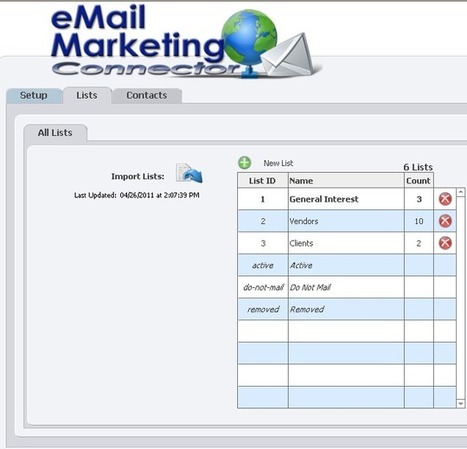
The eMail Marketing plug-in allows you to exchange data between FileMaker Pro and Constant Contact using nothing more than FileMaker script steps. 30Day Demo 1seat $200 System Requirements Application: FileMaker Pro 8 - 12 Platform: Windows® XP/VISTA/7
Mac OS X 10.6-10.8 Other:A Constant Contact account is required to use the plug-in. Why Use Our eMail Marketing Connector Plug-in? Keep Your FileMaker Pro Contacts and Constant Contact E-mail Lists Up To Date:
The eMail Marketing Connector plug-in allows you to easily manage both your FileMaker Pro contact data and your Constant Contact data so that your e-mail campaigns always have the most current list of contacts. Add, Update or Remove Contacts in Constant Contact:
Add new contacts, update existing contacts or remove contacts in your Constant Contact lists directly from FileMaker. This eliminates the need for double entry or manual imports. Add, Update or Remove Contact Lists in Constant Contact:
Add new lists, update existing lists or remove lists in your Constant Contact account directly from FileMaker. This plug-in bridges the gap between FileMaker Pro and Constant Contact. Opt Out Contacts:
Manage bounced and unsubscribed contacts directly in FileMaker through Constant Contact's Opt Out program. The eMail Marketing Connector plug-in can easily mark contacts who have opted out of your mailing campaigns and can update those records in FileMaker Pro.
|
|
Scooped by
David Anders
December 6, 2012 3:09 PM
|
Title: Can't login to FMS database on new Mac, other Macs can Post: I've found some previous posts regarding this, but still can't solve the problem. Please bear with me as I'm not fluent with the terminology here and there. The server is FMS 9.0.3.3xx, running on a Mac-mini OS 10.5 I'm trying to access the server using FMP 9.ov3, running on an iMac with OS 10.6. I just set up this new iMac, installed FMP 9. When I go into Open Remote File dialog box, it sees the host "host-name-here(192.168...etc)". When I click on this, nothing appears in the Available Files box. I should say that 5 other Mac computers, even an older G4 iMac, all can access the host as well as the database files, which appear in the Available Files box. On this iMac that can't log on, in FileMaker Network Settings dialog box, I have Network Sharing turned on. I read about a server.pem file that can be the culprit for such problems, either missing or corrupted, but it seemed limited to Windows. I searched for such a file on other Macs that are connecting to the database and found no such file. REPLY This does sound like a server.pem issue. You can find the server.pem file on OS X by right clicking (or CTRL + clicking) on the FileMaker Pro.app file within /Applications/FileMaker Pro 9/ and choosing Show Package Contents. This will bring up a new Finder window where you can navigate through /Contents/MacOS/ to find the server.pem file. Let me know if you run into any trouble replacing the non-working installation's server.pem file with a working one. TSBear FileMaker, Inc. FOLLOWUP I bow down to thee. It worked! I didn't know about finding files in an application's Show Package Contents option. In case it helps anyone else, perhaps the FileMaker team, there was a server.pem file in there, but it had zero KB file size. I copied another server.pem file from a working computer, which had 8 KB file size, and swapped it in. Now all is good.
|
|
Scooped by
David Anders
December 5, 2012 7:39 PM
|
fmDotNet is our pet open source project, led by Wim Decorte. You can find out more at the SourceForge project page. fmDotNet makes it easy to exchange data with FileMaker from any .NET project (C#, VB.NET). Not only dynamic web pages (ASP.NET) but also desktop applications, windows services and even from Mobile applications. (MonoTouch and MonoDroid use the Mono implementation of the .NET framework on iOS and Android based devices. Using FileMaker's XML publishing you can extract data using a URL like this (finding records where the content of someField matches someValue on a layout named someLayout in file someFile): http://TheServer/fmi/xml/fmresultset.xml?-db=someFile&-lay=someFile&some... The challenge is in getting the URL right but even more in handling the XML data that FileMaker returns and extracting meaningful data from it:
|
|
Scooped by
David Anders
December 4, 2012 6:41 PM
|
Title: Exporting layout to another FM-Database Post: Can i export or copy and past layout from one application to another in the some FM version? Yes and no. Yes, you can copy objects off the layout--even do a select all and copy all the objects in one such copy, but no, you can't copy the rest of the design elements such as what table occurrence the layout is based on or the type and size of any layout parts (Header, footer, sub summary...). Value lists, relationships linking to other tables as is needed for a portal or just to place a field from a related table also cannot be copied. Step 1. Create or rename a table occurrence in the target file so that it has the exact same name as the table occurrence on which the source layout is based. (This is the name shown in "show records from" in layout set up.) Now create a new blank layout based on this table occurrence. If the original layout contains portals or fields from a related table, these relationships and their table occurrences must also be exactly duplicated in the source file. Step 2. Enter layout mode on the source layout, click each part label and note the height of it in the Inspector's position tab. Recreate these parts on the target layout--you can copy the part's height from the inspector, change files and then select the layout part and paste into the inspector's height box to get exactly matching layout dimensions. Step 3. Recreate any value lists in the target file that are used on the layout in the source file. The names must be exactly the same. Step 4. If you do not have any buttons or script triggers on this layout that perform scripts, skip this step. Go to the source layout, select all layout objects and copy them to the clipboard. Go to the target layout and paste them. Do not bother trying to position the pasted objects correctly--you'll delete what you just pasted in a few moments. Import each and every script from the source file that is performed by a button or script trigger on the layout that you are duplicating. Review each script for potential issues and fix any that have occurred. We pasted the layout first so that any scripted references to objects on this layout will not be broken when we imported the scripts. Now delete all the pasted objects from the target layout. Any buttons or script triggers were broken due to the absence of the scripts we imported after the fact so we need to paste them again now that the scripts are in place. Step 5. Select all objects on the target layout. If this is fileMaker 12, group them as a single group. Note the top and left position values in the Inspector for this group of selected objects. Go to the target layout and paste the objects to the layout. With the newly pasted objects still selected, edit the values in the top and left boxes to exactly match the values in the source layout to precisely position them to fit the new layout. Step 6. Enter browse mode and carefully test your new layout to make sure that it works correctly in context of your new layout. At this point, you can edit any table occurrence names that you changed back at the beginning if you prefer their original names.
|
|
Scooped by
David Anders
December 2, 2012 2:37 PM
|
Text Parsing With FileMaker Pardon my extended absence from this column. Life just has a way of getting away from one at times, and the work load piles up. But hopefully I’m back to a normal schedule again. As mentioned in the last column I wrote regarding the direction of this tutorial series, we’ll now cover some basic text parsing functions. For beginning FileMakers, parsing text is one of the most useful skills to have as well as one of the first that questions are asked about. What Is Text Parsing Text parsing is the process of applying a calculation to a string to pull out some other string within it that is useful or to determine if some condition is true regarding the string. This comes up many times in FileMaker, or for that matter, any database application. I’m currently working on a project where data is received from an outside vendor as a text file, where each line is a record and each field in the record is a particular number of characters in the line (such as, characters 13 through 20 store the creation date of the record, 21 through 30 the product ID, etc.). This format is called a fixed format file because each field is stored in a fixed number of characters. Text parsing calculations allow me to extract the data into separate fields in my database.
|
|
Scooped by
David Anders
December 1, 2012 11:11 PM
|
Extracting Title, First, Middle, and Last Name from a Single Field Answer ID: 3638 Last Updated: Feb 27, 2012 The following calculation field definitions can extract any ordinary combination of title, first name or initial, middle name or initial, last name and suffix (e.g., Jr.) from a single name field. The formulas can correctly separate out names without a title, middle name or initial, and/ or suffix. Method for FileMaker Pro 3.0 and later
FullName (text) [this is the original field containing the entire name] Title (Calculation, text result)=
If(LeftWords(FullName, 1) = "mr" or LeftWords(FullName, 1) = "mrs" or LeftWords(FullName, 1) = "ms" or LeftWords(FullName, 1) = "dr" or LeftWords(FullName, 1) = "miss", LeftWords(FullName, 1), "") FirstName (Calculation, text result)=
If(IsEmpty(Title), LeftWords(FullName, 1), MiddleWords(FullName,2, 1)) Suffix (Calculation, text result)=
If(RightWords(FullName, 1) = "Jr" or RightWords(FullName, 1) = "II" or RightWords(FullName, 1) = "III" or RightWords(FullName, 1) = "IV" or RightWords(FullName, 1) = "V" or RightWords(FullName, 1) = "Esq"or RightWords(FullName, 1) = "MD" or RightWords(FullName, 1) = "Sr" or RightWords(FullName, 1) = "PhD", RightWords(FullName, 1), "") LastName (Calculation, text result)=
If(IsEmpty(Suffix)=1, RightWords(FullName, 1), LeftWords(RightWords(FullName, 2), 1)) MiddleName (Calculation, text result)=
Case(IsEmpty(Title) = 1 and MiddleWords(FullName, 2, 1) lastname, MiddleWords(FullName, 2, 1),
IsEmpty(Title) = 0 and MiddleWords(FullName, 3, 1) lastname, MiddleWords(FullName, 3, 1), "")
|
|
Scooped by
David Anders
December 1, 2012 9:47 AM
|
Business Management Software for Wedding Photographers... Key Features... Built, tried & tested by fulltime pro wedding photographers. Manage client contacts, bookings, enquiries, diary & tasks
Create quotes, invoices, receipts, sales orders & more with PDF export. Track workflow from consultation to album delivery. Publish events to iCal / Google Calendar to view on mobile devices Built in email client manages & filters 2 way email correspondence Built in Google maps for event venues Day Sheet & Client Schedules display all info ready for the big day
Built-in 2 way text messaging for quick client notification Digital Asset Management utility for quick ref & handling of photosales Accounting features with date range filtering & export to csv, excel etc.
Multi-user cross platform network accessibility
Multi currency enabled - £, $, €, ¥
Mobile, light (non system intensive) software Go mobile - Run (optionally) permenantly from a USB Flash Drive Single User Photobase v2.1 for Mac (Download) - £95.00
|
|
Scooped by
David Anders
November 29, 2012 1:02 AM
|
Navigation of portals in FileMaker is a pretty simple affair, you either have a scrollbar, or you don't. In this article we demonstrate another way to navigate portals using a pagination style. We also demonstrate how it can be implemented at the relationship level, or the portal level using filtering. Pagination? Here, we are talking about changing the typical navigation style of a portal from a scrollbar, to that more akin to a book, or website. Think about how you view results from google. You are presented with the first page of results, and then you can click a next link to view the next page of results, or you can go direct to a page number of results if provided. While our portal pagination is not quite as graphically fancy as googles, the basic idea is the same. We will build a back/forward button to page through portal records. We will also include first/last buttons to jump to the first or last page of records. Finally, we will give a page number box where the user can directly type in the page number of records they want to jump to.
|
|
Scooped by
David Anders
November 27, 2012 2:18 PM
|
|
|
Scooped by
David Anders
November 27, 2012 12:58 AM
|
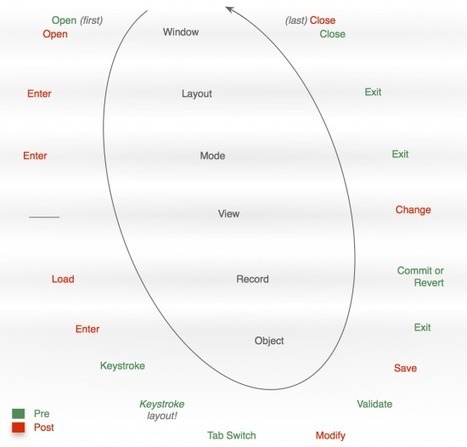
There are quite a few nuances in how FileMaker script triggers function. Two of the more straightforward ones are the sequence that script triggers evaluate in (e.g. OnObjectKeystroke fires before OnLayoutKeystroke) and the timing of a script as compared to the event that triggered it (i.e. pre- vs post-event triggering). For me, the difficulty with these two attributes isn't comprehension; it's memorization. I find myself looking this stuff up over and over again. So, to make it easier to remember, I mocked up the following diagram. Hopefully it has some use for you as well. Breaking this graphic down a bit... There is a method to the order in which triggers fire: First there is the entering into the interface elements, which happens in the following order: window, layout, mode, view, record, object.Next is the interacting with the objects that have been laid out; e.g. a user types something, a script changes some data, etc. Each of these script triggers deals with objects (except for the OnLayoutKeystroke).The "transaction" is completed with the leaving of the interface elements, which happens in reverse order: object, record, view, mode, layout, window. I've marked the post-event actions in red to connote a sort of warning, since FileMaker does not allow us to cancel these triggering events.
|
|
Scooped by
David Anders
November 27, 2012 12:02 AM
|
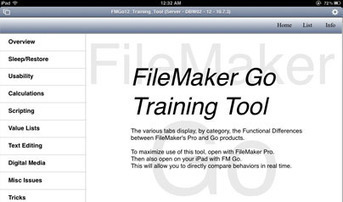
Richard Carlton Consulting has released a FileMaker Go training tool, designed to help Developers learn the functional differences between FileMaker Pro (for the desktop), and FileMaker Go (for the iPhone and iPad). While FileMaker Go is fundamentally FileMaker, it does have certain limitations that are specific to iOS – the iPhone and iPad operating systems – as well as inherent limitations associated with Mobile devices.
|
|
Scooped by
David Anders
November 26, 2012 8:15 PM
|
The iPhone Configuration Utility lets you easily create, encrypt, and install configuration profiles, track and install provisioning profiles and authorized applications, and capture device information including console logs. One of the features of the iPhone Configuration Utility is the ability to create "Web Clips." A "Web Clip" allows you to add web clips (URLs) to the home screen of your iOS device in the form of icons for easy access. The iPhone Configuration Utility also allows you to specify the name and graphic used for the icon when creating a Web Clip.FileMaker Go (and FileMaker Pro) support the ability to open a FileMaker Pro database using a URL. Therefore, a Web Clip can be used to open a FileMaker Pro file directly from the home screen of your iOS device. Besides opening a local or shared FileMaker Pro using a Web Clip, you can also specify: A script to run in the filePass a script parameterDefine local variables The iPhone Configuration Utility is provided by Apple and can be download for free from Apple's knowledge base: Mac OS Version: http://support.apple.com/kb/DL1465 Windows Version: http://support.apple.com/kb/DL1466
|