


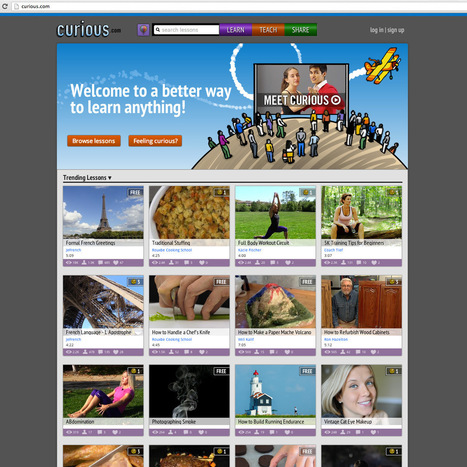

Join Curious.com for free online video lessons, how-to DIY projects, and community. Find or become a student in baking, photography, math, and more!
Via Nik Peachey

 Your new post is loading...
 Scoop.it! Join Curious.com for free online video lessons, how-to DIY projects, and community. Find or become a student in baking, photography, math, and more! Via Nik Peachey
Scoop.it!

More adults in Idaho have embraced wireless life than have adults in any other state, according to new data from the Centers for Disease Control and Prevention. 
Lauren Stahowiak's curator insight,
January 27, 2014 6:23 PM
As technology advances and changes, so does the need for households having no landlines. In Idaho, the majority has less of a need for landlines. Although reasons for ditching a landline may seem logical and practical, this article does not mention much about pricing differences between having landlines and wifi versus the use of cellphones. Are their other beneficial reasons why it is best to ditch landlines? What could be the disadvantages? 
Jessica Rieman's curator insight,
January 28, 2014 1:11 PM
This map shows that out of all 50 states, Montana, Wyoming and South Dakota are the states that have abandoned their landline phones. Maybe this depicts a way of living in simpilier means? Maybe it is not as a neccessity as it is to more of city states compared to rural. 
Joseph Thacker 's curator insight,
January 30, 2014 2:17 PM
I think most Idaho residents are wise for having only wireless telephones. In these modern times, most people have cell phones and wired telephones are becoming a thing of the past. My family and I also do not have a house phone, as we only have cell phones. I haven’t had a traditional wired telephone in my house in over ten years and we manage to save some money each month and avoid telemarketers.
Scoop.it!

"ABCya.com is My FAVORITE website for elementary learning! There is not a day that goes by in our classroom where we don't pop on the site for at least five minutes. The children enjoy the games so much.
The site is perfect for any elementary grade level. There is truly so much to offer. I especially love that the website is free to use and super simple to navigate."
Via John Evans 
Aunty Alice's curator insight,
December 29, 2013 2:56 PM
A great resource. I love it, but am concerned that this might encourage teachers to use it too much at the possible expense of frying developing brains. This is becoming of increasing concern around the world and in New Zealand at least one school has removed wireless access from classrooms. Also it is reported that even some of the people who invented the ipad put their children in technology free elementary schools. Do they know something we ignore at our peril? 
Mirta Liliana Filgueira's curator insight,
January 1, 2014 11:21 AM
Juegos interactivos para el aula. Nivel Primaria 
Suthipong Pongworn ตากล้องรับถ่ายภาพ's curator insight,
February 3, 2014 7:40 PM
สำหรับเด็กประถม ครู และผู้ปกครอง ที่จะเรียนรู้ไปพร้อมกับเด็กๆ ครับ
Scoop.it!

Twitter is definitely one of the best social media websites where you can create and grow your personal/professional learning network. Social networking now is one of the essential and uncostly means...
Scoop.it!

In the middle of October, we invited educators to tell us about the "apps, games, and websites that are helping to tranform their classrooms this year." We asked that you submit your responses in the form of Field Notes and we received more than... Via Joyce Valenza 
Nick Hester's curator insight,
December 3, 2013 9:56 AM
Games have always played a ket role in educaiton, in the classroom , sports, or at home, social media has key rolel to play going forward.. 
Ness Crouch's curator insight,
January 14, 2014 5:08 PM
I'm currently looking for new apps for our school iPads. This article has been very helpful! 
DECANOPOSTGRADO's curator insight,
July 24, 2014 3:57 PM
Visita http://facebook.com/hotelcasinointernacionalcucuta ... y a click en "ME GUSTA"
Scoop.it!
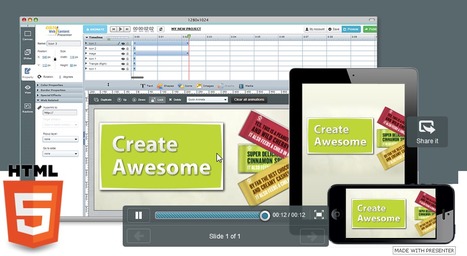
Use Presenter to create free professional interactive HTML5 Presentations, animations, banners, Splash pages and more. Beth Dichter's insight: Are you looking for a tool that will allow you to create interactive presentations, animations, infographics, and more? If so check out EWC Presenter. This is a cloud based tool that is easy to use. When you go to the website you will see a number of presentations that others have created. You can also access a number of videos that discuss the various features of Presenter athttps://vimeo.com/user15791939/videos Because this tool uses HTML5 any presentations you create should also run on mobile devices. Students could use this tool to animate presentations and infographics and work on them from a computer in any location. Via Beth Dichter, Jim Lerman 
Beth Dichter's curator insight,
November 10, 2013 10:06 PM
Are you looking for a tool that will allow you to create interactive presentations, animations, infographics, and more? If so check out EWC Presenter. This is a cloud based tool that is easy to use. When you go to the website you will see a number of presentations that others have created. You can also access a number of videos that discuss the various features of Presenter at https://vimeo.com/user15791939/videos Because this tool uses HTML5 any presentations you create should also run on mobile devices. Students could use this tool to animate presentations and infographics and work on them from a computer in any location.
Scoop.it!

Beth Dichter's insight:
YouTube is a great resource...but there are times when you wish you had a list of great channels based on your discipline. InformEd states "we can now sift through thousands of resources while navigating a single repository, the potential for inspiration and growth in the field of education has reached a new height." The criteria that was used to select the channels were "based on views, subscriptions and quality of content." Channels are divided into the following catgories: * General * Physical Science * Engineering & Technology * Mathematics * Politics, History & Current Events * The Arts * Learning a Foreign Language * University Channels Via Beth Dichter, Jim Lerman 
Armando's curator insight,
November 17, 2013 6:49 AM
197 Educational YouTube Channels You Should Know About

Judy Brown's curator insight,
May 29, 2014 7:32 PM
Autistic kids need to be shown lots of love and need a teacher who will treat them right.
Scoop.it!

"December 9-15, Computer Science Education will host the Hour Of Code–a one hour introduction to students on coding, programming, and why they should love it. It’s a one-hour introduction to computer science, designed to demystify “code” and show that anyone can learn the basics to be a maker, a creator, an innovator. They’ll include a variety of self-guided tutorials that anybody can do, on a browser, tablet, or smartphone. No experience needed.Watch this “how to” video for more information.
"In honor of the upcoming Hour of Code, here are a list of websites to practice everything from basics to advanced:" Via Jim Lerman
Scoop.it!

Carnegie Mellon University is convening a high-powered consortium of educators, researchers, and technology-company executives that will spearhead efforts to develop standards and promote best practices in online education.
Scoop.it!

This guide brings together some of the best tips on using Twitter in the classroom. We’ve sourced some of the best education blogs from the web to bring you these useful resources from influential bloggers. Our tips come from Jeff Dunn from Edudemic and Christopher Pappas from eLearning Industry plus other education bloggers who really know what they are talking about. 
Marie-Ann Roberts's curator insight,
November 15, 2013 8:24 AM
Essential reading to make Twitter for learning more effective. 
Dr. Francisco Raso's curator insight,
November 17, 2013 3:58 PM
Para un uso más responsable de Twitter en el aula... 
karin arentsen's curator insight,
November 27, 2013 3:34 PM
Comme je ne sais rien de twitter, mais les élèves l'utilisent souvent... Ce site donne plusieurs idées comment utiliser twitter en classe.
Scoop.it!

Blogvio lets you create responsive widgets for your website or blog. The service is free for up to 50,000 views per day and three sites. To create a widget, visit the Widgets area. Then: Choose an ...
Scoop.it!
Learn how to use Full Screen Presentation Mode in Evernote 5.3 Video recorded by Jeff Bradbury: @TeacherCast For more information about having TeacherCast br... Via Baiba Svenca 
Sigita Vaskevica's curator insight,
September 25, 2013 4:15 PM
Un peu de tempe libre- information creative! 
Viljenka Savli (http://www2.arnes.si/~sopvsavl/)'s curator insight,
September 30, 2013 4:21 PM
Evernote as a presentation tool. 
Alfredo Corell's curator insight,
October 2, 2013 3:28 PM
My preferred notes app now with Full Screen Presentation Mode!!!! awesome!!! |
Scoop.it!

"A new academic fairy tale goes something like this.
Once upon a time there was a great faculty member who had been lecturing to her class for 25 years. She was smart, entertaining and interesting. One day, the president of her university told her they were going to flip the classroom. In a flash, she placed much of her material online, along with interesting videos and other material and, in class, she cleverly led the discussion among students, always making sure to speak far less than her students.
The reality? It doesn’t always work out that way." Via EDTECH@UTRGV
Scoop.it!

iPad mobility means that students can move about taking photographs, recording audio, and shooting video, in any number of places. They can make multimedia stories, demonstrate how to solve math problems, create and simulate virtual experiences of virtually anything, and on and on. The skill of learning to edit media to enhance a project will be essential for the future. Active creativity and personalized learning are some of the main assets of any tablet. Via Nik Peachey 
Nik Peachey's curator insight,
December 29, 2013 5:56 AM
Not sure I agree with all of these, but worth thinking about.
Scoop.it!

Here’s a common scenario. Someone emails and asks about an elearning tutorial I have on the blog. It’s not always easy to find the specific tutorial buried in a given post.
Scoop.it!

"Individuals who are not digitally literate are at a disadvantage when it comes to interacting with others and being employed in the 21st century. But ignorance of the appropriate use of digital technologies can cause serious personal problems as well." Via John Evans, Dennis Swender
Scoop.it!
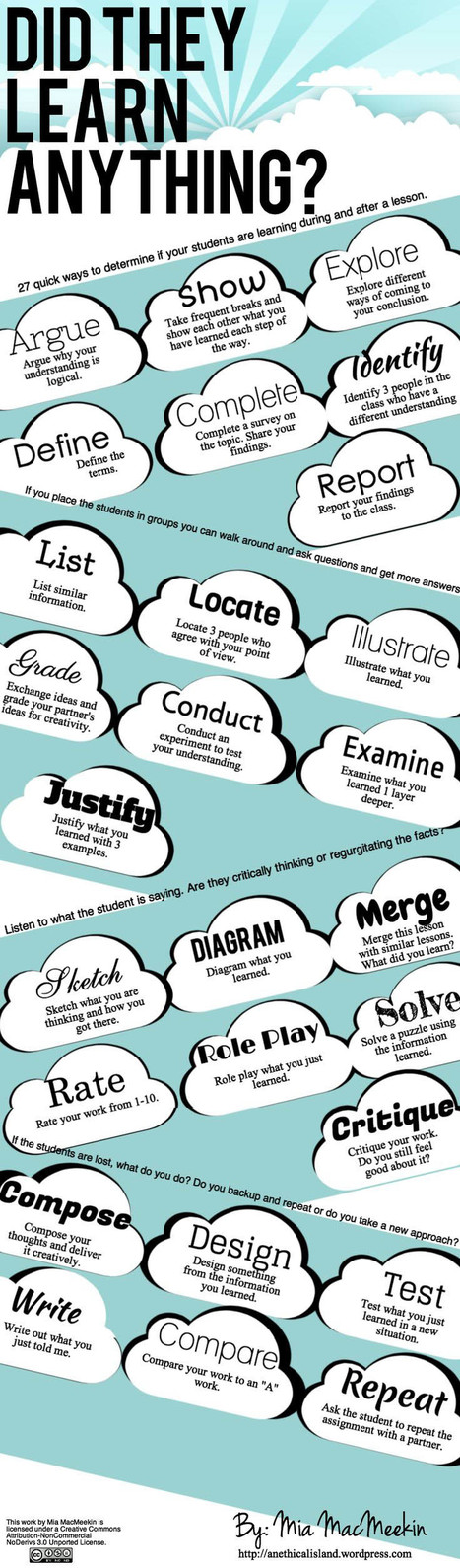
"Checking for understanding is the foundation of teaching.Whether you’re using formative assessment for data to personalize learning within a unit, or more summative data to refine a curriculum map, the ability to quickly and easily check for understanding is a critical part of what you do. (Which was the idea behind our post last March, “10 Assessments You Can Perform In 90 Seconds Or Less.”) "The following infographic Mia MacMeekin offers up 27 additional ways to check for understanding. Some aren’t necessarily quick–”Test what you learned in a new situation”–but there are a dozen or more other ideas that are worth adding to your teacher toolbox, many of which aren’t content-related, but rather cognitively-related (Locate 3 people who agree with your point of view.)" Via Margarita Parra, Jim Lerman 
Mary Reilley Clark's curator insight,
November 15, 2013 9:32 AM
Several of these would be easy to use with library lessons.
Scoop.it!
Robin Good's insight:
Swipe is a new web app which allows you to easily create multimedia web presentations by simply uploading images and PDF files or linking to specific video clips.
Once uploaded, slides can be easily re-titled and can be sorted intuitively in any order you want.
Your final Swipe presentation can be shared with anyone and you can show slides in-sync to anyone viewing. You can even stop or pause video clips that are part of your Swipe presentation as they are being viewed and re-start them when you like.
Swipe-based presentations can be created, edited, delivered and viewed across all kind of screen sizes and devices from desktop computers to smartphones.
Cool features include the ability to preview the next upcoming slide without viewers seeing, private and public settings, and a custom timer that measures your presentation time.
My comment: Excellent presentation tool for delivering in-sync slideshows. For delivering presentations to an audience you need to factor in a teleconference or audio conferencing tool for the audio part. As it is Swipe it's great for one-to-one or small group conferencing via Skype in which you want to show a presentation in sync with everyone (screen-sharing for groups on Skype is a pro option, it's paid, requires lots of bandwidth and it isn't that great if you don't a lot bandwidth).
The approach used by Swipe to show slides in sync with everyone is very bandwidth effective and makes it possible to use this tool effectively in situations where participants have little bandwidth and use smartphones and tablets, in place of using screen-sharing apps which are bandwidth-hungry solutions.
In private beta. Request access here: http://beta.swipe.to/ ;
Sample presentation: http://swipe.to/3392 ;
Help: http://beta.swipe.to/help/ ;
Launch video from Startup Rally: http://beta.swipe.to/video/ ; Via Robin Good, Jim Lerman 
Robin Good's curator insight,
September 11, 2013 4:06 PM
Swipe is a new web app which allows you to easily create multimedia web presentations by simply uploading images and PDF files or linking to specific video clips. Once uploaded, slides can be easily re-titled and can be sorted intuitively in any order you want. Your final Swipe presentation can be shared with anyone and you can show slides in-sync to anyone viewing. You can even stop or pause video clips that are part of your Swipe presentation as they are being viewed and re-start them when you like. Swipe-based presentations can be created, edited, delivered and viewed across all kind of screen sizes and devices from desktop computers to smartphones. Cool features include the ability to preview the next upcoming slide without viewers seeing, private and public settings, and a custom timer that measures your presentation time. My comment: Excellent presentation tool for delivering in-sync slideshows. For delivering presentations to an audience you need to factor in a teleconference or audio conferencing tool for the audio part. As it is Swipe it's great for one-to-one or small group conferencing via Skype in which you want to show a presentation in sync with everyone (screen-sharing for groups on Skype is a pro option, it's paid, requires lots of bandwidth and it isn't that great if you don't a lot bandwidth). The approach used by Swipe to show slides in sync with everyone is very bandwidth effective and makes it possible to use this tool effectively in situations where participants have little bandwidth and use smartphones and tablets, in place of using screen-sharing apps which are bandwidth-hungry solutions. In private beta. Request access here: http://beta.swipe.to/ Sample presentation: http://swipe.to/3392 Help: http://beta.swipe.to/help/ Launch video from Startup Rally: http://beta.swipe.to/video/
Scoop.it!

by David Kapuler
"Augmented reality (AR) is a live, direct or indirect, view of a physical, real-world environment whose elements are augmented (or supplemented) by computer-generated sensory input such as sound, video, graphics or GPS data. (Wikipedia) AR has been around for awhile but is really starting to garner interest in the educational community/sector. Using augmented reality is a great way to incorporate 21st century technology into the classroom using different types of apps, sites, and equipment." - See more at: http://www.techlearning.com/Default.aspx?tabid=67&entryid=6728#sthash.HvbpYEqm.dpuf
Via Jim Lerman
Scoop.it!

A list of inspirational Slideshare presentations that will definitely help you turn your boring eLearning courses into emotional journeys.
Scoop.it!

Getting a learner’s attention is a holy grail among instructional designers and eLearning professionals. Here are guidelines to help you get started: Via SHIFT eLearning
Scoop.it!

A picture is worth a thousand words. And when it comes to eLearning, picking images is a life-and-death decision.
Scoop.it!

If there is one thing I learnt when I was a teacher, it is this: Most people respond better to visual cues. Why? Because pictures and videos are processed much faster by the brain than text. Online... 
Stefano Principato's curator insight,
November 6, 2013 6:36 PM
Looking for tools to help make your stuff more visual and interactive? 
Martine Coutu's curator insight,
November 7, 2013 8:19 AM
Des applications pour vous aider à capturer et garder l'attention de votre audience cible. |







This looks really really interesting... just need some time to have a proper look.
Great one
for adult students ?