


How Technology Has Transformed the Classroom. #infographic compares educational technologies of yesteryear (20-30 years?) to the classroom resources of today (How Technology Has Transformed the Classroom.

 Your new post is loading...
 Scoop.it! How Technology Has Transformed the Classroom. #infographic compares educational technologies of yesteryear (20-30 years?) to the classroom resources of today (How Technology Has Transformed the Classroom. No comment yet.
Sign up to comment
Scoop.it!

There is no need to buy a massive set of encyclopedias anymore, as you can learn most things online these days. The trouble is that the internet is filled with terrible amounts of misinformation.
Scoop.it!

Whether you are designing an eLearning course or an instructor-led session, your solution will likely include a series carefully-planned learning interactions. These interactions should be closely
Scoop.it!

Feedolu is in public BETA from September 5th. It is an RSS feed reader that makes it easily to read, organize and share content. Via Giuseppe Mauriello, Jim Lerman 
Miquel Loriz's curator insight,
September 13, 2013 3:23 AM
Echaremos un vistazo, aunque Feedly funciona bien
Scoop.it!

What is Google Authorship? Google Authorship is the link between your Google+ profile and the content you create. Why would you want to set it up?
Scoop.it!

See on Scoop.it - Education Matters - (tech and non-tech) Chart for Teachers- Alternatives to Traditional Homework ~ Educational Technology and Mobile Learning http://t.co/LHYTbGlhId via @medkh9 See on educatorstechnology.com (Awesome Chart...
Scoop.it!

If you have a large number of pictures to transfer to your iPhone/iPad, the best approach is to connect your device to your computer and use the iTunes program. Via John Evans 
Viljenka Savli (http://www2.arnes.si/~sopvsavl/)'s curator insight,
August 22, 2013 2:34 AM
Important to know when working with a lot of photos, useful information... 
Tony Gough's curator insight,
August 26, 2013 7:19 AM
Useful advice for those who don't already know how to do this!
Scoop.it!

Time to update your virtual vocabulary! These tech terms are important for all connected educators to know about.
Scoop.it!

The best blogs on MOOCs, cloud computing, mobile learning, social media, digital pedagogy and more.
Scoop.it!

"Below is a list of some interesting web tools that you can use with your kids and students to help them learn coding. I have only included the most popular platforms and the ones I have personally tried. Have a look and as always your feedback is welcome." Via John Evans 
Kelly Blair's curator insight,
August 7, 2013 8:50 AM
A great list to get started with, I'm also going to use the programming lessons found at the Khan academy. 
AlGonzalezinfo's curator insight,
August 8, 2013 7:19 AM
Excellent post! I have a 10 year old and a 13 year old, I wonder if they will like different ones.
Scoop.it!

The following article gives real life examples of school projects in which the students used social media. Some took it upon themselves to use these outlets, and instructors assigned others.
Scoop.it!
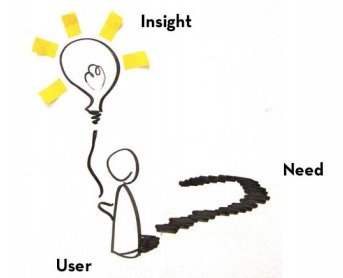
"Every year, we put together an overview of the current iteration of the design process we’re teaching, along with some of our most-used tools. The guide was originally intended for recent graduates of our Bootcamp: Adventures in Design Thinking class. But we’ve heard from folks who’ve never been to the d.school that have used it to create their own introductory experience to design thinking. The Bootcamp Bootleg is more of a cook book than a text book, and more of a constant work-in-progress than a polished and permanent piece." Via Jim Lerman 
Jim Lerman's curator insight,
August 3, 2013 3:38 AM
The Bootcamp Bootleg is a free resource from the Stanford dschool (design school) that leads viewers through the entire design process. An outstanding resource for implementation. |
Scoop.it!

Editor's Note: While not directly correlated to knowledge sharing, GIFs do contribute to the "smart web" by creating a new way to communicate ideas, add dimensions to conversation, and provide irony and other editorial flavor.
Scoop.it!

Pinterest is quickly becoming one of the biggest sources inspiration and innovation when it comes to cooking, design, and education.
Scoop.it!

While the tech blogosphere commences the self flagellation over getting it wrong on the whole “Apple needs a cheap iPhone and that’s why it is going to release the iPhone 5c”. The real story, in my opinion, is the one worth a thousand words on each of those aforementioned tech blogs but not getting near that sort of coverage — the new camera in the iPhone 5S. The camera? Yes, the camera. Via François-Xavier Schaeffer 
François-Xavier Schaeffer's comment,
September 15, 2013 6:23 AM
I need to see from myself if the iPhone 5S is as powerful as an high end DSLR. But there is a fact I have my iPhone with me most of the time, not my DSLR and the better camera is always the one you have with you.

robyns tut's comment,
September 29, 2013 8:10 AM
i feel that with the iPhones growing so rapidly, cameras will start to fade into the backround, because i have already noticed that people are taking their iPhones out to take pictures instead of their cameras. it is less effort, because its everything in one, whereas a camera, is only a camera. Cayleigh Fourie
Scoop.it!

Jackie Gerstein, Ed.D: "All of my classes, regardless of student age or demographics – elementary gifted students or graduate students, begin with ice-breakers and team-building activities. I recently developed a passion for using students’ mobile devices to do so as this devices have become natural and personalized extensions of students’ “selves.”" Via John Evans, ManufacturingStories 
Dr Pam Hill's curator insight,
September 16, 2013 9:46 AM
This is one of the first resources to actively use digital tools to upgrade the minutes before instruction starts. In my professional experience this would be very useful. I think this is a new area that can be developed further to build in opportunities for students to use technology to deepen their learning. What do you think? Would you use this new resource?
Scoop.it!

There are a lot of technology companies announcing their own innovative smartwatch right now, but are they as innovative as the EmoPulse Smile smartwatch? Via Tiaan Jonker 
Richard Platt's curator insight,
September 17, 2013 10:52 AM
Everyone is getting in on the act of wearable technology
Scoop.it!
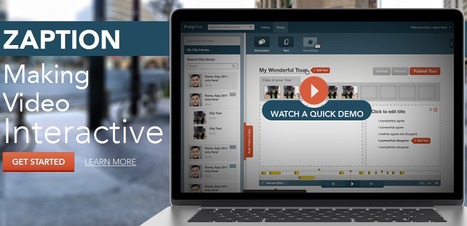
Zaption, a San Francisco based tech startup, is revolutionizing online video for education. Teachers, trainers, and content publishers use Zaption’s intuitive web app to quickly add images, text, quizzes, and discussions to existing videos from YouTube, Vimeo and private video libraries. The result is an interactive learning tour that transforms video from a “lean back” experience to an engaging “lean forward” activity. Via Baiba Svenca
Tony Gough's curator insight,
September 9, 2013 3:29 AM
Lots of potential in the teaching and training field. 
roberto gilli's comment,
September 9, 2013 4:07 AM
Great learning potential. Would be nice to see some real example.
Scoop.it!

Incorporating a fingerprint sensor on the iPhone could change the way we access everything from Twitter to our bank accounts. And it could make our devices a lot less interesting to would-be thieves. Via François-Xavier Schaeffer 
Serena Davie's curator insight,
August 22, 2013 12:05 AM
Brilliant. It is scary how much condifential data can be stored on these devices.
Scoop.it!

There are a host of online learning trends that have popped up over the year. Here's a detailed look at each of them.
Scoop.it!

One more theorist inspired post from me, once more applying ideas towards technological learning environments. This time I will examine the issue from a perspective inspired by Jean Baudrillard. Ba...
Scoop.it!

by Richard Byrne
"eduClipper, the social bookmarking service that I said teachers want Pinterest to be, can now be added to your Edmodo account and those of your students. The new eduClipper app for Edmodo lets you install eduClipper for all your students with the click of a button. Students can create content and share it with their peers and you. Via Jim Lerman 
Louise Robinson-Lay's curator insight,
August 9, 2013 10:41 PM
Adding educlipper to edmodo makes it an even more powerful tool. Content can be shared more easily.
Scoop.it!

Would you be interested in the best 5 free annotations tools for teachers? Would you like to know how to use them?
Scoop.it!
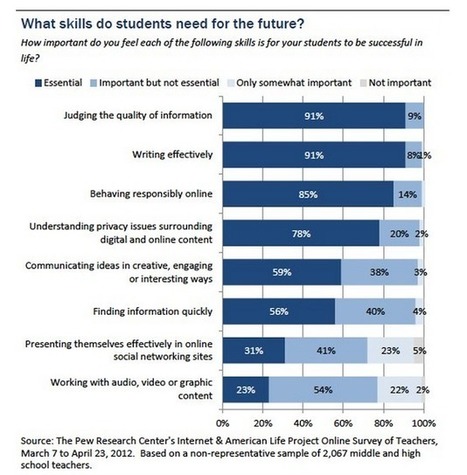
Have a look at the graph below and try to read the entire report to learn more about this study. Via SHIFT eLearning |






