


From
recordit

 Your new post is loading...
 Scoop.it!
From
recordit
Scoop.it!

All your websites and online resources in one place. Great for teachers, students and parents. Via Nik Peachey 
Nik Peachey's curator insight,
August 11, 2014 8:18 AM
This looks like a useful tool for setting up RSS feeds and gathering all your information in one place. Looks similar to Netbibes and PageFlakes.
Scoop.it!

Tracey Duffy's curator insight,
August 5, 2014 4:39 AM
Looks a really interesting tool for collaborative photo sharing.
Scoop.it!

"Does anyone visit Second Life anymore? Perhaps not, or at least not often. But video tutorials are still very helpful, which makes screencasting a useful skill to develop." Via EDTECH@UTRGV
Scoop.it!

"Too often, training is staid, boring, tedious and, simply put, awful! But learning new things shouldn’t be like having teeth pulled – it should be a joyous experience, not a punishment. There’s no good reason that training needs to be mind-numbingly dull these days. Here’s why:" Via EDTECH@UTRGV
Scoop.it!

Have you ever sat through a presentation that seemed to slog on and on? Presenters that are disorganized, dwell on trivial information and give long winded explanations that lead nowhere? Too many presentations are afflicted by poor planning and poor visuals. The audience who come to see these presentations, pay attention [...] Via Baiba Svenca 
Tim Brook's curator insight,
August 22, 2014 6:18 AM
There's loads of this kind of stuff out there but this one actually has some good advice!
Scoop.it!

journi is the easiest way to record your trips offline and on the go. It even lets you keep your friends in the loop without extra effort. And it’s free. Via Nik Peachey 
The Teacher's curator insight,
August 18, 2014 2:16 PM
Nik Peachey's insight:
This looks like a really nice free tool to use with students to get them blogging about trips and holidays. Nice that it also works offline. 
Mirta Liliana Filgueira's curator insight,
August 18, 2014 6:41 PM
Viajes Blogging. Grabar tus viajes fuera de linea. 
Marianthe Loucataris's curator insight,
August 30, 2014 7:42 AM
This looks good as a student blogging tool for excursions or holidays..
Scoop.it!

Bonnie Burns's curator insight,
August 18, 2014 11:26 AM
You can find that map here. All you need to do is log in with the same account you use on your phone, and the record of everywhere you’ve been for the last day to month will erupt across your screen like chicken pox.

Graeme Lewis's curator insight,
August 19, 2014 5:12 AM
what do you expect if you share your location?
Scoop.it!

How Can eLearning Professionals Effectively Use Avatars in eLearning? Check the Top 10 Tips on How to Use Avatars in eLearning to find out more! Via EDTECH@UTRGV
Scoop.it!

This overview shows the progression of Bloom's Digital Taxonomy, how each thinking skill applies in practice, and examples of activities using digital tools. Via John Evans
Scoop.it!

Apply Adult Learning Theory to eLearning. Applying Adult Learning Assumptions and Adult Learning Principles to eLearning. Apply Andragogy to eLearning! Via EDTECH@UTRGV 
Ulrike Grabe's curator insight,
August 20, 2014 8:04 AM
Assumption #1 (Self-Concept) Assumption #2 (Adult Learner Experience) Assumption #4 (Orientation to Learning) Principle of Andragogy#1 Principle of Andragogy#2 Principle of Andragogy #3 Principle of Andragogy #4
Scoop.it!

From
oedb
1) Hemingway Editor This is a free Web-based app that lets you paste in your writing to be analyzed and edited for optimal readability. The app quickly ide Via Ana Cristina Pratas, Jim Lerman 
Rosemary Tyrrell, Ed.D.'s curator insight,
August 17, 2014 11:29 AM
Not all are free, but there are some wonderful apps on this list. 
Maryalice Leister's curator insight,
August 17, 2014 8:48 PM
Some new ones listed I hadn't heard of or used. I am off to try them out and you'll have some great new tools if you do too. Easily learned and creates the impact you want. Not just for teachers either. Enjoy! 
Jennifer Lowton's curator insight,
August 24, 2014 7:49 AM
Nice list from Ana Cristina Pratas. I'll have to try Hemingway Editor, Zooburst and GIFBoom soon.
Scoop.it!

Out of all the students who enroll in a MOOC, only about 5 percent complete the course and receive a certificate of accomplishment. |
Scoop.it!
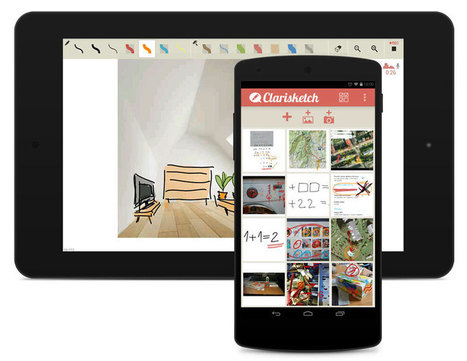
Through the narration and illustration of photos, Clarisketch saves time and improves the quality of messaging using a combination of photographs and annotated commentary. Clarisketch enables you to quickly comment and draw on diagrams, map routes, photos etc and share it with friends/colleagues via email, Facebook, Google+, Twitter or other social networks. Via Nik Peachey
Nik Peachey's curator insight,
August 13, 2014 7:03 AM
This looks like a handy tool for Android users.
Scoop.it!

Movenote is available on any browser and can be accessed with your Google account. Create video presentations quickly with your webcam and share them worldwide. Via Nik Peachey
Nik Peachey's curator insight,
August 1, 2014 4:07 AM
This looks like a really simple to use tool for recording presentations and getting them online.
Rosemary Tyrrell, Ed.D.'s curator insight,
August 1, 2014 11:41 AM
A way to do video presentations for gmail. Looks fairly simple. 
Miguel Paul Trijaud Calderón's curator insight,
August 4, 2014 6:41 AM
Movenote - Record and send your elearning lesson through your Gmail inbox.
Scoop.it!

PresentationTube Recorder is a simple tool designed to help instructors, students and business professionals record their presentations from the comfort of home or office, and without the need to have Internet connection while recording. The Recorder synchronizes a variety of visual aids including PowerPoint slides, Webcam streaming, whiteboard, drawing board, Web browser content, Desktop recording . Via Nik Peachey
Scoop.it!

by Brett Kelly
"Evernote is great on its own, but you can push it even further using great third-party apps. These are my favorites." Via Jim Lerman
Scoop.it!

Whether they have more experience facing an audience or sitting in one, most people have str... Via Baiba Svenca 
Baiba Svenca's curator insight,
August 17, 2014 2:45 AM
5 typical mistakes we make when presenting. Read the truth about these myths. 
wanderingsalsero's curator insight,
August 18, 2014 2:22 AM
I'm not sure if this is similar content but it's worth looking through. Presentations are the new discussions nowadays. Style is so much more critical today.
Scoop.it!

From
aplus
Your iPhone can do all sorts of magical things that you probably aren't aware of. Here's a list of some of the iPhone's coolest hidden features.
Via Jim Lerman
Scoop.it!

This infographic will serve as a guide for perfecting your social media profiles on all the major networks: Facebook, Twitter, Google+, Pinterest, LinkedIn, and Instagram.
__________________ ► Receive a FREE daily summary of The Marketing Technology Alert directly to your inbox. To subscribe, please go to http://ineomarketing.com/About_The_MAR_Sub.html (your privacy is protected). Via Joemktg 
Henrik Safegaard - Cloneartist's curator insight,
August 19, 2014 3:43 AM
"These days, your social profile is like your second face. It’s the identity tag for everything you do and everyone you encounter in the online world. Whether you’re trying to run a business, plan an event, promote a passion project, or just make friends, a finely-tuned social profile is the cornerstone of this endeavor."
Scoop.it!
Check out the Compilation of proven tips, techniques, and best practices that can help you create Killer Presentations. Via Baiba Svenca
Baiba Svenca's curator insight,
August 18, 2014 3:03 PM
12 proven tips for making better presentations. The slideshow is suitable for watching and discussing with students. 
Judih Weinstein Haggai's curator insight,
August 19, 2014 12:16 AM
i love this clear, clean presentation, especially the slide about colours.
Scoop.it!

Convert HTML web pages to PDF files. No installation, no registration, its free and easy to use. Via Ana Cristina Pratas, Jim Lerman
Scoop.it!

While six seconds does not sound like much time for learning, you may be surprised just how inventive students need to be to use Vine in the classroom. Via John Evans
Scoop.it!

To figure out how to get from here to there, eLearning professionals have to first understand where the "there" actually is. This list represents the newest and most important "rules" for eLearning today. 
Aparna Nagaraj's curator insight,
August 29, 2014 10:58 AM
Letting learners choose to move from one content to another to make connections as they wish is most needed in any kind of learning.
Scoop.it!

RT @iLearnDifferent: 20 Free Collaborative Web Tools to Use in Class ~ Educational Technology and Mobile Learning http://t.co/j6dDbONWb7 #e… Via Jim Lerman |







Needs to be downloaded and installed, but looks useful. Not sure how much you get for free.
Useful. Check out our screencasting infokit to further software ideas:
http://www.jiscdigitalmedia.ac.uk/infokit/screencasting/screencasting-home
And our presentation on mobile apps for screencasting:
http://www.slideshare.net/tduffy23/e-learning-2-0-conference-brunel-university-see-is-believing-screencasting
Easy to use screencaster