They used to say that a camera was only as good as the photographer using it but with the latest imaging technology in your Nokia Lumia 920 and Lumia 820 practically anyone can take great photos all the time. Furthermore, if you subscribe to the notion that taking pictures is all about capturing that great moment with your friends or family, then you’re going to love Nokia’s Smart Shoot app.
Smart Shoot is one of the of digital camera lens applications for your Nokia Lumia 920 or Lumia 820 smartphone; Cinemagraph and Panorama are a couple of the others.
Think of these camera applications as being similar to changing the lens on a digital SLR. They extend the functionality of your smartphone’s camera in much the same way but, of course, they are not heavy to carry around!
Picture the moment
How often in a group photo will one person have their eyes closed, or is looking the other way? And, isn’t it annoying when a total stranger walks into the edge of the frame just as you’re taking a shot?
Nokia’s imaging wizards have created Smart Shoot to help you in both of these common scenarios. By shooting a sequence of images, Smart Shoot can change faces and remove unwanted objects so that you’ll always have the perfect picture.
There’s no doubt that Smart Shoot is a fantastic technical achievement but it’s real genius lies in how simple it is to use.
Smart Shoot
Smart Shoot can be launched either through the dedicated app shortcut, or via the lens picker on your camera’s viewfinder – this is the icon with two horizontal arrows pointing in opposite directions.
When Smart Shoot is open the first thing you’ll see is a regular viewfinder and a message along the top reading ‘hold the phone steady’.
This is important because the camera will take a sequence of photos for you to then select the best faces or to remove unwanted objects. You’ll only need to hold the smartphone still for a few seconds – a dial on the screen tells you when it’s done.
When it’s ready, Smart Shoot will show you a very quick flick through each of the shots that it has captured – this is your cue to make the magic happen.
By flicking up and down the screen, you will scroll through each of the shots that have been taken. It might be that among these images is the perfect photo already, so you’ll just have to press save to make sure it is captured in your camera roll.
However, should you need to remove anything or use a combination of different faces from different shots then you’ll need to bring up the editing menu.
Removing objects
Tapping anywhere on the screen will bring up the menu. Tap on the ‘pencil’ edit icon to bring up the two options, erase objects or change faces.
By selecting ‘erase objects’ Smart Shoot will then automatically detect people or things that have strayed into the edges of your shot.
It will show you one or sometimes several things that can be removed and then it’s up to you if you want to keep them or not. Select the tick to confirm your choice and then remember to press save at the end.
This sequence of three images below shows how object removal can work to produce exactly the shot you were hoping for.
Changing faces
It is also just as easy to use the changing faces feature. When you select ‘change faces’ Smart Shoot will detect all the faces in the photo and circle them for you.
Selecting each circle/face will engage the slider tool that appears at the side of the screen – use this to scroll through specific shots and press the ‘tick’ icon to confirm your choice.
As you scroll through, you’ll magically see the face change with the range of options available – pick the one with the biggest smile and when they’re looking at the camera!
Do this for each face to create the perfect composite group photo. Again, remember to press save when you’ve finished.
What’s great about Smart Shoot is that it makes capturing that perfect split-second moment just that little bit easier and I love it because I am almost always the one who blinks!
One of our readers "Nabkawe" sent us a cool tip about the OS wide magnification available in WP8; basically it allows you to enlarge ANY part of the OS with no restrictions, read on below to find o...
So I got to Barcelona about tea time on Sunday 24th February , and on arriving at Barcelona Airport the first thing I did was get the link bus to Terminal 1 to register for the MWC, this took a little longer than I expected but by about six O'Clock I was in a taxi on my way to the apartment I was sharing with Mark Peters for the week. We met up about seven, dumped our stuff and headed out for a drink at a bar near our apartment and meeting up later on with Narive of UK Mobile Review at the Plaça Reial just off the Ramblas later on for a last glass of wine before turning in ready for an early start to get to the Nokia press event at the Fira the following morning.
Due to a minor hiccup getting on the right tube line we were a little late for the Nokia event, well, when I say late, most folk were getting there for seven thirty, it was just after eight when we arrived, and luckily my limited pass got me in, in fact with either the pass or help from friends I actually managed access to much more of the Congress than I initially expected to :) The anticipation in the press area was pretty intense, despite leaks of the products to be released, and certainly, as a massive Nokia I was extremely excited as Stephen Elop took the stage to start the event, and even though I wasn't very central or close to the stage I had my Nokia 808 with me and managed to get some fairly good shots of the event. ...
Nokia Place Tag Beta has just become available to those on Windows Phone 8 this morning.
Known Issues:
Sometimes the app will cause your camera to get a green screen, if this happens it is not only in the Place Tag app but in the stock camera too. To fix this a full reboot is required, after that all is okay again.
“Nokia Place Tag takes more than a photo. It reveals info about the places within your photo, such as museums and famous buildings, which you can then share as a postcard to your friends.
Wish you were here? You can also use Place Tag to get interesting background info about the places tagged in the photo. And if you need directions, that’s also easily available too.”
Multiply Your ImpactTurn your signature into dozens more by sharing this petition and recruiting people you know to sign.YOUYOUR FRIENDS170avg.THEIR FRIENDS10,000approx.
Windows Phone just recently became the third most popular mobile platform in the U.S., which demands a growing app store to help feed the operating system. There are already numerous apps that have been seemlessly converted over from other platforms, and Snapchat should be no exception. Let's get Snapchat onto windows phone!
Microsoft today officially announced the release of SharePoint Newsfeed app for Windows Phone devices. Microsoft released a preview version of this app back in November and now they have upd...
We have heard the rumor before, reporting that BBC's iPlayer, a video player for watching Episodes of your favorite shows was coming to WP. Apparently it is now official, and the BBC have confirmed...
Nokia is evidently adding some more customization options for Nokia Lumia 920 users (and possibly their other WP8 Lumias). The evidence comes from the latest update of Nokia’s display + touch app, which allows users to control the SuperSensitive Touch and sunlight readability options.
Now there is a third option called “Lumia color profile”, which will allow you to make your Lumia 920 “Vivid” or “Natural” by using a slider. Likewise you can change the color temperature from “Cool” to “Warm” on a second slider.
This will be the first time on Windows Phone that users were given access to changing more than just brightness on their display and it shows how Nokia is continually offering improved experiences.
But where is it?
The images for the “Lumia Color Profile” come with the Nokia system app updates that were released today. Specifically for display + touch version 1.5.0.20. But users have noticed that this option is not available, even after installation and a soft reset.
That leads us to believe that this feature, much like audio-levelling, will be “unlocked” with the new firmware update that is evidently forthcoming. In the past, certain Windows Phone functions like the Wi-Fi Hotspot feature only became available after a firmware update was installed.
Since this is a fairly major new feature, we’re going to bet that display + touch merely unlocks the UI for the “Lumia Color Profile” but it is the forthcoming firmware that will actually enable this feature.
The only thing we need to know now is when are we getting the 1308 firmware update?
Winp.cn reports that the latest firmware for the Nokia Lumia 920 on Navifirm offers a new utility and feature – the ability to clean out temporary files.
The firmware 1232.5957.1308.1004, which can be loaded via the Nokia Care Suite, will allow users to manually clean out temporarily files, but will also do it automatically at timed intervals.
It is not clear if this is Microsoft or Nokia’s work, but the colourful graphic does suggest to me Nokia is once again saving Microsoft’s bacon.
Hopefully the new firmware will roll out rapidly to affected users.
A very early build of Mozilla's browser now works on the new touch-centric Metro user interface of Windows 8. Oops, we're not supposed to say Metro anymore.
Mozilla is catching its browser up to Windows 8.
The Firefox Nightly version -- the precursor to Aurora, beta, and final releases -- now supports the touch-oriented, no-menu interface of Windows 8 formerly known as Metro, according to atweet from Mozilla about the development.
Mozilla developer Paul Rouget posted severalscreenshots of the Metro version of the early Firefox build.
The early build features a number of Metro features, including a no-menu-bar look that relies instead on actions triggered by swiping in from the edges of the screen. That includes the access to search engines, downloaded files, and tab selection.
The new browser is the result not just of programming work, but also of a lobbying campaign. To run with top performance, browsers today need access to low-level operating system interfaces, but third-party software was barred from using those interfaces unless running in the old-style "desktop" interface.
However, Microsoft eventually was persuaded to let browsers use the low-level interfaces on Windows 8. That's not the case with Windows RT, though, where only Microsoft's Internet Explorer has those privileges. ...
Nokia has released an NFC-tagging application that can make it easier to launch certain features on a Windows Phone or any other device with NFC capability. ...
Windowsmania.pl, who seem to have easy access to all kinds of Nokia Lumia repair manuals, have posted a tear down of the Nokia Lumia 720, and also solves the mystery of those 3 dots at the back.
They reveal that the three holes are actually contacts for a wireless charging back which does not replace but actually overlays the current back, and allows current via the holes to reach the battery.
See the detailed diagrams, including part numbers and so forth, at Windowsmania.pl here.
The UN estimates that by 2030 more than 5 billion people will be living in urban environments, with the fastest growth expected in Asia and Africa.
Megacities, such as Mexico City, Mumbai and Lagos, with a population of more than 10 million people are emerging around the world. But just as cities are important to foster economic innovation and human progress, they have a ‘dark side’ too, spreading pollution and other problems.
These important issues were explored by Michael Halbherr, Nokia’s Executive VP of Location & Commerce, in a keynote address at Mobile World Congress in Barcelona yesterday.
He set out a compelling argument showing how location services will help to make these sprawling metropolitan areas smarter, more sustainable and more efficient.
City Living
It is easy to see why cities have become such a magnetic force for so many people. Michael Halbherr calls them ‘the nexus of human progress where social and economic trends emerge. ‘
People are drawn to cities because they offer hope for jobs, prosperity and a higher standard of living. However, the sheer number of people involved and the monumental scale of growing cities have created a whole new set of challenges.
Space and resources are limited. Congestion and pollution are other common problems. Public transport and infrastructure are being stretched to their limits. You could say that chaos has become normal.
But location services can now help people and businesses make sense of this chaos and can be an indispensable guide to the changing world.
Reinventing the Map
Maps have been around since the Babylonian times, Michael Halbherr pointed out. He said though that maps are evolving and five trends are coming together to make maps more meaningful in how we manage our lives.
First there is the unprecedented growth of cities, but in addition the Internet is becoming mobile and sensors are embedded in every mobile device collecting tons of data. Plus there has been an explosion in the number of special purpose devices and the Internet is becoming more social.
Taken together these trends mean that ‘where?’ has become as fundamental to our lives as ‘how?’ and ‘why?’, especially in cities.
“We need to go beyond the map from the cacophony of the real world to the virtual world,” said Michael Halbherr. This is where Nokia has been reinventing the map.
The location experience
Rather than a series of coordinates and lines on a page, Nokia’s HERE Maps are dynamic reflecting the changing world we live in and the numerous ways we now use maps. It is what Michael calls ‘computational cartography.’
Take, for example, HERE City Lens, which shows people valuable information about the places around them on their smartphone’s viewfinder overlaid on top of what their seeing in the real world.
Michael said that the LiveSight technology powering HERE City Lens was just one example of reinventing the map and the possibilities were endless for helping people in their daily lives. He said that it’s an example of what now makes a phone a gateway to the real world.
The HERE experiences such as HERE Maps, HERE Drive, HERE Transit and HERE City Lens all help to get people where they need to go and help them to discover new places.
Plus these location solutions also work across every major operating system and platform.
Making cities smarter
In essence Michael emphasized that as cities have become more crowded and more chaotic, location tools have become increasingly crucial. Our reinvented maps will need to become more dynamic, hyper precise and fresh.
The challenge now is to create the most comprehensive and accurate picture of the real world so we can use those maps to help us whatever the use and context.
‘The new map will not just be for the developed world,’ said Halbherr. ‘But for all the people across the world moving from rural to urban areas and who need to make sense of the world where they live.’
As a consumer you could describe me as disloyal. I see no need or reason to be loyal to a brand, unless it gives you what you want or need. My loyalty as a consumer has first and foremost has always been to myself and to my business.
I first purchased the Lumia 800 last year in July having gone from Symbian, to iOS and then over to Windows Phone. The second I got the hand set I fell in love with the Live Tiles. Not only were they beautiful they were highly intuitive. I no longer had to reopen an app and go through several processes to get to the screen required, I could simply pin it and get it. Immediate gratification.
Family, friends, colleagues and even passers by bore the brunt of my enthusiasm for Windows Phone. It was everything I needed for work and play. I was prepared even to ignore the slight shortcomings within the operating system.
As time went by the little niggles started becoming more persistent. The music player was poor, new apps were few and far between and Zune reminded me of Sonicstage. Still, I remained committed.
And then, Microsoft did what I feared all along. They effectively pronounced my phone obsolete. Windows Phone 8 was to be only for new phones. The slow roll of new apps went from slow to almost stagnant. Why would an App Developer spend extra time configuring for WP 7.5 when WP8 was an investment in to the future?
I was furious. I understood why Microsoft did what they did but I still felt cheated. I swore blind I would never buy another Windows Phone and almost signed this declaration in my own blood. It was this announcement that turned the little niggles in to reasons to make them huge issues for myself. The final straw was when a new app, perfect for my business was released but only for WP8.
I ditched the Lumia 800 and got myself the Nexus 3 phone. As soon as I got it I regretted it. It lacked the sturdy physical build and the buttery UI that I was used to. I thought to myself hey I may not have my live tiles but I can use widgets. And I did. I hated every second of it though.
The widgets were ugly. Going from Live Tiles to Android Widgets was like travelling back in time to the days of garish Geocities.
I gave it another few days and decided enough was enough. I had to return the phone and try the iPhone 5. Reluctantly, I ordered the iPhone 5. Everybody told me I was mad not to get an iPhone so I figured hey they can’t all be crazy, right?
The moment I powered up the iPhone 5 I got a sense of déjà vu. Just as the Nexus brought me back in time the iPhone 5 took me back to 2010 when I had the iPhone 3G. I was amazed at how iOS had done comparatively nothing in 3 years. The interface looked dated, cold and dead. I missed the intuitive Windows Phone OS and my Live Tiles.
You may think I’m too obsessed with the Live Tiles. But in my particular line of work I have to be up to date almost on a 24 hour basis. The latest analytics information is vital. When in a client meeting and I needed information I had to trawl through screens to get one tiny bit of information I needed. On Windows Phone a quick glance at my home screen told me all I needed to know.
So with my tail between my legs I’ve returned the iPhone 5 and awaiting the Lumia 920.
Windows Phone users should always remember that whilst Windows Phone isn’t perfect it is better than others. When I have to shout at the screen when using Zune to get something done I’ll know it could be worse.
Whilst the Lumia 920 with Windows Phone 8 won’t have a thousand new fart apps every day, or won’t have the range of music player features Android offers it more than makes up in other respects. Lesson learnt
At last week's MWC one of the more effective NFC-related demos was Nokia's use of NFC tags to trigger the playing of Nokia Music Mixes. When tapped by a Lumia device running Windows Phone 8 these tags, after the standard NFC on-screen prompt was accepted, would trigger the opening of the Nokia Music app and start the playback of a specific Mix.
These tags can best be described as real world shortcuts to music, or as Mark Mulligan described it recently, when writing on hisMusic Industry Blog, sonic augmented reality. There's a whole raft of potential uses, from personal use (i.e. quick access to your favourite mixes), to public music discovery (e.g. on posters), and promotional previews (e.g. outside a music...
So how can you create these tags yourself? Well, it is possible to write them using one of the existing NFC writing app for Windows Phone, such as Nfc Interactor, but by far and away the easiest option is to use Steve Robbin's Mix NFC Tag Writer app, which does most of the hard work for you (i.e. working out the data and mix identifiers to use).
The Mix NFC Tag Writer app lets you write links for Nokia's pre-defined mixes, or for custom mixes. For the pre-defined mixes you select the mix category (e.g. Charts) and the mix you want to link to (e.g. UK singles chart). For custom mixes you will need to specify three artists (e.g. Lordi, The Smiths, and The Muppets) that will be used to generate the mix. In both cases the app uses the Nokia Music APIs to pull the necessary information from Nokia's server.
Once you have selected, or created, the Nokia Music Mix you want to write to an NFC tag you simply tap the publish button and hold the tag up to the back of the phone (or wherever the NFC aerial is located). The app will let you known when the link has been sucessfully written to the NFC tag.
Mix NFC Tag Writer can be downloaded from the Windows Phone Store for free. In order to use the app you'll need some writeable NFC tags, which can be purchased from various online reatilers, including Amazon. You can expect to pay about £1 per tag when buying in small quantities.
Nokia has a new app coming called 'Place Tag' that pulls down your location and allows you to place it on a photo you took, much like an instant postcard. The app is still in beta but should be released soon.
Mr. Elop was criticized a lot for his transition strategy that angered lots of fans and employees.
But what was Elop's strategy? well when you look at the WP8 portfolio you'll notice WP8 Lumia range is special.
Its the only range of products that directly competes with the Apple products range (sans the Ipads) . But instead of repeating it self over and over like the Apple range does, Nokia elected to use a design language that is Pure. in every sense possible which doesn't just help Nokia financially as simple means cheaper production process. but it allows them be distinctive about it. and colorful too.
How does the Lumia WP8 portfolio competes with Apple in the hardware department *Feel free to skip ahead this part if you're familiar with the hardware of the Lumia WP8 range. ...
Microsoft may have refreshes of its Mail, Calendar, Music and Games apps for Windows 8 and Windows RT in its app store as soon as this month.
There's been some worry that Microsoft's Windows team may be waiting until the "Blue" upgrade to Windows 8 and Windows RT to refresh the Microsoft-developed, first-party apps that are bundled with the operating system.
I'm hearing from my contacts that this is not the case. In fact, updates to the Windows Mail, Calendar, Music, and Games apps for Windows 8 and Windows RT may be available to users as soon as March (as in this month).
Microsoft officials aren't commenting on this bit of information that I received from one of my contacts who has been dead-on about Blue (so far). Blue is the codename for the operating system refresh for Windows 8 and Windows RT -- as well as a number of other Microsoft products -- that is under development and supposedly set to be released to users this summer.
Microsoft officials have acknowledged publicly that the Windows team is aware that the first-party apps on Windows 8 and Windows RT have room for improvement. Many users have been especially disappointed in the Mail and Music apps for the product, claiming they feel more like betas than full featured, polished products. Even though they're free, these apps, developed by the Windows team, just aren't very good, many of us Windows 8/Windows RT users feel. (The Windows 8/Windows RT apps built by the Bing AppEx team, on the other hand, are quite solid and usable.)
Microsoft made some changes to its built-in first-party apps between the time Windows 8/Windows RT were released to manufacturing (August 1, 2012) and when they went on sale (October 26, 2012). While minor refreshes have come to the Xbox Music app for Windows 8, not much else has happened on the built-in app front.
I've heard that Microsoft employees are currently dogfooding the updated first-party apps. The updated versions all will be pushed out via the Windows Store.
Meanwhile, because I know folks will ask, I don't have an update on the Outlook for Windows RT client that Microsoft employees also have been testing internally. I have no new word on when or if this will be made commercially available, possibly because of battery-life problems with the app, I've heard.
While on the topic of Windows 8 and Windows RT apps, there are a few new and/or updated third-party apps out this week worth noting:
Stardock has released a public beta of its ModernMix utility, which allows Windows 8 owners to run all of the Metro-Style/Windows Store apps on the desktop, enabling them to be resized in a window. ModernMix adds minimize/maximize buttons to apps running this way, making them work like current Windows apps do. The public beta costs $4.99, as Neowin noted.The CDC, Department of Health and Human Services, Mayo Clinic and other health-focused agencies and companies have developed some Windows 8 enterprise health apps, which these companies showed off at this week's Healthcare Information and Management Systems Society’s (HIMSS) annual conference.Box added some new functionality to its Windows 8 and Windows Phone 8 online storage apps, including new preview capabilities and Office support.
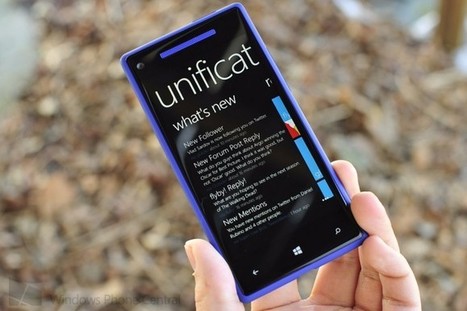
This morning we reported that NotifyMe! was in the works as an independent notification system for Windows Phone 8 and how this will be competing with Liquid Daffodil’s proposed Unification system, which is already in early beta testing.
We now have more info including some new screenshots of what that Unification system will look like, including some features that users can expect when it is finally released. What makes this interesting of course is this is not just conceptual but already being done by Liquid Daffodil, moving beyond the numerous proposed models we’ve seen in the past from the Windows Phone community.
This is real, this is happening, folks.
Unification: Displaying supported apps, with ability to jump to their notifications
Here are some of the main features that are now working in Unification:
Not just Notifications, but Notification History, 100% managed by a user Optional additional information that CAN’T be contained in a Toast or Tile, like 255 character message from the app Single location to view ALL your Notifications for ALL devices, including apps on Windows Phone 7, Windows Phone 8 and Windows 8 (like fantweestic! Super rowi Bros:TweetWerks) We’ve been told that all of Liquid Daffodil’s apps that utilize notifications have been updated to include Unification support and are pending Store approval. Likewise, for those wondering yes, Windows Phone Central is planning to opt-in with our app as well and we hope to be one of the first non-Liquid Daffodil apps to support this system at launch.
The big hurdle that Unification obviously faces is third-party app developers adding the line of code to their apps. In reality, that’s a simple step and since it is free for them, there really should be no excuse to not do it. But the question remains if users will start demanding that their favorite apps opt-in to Unification or, like the nascent ‘homebrew scene’, it remains a small minority. There is also the larger problem if major services like WhatsApp or Facebook would ever join the movement, which would seem important for the concept to take off.
For developers, the system is seemingly very simple and secure:
Free to developers It only takes one line of code Secure and encrypted It offers way more than an eventual Microsoft solution, especially Windows Phone 7 notifications AND “additional” messages As Unification comes closer to being a reality, we’ll see about posting those developers/apps that have signed on to the system, to help build momentum. What do you folks think?
Are you a developer and wish to get involved and participate in the beta of the Unification service? Be sure to contact the team at unifyus@liquiddaffodil.com. Liquid Daffodil are after all developers who support Windows and / or Windows Phone. Unification is a free project to participate in (and will be free once the service hits gold and..
A couple of days ago the Instagram icon was spotted on a Nokia Lumia 620 promotion banner, stirring up expectations near and far. By itself, the banner probably means nothing. Could be nothing but a careless photoshopping error from the designer, right? But now interesting rumor is coming out of China, the wonderland of leaks, again pointing to Instagram availability on Windows Phone.
Chinese site WPDang got words from its unnamed informant that Instagram for Windows Phone does exist, and it's now in the testing phase already. Maybe to compensate the much belated availability, the Windows Phone version will have one more filter than its iOS counterpart, but shamefully it wasn't indicated what exactly the Windows Phone exclusive filter is named or what it looks like.
The app is said to be coming "soon" to Windows Phone 8 devices (no love for Windows Phone 7.8), only for Lumia devices. It wasn't indicated for how long the app will remain Nokia-exclusive, if Instagram for Windows Phone will be hooked up to the OS camera app as a lens or if the app will extend beyond the Chines Market.
For now, we'll sit on the fence and watch how the latest Instagram for Windows Phone rumor develops.
When it comes to stocking up your photographic app arsenal, Nokia’s Panorama app – exclusive to Nokia Lumia Windows Phone 8 smartphone owners – is a must have if you want to capture the wider picture.
Cinemagraph for Nokia Lumia just got better. It's now easier to see which frame you're in so you can have better looping cinemagraphs without visible breaks. Those are the best cinemagraphs in my opionion. Nokia also added styling options to give your cinemagraph a certain look. This is similar to creative studio for your regular photos.
One of my annoyances with Windows Phone has been the fact that my profile picture on the “Me tile” always ends up horribly pixelated and blurry once my live account syncs with the Microsoft servers. This kind of defeats the purpose of having such a beautiful high resolution screen such as the 920′s seeing how the picture ends up looking even worse than they would on a Wvga screen. The reason for this ugly compression as far as I can gather is the fact that the images are stored on Microsoft’s servers; and compressing the images into oblivion is just a way to cut down on bandwidth used during sycning.
Usually once you change your picture through the phone it will remain crisp and beautiful until it syncs with the Microsoft server for the first time; after which you end up clawing your eyes out; thankfully there is an easy solution for those of us who have Facebook linked to our phones.
Recently I updated my FB profile picture, which had my 920′s me hub picture also update immediately to mimic the change; however I noticed that the picture remained high quality and crisp. A few days later I changed my Microsoft account’s (the one I used on my phone, Skype/messenger as well as my Windows 8 Laptop)to match the one I used on Facebook; instantly I was reverted back to low resolution land.
The easiest way I’ve found to fix this is to simply change your Facebook picture independently from your live account; since the Facebook picture remains on FB/Skydrive rather than being sent to Microsoft’s servers. If you do want to change your Microsoft account’s picture as well; through the phone choose your new picture (Me hub–> click on your current picture –> select new one) then choose “send to” and select whatever you want except Facebook; then change your Facebook picture to whatever you like (in other words your Facebook picture should be the last thing you change).
*Hint- you can change the Facebook image from your phone by navigating to the “Profile pictures” folder in your albums; just choose your current picture, update; then delete the newly updated pic from Facebook on your browser (since you’d end up with two same profile pictures).
-I realize this probably isn’t an issue for most of you, but hopefully it clears it up for some of the people who did have this problem.
Microsoft confirmed that all current Windows Phone 8 smartphones will be upgradeable to Windows Blue update--next unified software update for tablets, laptops and phones.
The update is said to come in yearly cycle and this 2013 we can expect a Windows Blue software update. Unfortunately, this update won’t arrive or will not be compatible to WP 7.5 devices. These devices are older Nokia Lumias such as Lumia 800, 900, 610,710 or 510.
The main reason to the missing support for WP7.5 is the hardware. All older Windows Phone came with single core processor over the dual core found in current WP8 devices.
Some teases were also shared by Microsoft, “Over the course of the next several months, I wouldn’t be surprised to see some exciting new devices and more interoperability…”, said by senior manager, Greg Sullivan.
Windows Blue-powered Lumia EOS 1000 PureView?
So does this tease points to a Lumia EOS with 41MP sensor like 808 PureView? We will know more in the coming months.
But are you ready for the Windows Blue software update for WP8, tablets and Ultrabooks to come?
To get content containing either thought or leadership enter:
To get content containing both thought and leadership enter:
To get content containing the expression thought leadership enter:
You can enter several keywords and you can refine them whenever you want. Our suggestion engine uses more signals but entering a few keywords here will rapidly give you great content to curate.


 Your new post is loading...