More Info Nokia Lumia 920 official: Dual-core 1.5GHz Snapdragon S4 CPU, 8MP PureView camera...
It's been almost a year to the day since we reviewed Nokia's first Windows Phone and now we're staring at its second-generation flagship, the Lumia 920. Since the Lumia 800, Nokia's taken a pretty big role in improving Windows Phone's standing in a crowded (but lucrative) smartphone battlefield. While it may be sharing the spotlight with the new HTC 8X, this slab of hewn polycarbonate has garnered plenty of admirers. No doubt, a large chunk of those would-be phone buyers are, for better and worse, lusting after the phone's PureView imaging tech -- and after our early tests, it looks like it could be just as impressive as the lossless optical zoom seen on the PureView 808.
The Lumia 920 dominated Nokia's presentation at Microsoft's Windows Phone 8 press event a few months ago, with the smaller Lumia 820 barely getting a look-in. It's got a "better-than-HD" 1,280 x 768, 4.5-inch high-contrast IPS display, built-in contactless charging, solid build quality and more of Nokia's exclusive software additions. This time, at least on hardware specifications, the company aims to put its flagship on equal footing with the likes of the Galaxy S III and the iPhone 5. Can Nokia's biggest and (literally) brightest smartphone maintain its place at top of the Windows Phone pile? How does that camera fare with extended use? And will the Lumia 920 offer enough to pull you away from Android or iOS for your next phone?..
Microsoft is making a pretty big deal about apps which exploit unique Windows Phone features like Live Tiles. Apps which are now so equipped will have it highlighted in the app description as can be seen in the screen shot above.
Microsoft have said previously it is the apps with live tiles and which exploit Windows Phone features which tend to get the sales, so hopefully highlighting this feature will encourage more windows phone devs to add them to apps.
Following the launch of Windows Phone 8 earlier this week, and in the footsteps of an updated Mac Connector and Windows 8 style Windows Phone app, comes the Windows Phone app for Windows 7 and Windows 8, for connectivity and sync between Windows...
One of the interesting omissions from Microsoft's recently launched Windows Phone 8 operating system is the lack of a notification center. Android and iOS both include a system to collect the various alerts triggered by applications, but Microsoft is lacking that crucial element. During a session on notifications at Build today, Microsoft's Thomas Fennel strongly hinted that the company is considering a notification center for Windows Phone.
"Because we ran out of time," admitted Fennel, after being questioned on the lack of notification center by an audience member. "It's very very important to me… we get tons of feedback from developers that they want something like that as well. I promise we're thinking very very hard on that one." The lack of notification center is evident when a notification is triggered and disappears, especially when a Live Tile is not enabled for that particular app. Other Microsoft representatives that The Verge has talked to at Build this week have pointed towards Live Tiles as a way to display notifications, but it's clear that Microsoft is considering a system to aggregate toast notifications for a quick overview.
We take a quick look at some upcoming Windows Phone 8 apps, including Urban Spoon, Words with Friends, Cut the Rope, Groupon, Hey DJ!, Angry Birds Roost and ...
Well it seems Microsoft didn’t announce all the WP8 features yesterday, seeing as how a new feature was discovered in a video today; an eagle eyed viewer spotted a Lumia 920 with “Grouped Tiles” on the home screen, grouped into “Games” and “Media” ins a sort of pseudo-folder. Even more interesting is the fact that users who have gotten there hands on the HTC 8X (and fully reviewed it) failed to point out such a feature, so is it possible we’re looking at the first of Nokia’s Software Customizations of WP? ...
...Now that the Lumia 920 is up for sale at Rogers Canada unboxings and reviews can’t be far off; and the first of them has just arrived.
Unboxing & setup:- I’m really digging the black chrome around the camera, much nicer than the silver on previous versions; also the new Windows Phone splash screen looks more attractive, just wish they’d do away with the carriers name during boot...
Let’s be clear about something: Windows Phone 7 was simply a warm up act for Windows Phone 8. It was the start of something big and different for Microsoft, a way for them to take a distinctive approach to the current smartphone exemplar. But Microsoft were hindered by numerous roadblocks: an aging kernel (the core of the OS), limited hardware and a desire to be more conservative in features waiting instead for user-feedback and to see how people actually use their phones.
With Windows Phone 8, the gloves are off.
There are two areas in which Windows Phone 8 differs from its predecessor: the core of the OS has been updated with the NT kernel and the addition and refinement of features. Consumers don’t need to know about the kernel specifics but they will see the results: new, top of the line hardware. That hardware will be evident in a few weeks when devices like the HTC 8X and Nokia Lumia 920 become available. ...
With the official launch of Windows 8 comes the official support of premium cable content via one of the various CableCARD tuners originally designed for Windows 7 Media Center. Silicon Dust is at the front of the pack as Media Center on Windows 8 is already officially supported and the documentation is available for both the HDHomeRun Prime as well as the ATSC or QAM HDHomeRun. The only feature we noticed was not supported for now, is WMC Sync. Ceton is still working on the official driver for its InfiniTV 4, but reassures us that the Windows 7 driver "does work relatively well," although, is unsupported -- the real loss here is that there are no plans to bring the InfiniTV tuner sharing feature to Windows 8. Last up is Hauppauge, who doesn't have a single mention of support of Windows 8 for the WinTV-DCR-2650 on its site (we reached out to them, will update once we hear back). Of course, support by Media Center and Windows 8 is one thing, but we're really waiting for a mention that any "Windows Store Apps" that can play nicely with all this premium HD content.
Silicon Dust WMC8, Silicon Dust HDHRP, Ceton Windows 8 Support
Two years after launching Windows Phone 7, Microsoft is starting up again with a new core powering Windows Phone 8. Are there enough improvements and will there be enough marketing to bring the masses to the platform this time around?...
...What are the major new features in Windows Phone 8?
OK, so now let's get into Windows Phone 8 and see what Microsoft did to improve on Windows Phone 7/7.5. Keep in mind that some of these new features may also be manufacturer specific and I'll try to point that out....
Now that businesses can buy Windows 8 and RT devices how do you run your own apps on them? It should be easy, but licensing issues add complexity...
However, if you go out of your way to buy tablets for use within your organization - whether you buy 10 or ten-thousand, it's reasonable to expect that you can install apps that you build to support whatever it is that you want to do. Hence "sideloading", the process that lets you install whatever you want on your own devices.
(For what it's worth, for me, the more restrictive you can possibly be in terms of which software you can install on a device the better, especially on post-PC devices.)
But on Windows 8 and Windows RT the sideloading story is quite difficult to get your head around, and it has the feeling of having been slapped together at the last minute. Let's look at what you need to do...
Microsoft's Windows Phone 8 event takes place later today -- where we expect to find out exactly how the integration between WP8, Microsoft's new mobile OS, and its new desktop OS Windows 8 will work...
...The app allows WP8 users to “get an overview of what’s on your phone, add photos, videos and music from your computer, find apps and dive into each category on the phone and share with other apps, or delete items to make space”, according to the app description. “Your computer and your Windows Phone 8 work together seamlessly with the Windows Phone app so you always have your photos, videos, and music, and more where you want them,” it adds. The Verge notes that it doesn’t work on Windows Phone 7-based devices, as you’d expect.
Here’s the full run down of features, according to the app listing
We have already shown you how to use the Refresh and Reset features in Windows 8, now we are back to show you how you can create a custom refresh image.
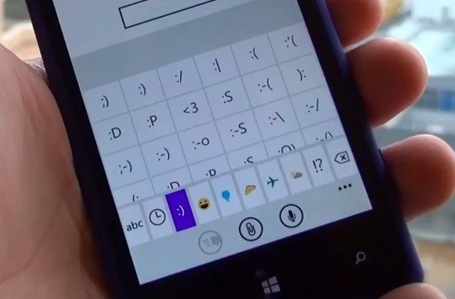
First up, here’s a look at the re-organized emoticons available when typing on WP8 (text/email/tweeting/browser/whatever).
Notice that instead of a big list, they’re organised into these tabs (are tabs metro?) that make it easier to see more emoticons of different types and a much wider variety too.
As mentioned, not a major feature but lots of small improvements that improve user experience.
Microsoft's Surface RT has launched, but most have yet to receive their tablet, despite promises from the software giant. From a ZDNet crowdsourced effort, here's what we know.
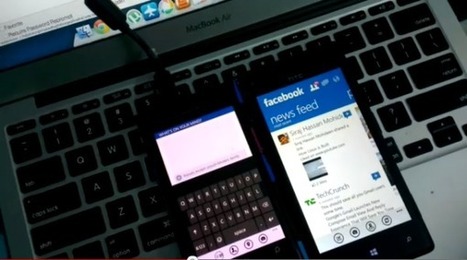
...Here’s a quick video Dhruv from FoneArena posted comparing the official Facebook app running on Windows Phone 7.5 against Wp8. The point of this video was to show the differences in Active resume between apps; where in 7.5 tapping the live tile/application in menu would restart the app all over again and cancel any progress, while in WP8 re-entering the app from the tile picks up from where you left off rather than restarting. One other thing I noticed was the massive difference in application loading speed; the Facebook app for 7.5 is amazing, but it’s downfall is the super long loading time (~5 seconds); this seems to have been fixed with WP8 where the app loaded almost instantly....
Microsoft Surface RT Review - Tablet Reviews by MobileTechReview...
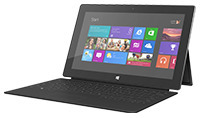
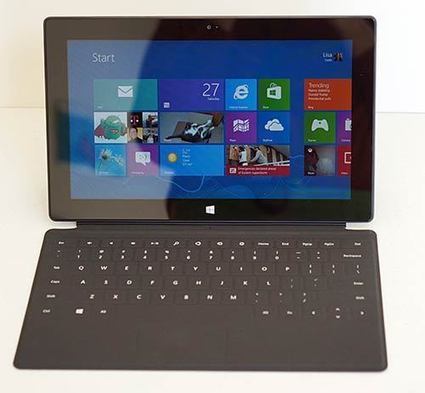
...Microsoft's Surface tablets are one of the most important technology milestones of the year. Yes, the Surface RT is Microsoft's first computing device, but it's also the perfect canvas for Redmond's boldest Windows OS release since Windows 95, if not Windows 1.0. Microsoft is taking a big leap with Windows 8 and it's dualistic UI that has both Live Tiles in the Modern UI (formerly called Metro) and the traditional, though updated, Windows 7 standard desktop UI. Modern UI is geared toward touch, because touchscreen tablets are the way of the future, not to mention a wildly profitable platform for Microsoft's competitor, Apple. To showcase the touch experience and bring more attention to that aspect of Windows 8, Microsoft is offering two sexy tablets, the Surface RT we look at in this review, and the upcoming Surface Pro that will run on an Intel processor....
...With Windows Phone 8 we see a marked upgrade to the baked-in capabilities of maps, as Nokia have embedded their “where” platform right into the heart of the OS. Nokia have just updated their Nokia Maps app to 3.0 and with it we start to see some of the big improvements that these underlying changes to the OS will bring. We think you're going to like it.
With Windows Phone 8 all apps will now be able to take advantage of the underlying improvements to mapping platform so offline mapping and turn by turn will be available to all. We have seen how well Nokia’s mapping apps perform on Windows Phone 7 with products like Nokia Drive so we know they can bring the goods to the table. It’s of no surprise to see that the company are already hard at work to make sure their location apps have some of the best experiences available in the marketplace.
Nokia Maps 3.0 offers true offline use so that you won’t be caught out while navigating in poor signal areas and the mobile implementation of venue maps . You'll also get vastly improved directions while navigating on foot.
There is still more to come with Nokia Maps, pedestrian navigation will get spoken turn-by-turn events in a future update and we know Nokia are always keen to keep these things fresh. Following is how things are looking as the app reached its 3.0 milestone..
News and Perspective covering the top stories, events and activities from Microsoft. The content for this blog includes the official information and stories from all of Microsoft's primary businesses....
...he developer opportunity on Windows has never been greater. Between expected PC shipment volumes in the coming year and the incredibly flexible terms of the Windows Store, the path to app monetization on Windows represents a huge business opportunity to everyone from the independent developer with a great idea to the world’s biggest companies who develop apps, games and device experiences to reach customers, extend their brands and drive revenue. It’s easy to publish to the Windows Store and Microsoft offers the most developer-friendly revenue sharing terms on the market. Speaking of devices, we’re carrying forward momentum from our recent launch events to showcase the broad array of incredible tablets, notebooks, ultrabooks, desktops, All-in-Ones and phones that our OEM partners are bringing to market, as well as Microsoft Surface, all of which are very much a part of the developer opportunity on Windows.
Apps and Experiences on Windows
Windows is more accessible to more developers than it’s ever been in our history. Whether you’re a developer who builds apps for the Microsoft platform today, or an HTML5 developer looking for a new path to app monetization, everything you know about writing code comes with you to Windows 8, and today’s availability of the SDK for Windows Phone 8 makes building apps and experiences that span PC, tablet, and phone easier than ever before.
We’re seeing great momentum in the Windows Store. Companies such as Expedia, Fitbit, Hotels.com, SAP, and Twitter are all building apps for the Windows Store. During the keynote today, we showcased a number of them, from companies like Disney, LEGO, PayPal, ESPN, as well as Microsoft’s Bing and Skype apps for Windows 8, showing how applications are at the center of the Windows experience:
Disney’s Phineas and Ferb game, “Agent P Strikes Back”, aka Perry the Platypus, on Windows 8, and forthcoming on Windows Phone 8, showcases how easily browser-based games can become Windows Store apps. Disney developed the game for Windows 8 by taking advantage of Windows 8 HTML5 support as well as built-in capabilities like in-game sharing and support for an Xbox controller via USB. “Agent P Strikes Back” is the first of a series of games that Disney will bring to the Windows 8 platform, including the hit mobile games “Where’s My Water?” and “Where’s My Perry?”. Dropbox’s new Windows Store app, coming soon, offers a cloud based storage and synchronization service for photos, documents and videos on Windows 8. ESPN previewed a Windows Store app that re-imagines the ESPN experience with aggregated news, scores and video as well as ESPN The Magazine, ESPN podcasts and photo galleries. With Windows 8, ESPN’s app allows fans to pin specific sports and teams to their Start Screen. The LEGO Group will deliver LEGO® Life of George, the award winning game that combines real LEGO Bricks and a smart device, with new unique features on Windows 8 and Windows Phone 8. With LEGO® Life of George, the LEGO Group is using Windows on mobile devices to explore the next frontier of childrens’ play, combining the physical world of LEGO bricks, the virtual and networked experiences and a child’s imagination and creativity. NASA's Jet Propulsion Laboratory recently released a number of free experiences on PCs, Windows Phone and Xbox geared for inspiration and learning in science, technology, engineering and mathematics (STEM). Making learning and discovery accessible, NASA's Mars Exploration Program has now released “NASA Be A Martian” and “Mars Rover: Curiosity” as free Mars-related apps for Windows 8 PCs. PayPal’s Windows 8 API enables developers to use the PayPal payment system within their Windows Store apps for simple and secure commerce activities for the more than 100 million active PayPal users. Crowdstar’s free Windows 8 game, Fish With Attitude, uses PayPal in-app purchases of game characters. Unity, the cross-platform game engine and development environment, is deep into development on the Windows Phone 8 add-on which will give game developers the power to deploy new and existing games to Windows Phone 8. Since unveiling Windows 8 at Build 2011 last year, we’ve talked a lot about our “no compromises” approach to Windows 8, and to illustrate the point, I had the opportunity today to demo the traditional desktop experience of AutoDesk’s AutoCAD app alongside SketchBook, the company’s immersive and touch-centric Windows Store app. It’s a great touch experience combined with a great, tried and true mouse-and-keyboard experience, and they come together in a real-world scenario that doesn’t require compromise. With Windows 8, developer creativity has no limits … you can create touch-first scenarios for when touch works best combined with a mouse-and-keyboard approach for when more traditional inputs are still the way to go.
Development across Windows 8 and Windows Phone 8
I touched on this earlier, but it bears repeating … the platform commonality and shared core between Windows 8 and Windows Phone 8 is very much a part of the opportunity. This is about enabling developers to quickly get from a great idea to a money-making app running on multiple devices, by reusing their skills and, in some cases, the actual code, all built using a common toolset in Visual Studio. The new Windows Phone 8 SDK enhances the platform opportunity with new developer features such as...
With a paradigm shift in how we look at a Start screen, Windows 8 has added a lot of shortcuts for easier navigation. Check out a loooooong list of shortcuts for Windows 8 to make your life simpler.
Expandable storage is a wonderful thing, but its implementation can sometimes leave something to be desireTake Windows 8, for instance -- its photo, movie and music apps leverage Windows libraries to access users' media collections, but won't allow users to include removable storage in the app-accessed party of indexed folders. Sure, you can keep all your media on one device, but half it will need to be accessed in a slightly roundabout way. This simply wasn't good enough for Toni Fowlie, who wanted all of her media -- from both her Surface's local storage and its microSD card -- to appear in the same library. She used an old NTFS feature to trick Windows into thinking her microSD was part of her device's local storage, and her efforts are worth sharing.
For what it's worth, Toni's little trick is hardly new, and it's not unique to Windows 8 users -- it's actually a feature of the NTFS file system. It's called a junction point, and put simply, it acts like regular directory, but points all actions to a remote folder. At first, this sounds a bit like a standard Windows shortcut -- but since this operation is working in the file system itself, rather than as a part of the Windows shell, programs, windows explorer and the command prompt all play along with the redirection nicely. There are programs available that can help you set up a junction point, but Toni opted for the old fashion method -- the command prompt.
Before creating the junction, Toni laid down some groundwork: a target folder in her root C:\ drive and four media directories on her SD card -- one for each library: documents, music, pictures and videos. A prompt command then made the links: mklink /j c:\sd2\d d:\documents, for example, creates a junction point with the label "d," which acts like a folder and links directly to the documents directory on the device's SD card. Finally, Toni added the created junctions to Windows 8's list of indexed locations and included those locations in the appropriate libraries. Viola! Extra storage for all that extra media, and easily accessible in Windows 8's fancy apps, too. Although this feature isn't exclusive to Microsoft's latest operating system by any means, it's certainly a useful workaround for users who want to leverage their removable media in a more ...
You can get a smoking deal on an upgrade to Windows 8 Pro if you're ready to make that purchase before January 31, 2013.
Microsoft has simplified the upgrade process for Windows 8 dramatically, at least for early adopters, starting with its decision to sell only two retail editions.
Between now and February 1, 2013, Microsoft is offering upgrades to Windows 8 Pro, the full-featured edition whose Windows 7 equivalent typically costs $200. (Upgrades to the less expensive base version of Windows 8 are not available at all right now, and won’t be available until these initial promotional offers are over.)
That makes for some smoking deals. But there are still a few gotchas to be had in the process. And one inexplicable pricing decision actually penalizes customers who are among the first to purchase PCs preloaded with Windows 8.
Here are the details.
If you are currently using Windows 7, Windows Vista, or Windows XP, you qualify for a $40 upgrade to Windows 8 Pro.
Start here to launch the Windows Upgrade Assistant, and you will rapidly get to this screen: ...
To get content containing either thought or leadership enter:
To get content containing both thought and leadership enter:
To get content containing the expression thought leadership enter:
You can enter several keywords and you can refine them whenever you want. Our suggestion engine uses more signals but entering a few keywords here will rapidly give you great content to curate.


 Your new post is loading...