When it comes to social media you’ve got so many different types of users. You have people who apply filters to cheap food, entrepreneurs sharing the latest SEO ‘tips and tricks’, and your Grandma replying to a comment in a status update. When it comes to Twitter, some people obsess over their perceived ‘klout’ and want to track the number of followers and other statistics. Follorep is a Windows Phone app that helps you keep track of some of those Twitter stats.
We were hoping to tell you guys about Follorep a handful of weeks back, but it was still rough around the edges. The developer recently put out an update that makes it a nice recommendation for Twitter users. There are a few things that need to be addressed, but it’s not bad at all, especially for the price.
Follorep is at its heart, an app that helps you track the number of followers you gain, lose, or regain overtime. When you first launch Follorep you’ll sign in with your Twitter account and give the app permission to read and write on behalf of you. This comes in handy and you’ll see why. From there you’ll run an analysis to get an initial count of everything – followers gained, lost, and regained. If it’s your first time using Follorep you probably won’t see anything because the app has tracked you before. Anytime you run an additional analysis you’ll see the changes if you have any. ...
Read more: http://nokia.ly/XAii7m The new HERE experiences are connected and work seamlessly together, making it easy to transition from walking to driving t...
So a week ago I was a building an application that was planned to be running on both windows 8 and windows phone 8 and since both of them are running on the same logic and both of them was written in C# and XAML it should be very easy.
So after 2 days, I faced 2 problems with my approach:
That both of the UI are using XAML doesn’t mean that they are the same both of the have their own components and navigation system you can see some examples in the images below.
Similar features with different API implantations some of these features are: Application lifecycle (PLM) Tiles and toast notifications System services Networking differences Background processing Image/video capture App bar So in order to solve these problems I had to abstract the application logic from the UI and I achieved that by using MVVM, It’s very similar to MVP (model-view presenter) and MVC (model-view-controller).
MVVM is an architectural pattern that is composed of three parts:
Model handles the data. View Model handles the logic of converting the model data into data that the view can use. View handles the UI Using MVVM helps structure your code to make it reusable between Windows 8 and Windows Phone 8 Both platforms use XAML and support data binding. So I found a very easy tutorial on how to implement MVVM you can find it in the video below presented by Jerry Nixon and you can see his full blog post here:
Trivial Pursuit, one of the Xbox Live titles that is exclusive to Nokia, is now available for Nokia's Windows Phone 8 devices. Prevsiouly the game was only available for Windows Phone 7.8 devices. ...
When Nokia launched its first cameraphone, in 2002, nobody predicted that six years later the company would be world’s biggest manufacturer of cameras. The same could be said of Instagram. In 2010 when it launched, you’d have been a brave person to forecast that in two years Instagram would have 100 million users sharing over a billion photos. But fantastic ideas have the power to set our world alight and mobile photography has done just that.
Instagram love is in the air
And that’s why we’re helping the Window’s Phone community show their passion for Instagram. Last week, we launched the#2InstaWithLove on the Windows Phone market place. Our aim is simple: To help Windows Phone users speak directly to Instagram and the Instagram community in a way they respect, through beautiful photography. The response has been incredible. In fact, downloads of #2InstaWithLove are off to the fastest start of any Windows Phone app ever.
Power to the Windows Phone people
But it’s not just Nokia Lumia lovers who want to see Instagram on Windows Phone. The entire Windows Phone community is eager to use this fantastic app. It’s for this reason we’ve made #2InstaWithLove available to every other Windows Phone user, regardless of device. So now more people than ever can profess their love of photography and Instagram. Just download it onto your Windows Phone then snap and share.
Why have we done this? Marco Argenti, our VP of Developer Experience: “This movement is about the people expressing their opinions, sharing their experiences, and making their voice heard. Many have asked to make the app available for all Windows Phones, and we listened.” ...
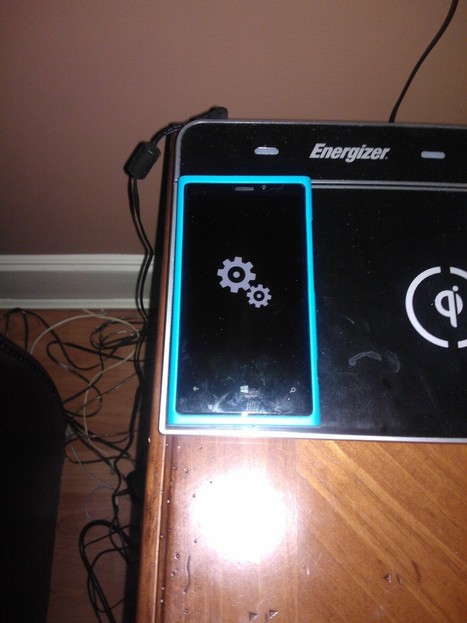
Ok yesterday, my Lumia 920 kept rebooting powering itself off numerous times, I decided to do a device reset because I had no idea what was the cause, maybe an app but had so many loaded & didn’t have the time to try and go through them 1 by 1. I did a device reset & all seemed well until I had the spinning gears for about 25- 30 minutes. I waited and waited and then knew I was in trouble over an hr had passed. I spoke to @jjkleebecause I know he had the same issue and knew the method to resolve it but to no avail, it didn’t work. I then contacted @NokiaLindsay from @NokiaCareus she told me the same method as @jjklee but I was doing something wrong. So I will post the exact steps on how to revive your Lumia 920 when you are stuck withspinning gears.
1- Wait till phone battery completely dies
2- Remove Sim
3- Put phone on wall charger
4-Let charger charge the phone and turn itself on automatically (do not power it on Manually)
This is all I was told to do & it worked, the issue I was having was that I kept putting powering it on manually & was met with spinning gears each time. I then said the heck with let battery Die and put it on charger, when it had enough juice to power itself on I saw the nokia logo screen the the wp8 splash screen & new all was good. Please let us know if this works for you & hopefully you never have to try it.
I would like to thank @jjklee @NokiaLindsay & @NokiaCareUs for the help
If you live under a rock then you might have missed the news yesterday that Google is discontinuing, terminating, killing their highly popular Google Reader service in July of this year. The news comes as a shock to many, including myself, that Google would do such a thing. Perhaps the most shaken up are 3rd party developers who’ve put a lot of work into creating apps for the service. The developers of NextGen, my favorite GR app for Windows Phone and Windows 8, comes to mind.
The official NextGen blog has addressed the issue to its users and here is what they said:
“But, the even bigger surprise to us is your support for Nextgen Reader. Since the announcement, we’ve received hundreds of emails and messages on Twitter/Facebook/etc. Please be assured that Nextgen Reader will continue to work perfectly across Windows & Windows Phone and we’re already looking into various alternatives:
Hosting our own service on Windows Azure. Newsblur support. Normandy – Feedly support. More importantly, if you have any thoughts or suggestions, please share them below in comments or feel free to send a mail, or reach us via Twitter and Facebook anytime.”
That is great news and I hope they succeed in whatever road they take. I mentioned in their comment section today that their name, NextGen, is perfect branding to lead us into the next generation of blog/news reading. Besides it being a staple on my Nokia Lumia 920, I also use the Windows 8 app on my laptop daily. It’s crucial for me that they push forward and come up with other solutions.
News and perspectives covering the top stories, events and activities from Microsoft. The content for this blog includes the official information and stories from all of Microsoft's primary businesses.
Twitter for Windows 8 brings you all the design, features and functionality of Twitter combined with the fast and fluid technology of Windows 8:
· The Discover (#) icon shows you new topics from people in your network and other information like Trends and Who to Follow suggestions.
· The Share charm makes it easier to tweet links, pictures and opinions to your followers from anywhere in Windows 8.
· Create the ultimate screen with Snap view on Windows 8. Drag Twitter into the narrow side of the screen and slide in another favorite app. You can stream a live video while you watch the conversation about it unfold on Twitter. Then use the Share charm to join the discussion.
While the design for Twitter for Windows 8 will seem familiar to anyone who has used the Twitter app for Windows Phone, the new Twitter app takes advantage of Windows 8 in some compelling ways, according to Windows blogger Brandon LeBlanc.
“First off – it has a Live Tile that allows you to quickly see who has replied to you on Twitter right from your Start screen and you’ll get notifications too for replies and direct messages,” he writes.
Head on over to the Windows Experience Blog to get the rest of the story.
Posted by Jeff Meisner Editor, The Official Microsoft Blog
Microsoft today released updated for Microsoft Surface Pro and Surface RT that brings in improved performance, Wifi reliability and more.
For Surface Pro,
The March cumulative update includes improved Surface Wi-Fi reliability, connectivity in various scenarios, and performance improvements including:
Fixes to Wi-Fi reliability allowing for better roaming and improvements to “Limited” connectivity scenarios.Windows To Go feature is enabled.Improved onscreen keyboard detection synchronization when going in and out of sleep.
For Surface RT,
The March cumulative update includes improved Surface Wi-Fi reliability, connectivity in various scenarios, and performance improvements including:
Fixes to Wi-Fi reliability allowing for better roaming and improvements to “Limited” connectivity scenarios.Resolves issues with integrated volume button.Improved Type and Touch cover typing experience on soft surfaces and when devices and keyboard are lying flat.Resolves issue with random muting.Trackpad performance improvements.
Update your Surface devices and enjoy these updates.
Heads up, Windows users. Tomorrow, Microsoft will release an update for Internet Explorer 10 that enables Flash content in both Windows 8 and Windows RT. As many of you are likely aware, the "full web" experience has been limited to the desktop browser on Windows 8 up until this point, which was an intentional move by Microsoft in order to improve performance, battery life and the touch experience. With the update, Internet Explorer 10 users for Windows 8 / RT will be able to access Flash content on all but a few sites that Microsoft has selectively blacklisted due to their negative impact on the user experience. Naturally, users of IE10 within the Windows 8 desktop environment will still be able to access all Flash-enabled content, regardless of whether the site is on the blackballed list. Now that you've waited this long, what's another day among friends?
Windows 8 Tips: How to setup GMail in the Windows 8 Mail app tutorial. This is a step by step walkthrough on getting a GMail account setup in the Windows 8 Mail app.
Last week we reported on the first signs of an upcoming Nokia firmware update (1307) that would help improve the management of the internal memory of Nokia's Lumia Windows Phone devices.
I got a couple tweets today from new Lumia 620 users saying that their new devices have come with the latest "storage management" in Windows Phone. Which allows you to clear your temporary files an...
Nous vous parlions vendredi dernier des petites horreursque nous avons eu la surprise de découvrir en surfant sur une connexion 3G SFR. A la lecture de certains commentaires, sur Refletscomme sur les trop rares sites qui semblent s’intéresser à ce qui constitue une atteinte manifeste à la Neutralité du Net, il nous a semblé bon de vous expliquer avec un peu plus de détails pourquoi les pratiques constatées chez SFR sont graves et pourquoi ni les utilisateurs, ni les éditeurs de sites web ne devraient un instant tolérer ce genre de pratiques. Le message que l’internaute va chercher sur Internet est altéré et modifié par l’opérateur, comme si le facteur ouvrait votre courrier et en modifiait le contenu avant de le faire parvenir au destinataire.
Votre opérateur vous ment
En ne procédant à aucun avertissement sur le fait qu’il modifie le code source des pages ou qu’il optimise sauvagement la qualité des images en les compressants, SFR ment sur la capacité de son réseau. C’est bien mignon d’offrir de la 4G kivasupervite®, mais est-ce le réseau qui est rapide car correctement dimensionné ou est-ce que le réseau est rapide car il manque la moitié des bits que vous souhaitez consulter ? Si le réseau d’SFR a des problèmes de congestion, c’est qu’il est sous-dimensionné. A l’opérateur de le dimensionner correctement en réalisant les investissements nécessaires pour le rendre plus fluide, quite à vendre son abonnement plus cher. Mais en aucuns cas ce dernier ne peut s’arroger le droit de décréter que ce sont les contenus qui trop lourds et non son réseau qui n’est pas assez performant. En procédant à des optimisations sur les contenus dans le dos des utilisateurs, SFR sert des pages plus légères, qui vont plus vites, mais il s’agit de pages dégradées pour faire croire à l’utilisateur que son réseau est plus rapide que celui du voisin. Dans les faits, il ne l’est pas puisqu’il taille dans les contenus ! Si un opérateur se permettait de dégrader les MP3 ou la VOD que vous avez légalement acheté sur un site sous prétexte que ça consomme trop de bande passante sur son réseau, tout le monde hurlerait au scandale. Et bien pour les images, c’est la même chose.
SFR ne propose pas explicitement de solution pour afficher « le vrai contenu » des pages
Ce point est la conséquence du premier, comme SFR vous ment délibérément, il ne vous propose évidemment pas de moyen, coté utilisateur (les éditeurs de sites en ont un mais encore faut-il qu’SFR les ait avertis de ce genre de procédé, ce qui n’est pas le cas), d’afficher le contenu original des pages, non modifié par son proxy pas si transparent que ça. Lors du FreeAdGate, toute la presse était vent debout et il y avait déjà de quoi. En activant par défaut le filtre de publicité, Free ciblait surtout Google. L’ARCEP s’est d’ailleurs saisie du dossier et a demandé à Free de proposer cette option sur Opt-In. Deux poids deux mesure ? Nous verrons si l’ARCEP se saisit du cas SFR, bien plus grave que le cas de Free. Mais Free en tapant sur les publicitaires s’assurait une réaction et également un chouette coup médiatique.
SFR altère des oeuvres de l’esprit
En modifiant sauvagement le contenu du HTML d’un site web ou en optimisant de manière sauvage les images des sites web, SFR altère l’expérience utilisateur souhaitée par l’éditeur du site. SFR se substitue ainsi à l’éditeur du site et décide pour lui de l’expérience utilisateur qu’il souhaite délivrer aux internautes. Non seulement il n’est plus dans rôle d’intermédiaire délivrant un message, mais en plus de ça il opère une action très discutable en matière de propriété intellectuelle : Reflets ne se souviens pas avoir signé quoi que ce soit avec SFR pour lui permettre de modifier le source son site web avant de le restituer à nos lecteurs.
Un risque évident de manipulation de l’information
Avec ce genre de solutions probablement une appliance… peut être même du mêmes style que celles utilisés par le régime syrien pour surveiller et censuré Internet, dans les faits, rien n’empêche SFR de coupler un script à son proxy qui remplacera par exemple la chaine de caractères « François Hollande » par « Nicolas Sarkozy ». L’utilisateur n’y verra que du feu. Il faut être conscient que la présence même de ce genre de dispositif est une porte ouverte à d’importantes dérives, à des manipulations d’information, à de la censure.
La sécurité et la confidentialité des échanges
En insérant un dispositif tiers entre vous et Internet, SFR procède à un traitement, une modification et une altération de l’information que vous consultez sur Internet. Les tunisiens, pour ne citer qu’eux, en ont fait les frais avec un dispositif sensiblement similaire : un proxy injectant un javascript dans les pages qui permettait l’interception des frappes sur le clavier quand il ne s’agissait pas de manipulation de certificats SSL avec le « bienveillant » concours de Microsoft. Pouvons nous faire confiance à un fournisseur d’accès qui altère le contenu d’une page web ? Doit-on faire confiance à un fournisseur d’accès qui s’est équipé d’un dispositif dont la fonction est de modifier à la volée les contenus que nous visitons (avec les conséquences que nous connaissons dans certains pays) ? La réponse est évidemment non.
Vous avez dit neutralité ?
Nous affirmions plus haut qu’il s’agissait ici d’une atteinte manifeste à la neutralité du Net. Dans sa définition, la Neutralité du Net implique que tout internaute, à n’importe quel point du réseau, accède aux mêmes contenus. Les contenus originaux, non modifiés par un intermédiaire dont le rôle est d’acheminer l’information. C’est encore plus grave quand une manipulation est opérée à l’insu des utilisateurs. Ici SFR nous sert des contenus qui ne sont plus les contenus originaux. Un utilisateur du réseau mobile SFR n’accède pas au même Internet que les autres. On peut même dire qu’il n’accède donc pas à Internet mais à un ersatz d’Internet.
Tromperie sur la marchandise ?
Ce qui nous est vendu c’est un accès mobile à Internet. Nous ne signons pas un contrat avec notre opérateur pour accéder à son réseau local, mais bien à Internet. C’est écrit en toutes lettres dans le contrat que j’ai signé avec mon opérateur. Or Je n’accède pas à Internet, (pas même au web!) mais à une version modifiée par ses soins d’Internet et du web, modifié par un équipement situé entre Internet et moi et entièrement sous le controle d’SFR, en toute opacité. Oui je me sens trompé sur ce que l’on m’a vendu, et au prix du Mo payé, j’entends bien qu’il ne manque pas un seul octet dans les contenus auxquels je souhaite accéder. La promesse de vente n’est pas tenue, je n’accède à Internet, je n’accède même pas au web.
La suite ?
La suite logique serait que l’ARCEP se saisisse du dossier et mette en demeure SFR :
D’avertir les utilisateurs explicitement des altérations de contenus qu’il opère ;De proposer un mécanisme de désactivation de ces « optimisations » ;De ne pas proposer ces « optimisations » par Opt-Out (ce qui n’est même pas encore le cas), mais par Opt-In (que l’utilisateur choisisse volontairement d’accéder à un internet « optimisé » par SFR, en toute connaissance de cause.
L’ARCEP se saisira t-elle elle même du dossier ? Dans les faits, il y a bien peu de chances. Seul un opérateur peut la saisir, et il faut en outre que ce dernier s’estime lésé pour justifier sa démarche. En outre l’ARCEP est en ce moment en proie à une dissolution de ses pouvoirs. Il semblerait que Bercy, le « gestionnaire de la SARL Internet »‘, n’ait plus spécialement envie de donner les moyens techniques et juridiques à une autorité indépendante gardienne des bonnes pratiques des opérateurs. Bercy a toujours eu la fâcheuse tendance à plus reconnaitre le « marché Internet » et l’ économie numérique au détriment du bien commun universel qu’il constitue.
Well, it’s been one heck of a busy week here at Microsoft! This week, Windows Phone 8 won the smartphone category in PCMag.com’s 2013 Readers’ Choice Awards, the Xbox 360 kept the top console spot in the U.S., the Duke of York visited the Yammer office in London and the Twitter app for Windows 8 was released. Phew! Read more about it below.
And the winner is… PCMag.com’s 2013 Readers’ Choice Awards are in and Windows Phone 8 won in the smartphone category! “According to our survey respondents, Microsoft's Windows Phone 8 clearly bests Apple and Android. In 2012, Microsoft's Windows Phone 7 shared the Readers' Choice Award for mobile phone platforms with Apple's iOS. This year, Microsoft's Windows Phone 8 stands alone at the top, relegating Apple's iOS to Honorable Mention,” PCMag.com writer Ben Gottesman reports. You can get the full story over on PCMag.com.
Keep better track of favorite bands using Buzz app for Windows Phone. Do concert and album announcements tend to get lost in the noise of Facebook, Farmville, and family? Do you usually find out local shows from reviews the next day. If that’s the case, you can stay more up to date on the music scene with Buzz, a recently-enabled feature of Windows Phone 8 that rolls up info from social media and Bing to provide a snapshot of what your favorite bands are up to. Where available, you’ll find it in the Music+Videos Hub when you tap on an artist. Read this post on The Windows Phone Blog to get the entire story. Below is a trio of screenshots from the Buzz app. ...
What are you doing, standing there tentatively at the edge of the pool? Come on in, the water’s lovely and warm. What, it’s not as lovely and warm as the last pool you were in? Someone says it’s as bad as the pool you were in before that? Poppycock. It’s nowhere near as rubbish as that. What’s that hulking great thing in the corner, you say? Ignore it, you don’t need it.
All of this is a rather convoluted way of saying Windows 8 is not as bad as everyone is making out. But there is that one rather large elephant in the room in the form of the Modern UI, or whatever Microsoft’s calling it these days. But here’s the trick: you can ignore it all with the help of a free -- and now portable -- tool called Skip Metro Suite 3.0.
Skip Metro Suite 3.0 allows you to do two principal things: first, you can bypass the Start screen entirely, so after Windows logs on you find yourself at the more familiar looking Windows 8 desktop. Sure, there are changes, but on the whole we like them. There are plenty of new features and improvements here to justify the update.
Second, Skip Metro Suite 3.0 lets you selectively disable the hotspots at the edge of your screen, aimed at touchscreen users wanting quick access to the Charms bar, task switcher or Start menu. Disabling these means your mouse is free to roam at will into the corners of your screen without worrying about triggering something.
And you can still access these elements by using their keyboard shortcuts: [Win] for the Start screen, [Win] + [Tab] for the task switcher and [Win] + [C] for the Charms bar. In short, the Modern UI is kept out of sight (and largely out of mind) – it’s there if you need it or want to explore it, but it won’t get in the way of your day-to-day.
Everything’s achieved via a simple interface -- just tick the options you want to disable, save your settings, reboot and they’re implemented. Better still, version 3.0 of this useful tool has been completely rewritten from the ground up, converting it into a tiny, standalone portable app with no third-party dependencies. Just fire it up each time you want to tweak (or reverse your changes).
Version 3.0 also claims to have squashed all previous bugs and issues by being rewritten from scratch, and in lieu of an uninstaller utility comes with a new option for disabling the program entirely, so Windows 8 is free to perform as Microsoft envisaged.
It’s all very useful, but it’s worth noting that you’re still left without the traditional Start menu (the [Win] + [X] menu is okay, but no real substitute). If you’re looking for all the features of Skip Metro Suite and the old Start menu, install the Classic Start portion of Classic Shell 3.6.5instead.
Skip Metro Suite 3.0 is available now as a freeware download for PCs running Windows 8.
Alex from Rankin Film Productions explains digital white balance on your Lumia and shows you how to improve your photos under a wider range of lighting conditions.
Nokia have teamed up with Rankin Film Productions for year two of Collabor8te -- a scheme to support the next generation of image-makers.
Reading online articles, news stories, or blogs, often leaves us wanting to contribute to the discussion with the author and other readers. That’s where a good commenting system comes in handy, something that Disqus excels at providing.
Still hurting from Google's "spring cleaning" announcement yesterday? Google Reader fans may be out of luck, but Windows Phone users can take heart in knowing that Microsoft made the whitelist for the CalDAV sync interface, which is now shelved to all but developers who get Mountain View's green light.
Early this year, Google announced it would extend support for Exchange ActiveSync on Windows Phone through July 31st, with the implication being that Redmond would build support for CalDAV in the meantime. Luckily Microsoft's work was not for nothing, though -- and this is a big though -- the Windows team won't be adding CalDAV or CarDAV support for users trying to connect a Google account via Mail, Calendar or People apps after January 30th, 2013.
Microsoft quietly removed the ability to make your Windows 8 laptop a WiFi hotspot for mobile devices. You can still do it though, here’s how using Virtual Router Plus.
Gameloft is one of the most prolific and well-loved games developers across the whole range of Nokia phones, from feature phones like the new Nokia 301, to our latest and greatest smartphones in the Lumia range.
We met with Gameloft’s Nicolas Pochez in Barcelona to find out the latest from the company.
It was good timing. Three of the company’s latest games, Asphalt 7, Real Football 2013 and The Amazing Spider-Man went live in the Windows Phone Store recently. The releases mark the first of 12 titles for Windows Phone 8 smartphones scheduled for release over the next few months.
“We aim to bring our top-selling games to the Windows Phone devices,” says Pochez. The 2013 line up will also include Ice Age Village and Dark Knight Rises.
“I’m looking forward to seeing the games on the new hardware,” Pochez continues, “early signs are that performance will be extremely good.”
Gameloft is also a prolific developer for Nokia’s Series 40 feature and smart phones with a strong presence on the Nokia Store. Here, once again, Asphalt is a key franchise for the company, though it finds that there’s a heavier proportion of casual games as opposed to arcade games.
On Nokia Asha, Gameloft has put a lot of innovation into revenue models, with successful experiments in ‘try & buy’ and ‘free-to-play’ models. “We’re one of the only publishers using a ‘freemium’ model on Asha,” says Pochez. “The success of that has helped us to fund further development in Java gaming when many of our competitors are ramping it down.
“So, for example, we have a game called ‘The Littlest Petshop’. It’s about – surprise, surprise – running a pet shop. Not to be stereotypical, but it’s especially popular with young girls.
“We offer the game for free, so how do we make money out of it as a business?
“You can buy your way through some of the more time-consuming aspects of the game with special tokens, bought with an in-app currency. Some people are time-poor and cash-rich, so this in-app buying progress suits them.
“The other way to make money is by offering ways to expand the game by offering in-app purchases. For example new animals or furniture for the shop.
“It’s meant that we need to adopt a new way of thinking about our games. They’re more like services we need to continue to feed and evolve, rather than final products we’re shipping out of the factory.”
Finally, Pochez reveals that Gameloft is working with Nokia to improve the gaming experience by tapping into the different capabilities available on the Nokia platform.
Gameloft won’t let us tell you any more about this just yet. But watch this space…
This is the demo for drive assistant, an app that uses voice commands to launch Windows Phone 8 maps (Here Drive + Beta) and automatically calculates the route to your predefined destination. You can use the search function in the maps inside the drive assistant app to look for an address or business and get directions. I also show you how to add and remove voice commands.
After taking videos on the Surface RT, playing them on your HDTV via Xbox 360, can't be done from the Camera app. Here's how to find and stream your videos.
Windows 8 Video Tutorial shows how to create Power Shortcuts on the Metro Screen that allow instantly shutdown, restart, log off or lock your Windows 8 PC.
Alex from Rankin Film Productions explains digital white balance on your Lumia and shows you how to improve your photos under a wider range of lighting condi...
To get content containing either thought or leadership enter:
To get content containing both thought and leadership enter:
To get content containing the expression thought leadership enter:
You can enter several keywords and you can refine them whenever you want. Our suggestion engine uses more signals but entering a few keywords here will rapidly give you great content to curate.


 Your new post is loading...