


We don't think it'd be so easy to find 25 ultra-lovable facts about most devices. But, the Nokia 2520 isn't just any device. It’s Nokia’s first ever tablet and it’s had rave reviews from all around the globe from Abu Dhabi to the Americas.

 Your new post is loading...
 Scoop.it! We don't think it'd be so easy to find 25 ultra-lovable facts about most devices. But, the Nokia 2520 isn't just any device. It’s Nokia’s first ever tablet and it’s had rave reviews from all around the globe from Abu Dhabi to the Americas. 
No comment yet.
Sign up to comment
Scoop.it!

Dell has launched the refreshed XPS 15 Windows 8 laptop in Australia. The laptop may look relatively similar, and so it should as it shares its looks with the Dell M3800.
Scoop.it!

The official Windows Phone Blog is the place for Windows Phone news, tips & tricks, app reviews, podcasts, and more!
f you’re planning to pick up Call of Duty: Ghosts, the latest installment of the blockbuster franchise, make sure to grab the free new Call of Duty companion app for Windows Phone 8 that was also released today. Download it now The app makes it easy to keep up-to-date with Call of Duty: Ghosts news, track game progress and stats, and manage weapon load-outs for your next mission. You can also join, create, and manage a Call of Duty: Ghosts Clan from the app, as well as communicate with Clan Members to coordinate playtimes and gameplay strategies. Is your Clan looking for a new challenge? Then gear up to battle it out with other Clans for exclusive in-game bonuses.
Scoop.it!
Often we come across comparisons of Microsoft Surface with Apple iPad. While both of them are meant to be tablets, Microsoft Surface running Windows RT is much more powerful than an Apple iPad. When you compare recently released Apple iPad Air and Microsoft Surface 2, I think Surface 2 offers lot more value to most of the consumers with full web browser support, USB port and kickstand built-in and more. This fan made video released yesterday shows the capabilities of Surface 2.
When someone asks you why they should buy a Surface 2 against iPad Air, ask them to watch this video.
Scoop.it!
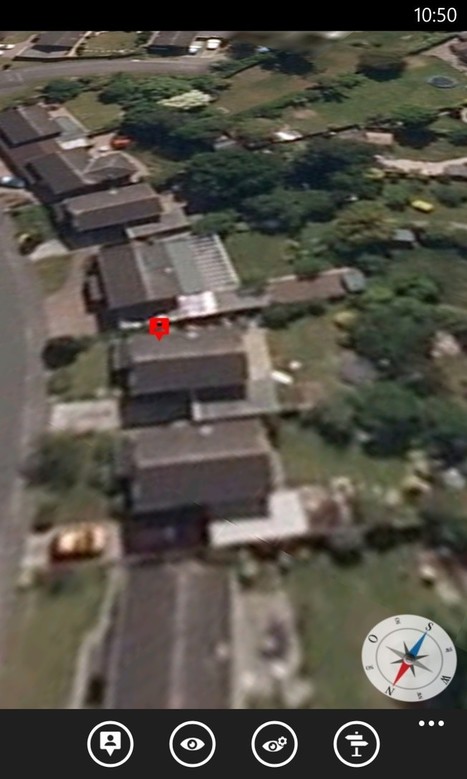
With Nokia's HERE Maps and HERE Drive applications ensconced on 90% of the Windows Phones in existence, another navigation aid seems somewhat redundant, but there are some neat tweaks worth highlighting in Compass Deluxe, not least the use of aerial...
Scoop.it!
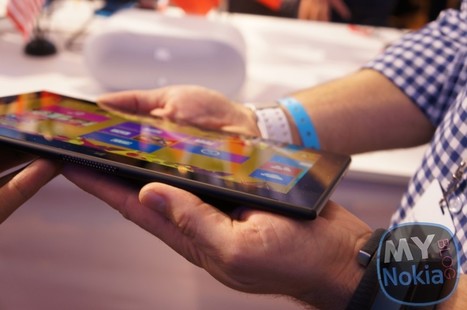
Last month at Nokia World, Nokia finally took the wraps off their much awaited tablet, the Lumia 2520; however it seems they aren't done with the tablet arena just yet. According to @evleaks Nokia'...
Scoop.it!

Clutter is a brand new Windows Phone application which makes it easy, quick and simple for every user to find information about his favorite tv series and track the upcoming episodes of his favorite shows. Clutter comes in two version, the lite one and the full version which costs $1.29 and comes both in Windows Phone 7.5 and Windows Phone 8. Here is a small list with some of the features of Clutter. Find information for your favorite series (Actors / Episodes / Images)
Scoop.it!

File Downloader is one of a kind application in the Windows Store packed with features to download and share content. It is dynamically evolving having regular updates introducing new features. Other downloaders usually target particular type of content like YouTube or Music content. File Downloader on the other hand consolidates all that into a single application adding much more and covering the gap of inter-device communication and sharing. You can download any files (music, pictures, video, documents, etc.) individually or using a web browser, manage them in the local storage, save to the Media Library or SkyDrive, send via e-mail or bluetooth, execute using default applications, and share with FTP server. Once the downloading is started you don’t even need to keep the File Downloader running, everything is done in background. Here is a list of major features: Download files copy/pasting or entering URLs.Specify a location for downloading anywhere in the isolated storage.Use the internet explorer to navigate web sites and click on files for downloading.Download YouTube video in multiple formats (use YouTube link on the Link tab).Download content from FTP servers using direct URLs or FTP client (supporting multi-language names).Monitor the transfer queue.Manage the isolated storage files and directories.Save image and audio files to the Media Library.Save files to SkyDrive keeping the files hierarchy.Send files via e-mail using SMTP server of your choice.Send files via bluetooth to any devices such as Android, iPhone, Windows Phone, etc.Share the files with the integrated light FTP server (supporting multi-language names).
Scoop.it!

One of the most requested features of Windows Phone is a file explorer which would allow users to directly access and manipulate files on their phone. If you have a Samsung ATIV S, which due to a Samsung-induced vulnerability has now been fully interop unlocked, you can have your cake and eat it too. Hjc4869 on XDA-Developers is developing a file explorer for the device which can already move, copy and delete files, and importantly open files from the memory card, including opening video files stored on the card. To get the XAP on your phone you need an unlocked handset and the XAP, which can be downloaded from this XDA-Developers thread here.
Scoop.it!

If you don't have a Microsoft Account or you have no interest in its cloud features, then a local account provides always-available access to Windows 8.1, but its setup option is slightly hidden.
Scoop.it!

2flicka is a new third party Flickr app from JC Mobile Solutions, the same developer behind the versatile SNUpload app. The app, aimed at the Flickr enthusiast, provides a way to easily upload and view photos on Yahoo's photo sharing service. Key features of the app include a comprehensive upload tool, an integrated camera (with a direct upload to Flickr option), built in editing tools (filters), the ability to view friends and family's recent activity on Flickr, and built in sharing tools (to Twitter and Facebook). 2flicka open with a multi-page pivot view, which gives access to all the key app functions. The "friends activity" page show recent uploads from your Flickr contacts in an Instagram style time line, "my stream" shows your own recent upload, "photos of me" shows photos that you have been tagged in, "my favourites" shows the photos you have tagged as favourites, "my photosets" shows a gallery of your Flickr sets, "upload" is the location for in-app upload of existing pictures, and the "more" page gives access to other features. The "upload" page shows a thumbnail list of photos recent captured using the phone (i.e. the camera roll), ready for uploading to Flickr. You can select multiple photos to upload, and there are also an intelligent "select all since last upload" option, a great improvement over the upload-one-photo-at-a-time that you'll find in some photo sharing apps. For each photo you upload you can add a title and description, provide tags, assign to photoset, and specify visibility settings. The app also ties into Windows Phone sharing framework, which means you can choose to share a photo to 2flicka, from the Windows Phone Photos Hub, which will drop you into the standard 2flicka upload screen. 2flicka2flicka Regular Flickr users will also appreciate the way they can use the search and nearby tools to find and view photos from the wider Flickr community (by recent, interestingness, people, and tags). For any photo viewed using the app it is possible to access information about photos being view (location, EXIF tags, comments), as well as being able to take standard Flickr actions (add comment, add to favourites, download). 2flicka2flicka 2flicka feels reasonably polished for a first release, although we did not a few unexpected app crashes. The official Flickr app for Windows Phone provides a similar core set of features, but ultimately 2flicka is a little more versatile, and will almost certainly receive more update attention that the official app. That makes a one off payment of £1.29 seem reasonable, though we do think the developer would do well to add a trial version to the Windows Phone Store.
Scoop.it!

For the better image quality and flexibility of raw photos, Nokia's Lumia 1520 will shoot with Adobe's DNG format. Similar raw support will come to the Lumia 1020 in early 2014. Read this article by Stephen Shankland on CNET News.
Scoop.it!

Another gripe about Windows Phone has been resolved with Update 3 on the HTC 8X Most pundits and tech enthusiasts tend to agree that Windows Phone 8 is a really good operating system. What it is missing are lots of little things that can annoy some users and keep it from being perfect. The GDR revisions, like the recent Update 3, go a long way in filling in those gaps to deliver an improved user experience. One of the grievances that people have about Windows Phone is the inability to charge the device and to have it powered-off at the same time. Windows Phone is unique here, since most phones allow you to power down the device and then to plug it in to charge. It’s a great method to max out your recharging power (since you’re not operating the radio), and it’s also a way to get some quiet time, while being useful. Reports are coming in, and Windows Phone Central has been able to confirm, that the HTC 8X, which recently began receiving Update 3 globally and on AT&T, has finally resolved this issue. The website Windows Phone Italy first reported on the new finding and our George Ponder was able to verify it on his AT&T branded HTC 8X (with Update 3 installed). Assuming users have installed Windows Phone 8 Update 3 (build 10501), powering the device down and then plugging it in will result in the following behavior: HTC 8X vibrates as if it was powering up, but the screen stays blackThe HTC splash screen appearsThen a battery iconThe phone will not boot into the OS While a seemingly trivial thing, this feature will sure make a lot of users happy. The change, isolated so far to the HTC 8X, is most likely a configuration in that device’s firmware and not the OS itself. Instead, Microsoft most likely enabled the feature in the OS, but left it up to manufacturers to enable the feature, should they choose so. Hopefully Nokia and Samsung will allow the option in their forthcoming firmware, as we’re guessing many of your will want this new feature.
|
Scoop.it!

The official Windows Phone Blog is the place for Windows Phone news, tips & tricks, app reviews, podcasts, and more!
Scoop.it!

Nokia Video Director makes video editing easy. The app gives you a stylish video in minutes without the complexity of other alternatives out there. With...
Scoop.it!
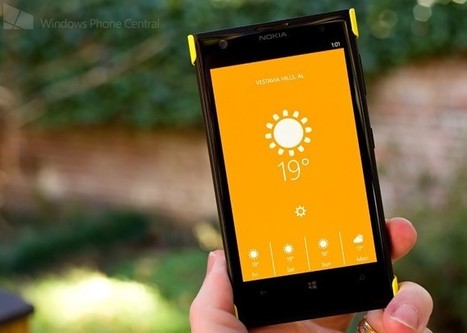
While the weather app collection for our Windows Phone is rather crowded, Just Weather is one of the latest offerings for Windows Phone 8. The simplistic, minimalistic weather app has potential but also has some room for improvement.
Scoop.it!

During Nokia World Abu Dhabi, Conversations brought together National Geographic photographer Stephen Alvarez and the man leading the team behind Nokia’s imaging technologies, Juha Alakarhu....
Scoop.it!

WPC have gotten their hands on some high res pictures of Verizon's upcoming Lumia, the 929. Similar to the 928 it seems Nokia can't keep this one under wraps, as it has now been fully leaked from a...
Scoop.it!

AwesomeLock is a feature rich Windows Phone 8 lockscreen app that delivers news, weather and your next appointment to your Windows Phone lockscreen.
Scoop.it!

Janne had some hands on with the Nokia Lumia 1520, 2520 and Asha 503 whilst at a fair in Helsinki. Lucky! Here's Janne's findings. Cheers Janne! _____ I had a chance to try out Asha 503, Lumia 1520...
Scoop.it!

The UC Browser has more than 400 million users across more than 150 countries and regions. The 3.2 update for the cross-platform UC Browser is just waiting to hit the Windows Phone Store, and will bring along with it some great new features. ucbrowserqrIn its latest 3.2 update it brings: Background Download: Keep downloading files even after you exit UC Browser.
Scoop.it!

A quick Piece giving my thoughts on my Lumia 1020 and including quite a lot of photos.
Scoop.it!

Although Windows Phone 8 is nearly one year old, the promise of numerous VOIP apps is still not quite a reality. Yesterday though, Nimbuzz, an old school messaging service, finally delivered on free voice calls for their Windows Phone app.
Scoop.it!

The Nokia Lumia 2520 boasts a glorious 10.1-inch touchscreen as well as a beautifully crafted polycarbonate body that you’ll – of course – want to keep looking shiny and new for as long as possible.
Thankfully, the Nokia Power Keyboard is an ideal companion and gives your new tablet all-around protection. The Nokia Lumia 2520 sits comfortably into the frame of the Nokia Power Keyboard as one half reaches around the side to lie flat and protect the screen. The cover then extends over the other side of the tablet and is secured to the back of the cover.
Scoop.it!

I've enabled two-step authentication on all of my online accounts that support it because doing so is more secure. But two-step authentication can also be a bit of a pain, and managing multiple accounts adds to the misery. Fortunately, a Microsoft app for Windows Phone 8 that generates codes for the second step of authentication also works with your Google account. And you can enable it to provide authentication codes for multiple accounts. Confused? Welcome to the club. Back in April, Microsoft announced that it was adding two-step authentication to its Microsoft Account. (Curiously, it has still not added this option to Office 365.) This functionality, available to Google account holders since 2011, requires you to enter two pieces of information when you access your account. The first is your password, of course. But the second is a special code that is sent to a device you have under your control. This code can be transmitted via a text message, a phone call, or can be generated by something called an authenticator app. Microsoft makes an Authenticator app of its own for Windows Phone 8. And I've been using this app to protect my primary Microsoft account since Microsoft made it available in April. I wrote about adding two-step authentication to your Microsoft account, and using this app, in Enable and Use Two-Step Authentication with Your Microsoft Account, if you need more information. But here's the thing. Microsoft's Authenticator app, like other similar apps, can be configured to work with multiple accounts. That means multiple Microsoft accounts, but also any other account types that work to the same security standard. Google is one such account type. For the past couple of years, however, I've been receiving Google verification codes—the second part of the two-step authentication process—via text message. The reason is simple: Like most people, I configured it in whatever way a few years back and then never reexamined it. And what I didn't understand when Microsoft provided its own two-step authentication and Authenticator app was that you could configure the app to work with multiple accounts. And, as is the case with most people, what prompted change was an unexpected event. Working this morning, normally, my phone suddenly buzzed with a new text message. From Google. With a two-step authentication verification code. Now, this could mean a number of things, not all of them alarming. But one possibility is that someone actually has my account name and password, and was only stymied in breaking into my account because I had enabled two-step authentication (or, what Google calls 2-step verification). Seeing this, freezing up for a moment, I realized I had better spend at least a few minutes examining the security of my Google account. And while I did make of the expected reactionary changes around my password, recovery options, and so on, I also took the long-overdue step of switching from receiving two-step authentication verification codes via text messages. Now, I use the Authenticator app instead, as I do for my Microsoft accounts. As noted before, this app can support multiple accounts. This means that you can add additional Microsoft accounts, which is helpful for those of us with more than one, as well as any additional third-party accounts that use the same system. Google does, but so do services like Dropbox and LastPass. Google makes an authenticator app of its own for Android, of course, and for iOS. But I use Windows Phone, so I use Microsoft's Authenticator app.
To use this app with your Google account, open a web browser and navigate to Google Accounts. After logging in, navigate to Security and then click "Edit" next to 2-Step Verification. On the Verification Codes tab, choose the app (not SMS/Voice) option and then pick Android from the list. (It doesn't matter which phone type you choose.) On your Windows Phone, open Authenticator and tap the Add ("+") button on the app bar at the bottom of the screen to add an account. Then, tap the Camera button at the bottom and scan the QR code that Google is displaying on your PC's web browser. This will configure your Google account to use Authenticator to generate codes for two-step authentication. Now, when you're prompted to enter a verification code by Google, you can use the code generated by the Authenticator app. And while you're at it, be sure to add any other accounts that support this feature to the Authenticator app as well. Then go forth and be secure.
|




