


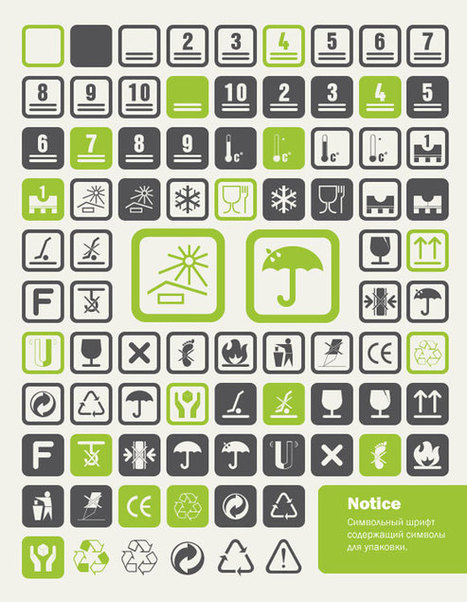

Dingbats are a special type of fonts containing decorative symbols that you can use to make awesome presentations and decorate your slides

 Your new post is loading...
 Scoop.it! Dingbats are a special type of fonts containing decorative symbols that you can use to make awesome presentations and decorate your slides 
No comment yet.
Sign up to comment
Scoop.it!

If you need to export all text from a .PPT PowerPoint presentation to a text file then there are many possible workarounds.
Scoop.it!
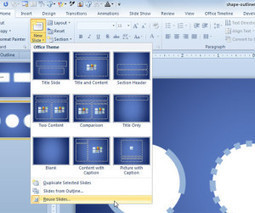
If you plan to reuse slides for your PowerPoint presentations then you will find interesting to learn more about the Slide Library. You can share and reuse individual PowerPoint slides by storing them in a Slide Library. Via SlideHunter
Scoop.it!

If you need to rotate objects in PowerPoint you can do it from different ways, however to be more efficient at design process you can use the PowerPoint shortcuts and keyboard to rotate objects in the presentation.
Scoop.it!

Under this model similar communication functions are grouped into logical layers that we can represent in a vertical list. A layer serves the layer above it and is served by the layer below it
Scoop.it!

You must have participated in some elocution, recitation or extempore contests during your school days. What was the experience like?
Scoop.it!

If you are interested to make 3D Objects for your PowerPoint presentations or 3D PowerPoint templates then this quick guide will help you to convert your 2D shapes to 3D shapes in PowerPoint using perspective and Format Shape options. You can use the same techniques explained here to make nice 3D PowerPoint graphics like the 3D Pie Chart template that you can download for free.
Via SlideHunter
Scoop.it!

Going for a cloud-based, online presentation or if you desire to create a demonstration that has more appeal and creativity, along with the functionality to serve the requirements of different sectors, then most people select Prezi.
Scoop.it!

A flowchart is a representation of a process which shows various steps in diagrammatic representation, by describing the step by step parts of the process
Scoop.it!

This article will demonstrate how to use the freeform and shape operations to draw a simple but useful Coca Cola bottle in PowerPoint 2010. First, we start embedding a simple bottle in PowerPoint that we will use as the stencil template. Then we will use the curve shape option to draw the contour of the bottle or bottle outline, only for the half. Via FPPT
Scoop.it!

A Post-it note (also known as Sticky Note) is a piece of paper stationery with a re-adherable strip of adhesive on the back that was coined to 3M. Post its were designed for temporarily attaching notes to documents and other surfaces but nowadays this concept has been spread among many different sectors, topics and interests. In computers and IT, post its can also be represented as images and using shapes in PowerPoint is a good way to represent post it in a slide and then save them as picture. Via FPPT
Scoop.it!

Google Fusion Tables is a free online service from Google that helps you to visualize table data in a different way. You can use this tool to gather and visualize data from the Internet. The reason why we published here about Google Fusion Tables is that you can get some inspiration and ideas to use in your PowerPoint presentations Via FPPT
Scoop.it!

CEO Business Character with Suitcase illutration is a free illustration for Adobe Illustrator and to be used in presentations that you can download for free.
|
Scoop.it!

As per the recent studies, it has been found that many people are more afraid of public speaking than dying. Because their nervousness is in control and that makes it difficult for them to commune with large audience.
Scoop.it!

PowerPoint can be used as a powerful collaboration tool to make presentations and group editing. Other team members and colleagues can use PowerPoint to edit and accept changes made by another person within the organization, and for this purpose the Review commands in PowerPoint 2010 can be very handy to review presentation changes and track changes in PowerPoint 2010 or other versions like 2007 and 2013. Here we will review how to use PowerPoint Review and the different options available for Proofing, Language options, Comments (Create, Edit, Delete) as well as PowerPoint comparison tool under Compare section Via FPPT
Scoop.it!

OfficeOne Shape Locker allows locking shapes, placeholders, pictures, videos, and text boxes in slides.
Scoop.it!
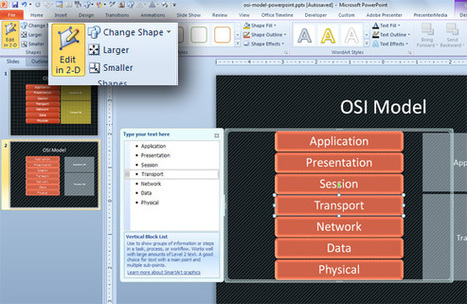
If you are dealing with 3D graphics in your PowerPoint presentation then you it is good to know that PowerPoint lets you edit the SmartArt Graphics in 2D mode (only for editing purposes) which makes easier to edit the text and shape properties...
Scoop.it!

PowerPoint is one of the most powerful tools often used by trainers, businessmen, students or lecturers commonly. It bears lots of functions and features to create interesting and dynamic slides presentation.
Scoop.it!

PowerPoint presentations are easy enough to make, however making them extra special requires the right blend of text and visually appealing content. This is why people look for PowerPoint templates that can suit their presentation requirements.
Scoop.it!

You can use Microsoft Graph in PowerPoint to create several types of charts, including line, column, area and pie charts. You can use Microsoft Organization Charts and shapes to create organization charts.
Scoop.it!

If you need to share your presentations online then SlideOnline.com can be very useful. SlideOnline.com is a free service where you can upload PowerPoint (.PPT) and PDF presentations to be shared online or embedded into blogs or websites.
Scoop.it!

Sometimes you need to branch an arrow in PowerPoint to mark or show an item in the slide. You can do that by using a simple branched arrow in PowerPoint. Moreover, we can design a simple branched arrow shape in PowerPoint 2010 that will be helpful to show these items in the slide. Via FPPT
Scoop.it!

Here is a quick tip if you are interested to apply a font shadow to all the slides and text content in a PowerPoint presentation Via FPPT
Scoop.it!

Money In Pockets Illustration for business is a nice character illustration for presentations in PowerPoint, Keynote and Adobe Illustrator that you can download and use freely.
|





