PowerPoint Presentation Library
14.0K views | +0 today
PowerPoint Presentation Library
PowerPoint tips, Presentation Tools for PowerPoint, Keynote, Prezi, etc
Curated by Marilyn M.
Your new post is loading...
Scooped by Marilyn M.
November 24, 2012 10:42 AM
Scoop.it!

CEO Business Success Character

CEO Business Success Character | PowerPoint Presentation Library | Scoop.it

CEO Success contain two business avatars and CEO role in an organization celebrating the business success.


This business success avatar is an illustration to enhance business presentations or as business flyer design.


CEO Business Success illustration  includes:

1. .ai vector for Adobe Illustrator
2. .png image with transparency


You can use CEO Business Success in:


1. Business flyer designs
2. Business PowerPoint presentations on success, business goals, company FODA
3. Decorate charts or business diagrams

No comment yet.
Scooped by Marilyn M.
November 24, 2012 9:40 AM
Scoop.it!

What are the Skills of Good Speakers

What are the Skills of Good Speakers | PowerPoint Presentation Library | Scoop.it

A Good Speaker is one who delivers his message in actual manner. Merely speaking makes no sense until your audience doesn’t love to hear you. So, it become essential to have those skills which makes you an ebullient and eminent speaker. You can learn below some presentation tips for better skills performing public speaking presentations

No comment yet.
Scooped by Marilyn M.
November 24, 2012 9:07 AM
Scoop.it!

Using Triggers in PowerPoint 2010

Using Triggers in PowerPoint 2010 | PowerPoint Presentation Library | Scoop.it
PowerPoint 2010 and PowerPoint 2013 comes with a Trigger feature that enables us to play animations based on a particular action. You can use triggers for example to start an animation after the user clicks on another shape or object.
No comment yet.
Scooped by Marilyn M.
November 23, 2012 12:00 PM
Scoop.it!

Make a Timeline PowerPoint Template using Office Timeline

Make a Timeline PowerPoint Template using Office Timeline | PowerPoint Presentation Library | Scoop.it
OfficeTimeline is a free addin for PowerPoint 2007 and 2010 that you can use to make visually rich timelines in PowerPoint presentations.


The new version of OfficeTimeline comes with new themes to use featuring the new Metro interface used in other recent Microsoft products like Windows 8 and Outlook.com. But you can also choose to use other existing themes like the Gantt template, Phases template or even Interval templates.

No comment yet.
Scooped by Marilyn M.
November 20, 2012 8:25 AM
Scoop.it!

Closing Remarks for Presentations

Closing Remarks for Presentations | PowerPoint Presentation Library | Scoop.it

For an effective presentation, it is vital to have a great opening and closing because that proves your presentation skills.

No comment yet.
Scooped by Marilyn M.
November 20, 2012 2:40 AM
Scoop.it!

How to Make Histograms in PowerPoint using Excel Charts

How to Make Histograms in PowerPoint using Excel Charts | PowerPoint Presentation Library | Scoop.it
Using Excel and free Analysis Toolpak addin for Excel you can create useful histograms for your spreadsheets, but also use the resulting image to copy and paste the Histogram in PowerPoint presentations.
No comment yet.
Scooped by Marilyn M.
November 17, 2012 5:11 AM
Scoop.it!

How to Create a QR Code for PowerPoint Presentations

How to Create a QR Code for PowerPoint Presentations | PowerPoint Presentation Library | Scoop.it
There are many ways to create a QR Code image and you can embed QR Code in PowerPoint slides for example to display the code in a product detail page or Contact Us slide.
No comment yet.
Scooped by Marilyn M.
November 17, 2012 4:22 AM
Scoop.it!

How to Make a 16:9 Presentation Template in PowerPoint 2010

How to Make a 16:9 Presentation Template in PowerPoint 2010 | PowerPoint Presentation Library | Scoop.it
With the new era of digital TV used for widescreen projection of PowerPoint presentations, you may be interested to convert your old PowerPoint templates to a widescreen template compatible with your new TV monitor.
No comment yet.
Rescooped by Marilyn M. from PowerPoint presentations and PPT templates
November 13, 2012 10:10 AM
Scoop.it!

Make a Timeline in PowerPoint using Adobe Presenter 8

Make a Timeline in PowerPoint using Adobe Presenter 8 | PowerPoint Presentation Library | Scoop.it

Adobe Presenter comes with an Interactions menu that allows us to insert rich diagrams including animated charts and graphics, but also nice timelines for PowerPoint. Using Interactions Timelines you can make a simple but descriptive timeline in PowerPoint for your milestones and events.


In order to insert a timeline in PowerPoint you will need to click on Adobe Presenter menu and then click on Interactions under Insert section.


Via FPPT
No comment yet.
Scooped by Marilyn M.
November 10, 2012 10:55 AM
Scoop.it!

Prezi Is The Cloud-Based Presentation Creator That Is Making PowerPoint Look Like Child’s Play

Prezi Is The Cloud-Based Presentation Creator That Is Making PowerPoint Look Like Child’s Play | PowerPoint Presentation Library | Scoop.it
Prezi is kind of like discovering new music - you want to share the awesomeness with your friends, but you don't want too many people to find out and ruin the underground...


There are three pricing tiers offered by Prezi:

Public (free) – Your presentation will be open for public view, you have access to all core features, 100MB of storage
Enjoy ($59 yearly) – Your presentations will be private, you have premium support, you can use your own logo and you have 500MB of storage
Pro ($159 yearly) – Everything from the enjoy package, plus you can work with Prezi offline with 2g of storage

No comment yet.
Scooped by Marilyn M.
November 10, 2012 10:07 AM
Scoop.it!

How to Open Adobe Illustrator .ai Vectors in PowerPoint 2010

How to Open Adobe Illustrator .ai Vectors in PowerPoint 2010 | PowerPoint Presentation Library | Scoop.it
Adobe Illustrator is a great software package from Adobe that we can use to make vectorized graphics. If you need to open .ai in PowerPoint 2010 then here we will explain how how to export your .ai files.


First, you need to convert your .ai file to any format supported by PowerPoint. If we use a vector file format as output then we can take advantage of the vector format also in PowerPoint.


One of the vector formats supported by PowerPoint is .emf (which stands for Enhanced Metafile). You can export the illustration file to .emf and then import the file in PowerPoint.


Finally, to open the graphic in PowerPoint you will need to insert a picture in PowerPoint 2010.

No comment yet.
Scooped by Marilyn M.
November 8, 2012 9:40 AM
Scoop.it!

90-10 Principle

90-10 Principle | PowerPoint Presentation Library | Scoop.it
In Presentations, usually the 90/10 principle can be represented by visualization tools like pictures and the iceberg in the picture above is an example of this kind of visualizations that helps to understand the concept.
No comment yet.
Scooped by Marilyn M.
November 8, 2012 9:28 AM
Scoop.it!

3D Charts for PowerPoint Presentations

3D Charts for PowerPoint Presentations | PowerPoint Presentation Library | Scoop.it
Decorating your PPT slides with nice 3D charts can be really helpful to impress your audience in any business PowerPoint presentations. However, designing 3D charts may not be straightforward even for savvy PowerPoint users.


You can try to design 3D charts online with tools like Archimy. This free online tools let you design complex 3D charts.


AmCharts has a nice Chart Visual Editor that helps to create settings and data files suitable for Flash charts (bundle and stock). It won’t produce code if you are working with JavaScript charts only but if you need to use these 3D charts in PowerPoint presentations then you can take screenshots, for example using tools like Greenshot.


Alternatively you can use ChartGo as a free online service to make 2D and 3D charts. Maani.us has a nice gallery of 3D charts that uses XML. (Read more in http://www.maani.us/xml_charts/)


You can download 3D graphics and charts from CrystalGraphics.com that are suitable as generic 3D Charts for any business presentation.

No comment yet.
Scooped by Marilyn M.
November 24, 2012 9:43 AM
Scoop.it!

Funny Ways to Start a Speech

Funny Ways to Start a Speech | PowerPoint Presentation Library | Scoop.it
Speeches and presentations are being considered as the best way of conveying your message to public, but do you really think, the way you give presentation is effective enough to deliver your message completely?
No comment yet.
Scooped by Marilyn M.
November 24, 2012 9:10 AM
Scoop.it!

How To Change Default Template Size in PowerPoint 2010

How To Change Default Template Size in PowerPoint 2010 | PowerPoint Presentation Library | Scoop.it
If you use PowerPoint to make your presentations in a particular slide size, let’s say 16:9 so it fits perfectly in a widescreen monitor, then you may be interested to make this the default slide size in PowerPoint presentations every time you...
No comment yet.
Scooped by Marilyn M.
November 24, 2012 8:49 AM
Scoop.it!

How to Apply 3D Rotation Effects in PowerPoint 2010

How to Apply 3D Rotation Effects in PowerPoint 2010 | PowerPoint Presentation Library | Scoop.it
In this tutorial, we will be exploring adding a 3D element to a shape as well as 3D rotation. Now we touched on it in passing in the PowerPoint Layout tutorial, however this time we will be going into more depth.
No comment yet.
Scooped by Marilyn M.
November 23, 2012 11:39 AM
Scoop.it!

How to Show the Ruler in PowerPoint 2010

How to Show the Ruler in PowerPoint 2010 | PowerPoint Presentation Library | Scoop.it
The ruler in PowerPoint as well as any other presentation or image editing software can be a useful tool when you need perfect pixel alignment.
No comment yet.
Scooped by Marilyn M.
November 20, 2012 7:50 AM
Scoop.it!

How to add text shadow in PowerPoint slide design

How to add text shadow in PowerPoint slide design | PowerPoint Presentation Library | Scoop.it

You can add multiple effects to text in PowerPoint slide, in particular you can add text shadow to the text paragraphs in the slide design. Learn how.

No comment yet.
Rescooped by Marilyn M. from Digital Presentations in Education
November 18, 2012 10:51 AM
Scoop.it!

Waterfall Chart in PowerPoint 2010

Waterfall Chart in PowerPoint 2010 | PowerPoint Presentation Library | Scoop.it

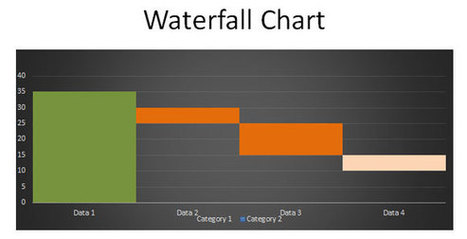
"The Waterfall Chart is a nice chart that helps to illustrate the change. This kind of chart is very effective and intuitive to use in PowerPoint presentations in order to show the total change along a breakdown of the individual components that have driven a change...


Via Baiba Svenca
No comment yet.
Scooped by Marilyn M.
November 17, 2012 5:00 AM
Scoop.it!

Using 21:9 Aspect Ratio in PowerPoint presentations

Using 21:9 Aspect Ratio in PowerPoint presentations | PowerPoint Presentation Library | Scoop.it
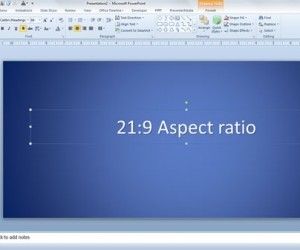
Modern laptops and some TV screens comes with a cinematic 21:9 aspect ratio screen.


If you want to play a PowerPoint presentation in this kind of screens or devices and want to perfectly fit the presentation in the screen without leaving a blank border, then you should change your presentation aspect ratio to 21:9.

No comment yet.
Scooped by Marilyn M.
November 16, 2012 6:58 AM
Scoop.it!

How to Export MapPoint to PowerPoint

How to Export MapPoint to PowerPoint | PowerPoint Presentation Library | Scoop.it
The easiest way to export MapPoint to PowerPoint 2010 or any other version of MS PowerPoint like PowerPoint 2007 and 2013 is saving the work as a web page and then getting the output files.
No comment yet.
Scooped by Marilyn M.
November 11, 2012 9:13 AM
Scoop.it!

How to Create a PowerPoint Online using MS Office Web Apps

How to Create a PowerPoint Online using MS Office Web Apps | PowerPoint Presentation Library | Scoop.it
If you need to create a PowerPoint online and you don’t have MS Office, don’t worry. Microsoft has a new online version of PowerPoint available from SkyDrive and originally named Office Web Apps.
No comment yet.
Scooped by Marilyn M.
November 10, 2012 10:15 AM
Scoop.it!

Using Triggers in PowerPoint 2010

Using Triggers in PowerPoint 2010 | PowerPoint Presentation Library | Scoop.it
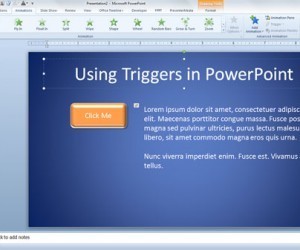
PowerPoint 2010 and PowerPoint 2013 comes with a Trigger feature that enables us to play animations based on a particular action. You can use triggers for example to start an animation after the user clicks on another shape or object.


To start using Triggers you need first to insert an animation effect in your slides. As soon as there is at least one animation you can start configuring triggers.


For the example above, we have added an animation to the lorem ipsum text on the right, and configured the orange button as the trigger. So when you press the button the entrance animation will play.


On Bookmark option let you configure the trigger using bookmarks for audio and video objects in PowerPoint.


This is just a briefly introduction about the application of triggers in PowerPoint 2010.

No comment yet.
Scooped by Marilyn M.
November 8, 2012 9:50 AM
Scoop.it!

Create And Share Attractive Presentations Using iPad With Haiku Deck

Create And Share Attractive Presentations Using iPad With Haiku Deck | PowerPoint Presentation Library | Scoop.it

Create And Share Attractive Presentations Using iPad With Haiku Deck


It can be hard to share slides made from a PowerPoint presentation with people using smartphones or tablets as PowerPoint is not compatible with other platforms available today. But with Haiku Deck, which is an iPad application, we can now create and share attractive presentations using iPad.


While there are other applications which can also be used for this purpose, such as Bloom, however Haiku deck is more of a specialized app for creating presentations on iPad. The biggest advantage of using Haiku Deck is that you can share your presentations online so that they can be viewed with any device via a browser.

No comment yet.
Scooped by Marilyn M.
November 8, 2012 9:36 AM
Scoop.it!

Conduct Online Meetings, Webinars And Training Courses With GoToMeeting

Conduct Online Meetings, Webinars And Training Courses With GoToMeeting | PowerPoint Presentation Library | Scoop.it
GoToMeeting is a web based platform for holding webinars, online meetings or conducting training courses. This web service offers three types of products including GoToMeeting, GoToWebinar and GoToTraining.
No comment yet.