


We will show you here how to style a table in PowerPoint so you can change the background and border color

 Your new post is loading...
 Scoop.it! We will show you here how to style a table in PowerPoint so you can change the background and border color 
No comment yet.
Sign up to comment
Scoop.it!

Either if you are creating a PowerPoint template or just designing your final PowerPoint presentation you can create bubbles for conversations or callouts in your slide to highlight any important text or concept or as speeches boxes in PowerPoint. Here we will show you how to create callouts for PowerPoint Via FPPT

FPPT's curator insight,
December 20, 2012 8:06 AM
Either if you are creating a PowerPoint template or just designing your final PowerPoint presentation you can create bubbles for conversations or callouts in your slide to highlight any important text or concept or as speeches boxes in PowerPoint. Here we will show you how to create callouts for PowerPoint
Scoop.it!

Presenters also need to innovate when designing PowerPoint presentations and even if you have other PowerPoint alternatives to use like Prezi, SlideRocket and many other, PowerPoint is still the most popular software for editing and creating PowerPoint presentations. If you want to captivate your audience with presentations in PowerPoint then you’d need to find the way to include catchy images, graphics and why not look for new presentation ideas to use.
Via FPPT
Scoop.it!

Boy Scouting Association has their own branded PowerPoint templates that you can use if you are a member of its association.
Marilyn M.'s insight:
here's the download page from the BSA website http://www.scouting.org/scoutsource/marketing/downloads/powerpointtemplates.aspx
Scoop.it!

Decorating your PPT slides with nice 3D charts can be really helpful to impress your audience in any business PowerPoint presentations. However, designing 3D charts may not be straightforward even for savvy PowerPoint users. Via FPPT
Scoop.it!

Project management can be often a confusing task, especially when one has to manage multiple projects at the same time
Scoop.it!

Learn How to Convert and Export PowerPoint 2010 Presentation to Videos
Scoop.it!

In PowerPoint 2010 you can easily change the presentation background color and image and improve the overall presentation.
Scoop.it!

Aside from being a perfect tool for you to present comfortably by allowing you to change slides easily and remotely, it also gives you the facility to keep an eye on time, so that you could manage the time properly.
Apart from these there are several other benefits also. Let’s have a brief discussion about SMK-Link Wireless Stopwatch Presenter...
Scoop.it!
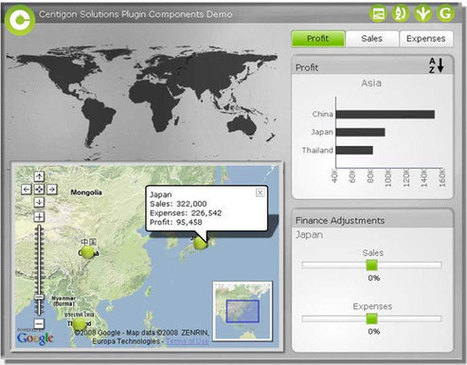
You can embed XCelsius Dashboards into your PowerPoint presentations for the next meeting or online remote presentation. This way you don’t need to switch from PowerPoint to the browser or exit your presentation any time that the CEO want to check how the dashboard look in the projector screen.
Scoop.it!

ThreeDify 3Doffice is an add-in for MS Office applications like Microsoft Word, PowerPoint and Excel which allows viewing, creating and tweaking 3D designs...
Scoop.it!

The PowerPoint 2010 Power Shortcuts Training Course by Lynda.com can help you discover the shortcuts used by pros to increase their efficiency in using MS PowerPoint...
Scoop.it!

No Money Cartoon is a broked guy or character under an organization. You can download this cartoon vector and free illustration to be used in your business opportunity presentations on how to earn money or financial crisis management presentations.
No Money Cartoon character is available for free download and includes: 1) .ai for Adobe Illustrator
|
Scoop.it!

If you want to download PowerPoint themes, then you should know that .thmx is the new extension for themes and PowerPoint templates since PowerPoint 2007.
Scoop.it!

PDF creators are one of the most convenient applications for converting PowerPoint files to PDF format. PDF creators usually install as virtual printers and enable conversion of files from various formats via the Print command of an application. However, converting documents in such a way can be quite laborious. PrimoPDF is a PDF converter that allows converting files from almost any Windows application via drag and drop, as well as from the Print command.
Via FPPT
Scoop.it!

Downloading and adding Clip Art in any Microsoft Office program is easy and features two methods. We’ll be explaining both methods in this tutorial. We’ll start using Microsoft PowerPoint.
Scoop.it!

If you need a catchy stop sign image for PowerPoint presentations then this is free image submitted by FPPT.com is a good example of image that you can use. This photo was taken with our own camera in a trip to Palm Beach and we were tempted to take and provide this stop sign photo for free to all our users. Stop signs can be used in a variety of PowerPoint presentations starting from business presentations to other non-business related presentations
Via FPPT
Scoop.it!

Online 3D Function Grapher is a free online utility where you can make simple 3D plots from a Math function. You can use the online tool to make simple 3D graphs and plot mathematical functions in 3D. All functions can be set different boundaries for x, y, and z, to maximize your viewing enjoyment
Via FPPT
Scoop.it!

Learn How to Design Awesome Interactive Clickable Charts in PowerPoint
Scoop.it!

The new PowerPoint 2013 comes with lot of new features and by default the slide size is prepared for widescreen TV monitors and projectors. However, you can change the slide size easily and here we will explain how to.
Scoop.it!

Previously we brought you the review of PowToon which is a webs service for creating animated video presentations. However, if you are looking for a desktop or mobile application which can help you create animated videos in a quick and easy way, then it’s time you try VideoScribe.
Similar to PowToon, VideoScribe provides a wide range of options to create engaging animated presentations, marketing and educational videos, video content for your YouTube channel and the like.
Creating presentations in such a way can help you produce more dynamic content than PowerPoint presentations.
Scoop.it!

Displaying an agenda or summary of items in a PowerPoint presentation is something that we may need to include in our business or presentations...
Scoop.it!

Microsoft is unveiling new PowerPoint 2013 with a lot of new features. With the codename Office 15, it is the next generation suite for Microsoft’s famous “Office” applications Microsoft seems to be on a mission to revamp its products this year.
Are you ready to create more striking presentations? With PowerPoint 2013 you can select a theme, add a design variant, align text and pictures, and more. Work on the same version with others at the same time using the enhanced collaboration interface and present with more confidence and control.
Scoop.it!

Choosing colors can be trivial for many people, but if you are wondering how to choose a good color scheme for PowerPoint presentations then let's see some ideas here.
Scoop.it!

In this tutorial you will learn to make a gap analysis chart. This kind of chart is also known as a spider gap chart, spider chart, and by the name used in PowerPoint—radar chart. The gap analysis chart is great for showing the current and target strengths of something (a company, team, etc.), priorities by majority vote, and other things. In this tutorial we’ll just focus on current and target strengths.
|




