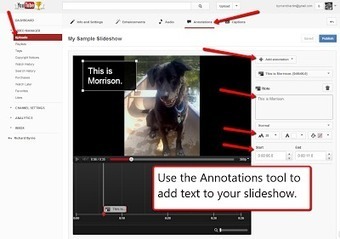
Free online training for teachers and students in ICT. These are step by step camtasia screencasts that take you through a whole range of ict and web 2.0 tools.
Via Alfredo Calderón

 Your new post is loading...
 Scoop.it! Free online training for teachers and students in ICT. These are step by step camtasia screencasts that take you through a whole range of ict and web 2.0 tools. Via Alfredo Calderón No comment yet.
Sign up to comment
Scoop.it!

by Richard Byrne
"Viintage is a neat site that developed by a husband and wife graphic design and photography team. Viintage features collections of vintage posters, postcards, and various printed advertisements that have been released into the public domain. Viintage hosts thousands images organized into dozens of categories like vintage travel posters, classic alphabet learning books, and vintage nursery rhymes images. You can download medium resolution (600px-3000px) copies of the images for free and higher resolutions are available to premium site members." Via Jim Lerman, Amélie Silvert, Renee Maufroid 
Sarantis Chelmis's curator insight,
January 19, 2014 1:47 AM
Great graphic resources for school or eLearning use
Scoop.it!

Mon Pearltrees dédié aux TICE et au Web 2.0. Vous y retrouverez une sélection de sites et d'outils utiles et/ou indispensables, à connaître et à faire connaître...
Via Odile Dupont
Scoop.it!

El dispositivo está destinado a los desarrolladores interesados en trabajar en los campos de ropa tecnológica o internet de las cosasEn el tamaño –y la forma– de una tarjeta SD, Intel ha introducido un procesador con dos núcleos, conexión wifi y bluetooth... Via Nicolás Dominguez
Scoop.it!
Juergen Wagner's insight:
Further free webinars in the near future: A3.122-2434: "Kooperative Lernformen" im Französischunterricht A3.124-1234: GoAnimate y su integración en redes sociales E4.123-0534: Creating e-books to defend the environment - an award winning project: A3.124-1334 Recursos de la web para el aula de E/LE E4.111-0134: Soziale Netzwerke im Fremdsprachenunterricht: Von Facebook zu Edmodo 
Marie-Hélène Fasquel-Erhart's curator insight,
January 18, 2014 2:58 PM
Feel free to attend the webinar :)
Scoop.it!

This post explains how to create a webpage on Moodle that contains pictures, videos and hyperlinks to websites and files. Via Miloš Bajčetić, Rui Guimarães Lima, michel verstrepen
Scoop.it!

One of our Training Managers Alison ,discusses 5 of the most common questions she gets asked in a Moodle training session.
Scoop.it!
Blogging in and out of Moodle: http://moodle4teachers.org (Blogging in and out of Moodle: http://t.co/94VycHWJmi via @youtube)
Scoop.it!
E4.123-0134 - Livening classroom activities with Triptico Referentin: Tilly Harrison an extremely useful application for livening classroom activities a suite of different tools that work best with an Interactive Whiteboard but can be used without organise groups, time different activities, create fun interactive quizzes and focus on vocabulary with these great-looking appsno particular expertise needed, the basic software is free and downloads easily to any platform. Via Shona Whyte, Juergen Wagner
Scoop.it!

Sabrina's curator insight,
January 12, 2014 10:39 AM
There are many great whiteboard apps for tablets but finding Web based whiteboard tools have been difficult. Finding a good one that stays active and is free for educators has been elusive but it is a needed tool for effective classrooms. Happy to have found this blog showcasing 7 free options for teachers.
Scoop.it!

If you can't get a specific someone to stop emailing you, you can get Gmail to delete those messages from your inbox automatically by setting up a filter. Via John Purificati |
Scoop.it!

Timelines have become an indispensable part of the learning experience as they enable students to participate more actively in learning and acquire knowledge the easy way. Via Gilles Le Page 
Gilles Le Page's curator insight,
January 19, 2014 2:49 AM
créer des timelines avec ou pour ses élèves
Scoop.it!

Scoop.it!

Below are a few steps showing how this was done from Drupal 7.2.x to Moodle 2.6
Steps taken: 1. Install the ssso auth method to Moodle. 2. Log into Moodle and make sure this auth method is enabled. 3. Create a block in Drupal containing the necessary fields and URL to the Moodle site. 4. Make sure the block is only available to authenticated users. 5. I did not make it available to Administrators since I wanted the two sites to have unique administration access rights. 6- Add custom fields to Drupal for – firstname, lastname, city and country. Via Miloš Bajčetić
Scoop.it!
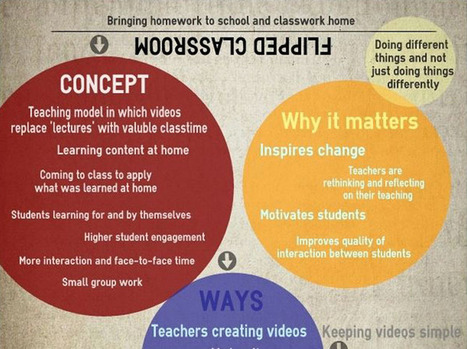
The Definition Of The Flipped Classroom For most of you this is probably review, but there may be a few of you who kinda-sorta’ know what a flipped classroom is without being certain. So here’s... Via Yashy Tohsaku 
Bouchut's curator insight,
January 17, 2014 5:01 AM
les learnings contents peuvent aussi provenir des blogs
Scoop.it!
PowerPoint slides for my presentation. (free) Webinar about award-winning project (UNESCO Innovation Days, March 2013), selected for the Microsoft Global Forum Via Marie-Hélène Fasquel-Erhart
Marie-Hélène Fasquel-Erhart's curator insight,
January 15, 2014 3:33 PM
Feel free to attend the free webinar!
Scoop.it!

A free HTML5 app to take the pain out of transcribing interviews. Useful for journalists, academics and anyone else transcribing audio. And it's open source, too. Via Luísa Lima
Scoop.it!

So you have a class set of laptops or tablets? Perhaps the most daunting thing about a 1-to-1 classroom is how to fill those screens with meaningful learning. As you set up your 1-to-1 classroom, take these 26 websites, tools, and apps recommended by teachers who have already vetted them.
Via Alfredo Calderón
Scoop.it!

Facebook now has almost 1.2 billion users according to Wikipedia, and we all know that Wikipedia is right about everything. With so many users it’s likely that we’ve all added people over the years that we probably don’t know anymore, or have likely fallen out with for some crazy reason that we probably can’t even remember. Regardless, just because someone’s our friend on Facebook today, it doesn’t mean they will be tomorrow. Via Brian Yanish - MarketingHits.com, Jenny Smith
Scoop.it!
E4.123-0134 - Livening classroom activities with Triptico Referentin: Tilly Harrison an extremely useful application for livening classroom activities a suite of different tools that work best with an Interactive Whiteboard but can be used without organise groups, time different activities, create fun interactive quizzes and focus on vocabulary with these great-looking appsno particular expertise needed, the basic software is free and downloads easily to any platform. Via Shona Whyte
Scoop.it!

Class Charts seating charts double as behavior tracking charts. To document a student's attendance and behavior just select his name from the chart and tap the appropriate icon for attendance or behavior. You can record positive and negative behaviors. Students and parents can see their reports by accessing Class Charts through an invitation code that you send to them.
Via Nik Peachey 
CECI Jean-François's curator insight,
January 13, 2014 7:58 AM
Drôle de concept de suivi de classe sur trombiniscope...a voir!
Scoop.it!

key points raised at the tablets for schools 'developing a mobile strategy for the nation conference 2013' Via WebTeachers |