"Canva is a tool to create infographics, social media graphics, and more. If you need to gain traffic, you need a graphic.Canva is to graphic designwhat the Keurig coffee maker is to drinking coffee. It is free, but they make money by having stock images you can buy for $1 a piece if you want them. Everything I did was free. Here are some ways I’ve used Canva in the last 24 hours along with a tutorial video at the bottom on how to use it."
Jim Lerman's insight: Canva is the best free online graphic design program, hands down.
Hangout über das Thema FlippedClassroom mit Prof. Dr. Christian Spannagel (aka @dunkelmunkel) und Studierenden meines Seminars „explore.create.share“ #ecs15 ...
If you’re a serious Moodler (ok, even if you’re not) and are interested in going seriously deep with your Moodle knowledge, you might want to check out the Free Moodle Podcast. Created …
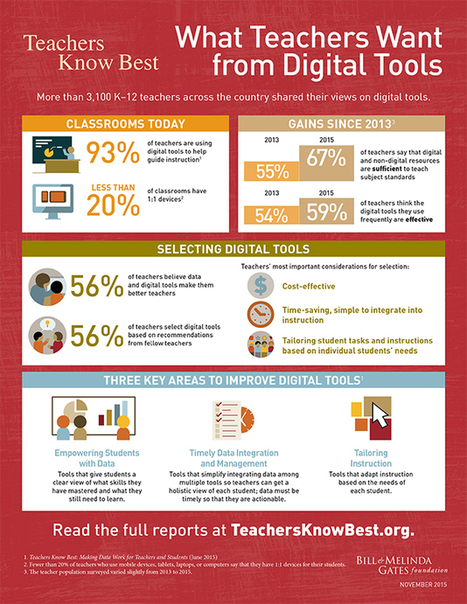
This study of more than 3,100 teachers revisits key questions explored in the original Teachers Know Best report: how teachers use digital instructional tools in the classroom, as well as their attitudes towards technology and whether they believe existing digital tools are effective. As with the original report, research centered on consumer analytics and insight provides an opportunity to shift from anecdotes to a richer understanding of whether product developers are creating the digital tools that teachers want and need,
How to use the editing icons of Moodle using the Learn Moodle site – an overview of the icon legend to make customisation and editing easier in Moodle.
Beim Inverted oder Flipped Classroom wird der traditionelle Unterricht auf den Kopf gestellt. Lehrer vermitteln Lehrstoff nicht mehr als Vortragende im Klass...
On occasions when face-to-face communication is essential, but in-person meetings are out of the question, video conferencing systems are a valuable asset. The challenge is to find the best video conferencing system for your specific eLearning needs and budget, especially when there are so many options available. Here are the top 10 video conferencing systems that every eLearning professional should know about.
Es fundamental estar actualizado en las opciones que presenta el mercado de herramientas, En este caso, las posibilidades que ofrecen 10 sistemas o plataformas para videoconferencias (webconferencias). Cada una de ellas tiene sus características técnicas, pero es muy IMPORTANTE la consideración de los planes gratuitos (free) con la limitaciones que eso pueda tener, ya que la disposición de equipos, facilidades de acceso y conectividad, son condicionantes en sociedades en las cuales usuarios (instituciones educativas/formación, docentes o participantes) no cuentan con recursos económicos y técnicos para acceder a todas esas maravillas.
Classroom teachers and technology innovation has been a hot topic for many, many years. It doesn’t have to be stressful trying to learn something new. Approaching new technology with a plan in place will help you to become a master at technology in the classroom and will reduce the stress that naturally comes with trying to learn new technology.
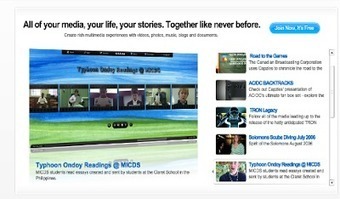
Capzles is an excellent web tool for creating visually interactive rich-media timelines using a number of materials including: videos, photos, text, audio, music and many more. You can use this tool with students in class to create timelines on various educational topics (e,g history and science projects). Capzles can be a great way for students to create digital portfolios and display their work. It can also be used for digital storytelling where students can experiment with different multimedia storylines. There are in fact endless possibilities to use Capzles in your instruction.
Want to start Genius Hour in your classroom but not sure where and how to begin? Already started Genius Hour and need a bit more guidance? I hosted this 25 minute webinar to jumpstart Genius Hour in your classroom.
"For most people, PowerPoint is boring. When you need to make a presentation, it’s the most basic and obvious choice. Unless you have some design chops and/or a lot of time, a ‘beautiful PowerPoint presentation’ is often something of an oxymoron ..."
Screencasting is when you record a video of your computer screen, oftentimes for teaching or sharing ideas. Common examples of screencasts are onscreen tutorials, video lessons, or slideshare presentations.
Du suchst herausragende kostenlose Bilder für deinen Blog, ein Arbeitsblatt im Schulunterricht oder für einen Bildungsevent? Ich habe dir mehr als 15 Seiten zusammengestellt, auf denen du absolut kostenfreie Bilder und Fotos zur freien Verwendung bekommst. Fotos bearbeiten, kopieren, veröffentlichen, ja sogar verkaufen kann man ohne Probleme mit den entsprechenden Creative Commons Lizenzen, wenn man immer...
Hot on the heals of the release of Moodle Mobile 2.3, Moodle published the Mobile 2.4 release notes. This release has two (very important) new additions – surveys and LTI support.
When no meaningful relationship exists between an educational technology and pedagogy, the tool itself loses value. Open educational resources provide a relevant example of how pedagogy can point toward a richer way to integrate technology into our courses and our teaching philosophies.
To get content containing either thought or leadership enter:
To get content containing both thought and leadership enter:
To get content containing the expression thought leadership enter:
You can enter several keywords and you can refine them whenever you want. Our suggestion engine uses more signals but entering a few keywords here will rapidly give you great content to curate.


 Your new post is loading...