


Speech to text technologies allow you to transcribe your speech into text in a couple of clicks. Most of the established platform
Via Dr. Tom D'Amico (@TDOttawa)

 Your new post is loading...
 Scoop.it! Speech to text technologies allow you to transcribe your speech into text in a couple of clicks. Most of the established platform Via Dr. Tom D'Amico (@TDOttawa) No comment yet.
Sign up to comment
Scoop.it!
Je vous explique ici ce que vous devez faire en cas de vol en France. J'ai trouvé un numéro de téléphone général qui est le 0892705705 Mais attention, c Via Elena Pérez
Scoop.it!
http://www.tc.columbia.edu/alumni/ Alumna Khaitsa Wasiyo (Ed.D. '09; M.A. '02) presents 7 Technologies that are Changing Classroom Education. Discover seve
Via Yashy Tohsaku
Scoop.it!

This set of videos shows Advanced Features in Google Forms. Learn to make mazes, add video, add pictures, validate text information and more. Great tech tool. Via Elke Höfler
Scoop.it!
Slides for talk given at the Moodle Moot'AU 2016 - see http://bit.ly/howBook for more
Via michel verstrepen
Scoop.it!

Werden virtuelle Lehrer klassischen Unterricht ersetzten? Wir sprachen mit Prof. Fritz Breithaupt über Vor- und Nachteile der digitalen Bildungsrevolution. Via Elke Höfler
Scoop.it!
You cannot cheat with open digital badges. The badges on Moodle allow the issues full control over the badge. Take a course on Moodle for Teachers and tr
Via Yashy Tohsaku
Scoop.it!

It takes a little creativity to flip your class, but it doesn’t have to be intimidating. These no-tech strategies get students interacting with the content.
Scoop.it!

"One of the strategies that I use when creating lesson plans is to reflect on the previous lesson. Part of that reflection include ..."
Via Leona Ungerer
Scoop.it!

Days when I could use colours on my skin rather than speak worlds of words. Days when it is the visual, not the verbal, tha Via Ana Cristina Pratas
Scoop.it!

Snapito est un service en ligne que nous vous avions présenté en 2013 , mais qui avait été fermé dès 2014. Le voici de retour et c'es Via Elena Pérez
Scoop.it!

When implementing and successfully sustaining a mobile learning initiative, it is imperative not to allow the device to drive instruction. Lessons, curriculum, schools and districts should never be built around technology. Everything we do in education should be built around learning. Thus, if the ultimate goal is to improve student outcomes then the role of any mobile device initiative should be to support or enhance learning. Via Nik Peachey 
Gaby K. Slezák's curator insight,
September 23, 2016 7:32 AM
Tech follows learning - not the other way around.

Zarah Gagatiga's curator insight,
September 27, 2016 11:15 PM
Pedagogy. Pedagogy. Pedagogy. Then, Technology.
|
Scoop.it!

A great option for recording Google Hangouts. A very easy to use option, ScreenCastle gives you the ability to record your entire screen, or to change the size of the recording box by pixel dimensions. An unlimited service, ScreenCastle will tape from the moment you hit record until you're ready to stop. You then have to upload your recording to the site. There are various sharing options open to you — a direct link to watch the video, an embed code to put it on your site, and a direct link to the FLV file. ScreenCastle also auto-generates a preview image of your footage
Via Peggy George
Scoop.it!
Enhance your online teaching skill set by learning about the latest emerging educational technologies being used in higher education today. Blackboard has many useful features, but there are so many more technologies you can use in your online courses. This video will provide you with tips and tools for using technology in your teaching, from creating content to enhancing communication and collaboration. Via Edumorfosis, Javier Sánchez Bolado
Scoop.it!
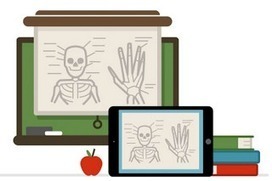
In today’s post, I am sharing with you some interesting tips I learned from Jonathan Wylie to help you record your iPad screen and create instructional screencasts and tutorials. The first thing that comes to mind when thinking of creating a screencast on iPad are those popular apps such as Explain Everything and Educreations but the thing with these apps is that they do not allow you to record what you do on other apps. For instance, you can not open Explain Everything and go to Evernote app to record your screen there, once Explain Everything window is closed , recording stops. Via John Evans, Ana Lara
Scoop.it!
Present.Me is a great technology for teachers who are looking to flip or blend their learning. You can access a free copy of this teacher tool. Via Elke Höfler
Scoop.it!

Titus Learning, the UK based Moodle company has created a few detailed Moodle training videos for first time Moodle users. The topics chosen for the videos are focused on the general questions from newbie Moodlers like: Via Miloš Bajčetić
Scoop.it!
Using the Web 2.0 write up in Wikipedia this video is to help teach educators about Web 2.0 tools.
Via Lyudmila Anikina
Scoop.it!

"Create Top Notch Graphics With Ease, for Little or no Cost (fun for Students too!) This 3 Minute TOOL-torial introduces Canva, a mostly free* app that makes it a breeze to create graphic images combining images and text ..." Via Leona Ungerer
Scoop.it!
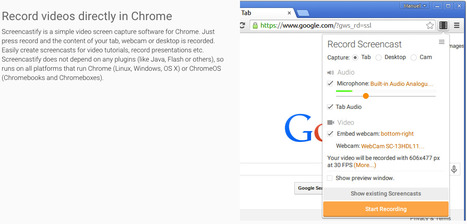
A simple video screen recorder for Chrome, Via Ana Cristina Pratas, Javier Sánchez Bolado
Scoop.it!

Check out these brief videos that offer quick introductions to help you get started with numerous different tech tools and resources for teaching and learning Be sure to share these great resources with your friends and colleagues! Access all of Via Dr. Tom D'Amico (@TDOttawa)
Scoop.it!
|






