


A reusable chart library for d3.js.
Our examples should provide you with enough code to start making beautiful charts.


 Your new post is loading...
  Scoop.it! A reusable chart library for d3.js. Our examples should provide you with enough code to start making beautiful charts. 
No comment yet.
Sign up to comment
Scoop.it!

Creating impressive presentation is an art. For a long time PowerPoint stood alone as the de facto tool for creating presentations. Now, things have changed, as the web has become the focal point for all businesses, and as browser capabilities improved tremendously. Modern browsers are now capable of rendering 3-D graphics and animations just like in any other native applications. Then there came some cool presentation libraries based on HTML5 and CSS3. Reveal.js is a highly popular library for creating stunning presentations. Websockets is a new standard defined as a part of HTML5 spec, which enables bi-directional, full-duplex communication in browsers. There are number of JavaScript libraries that make working with Websockets easier, of which Socket.IO is a prominent one. In this article we’ll discuss how to create a Reveal.js presentation that can be controlled by multiple users. We’ll make use of Socket.IO for sending and receiving slide change events in real-time. Reveal.js already comes with a multiplexer plugin, but this is a bit difficult to set up so we’ll ignore that for the time being. Let’s focus on how we can write a Socket.IO server that’ll suit our purpose.
Scoop.it!

AppJS is an SDK to develop desktop applications using Node.js melded with Chromium. With AppJS you can develop desktop tools and applications using the same libraries and knowledge used to build websites. Using AppJS you don't need to be worry about coding cross-platform or learning new languages and tools. You are already familiar with HTML, CSS and Javascript. What is better than this stack for application development? Beside, AppJS uses Chromium at the core so you get latest HTML 5 APIs working. So relax and focus on the task your application should do.
Scoop.it!
If you are reading this post you probably agree with me that AngularJs is pretty awesome. Because it’s so new, there are a number of gaps in the framework. My last post was inspired by filling a gap, and now again, I will present a directive and service I wrote because it doesn’t exist within the framework. I am working on an application that requires users to upload files. As it’s 2013 and we are living in an asynchronous world, I wanted an intuitive UI where my users can upload files, along with some data and view upload progress. I’ve found a bunch of stuff that wraps jquery implementations, but nothing native, so, I guess I’ll build one. Design Goals As usual, I started “outside-in”, that is, I had an idea of the API I wanted to work with from the parent scope (i.e. the angular module that houses the directive) and then figured out how to build it. The directive is an element that is replaced in the DOM with the appropriate html elements.
Scoop.it!

Fast-forward to this month, and it seemed worthwhile to get my Node.js service for Blastanova caught up to speed with the newly crowned and beloved taskrunner, Grunt.js. It’s a relief to offload the task-running glue of my project to a massively used and iterated open-source project. I can use a bunch of convenience features that already exist like copying files, FTPing, reading JSON configurations, et cetera…and I can also build on them and create custom tasks unique to my project. Now I have a new project for which I’m using Grunt.js. I’ll take this opportunity to share a task Grunt.js can perform that I find pretty darn awe-inspiring because of the awesomeness of the most well-known, cross-platform, free video utility available today. FFMPEG is used all over the place to convert a piece of audio or video from one format to another and/or inject metadata into them. Some folks will use it to transform video on the fly for you to watch if your platform doesn’t support a specific format. Me? I’m running a radio show, so my Grunt task needs to be the sort of thing where I send video in and get audio out. So there it is, my current project problem set-up. Let’s talk about how to get it done!
Scoop.it!

angular-translate is an AngularJS module that makes your life much easier when it comes to i18n and l10n including lazy loading and pluralization. It provides components like filters and directives, asynchronous loading of i18n data, full pluralization support through MessageFormat and much more! angular-translate is very flexible. You can build your own loaders, storages or error handlers and extend angular-translate to your needs!
Scoop.it!
This 49 minute talk covers several topics in JavaScript and web security, including secure password storage and authentication, SRP protocol, and common JavaScript security threats and injection techniques.
Scoop.it!

For most of you, the reason that you’re writing directives is probably pretty straightforward, such as to integrate with existing Bootstrap modules and jQuery extensions, or to DRY up your UI. In this post, I’ll lay out the basic idea behind AngularJS directives, demonstrate what they do with roughly corresponding jQuery code, and provide you with enough knowledge to develop some pretty sophisticated directives.
Scoop.it!
Back in March I wrote a post "Understanding Constructor Functions in Javascript and This keyword" in which, while explaining the concept of this in Javascript, I stated that it is impossible to tell what the this keyword references by just looking at the function definition. You only get to decide or know what the this keyword refers to, by the way the function is called. Call the function one way, and have this refer to one object, call it another way and you can have it refer to a totally different object. Showing that in Javascript, this is a context-indicator.
Scoop.it!

A while ago I noticed that AngularJS doesn’t show invalid model values bound to an <input/> While running the example displays letters = 1 but the <input/> element remains empty. In this blog post I will dig into how AngularJS handles rendering, parsing and validation and will finally provide a workaround / solution for this AngularJS bug as well as some other improvements. In order to solve this issue we first need to understand how model values are rendered and validated. Whenever a model value bound with ngModel changes, AngularJS uses the NgModelController#$formatters array to validate and format the model value for rendering...
Scoop.it!

One of the tasks that comes up fairly frequently in application development is ensuring that a specific value is unique as a user enters it into a form. For example, you may have a user name or email that is entered by a user that you want to ensure is unique before allowing them to submit the form. There are a variety of ways to handle that type of scenario including making standard Ajax calls directly from an AngularJS controller, but if you find yourself performing this type of task over and over it may be time to consolidate your code and make a re-useable component. Enter directives – the perfect way to add “unique value” functionality into a form. In this post I’m going to walk through a simple unique value directive and show how it can be used. Along the way I’ll also discuss a few aspects of validation in AngularJS as well.
Scoop.it!
Code must work, but
Quality
Scoop.it!

I really enjoy using block-style template inheritance in Jade and Handlebars. From my understanding, this pattern was popularized by Django. AngularJS rocks, but it relies on template inclusion to define layouts. This means the a layout context is spread across several templates. With block-style template inheritance, layouts are defined within a single template. Moreover, multiple layouts can be DRY’ed up with inheritance. So I set out to build angular-blocks, an AngularJS module, to support template blocks.
|
Scoop.it!
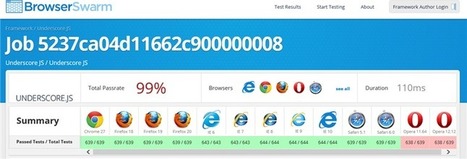
An open source tool that helps Web developers automate testing of their JavaScript frameworks and libraries across devices and browsers. Quality frameworks are the foundation for the modern Web, but framework developers often do not have the resources to test across browsers. BrowserSwarm helps developers build great, interoperable frameworks. The project complements modern.IE, which provides a set of free tools and resources to help developers build Web sites for all modern browsers. BrowserSwarm connects directly to your team’s code repository on GitHub and uses Sauce Labs’ cloud to automatically run Unit Tests using QUnit. A simple report separates which test cases passed and failed so you can quickly see what needs to be fixed. BrowserSwarm provides test results using top frameworks and libraries such as prototype.js and Modernizr. You receive an overall pass rate across browsers and devices, along with individual test pass rates for top browsers.
Scoop.it!
This directive allow to liven your tables. It support sorting, filtering and pagination. Header row with titles and filters automatic generated on compilation step. Examples:
Scoop.it!

RAD.js is a system-level software framework which helps build a single-page cross-platform application that looks and feels as a conventional multi-page one. Now, cross-platform software of high quality can be created faster and easier than before. This framework was created by JS/HTML team of MobiDev, under the guidance of the leading PhoneGap specialist, Yuriy Luchaninov.
Scoop.it!

Creating themes using CSS is awesome, but its complex syntax makes life difficult. As project grows and demands more and more styling consumes lot of time in organizing it perfectly. To over come all these, as part of this article we will see how Sass and Compass will help in creating the themes easily and use it in your application. Most of the application needs an custom theme to give an unique look and feel for application, so in order to create an custom theme we will see following items as part of this article * Tools required
Scoop.it!

Avatar provides a JavaScript services layer zeroed in on supporting REST, WebSockets and Server-Sent Events, and a rich client side framework that assumes very minor JavaScript knowledge. The services side is focused on building data services using JavaScript, while the optional client side is entirely focused on supporting HTML5 and TSA (Thin Server Architecture). An Avatar application is comprised of either client side 'views', server side 'services' or, for convenience, both. Importantly, there is no inherent coupling between views and services, enabling views to communicate with existing services and for services to be consumed by any type of client. An application 'archive' is deployed on the server and is compiled to generate JavaScript tailored to the application. Generated JavaScript for views handles data-binding with the DOM/UI as well as data-management to remote services and local storage.
Scoop.it!

On tech.pro, almost every form input has a placeholder. Unfortunately, some older browsers (like IE8 and IE9) do not have support for this new attribute. If one follows the prescription of Progressive Enhancement, this is no problem at all — if the text in the placeholder attribute is merely meant to be additional, users with older browsers will not see it but it will not ruin the user experience entirely. The input placeholder is a perfect example of something that was probably intended to only enhance. The problem of course, is that sometimes we don't want to be shackled by older browsers. Some forms can be made a lot cleaner visually by using only the placeholder attribute to label the fields. With Knockout.js the issue is that the value binding was not planning for some pesky jquery plugin to start messing with the actual value of the DOM element. As a result, if you are binding to the input with knockout, while at the same time using the jquery.placeholder plugin to emulate the placeholder behavior, you've just introduced a nightmare for yourself.
Scoop.it!

We will build two types of data-grids (tables) in this article: In both of the above we want the following: We would display a list of students, their age, school name, and school address in a data-grid (as shown in the image above). In this article, I want to demonstrate the use of KO and some basic object oriented JavaScript. There are other good articles on CodeProject demonstrating, for example, the use of jqGrid with MVC 4. However here we will develop the entire data-grid (with paging/sorting functions) to have better control over the generated output. Though I have used ASP.NET MVC 4 as backend to this project, other technologies (PHP etc.) can be used as well, as the client side code to generate data-grid is agnostic of backend technology. I will keep explaining any particular JavaScript constructs that are a bit tricky for users having only basic knowledge of JavaScript.
Scoop.it!

So you’ve got an AngularJS UI built out, but you’ll need a fleshed-out backend before being able to really take it for a test drive, right? Actually, it turns out, with the magic of Angular and its mocked $httpBackend, we don’t need no stinking backend! If you’ve heard of $httpBackend, you’ve probably heard of it it terms of writing unit tests. While unit testing like this can help test and play with bits of code, it can’t drive an overall vision the way that seeing, clicking, and typing into a prototype can. Therefore, I’ve taken $httpBackend and implemented a complete mock-up of my backend to allow me to use my UI and iterate quickly. Basically, I can now simply open file://path/to/my/project/index.html in my browser use my application as if it were backed by a database on a server. (That is as long as I don’t fully reload the page:) ).
Scoop.it!

The first installment discussed what Knockout.js is, why and how it evolved, and how it fits into Web development. This month, the discussion dives into best practices for Knockout, extending it and creating custom bindings. To get the most utility out of Knockout's components, the need for the Model-View-ViewModel (MVVM) design pattern must be understood. This architectural pattern arose out of Microsoft's implementation of Martin Fowler's presentation model design pattern to support Windows Presentation Foundation (WPF) and Silverlight.
Scoop.it!

I recently released a fun project called rainyday.js. I consider it a rather humble piece of code and, in fact, it is more or less my first contact with JavaScript on a level that requires a little more than displaying alert popups. Hopefully, some of you will find it useful and interesting. The idea behind rainyday.js is to create a light JavaScript library that makes use of the HTML5 canvas to render an animation of raindrops falling on a glass surface. Simple enough, yet challenging at times, especially since we’re trying to avoid that cartoonish look usually attributed to JavaScript animations and at the same time make sure the animations work smoothly. In this article I’ll try to describe the overall approach as well as the “little things”, so bare with me. The animation uses three different canvas objects in order to achieve the layering effect, as can be seen on the figure below...
Scoop.it!

A framework for developers who want to design, build and share cross device applications. I can give you a simple and powerful structure to make the most of your web applications. An application consists of three work contexts: Model, View and Controller, developers usually call it the MVC pattern. These three contexts are equally important and each has its full integrity giving responsibility to your application.
Scoop.it!

Over the last five years, thanks largely to the rise of frameworks such as jQuery and Prototype, JavaScript has risen to become a first tier language for scripting on the web. This increased popularity and ease of use, has led to the creation of fully fledged applications such as Gmail, which contain thousands of lines of JavaScript code that required teams of talented developers to create. As a result of this increasing complexity however, when something does go wrong developers need powerful JavaScript debugging tools in order to quickly root out the cause of the issue and fix it efficiently. A simple var dump via the alert() dialogue simply won’t cut it anymore. In this tutorial I’ll outline some of the features of modern developer tools that you can use today to help make JavaScript debugging less painful. We’ll focus primarily on the Chrome developer tools and Firebug but many of these features are available in other tools such as Opera Dragonfly.
|




