JavaScript for Line of Business Applications
606.6K views | +19 today
JavaScript for Line of Business Applications
Keeping track of current JavaScript Frameworks that help design your clientside Business Logic Layers.
Curated by Jan Hesse
Beam to my Inbox:
Your new post is loading...

Popular Tags - Filter using the Funnel

Scoop.it!

syringe - An ultra-lightweight dependency injection framework for JavaScript

syringe - An ultra-lightweight dependency injection framework for JavaScript | JavaScript for Line of Business Applications | Scoop.it

Syringe is a teeny-tiny JavaScript dependency injection framework that allows you to dynamically assign data contracts to your functions and methods. No more worrying about passing information directly, indirectly, or relying on the lexical scope as Syringe can vaccinate your operations ahead of time!

Now, let's roll up our sleeves and begin shall we?

No comment yet.
Scoop.it!

Building a single-page app, one page at time

Building a single-page app, one page at time | JavaScript for Line of Business Applications | Scoop.it

In addition to requiring that music is continuously playable, we also must provide server-rendered versions of our public pages – this makes our content accessible to search engines and screen readers, simplifies linking and sharing, and results in faster load times through our cache system. This requirement is a large part why of we avoided earlier solutions like hashbang URLs or iframes, and waited for HTML5 history to be widely available. We also wanted a transition path that didn’t require a full rewrite or a big launch to inaugurate the new version. Building a second version of the app in parallel to maintaining the first was just not an option for our four-person dev team.

These requirements pushed us toward more adaptable technologies and newer libraries. Over the course of several months we began using Backbone.js to manage our models and view logic, Require.js to handle dependencies, and several flavors of Mustache for templating, keeping these updates in the production codebase without radically changing the application or UI. These updates readied us for futher abstraction into a single-page application.

No comment yet.
Scoop.it!

The wondrous world of JavaScript

The wondrous world of JavaScript | JavaScript for Line of Business Applications | Scoop.it

If you’re following the latest trends in the web development world, you might have noticed that the last years the popularity of JavaScript increased a lot. Lots of frameworks became popular like Google’sAngularJS, ember.js and of course Backbone.js.

One of the first of these “big” frameworks was Backbone.js. JavaScript code before that time was usually unstructured, contained a lot of spaghetti code and was hard to maintain.
Backbone.js gave you the possibility to follow the MVC (Model-view-controller) design paradigm, or in their case, MVP (Model-view-presenter).

Backbone.js gave you the possibility to divide your application in logical parts andprovided data binding. Only that wasn’t enough of course, because applications needed more components like:
* A module system
* Templating
* Data binding
* Data synchronisation
* Widgets
* Testing framework

And so, other frameworks were born, like: RequireJS, CommonJS, Component, AngularJS, Twitter Bootstrap, Flight, Hogan.js, QUnit, Jasmine, … (and I can probably go on for another hour).

No comment yet.
Scoop.it!

Crossfilter - Fast Multidimensional Filtering for Coordinated Views

Crossfilter - Fast Multidimensional Filtering for Coordinated Views | JavaScript for Line of Business Applications | Scoop.it

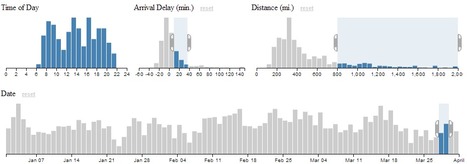
Crossfilter is a JavaScript library for exploring large multivariate datasets in the browser. Crossfilter supports extremely fast (<30ms) interaction with coordinated views, even with datasets containing a million or more records; we built it to power analytics for Square Register, allowing merchants to slice and dice their payment history fluidly.

Since most interactions only involve a single dimension, and then only small adjustments are made to the filter values, incremental filtering and reducing is significantly faster than starting from scratch. Crossfilter uses sorted indexes (and a few bit-twiddling hacks) to make this possible, dramatically increasing the perfor­mance of live histograms and top-K lists. For more details on how Crossfilter works, see the API reference.

No comment yet.
Scoop.it!

AngularJS + ASP.NET Web Api + TypeScript - Single Page Application (SPA) Starter Kit for Visual Studio

AngularJS + ASP.NET Web Api + TypeScript - Single Page Application (SPA) Starter Kit for Visual Studio | JavaScript for Line of Business Applications | Scoop.it

This project is an application skeleton for a simple AngularJS app. You can use it to bootstrap you AngularJS web application projects in Visual Studio environment.

This seed contains AngularJS libraries, test libraries and a bunch of scripts all preconfigured for instant web development gratification. Just clone the repo (or download the zip/tarball), open it in Visual Studio 2012 and you are ready to develop and test your web application.

This seed doesn't do much, just shows how to write two controllers and views together. You can check it out by running App project in Visual Studio.

Technologies:

* AngularJS MV* family JavaScript Framework
* ASP.NET Web Api library for building RESTful services
* ASP.NET Web Pages adds Razor syntax to your HTML views
* ASP.NET Web Optimization Framework bundles and minifies JavaScript/CSS files
* TypeScript adds static typing to JavaScript and better IDE goodies
* LESS CSS extends CSS with dynamic behavior

Peter Verster's curator insight, September 29, 2013 4:12 AM

I personally use backbone.js and WebApi running in worker roles. Good to see the embrace

sreekanth's curator insight, August 10, 2015 2:16 PM

ASP.NET App Suspend is built on top of another new feature in Windows Server 2012 R2, called IIS Idle Worker Process Page-out, which is a new addition to Internet Information Services.

Scoop.it!

End to end web app with Django-Rest-Framework & AngularJS [Part 3 ]

End to end web app with Django-Rest-Framework & AngularJS [Part 3 ] | JavaScript for Line of Business Applications | Scoop.it

In the 2 previous posts we built a backend API with DRF and a client with AngularJs.
In this part, we will add authentication and permission to our app. We will add some restrictions on who can edit and delete posts.

* Authenticated users can create blog posts
* Posts are tied to their author (edit/delete permissions)
* Posts are read only for unauthenticated users


A REST API allows your users to interact with your website from anything that can send an HTTP request. In this post we will create a RESTful api in Django using the Django-Rest-Framework. And we will access this api using a client developed under AngularJS.

To utilize the API developed in Django, we are going to use $http & $q services in Angular. The $httpservice is a core Angular service that facilitates communication with the remote HTTP servers via browser’s XMLHttpRequest object or via JSONP. $q is promise implementation that comes with Angular.

No comment yet.
Scoop.it!

Getting started with web components and polymer.js

Getting started with web components and polymer.js | JavaScript for Line of Business Applications | Scoop.it

Web components are basically small encapsuled units inside of a website or web application(like for example the HTML5 video element). They include their own styling(CSS) and their own behaviour(JS). And this is the main advantage of them. Imagine little pieces inside of your web app, that are not influenced by the global stylesheet and whose children are not affected by any written JavaScript function. This way you end up with a box of bricks and the only thing to do is putting them together easily. Additionally you can use them whereever you want, because they include everything they need to look awesome and to behave awesome. Sounds really like a dream to me. :)

I started looking around and decided to use polymer.js (written by the Google guys) to play around with the principle of web components. Unfortunately they are rarely supported these days and this library gives me the opportunity to use this technique already today by providing needed polyfills.

No comment yet.
Scoop.it!

Classless JavaScript

As JavaScript developers, or even web developers as a whole, we seem terrified by the thought of direct usage. No technique or idea seems to be considered “legit” until it has been abstracted by several layers of syntactic sugar and, potentially useless, fluff.

One of the common abstractions is the addition of “classes” to JavaScript; prototypical inheritance isn’t good enough for us lot by the looks of things. We seem to crave the features of other languages when our language of choice isn’t really built for them, it’s built in a different way and probably shouldn’t have classical inheritance principals forced down its VM / throat.

So what if we worked with JavaScript in a more natural way? First, what would be more natural? Personally I believe that, like the underlying language, everything should revolve around objects; we create and manipulate these malleable entities instead of trying to lock things down and restrict our data.

This idea lends its self exceptionally well to functional programming and the actual VM, which no longer needs to mess with prototype chains or any other form of inheritance for that matter. It’s as raw as JavaScript usage can get, it’s kind of like C structs (although nothing like them at the same time) and I think it’s pretty elegant.

No comment yet.
Scoop.it!

Angular-xeditable :: Edit-in-place for AngularJS

Angular-xeditable :: Edit-in-place for AngularJS | JavaScript for Line of Business Applications | Scoop.it

Angular-xeditable allows you to create editable elements in AngularJS project.
It is based on ideas of x-editable but was written from scratch to use power of angular and support complex forms / editable grids.

* Simple editable text
* Select local
* Select multiple
* Textarea
* Checkbox
* Validate local
* Onbefore/Onaftersave
* Editable form
* Editable table


No comment yet.
Scoop.it!

API-based Web Application with Backbone, Require.js and Slim framework

API-based Web Application with Backbone, Require.js and Slim framework | JavaScript for Line of Business Applications | Scoop.it

A single-page application (SPA) was something I’ve been exploring for the last few months. I always liked the idea of moving certain responsibilities to the client’s side. After all, why would you like to waste server’s RAM/CPU to buil a HTML page (and pay for a transfer to deliver it) when a web browser is perfectly capable of doing that on its own? You will not only save money but also provide a better user experience. In addition to the performance, moving the presentation layer to the web browser gives a clearer division between back-end and front-end code.

 I used an extremely useful boilerplate for Backbone.js created by Thomas Davis as a foundation to create an example App which talks to a PHP back-end.

The back-end could be a plain PHP but instead I went for the Slim micro framework. It’s fast, very easy to learn and will enforce a better code structure. After all, this is one of the best use cases for a micro framework.


No comment yet.
Scoop.it!

Sorting Paging a Grid using Knockout JS and ASP.NET Web API Data Service

Sorting Paging a Grid using Knockout JS and ASP.NET Web API Data Service | JavaScript for Line of Business Applications | Scoop.it

This article uses ASP.NET Web API and Knockout JS to implement Templating and Data Binding and applies it to a common Line of Business application requirement – Paging and Sorting a Grid

Knockout JS as we know is a highly versatile JavaScript library that helps us implement the MVVM pattern on the client by providing us with two way data binding and templating capabilities. Today we will use Knockout JS and ASP.NET Web API to build an application that represents data in a tabular format with AJAX based sorting and paging capabilities.

Representing Tabular data in a table is as old as web itself and today end users expect a certain amount of features and functionality built in. These include fast access, sorting, paging and filtering. There are well established libraries like Datatables.net that already do these for us. However, knowing how something is implemented, helps us tweak things to our advantage, because no two requirements are the same, ever.

No comment yet.
Scoop.it!

BladeRunnerJS - Divide & conquer your web apps

BladeRunnerJS - Divide & conquer your web apps | JavaScript for Line of Business Applications | Scoop.it

BladeRunnerJS (BRJS) is a development toolkit and lightweight framework for building modular large-scale HTML5 single page web apps. It consists of a set of conventions plus associated tools and libraries that make it easy to develop, test, deploy and maintain large JavaScript apps.  In particular, it supports simultaneous development by multiple teams of very large JavaScript codebases with numerous components. It does this by providing powerful workflows based on software engineering principles.

BRJS was originally created to make it easier to build extremely complex high-end financial trading apps in HTML5, and it has had a major impact on developer productivity for us and our customers. As the number of developers creating large-scale front-end web apps increases, we hope that BRJS will turn out to be useful to others. We’re also keen to validate our hunch that it will be equally valuable for building complex applications in other domains.

No comment yet.
Scoop.it!

Fat Arrow Functions in JavaScript

Fat Arrow Functions in JavaScript | JavaScript for Line of Business Applications | Scoop.it

Since sometime back in the heady days of Firefox 22, Firefox gained the ability to use Fat Arrow Functions in JavaScript. Users of CoffeeScript (or, I guess, C#) will be familiar with the syntax. We’ve been using these in Firefox DevTools code for nearly 6 months.

You can use them today in any shipping Firefox and experiment with them live in theScratchpad or Console.

They look like this:

let x = (args) => { /* some function gunk */ };

If you want to call it, you can with x();

Fat Arrow functions have a couple of interesting properties. First and probably most useful is that they gain the scope of the environment they’re defined in. You can’t change the value of this by using a call() or bind() function.

Second, Fat Arrow functions don’t have their own prototype or a constructor. (They have the standard Function prototype). This means trying to use the new operator on a fat arrow function results in a TypeError.

That’s all well and good, but what is the practical application of all of this? ...

No comment yet.
Scoop.it!

Dependency Injection in Node.JS

Dependency Injection in Node.JS | JavaScript for Line of Business Applications | Scoop.it

Dependency injection frameworks are relatively uncommon in node. On the client, Angular uses dependency injection, but the learning curve of Angular is so steep that the core of dependency injection ends up being obscured by all the other concepts. Generally, javascripters think of dependency injection as "that thing Martin Fowler invented."

Despite its reputation as an obscure Design Pattern, dependency injection is a pretty good idea. In fact, i.TV wrote their own dependency injection framework, dependable, when they realized they were doing it manually throughout their application code. By using dependency injection, we've been able to clean up a bunch of boilerplate code, keep our codebase tidy, and solve Real Problems in application development.

No comment yet.
Scoop.it!

In praise of AngularJS

I can think of two main stumbling blocks: “Dependency Injection” and all that “service”, “factory”, and “controller” stuff (not to mention “directives”). And Model-View-Something.

It’s not hard. It wasn’t designed to be hard. The terminology is pretty clever. I’d say that it was invented to produce a mental model which can be used and extended. And like a beautiful clock, it doesn’t start ticking until all the little pieces are positioned just right. Then it will run (and evolve!) forever.

Dependency injection is nothing new, it’s essentially another name for “require” (Node.js), “import” (Python), or “#include” (C/C++). 

That’s dependency injection. And Angular uses it all over the place. It will often call functions through a special “injector” and get hold of all args expected by the function. One reason this works is because closures can be used to get local scope information into the function. Note how myCode had access to “value” via a normal JavaScript closure.

In short: dependency injection is a way for functions to import all the pieces they need. This makes them extremely modular (and it’s great for test suites, because you can inject special versions and mock objects to test each piece of code outside its normal context).

The other big hurdle I had to overcome when starting out with Angular, is all those services, providers, factories, controllers, and directives. As it turns out, that too is much simpler than it might seem...

No comment yet.
Scoop.it!

7 tips for a Node.js padawan

7 tips for a Node.js padawan | JavaScript for Line of Business Applications | Scoop.it
Or stuff I wish I knew when I started.

Node.js development is extremely fun and satisfying. There are over 35k modules to choose from, and overall node is very easy to develop a working application that can scale easily.

However for developers just starting off with Node.js development, there are a few bumps along the road. In this short post I cover a few of the things I questioned and ran into while learning Node.js.

No comment yet.
Scoop.it!

Easy API Scaffolding with Simple-API and Node.js

Easy API Scaffolding with Simple-API and Node.js | JavaScript for Line of Business Applications | Scoop.it

API’s are often a pain to build. There’s all kinds of moving pieces: routing, data parsing, serialization, database interactions, etc. For years I’ve struggled with writing web API’s in Node.js – there’s just so much complexity required in an API boilerplate. That’s why I wrote Simple API. Simple API is an incredibly easy to use module for writing web-based APIs in Node.js

I often hear people say that they’ve written a library that makes something “simple”, but in reality they’ve just made it a different kind of complex. In this article, I hope to prove that’s not the case with Simple API. This tutorial is going to teach you to write an API for a ToDo list, where the entire project is less than 300 lines of code. That’s the entire project – the API related files are less than 200 lines of code.

No comment yet.
Scoop.it!

The concepts of AngularJS Forms

The concepts of AngularJS Forms | JavaScript for Line of Business Applications | Scoop.it

This article cover the concept of angular form, it also explains what aspect has been extended from plain HTML form, such as states and methods of angular form and how developers can work with it by understanding flow of angular form states.


If you think you have worked often with form, I’m sure you have. But if you’re a self-taught developer who jumps from one tutorial to another, you probably missed a detail or two. In order to understand angular forms, you need to recall the concept of form. Well, I will explain in a simple definition, I hope you will agree with me.

Beforehand, I will explain what control is. Control is a way for user can input data to application, a feature which allows user to control the application. Example of individual control is button, input, textarea, select, etc. Now that we know about controls let’s define a form.

Form is simply a group of controls. So, form is just a collection of related individual controls grouped together and has a meaning, for example login form, meaning a group of control which allows user to input their credential to enter the application.

No comment yet.
Scoop.it!

Extjs , some best practices

Extjs , some best practices | JavaScript for Line of Business Applications | Scoop.it

During searching for best codding practices of extjs I found following links very good and informative.

No comment yet.
Scoop.it!

The ECMAScript Internationalization API

The ECMAScript Internationalization API | JavaScript for Line of Business Applications | Scoop.it

The ECMAScript Internationalization API is a standard JavaScript API that helps with tasks related to internationalization: collation, number formatting, date and time formatting. This blog post gives a brief overview and points to more reading material.

The specification of the ECMAScript Internationalization API is edited by Norbert Lindenberg. It is available in the formats PDF, HTML and EPUB. Additionally, there are several comprehensive introductory articles...

* Collation
* Number formatting
* Date and time formatting


No comment yet.
Scoop.it!

Writing Client-Side JavaScript Modules, AMD, RequireJS & the "wrapper" Module

Writing Client-Side JavaScript Modules, AMD, RequireJS & the "wrapper" Module | JavaScript for Line of Business Applications | Scoop.it

An often overlooked piece of JavaScript examples, tutorials and discussion is the writing of libraries/modules.

While there is a vibrant community of people writing UI centric jQuery Plugins with a de-facto style and methodology, paging through Github repositories of the many libraries, frameworks, plugins, etc will show an extremely disparate set of coding styles and methods.


History, ES6, Transpilers and AMD


As more and more browsers support experimental ES6 Module Features, and others use transpilers to write in ES6 transpiling to shim'd JavaScript/ECMAScript5 which export to AMD format & client-side JavaScript becomes even more complex and large, users will use module style coding as the standard.

Regardless of whether or not you want to support CommonJS, RequireJS/AMD or just write a library which aliases its' constructor or main method/object to the window: anyone could benefit from writing small, testable and compartmentalized modules.

No comment yet.
Scoop.it!

typeahead.js directive for angular.js

typeahead.js directive for angular.js | JavaScript for Line of Business Applications | Scoop.it

Some fellows at Twitter open-sourced their implementation of autocomplete.  They called it typeahead.js. Head over to their documentation pages to read more details about this awesome library. It is important that you understand the parameters/options that the library needs in order to configure it, and make it work.

In this post, I was tinkering on making an angularJS directive to wrap the typeahead.jsautocomplete library.  The end product, would look like something as shown below. Note that I am using Bootstrap 3 CSS library to style my web page...

No comment yet.
Scoop.it!

JavaScript: The Real Bad Parts

difficult concepts to grasp in the languagehigh blog post to understanding ratio

* 6 DIFFERENT WAYS TO SET THIS
* WHAT ON EARTH IS PROTOTYPAL INHERITANCE
* SCOPING: BREAKING THE PRINCIPLE OF LEAST SURPRISE
* TAKEAWAYS

No comment yet.
Scoop.it!

Django/Ember Authentication is Easy

Django/Ember Authentication is Easy | JavaScript for Line of Business Applications | Scoop.it

As I’ve previously explained, one of the biggest hurdles to jump when getting started with Ember is authentication. Not anymore! I’ve put together a simple architecture that provides session-based authentication in a relatively small amount of code.

If you Google “Ember authentication” you’ll likely get a handful of SO posts and an even smaller handful of blog posts almost all of which implement some kind of token-based authentication, usually relying on Rails or Node for authentication. This requires you to perform a back-and-forth exchange with the server to authenticate credentials and receive a token. You probably have to store the token in some kind of manually made cookie or local-based storage, and you have to remember to consistently provide the token whenever you access a restricted resource.

Session-based authentication is a lot easier! First, the server-side mechanics for session-based auth are entirely built in to Django. Second, because the majority of the work is done server-side, there is little required of you in Ember. Finally, using session-based auth instead of token-based auth makes SSL a little less of a necessity since you’re not flinging naked tokens around with every request.

REST purists might argue that session-based authentication is technically not “stateless.” The trade-off depends on project requirements and personal preference. For single-page web applications, I can’t think of any practical downsides.


No comment yet.
Scoop.it!

AngularJS Tips and Tricks [UPDATED]

AngularJS Tips and Tricks [UPDATED] | JavaScript for Line of Business Applications | Scoop.it

I've compared a LOT of different javascript frameworks for my company's rewrite, and finally settled on AngularJS because of how rapidly I'm able to produce prototypes. In my opinion, it's excellent for CRUD applications (meaning forms, tables and reports). I'm still trying to lean towards emphasizing reusable widgets and directives instead of just custom-coding everything for your own app. If you are still on the fence take a look at TodoMVC for an excellent unbaised comparison.

* Serializing the form
* Useful $scope methods
* Unescape HTML
* Avoiding Flash Of Unstyled Content (FOUC)
* Terse Class Toggling
* Working with Templates
* Working with Directives
* Working with Resources
* Nuances of ngDisabled
* Easy Table Sorting
* Routing Tricks
* Efficient storing groups of checkboxes
* Forcefully Compile HTML Partials
* Set a $scope variable's value from a Directive
* Refreshing Paritals and <ng-include>
* jQuery Plugins not triggering ng-model updates?
* Form Builder Demo
* Form Validating & Validating Too Early?
* Animating the creation of new elements (10.6)
* Want a CSS sandbox (webkit)
* QUnit Testing Examples
* Debugging
* Useful Resources

No comment yet.