


The iPad is inherently an individualized device - the app 'Our Pad' makes it easier to work around that.
Via Andrea Zeitz, Christian Sparre

 Your new post is loading...
 Scoop.it! The iPad is inherently an individualized device - the app 'Our Pad' makes it easier to work around that. Via Andrea Zeitz, Christian Sparre No comment yet.
Sign up to comment
Scoop.it!

This post lists useful and effective tools that will help updating blogs easier and also show examples of how some of these applications can be used successfully for both teachers and students. ... Via Ana Cristina Pratas
Scoop.it!

From the website
"Team Viewer is a free application that allows devices such as the iPad and iPhone to remotely log in to a stationary computer. In the morning, I come into my office and set up my laptop and then carry around my iPad with me the rest of the day. By using the iPad, I not only have access to my wide variety of apps, but I can also remotely project my laptop screen on the iPad and make use of the programs I have running in my office. By doing this, I have eliminated the need to carry another piece of heavy equipment throughout the busy school hallways.
"Installation of Team Viewer on your PC or Mac is very simple. To start a session, you need to open the Team Viewer app and log into your computers individual address and type in your password. It couldn’t be simpler.
"Team viewer works on any desktop configuration and is great for setups with one or multiple monitors. The app provides users with a build in keyboard giving you complete control over every aspect of your remote machine." ... Via Ana Cristina Pratas
Scoop.it!

Solid little collection of resources to help everyone, from beginners to experts, become more adept at using the Google Apps. -JL Via Dr. Tom D'Amico (@TDOttawa)
Scoop.it!
From the website
"Story Dice - creative storytelling cubes for plot, character, and setting ideas, Fun for actors, writers, and friends!
"This app can be used with a wide variety of age groups ranging from preschoolers to teenagers.
Scoop.it!

Description by Internet Scout Project
"Everyone knows that it is easy to go down the proverbial rabbit hole while working online. One minute you could be checking on some higher education statistics and you might end up at IMDB.com for a solid hour. BringFocus helps users stay on task by helping them stay focused on one task at a time. Visitors can view screenshots of the program and also view a short demonstration video for more information on how BringFocus works. This version is compatible with Windows operating systems."
Scoop.it!

From the website:
"In the ultimate epitomization of the maxim "Go where you are needed," Bertie County is also home to the community-focused nonprofit group Project H Design. Headed by Emily Pilloton and Matt Miller, and supported by both the W.K. Kellogg and Adobe Foundations, this nonprofit "uses the power of design and hands-on building to catalyze communities and public education from within." With several student-built community projects under its belt and a near-cult following on Twitter, the group has gained national attention for its "flagship program," Studio H.
"Studio H is a public high school "design/build" curriculum that—at the time of its creation—was the country's first design, vocation, and community service program in a public high school. The mission, Pilloton notes, was to encourage design thinking in the classroom without resorting to being a "glorified art class." "My hope for Studio H and for this type of curriculum and academic approach is that the things we do produce go beyond the classroom and can be looked at examples of progress," she added."
Scoop.it!

From
www

"Leading this week’s must-have apps roundup is a terrific photography app called StillShot, which allows you to extract full-resolution still images from your videos.
From Cult of Mac Via Tim Mickan
Scoop.it!

"While reality can be scary, there are plenty of safe sites designed for kids under 13. Still, all the kid-friendly social networking sites in the world won’t help if kids find the adult versions more fun. We researched kid-friendly sites and then talked to kids to get a feel for the fun factor to collect four kid-approved sites." Via Gust MEES
Scoop.it!

Write a letter to your future self and have it delivered on a specific date; or read the public (anonymous) letters of others. Young writers can get really creative with this. -JL
Scoop.it!

How a new augmented reality platform for the iPhone is helping educators explore the possibilities of mobile for learning, and the value of putting students in the driver’s seat. Via Judy Brown, Robert Farrow, Tim Seal, Score Project, Aust Digital Futures, Informatics
Scoop.it!

The key for YouTube to display your video the best possible way, is to upload the best possible quality video that meets or exceeds their requirements. That is by encoding videos the right way. Via Informatics
Scoop.it!

"Sure, there are plenty of apps you can use in education. There are even apps created specifically for use in education. Apple has a whole category dedicated to education in the App store. But how do you really know which ones are worth downloading, or possibly even paying for? TCEA (Texas Computer Education Association) to the rescue! TCEA regularly tests available apps and recommends apps that teachers should be using. TCEA maintains a list of recommended apps in a shared document via Google Docs. The list is organized by subject area and free apps are color coded in white. Click Here To View The Mega Google Doc (H/T Apps In Education): https://docs.google.com/spreadsheet/ccc?key=0AvFbfb1mWoNwdGlweWtkZkFRS1gzUDMtTUtoTEw0MkE#gid=0
http://appsineducation.blogspot.com/2012/02/1000-recommended-apps-sorted-by-subject.html
Via Anne Whaits |
Scoop.it!

From the website
"Polling has long been a source of inestimable knowledge particularly for researchers. Gone are the days when one needs so much paper work and travelling to make a single poll or survey. Thanks to the massive influx of technology, what used to take months to survey takes only a couple of days.
"There are now a wide range of great web tools that allow users to create and conduct polls and surveys instantly and for free.
"I have compiled a list of some of the best survey tools specifically for teachers taking into consideration their educational needs. These tools are free and very simple to use. Most of them have embed codes to use when sharing them on your classroom blog or website." Via Dr. Tom D'Amico (@TDOttawa)
Scoop.it!
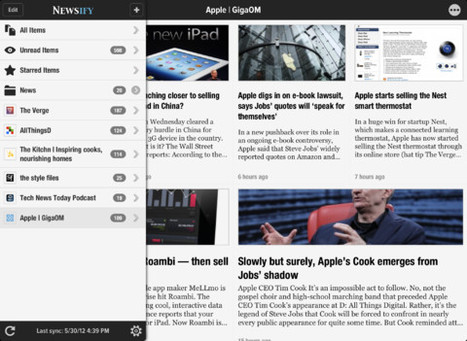
By Aldrin Calimlim
"Newsify is a Google Reader client that looks as though it were the lovechild of Reeder and Flipboard. This should value it at a dollar at the very least, but since its release last April, Newsify has been available for free. Also since its launch, Newsify has been packed with features comparable to those of its supposed “parent” apps. And more features have just been added to the app following its update a few hours ago."
Scoop.it!

From
croak
Simple way to record your voice in 3o-second segments and upload to the cloud, with a unique URL. Also works on mobile devices. Debuted in mid-May 2o12. Could become very popular. See a description and review at http://bit.ly/LamPpp. -JL Via Ana Cristina Pratas
Scoop.it!
11 free apps and 4 paid apps as chosen by teachers in March 2012. I think the paid apps Splashtop and Explain Everything are definitely worth checking out. They are very liberating uses of the iPad. -JL
Scoop.it!

Storyrobe is an exciting new digital storytelling application for the iPhone and iPod Touch. Storyrobe lets you tell create digital stories using images and video from your camera or photo library. You can use the built in microphone, or any 3rd party microphone to create audio recordings with photos and videos. Use Storyrobe to tell, share, and add to others stories creating a Storyrobe™ Via Ana Cristina Pratas
Scoop.it!
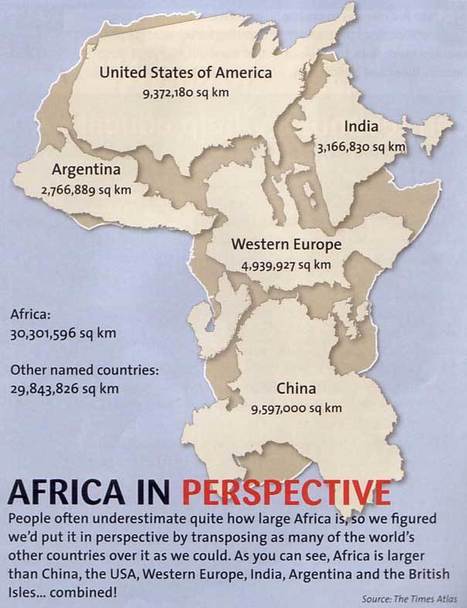
From Internet Scout Report
"Staff at the State University of New York's University at Buffalo's Map Collection have worked to bring the general public this top-notch guide to teaching with maps. The resources are culled from the University at Buffalo, digital collections from other institutions, and the Internet. The materials are organized into 14 thematic categories, such as Gazetteers, GIS Maps and Sites, and Satellite and Remote-Sensing Images. Visitors will note that each resource has a brief annotation along with a direct link to the resource.
"Locating Maps on the World Wide Web is a great resource, as it features high-quality links to collections at the University of Texas at Austin, the United Nations, and the US Geological Survey. Moving on, the Teaching Resources and Other Materials area is another great find. Here visitors can make their way through over two dozen resources, including the Using Historic Maps in College and University Courses site from the Newberry Library in Chicago."
Scoop.it!
From the website
"Lists for Writers is a great addition to any writer’s toolbox. Helpful to both novice and expert writers alike, this app delivers list after list for your brainstorming sessions: names, character traits, plot lines, occupations, obsessions, action verbs, and much more!?
Scoop.it!

How to create a community of learners. Reflective prompts for students, teacher and principals. Modeled on Bloom's approach to thinking.
Peter Pappas has developed a simple and very powerful guide to reflective thinking for students, teachers, and principals based on Bloom's new cognitive taxanomy. A marvelous tool for moving people to build their habits of higher level thinking. Links to Parts 2, 3, and 4 of his 4-part blog series, and a short Prezi presentation on this topic are included here. Impressive. -JL
Scoop.it!

An exploration of scale and levels of detail. How much or little is contained within the tiniest, most ordinary of moments.
@richardanderson writes:
"Telescopic Text (telescopictext.com) is a fabulous demonstration to children of how to extend their creative writing. From the simple starting text "I made tea", the writing unfolds with each click on one of the "greyed" words to insert new details, adjectives and emotions.
"At telescopictext.org, you can register and make your own unfolding texts." -------------- Students will get the hang of telescopictext.com quite rapidly...in which a simple 3-word sentence is expanded by clicking on "greyed out" words. Once they understand the concept, they can move on to telescopictext.org. Here students can completely control the process and rapidly and easily develop quite sophisticated writing samples. -JL
Scoop.it!
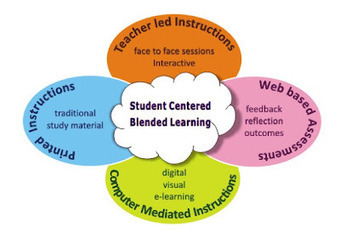
By Eric Sheninger, Principal, New Milford (NJ) HS
"Mrs. Kanchan Chellani, one of our math teachers here at NMHS, is very enthusiastic and creative. To engage students in her classroom, she has developed an interactive, student-centered learning environment. Through the use of technology, collaborative learning, and teaching mathematical concepts in the real-world and interdisciplinary context, she has managed to successfully work towards creating this desired positive and energetic blended learning environment. Some of the many methods Mrs. Chellani has employed in her daily instruction include integrating Smart Board interactive review games and videos to reinforce prior learning, case studies performed in the computer lab so students understand the significance of the material taught, and team assignments to foster a collaborative working environment."
Scoop.it!
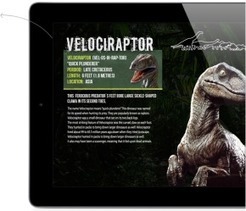
by Sarah Cargill
"Nearpod is like the Join.me for iPad presentations, yet – better. I’ve seen iPad browser sharing tools and iPad presentation managers, yet nothing with the suite of tools Nearpod offers for classroom instruction. “Nearpod is an excellent way to integrate ipads in the classroom, maintain integrity and classroom management, and be thorough in teaching a concept,” says Sair Weitmann, a seventh and eighth grade English teacher at American Heritage School in Plantation, FL.
Nearpod, which is free and works on any mobile iOS device as well as online with a Web browser, makes it easy for educators to: -Share live presentations in-person or remotely -Show quality multimedia like images, video and audio -Assess students’ comprehension of the material, and -Monitor progress and activity within the presentation." 
igabrielleprr@gmail.com's curator insight,
January 27, 2025 12:20 AM
Most schools are becoming 1 to 1 districts and luckily the device doesn't matter when you need access to Nearpod. As long as the device is equipped with internet, one can access Nearpod through a web browser and a join code. The join-code allows the student to follow along in the live lesson or the student-paced lesson with access to all content and media in the presentation.
|






