Nearly three years ago Google announced plans for its Chrome OS; a platform for networked computers. The OS has reached a point in maturity where it is useful.
by Om Malik (5/29/12)
"Google and its partner, Samsung, are launching a new Chromebook and Chromebox today, targeting them at the educational and corporate customers. The Chromebook from Samsung is like any other 12.1-inch budget laptop, while Chromebox is a tiny PC that you can connect to any keyboard, mouse and monitor similar to Apple’s Mac Mini. The Chromebook starts at $449 while the entry-level price of Chromebox is $329."
"Watch hundreds {actually over 1000 as of 5/30/12 -JL} of videos in the Flipped Learning Education TV channel. Sort by subject area, grade level and presenter. Hosted by JDL Horizon’s EduVision, this online video channel is a plethora of videos to get you started flipping your class.
" We recommend the following videos to get started.
Flipped Classes for 5th grade Math
The Flipped Mastery Classroom in Action
The Flipped Classroom – One Teacher Changes the Paradigm
"Everyone thinks that Project Based Learning has something to do with “authentic” learning. But not everyone agrees what this means.
A project can be authentic in four ways, some of which may be combined in one project: 1.It meets a real need in the world beyond the classroom or the products students create are used by real people.
2.It focuses on a problem or an issue or topic that is relevant to students’ lives—the more directly, the better—or on a problem or issue that is actually being faced by adults in the world students will soon enter.
3.It sets up a scenario or simulation that is realistic, even if it is fictitious. 4.It involves tools, tasks, or processes used by adults in real settings and by professionals in the workplace. This criteria for authenticity could apply to any of the above examples of projects."
"From the main page, teachers can browse lessons and activities in one of three categories: Culture, Subject and Age Group. From there, it is a long journey that ends with printables, lesson plans, writing assignments, cultural discussions and more.
"A quick look at the packet covering Azetc culture for late elementary school-aged students reveals 28 pages of lessons and activities. The site also offers three other age-group-specific packets on the Aztecs. If they contain the same number of pages, that means the museum offers 112 pages of ready-to-print classroom materials just on Aztec culture.
"Once users get past the sheer volume of materials, they’ll find that the quality is second-to-none. It helps that the British Museum has been one of the world’s preeminent museums for well over 200 years."
Teacher Sarah Wessling in a 2 min. video talking about and demonstrating giving audio feedback to writing students using a podcast (dictating into an iPod and then sending to students). Well done video and excellent demonstrtion by Wessling. -JL
"I’m not the most dedicated Instagrammer (need to get out more) or the best photographer (wish I was) but like many other educators, I enjoy sharing my photos on Instagram.
"Why? It’s fun! Easy! I can quickly share photos taken on my iPhone when I’m out and about! Or have fun editing photos and sharing from my camera on my iPad! And in the process I’m learning more about photography, photo editing and other Instagram users.
"Here’s my advice to help you get started or get more out of using Instagram."
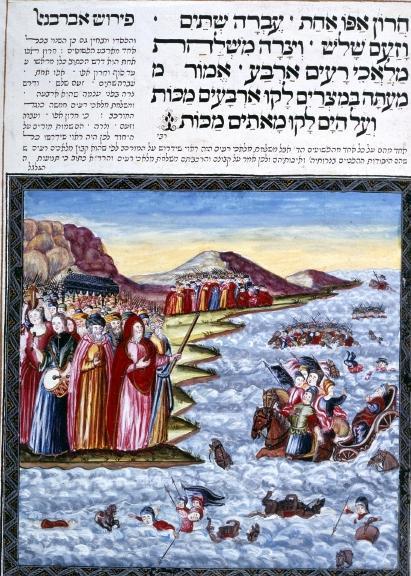
( Above - The Israelites, having crossed the Red Sea, watch the Egyptians drowning)
From the website:
"Bridging World History is inquiry-based, integrated, and recursive, and uses video, Web, and text materials to provide a comprehensive and interactive learning experience. The video and Web materials may be used non-sequentially and on their own as supplements to the study of world history; however, in their entirety, the materials provide a complete world history course.
"Each unit consists of a 30-minute video and an online text chapter. These chapters include journal articles and other readings, an overview of the unit content (see Assumption of User Knowledge), as well as a course guide chapter that provides a structure for course sessions, learning activities, and homework assignments. You can access all of the materials (including broadband, on-demand streaming of the video programs) through the Web site."
Very well done Web 1.0-type site intended for AP HS, college, or adult audiences. Course can be built around this site or selected pieces may be used to supplement. Produced by many collaborating organizations including Annenberg and Oregon Public Broadcasting. -JL
"Any teacher who has assigned group projects to students has at some point had to help those students organize and equitably distribute work. (Or has had to listen to students complaints about other group members not pulling their weight). Here are some tools that you can have students use to manage their responsibilities when working on group projects."
"They say patience is a virtue, but like temperance and chastity, it's not much fun. Unfortunately, if you want to reach a state of true techstasy, you may need to repress your desire to buy a new gadget today and wait for the next version to come out.
"To be fair, sometimes now is the best time to buy a particular device and sometimes you drop your phone into a public toilet and have to replace it right away. But when you buy that 3G phone a month before its hot new 4G replacement comes out, you might as well buy an "I'm with stupid" t-shirt for your friends to wear when you go out together."
Silvia Tolisano has developed an excellent rubric for assessing educational apps from the point of view of their efficacy in promoting transformative uses of the iPad. Within her description of how she arrived at the rubric, Silvia provides links to a number of additional powerful resources. Great blog post and looks like a great tool. -JL
"Designed for lesson study, LessonNote lets you trak who is talking to whom, when, and for how long, and lets you jot handwritten notes about what is being said and what students are doing. iPad 2 users can also record photos of student work (iPad 1 users can import photos afterwards).
"Record observations by tapping anything on the classroom. Drag from one entity to another to record interactions.
When you review your notes, the classroom highlights whom a note was about, while a timeline provides a bird's-eye view of the lesson, showing when events occurred and how long they lasted."
A school culture is is key to cultivating and supporting 21st Century Skills. At High Tech High, 21st century skills are fundamental to everything that happens.
Great video about the school that may be one of the best in America. -JL
This is the first episode of the Flipped Learning Network Podcast interviewing Aaron Sams.
From the Flipped Learning emai newsletter
"Listen to the FLN Podcasts hosted by Troy Cockrum, flipped English teacher in the Archdiocese of Indianapolis. The inaugural podcast has been posted!
"In the first episode, Troy interviews Aaron Sams, pioneer of flipped learning, discussing the “Good teaching classroom.” Listen in as they talk about the flipped class and flipped-mastery learning, debate blended learning, and discuss institutional vs. individual adoption. Hear more about the new FLN and the professional development options and other benefits. Listen now! Flipped Learning Podcasts"
The capacity to build and engage a community of learners is one which I believe will be essential to your relevance as an instructional designer, teacher, or trainer. ... Wikis are one of the most underutilized tools in the instructional designer’s toolbox. As trainers, it is imperative that we engage the learner beyond the classroom in order to effect real, permanent, and quantifiable changes in behavior. Yet, often times I find designers and trainers unwilling to engage their audiences beyond the classroom with this tool.
Several reasons for this exist.
Firstly, some training teams lament they are constrained by IT policies not conducive tocollaborative tools. Some training managers have even asked,”Can I implement a wiki bypassing IT altogether?” While the answer is yes, you can go with a SaaS vendor and be up and running in under ten minutes, it is advisable to not bypass your IT team and instead model the collaborative spirit you want to see in your workforce. You must be the change you want to see in the world, even if you sometimes feel like strangling your IT people.
"The National Gallery’s educational material far surpasses its design. A trove of classroom resources resides only a click away from the homepage. There are lesson plans, worksheets, printables, video tours, teacher workshops and so much more. The sheer volume of materials would make NGA.gov a worthy destination even if it was merely an educational site.Naturally, the classroom materials are all first-rate, and come complete with teacher’s guides. Instead of seeking only to bring the user to the museum, the National Gallery does an excellent job of bringing the museum to the user.
"Art teachers, rejoice. History and social studies teachers, call it a victory that the National Gallery has so much to offer."
"With education technology rapidly growing in popularity and a burgeoning online group of flipped classroom fanatics, coding converts and mobile learning masters, Twitter is fast becoming one of the richest resources for picking up teaching tips and tricks. But for busy educators, time is of the essence, and trawling through search terms for hours trying to find the right people to follow can be frustrating and ineffective. Not to mention that following too many accounts can leave you with such an unwieldy whirlwind of a feed that you miss countless tweets as they whizz by in the melee. To save you the time and energy, we’ve combed Twitter for 10 of the very best educators to follow for fantastic, up-to-the minute news, resources and tips on education technology."
"This morning I received an email from a reader who had taken a group on a tour of historic places in Boston and was looking for some suggestions for ways to create a collaborative image gallery. Writing a response to that email got me thinking about some ways to collaboratively create image galleries. The following tools could be used by you and your students to create galleries of images captured while on a field trip. These tools could also be used to collaboratively create galleries of Creative Commons and Public Domain images."
"Educator Lisa M. Dabbs recommends in this blog post three online resources teachers can use to reflect on -- and learn from -- the past school year. They include a Web-based tool for recording the year's challenges and successes, a multimedia timeline tool to map memorable moments, and a website to encourage continued student-to-student and student-teacher collaboration."
If you have either attended or facilitated training in a virtual classroom you know that maintaining a high level of interactivity is key to keeping participants engaged. Here are ten ideas for exercises to try in your next virtual classroom session:
By Stephen Wilmarth on Silvia Tolisano's blog, Langwitches.
Wilmarth describes (and provides ample video samples of) a very rich project in which students at his middle school in Wuhan China exchange videos with an all-girls Catholic high school in Liverpool, Australia.
The basic idea of the project is that students at one school create a video with images and audio and prepare to send it to their partner school. Before doing so, however, the audio track is stripped out. Then the students at the receiving school create their own audio track. Then students are asked to analyze both versions of the films for cultural, language, and creative differences and similarities.
As Wilmarth describes the project further, "I’m interested in finding “evidence” of learning. How does making a movie, including storyboarding, scripting, filming, directing, and producing help to improve language and communication skills? Is there evidence here that language teaching objectives are being met?"
This is a great project and the videos Wilmarth provides are wonderful resources to be considered from numerous perspectives. While the project was designed originally as an ESL project, certainly native speakers can benefit significantly from the analytical and communcation skills the exchanges incorporate. -JL
Nicely put together powerpoint on some of the meanings and questions surrounding mobile learning. Effective use of visuals. Can't wait till Mr. Wheeler uploads the audio to go with it; will be even better. -JL
To get content containing either thought or leadership enter:
To get content containing both thought and leadership enter:
To get content containing the expression thought leadership enter:
You can enter several keywords and you can refine them whenever you want. Our suggestion engine uses more signals but entering a few keywords here will rapidly give you great content to curate.


 Your new post is loading...