


By Laura Bates
"A list of 10 great educational tools for tech savvy teachers to use in their classrooms."
You may have heard of several of these, but others are new to me and look quite interesting. -JL

 Your new post is loading...
 Scoop.it! By Laura Bates "A list of 10 great educational tools for tech savvy teachers to use in their classrooms."
You may have heard of several of these, but others are new to me and look quite interesting. -JL No comment yet.
Sign up to comment
Scoop.it!

There are some behind-the-scenes features in the OS X print system that can be convenient options for managing printers and printing in OS X. Read this blog post by Topher Kessler on MacFixIt.
Scoop.it!

"By the end of 2012, paid mobile apps are projected to be an $8 billion a year market. To put that in perspective, that’s how much money the entire National Football League brought in in 2010. So if you can’t throw a 70-yard pass or tackle a 250-pound running back, it might be wise to explore a career in app design. Many enterprising and creative students have already begun making waves in this still-new industry. Here are 25 of the best products they’ve come up with."
Scoop.it!

by Yancey Strickler
"Last week Amanda Palmer became the first musician to raise more than a million dollars on Kickstarter. Her project's numbers: $1,192,793 pledged by 24,883 people in 30 days. A musician getting a million dollars from the internet is a very big deal. How did it happen?"
What an inspiring story! -JL
Scoop.it!

By Ronnie Burt
"If you haven’t noticed, we’re a bit obsessed with the iPad here. Our recent survey results show that the use of iPads in classrooms is majorly on the rise. So, here are seven of our favorite apps that every educator should have – and students too!"
Scoop.it!

By Shane McGlaun
"This week [June 1, 2012] Google launched a new project called the World Wonders Project. The goal of the project is to let people explore ancient and cultural sites around the world up close. It sounds sort of like Street view for history and archaeology buffs. The World Wonders Project currently has 132 ancient and cultural sites located in 18 different countries for people to view."
Scoop.it!

By Med Kharbach
"There are in fact several useful bookmarklets that teachers and students can use. Some of these bookmarklets are listed below. Just keep in mind that most of the social networking websites have thier own bookmarklet that you can drag and drop into your toolbar. So if you use a certain service on a daily basis, then you better search for its bookmarklet that might be provided in their homepage.
"Here are some examples of interesting bookmarklets that I personally use on my browser:"
Scoop.it!

From the website
"Send your kids to summer camp...virtually. Using our new Learning Ratings, it's easy to find apps, games, and websites that will let your kids have fun — and learn new skills over the summer.
"And what better way to orient skills than around camp themes? Download our summer learning guide, which has 50+ recommendations with the highest Learning Ratings for kids age 2-17. There are also great tips and activities that you can use to support your kids as they sharpen their skills.
"Download Your Camp Virtual Guide
"Select the Camp Virtual guide for your kid's age below -- or download the complete guide to get our recommendations for all ages. And don't forget to share with other potential campers, too!"
Scoop.it!

Description by Internet Scout Project
"Making math fun, interesting, and relevant for middle and high school students can be a challenge. We were impressed by how Get the Math stepped up to meet that challenge by showing students how algebraic reasoning is necessary in a variety of contexts, from music to fashion to special effects. The problems push students not only to complete complex, multi-step problems, but also to reflect on the reasoning behind their approaches. Once students have worked their way through initial interactive problems, related problems build on and reinforce their understanding. The skillful use of multimedia to augment learning ensures that students will internalize math as a way of thinking, rather than simply something to memorize.
"How does math get used in the "real world?" The short answer is that it is used to create hip-hop music, in fashion design, and through a number of other endeavors. This interactive website combines video and web interactive to help young people develop algebraic thinking skills for solving real-world problems. The series is funded by The Moody's Foundation, along with assistance from WNET and American Public Television. The sections of the site include The Challenges, Video, and Teachers. In The Challenges area, users will find video segments profiling the various young professionals who use math in their work, along with interactive tools to help students solve the challenges they are presented with. Moving on, the Teachers area includes resources for teachers, such as a training video showing how to use project materials in the classroom, along with student handouts. Visitors shouldn't miss the Basketball challenge, featuring NBA player Elton Brand talking about the problems presented by free throw shooting."
From The Scout Report, Copyright Internet Scout 2012. http://scout.wisc.edu/
Scoop.it!

Jackie Gerstein has been on a tear lately, having written 5 lengthy posts on the Flipped Classroom in a short period of time. In a very interesting variation on the Flip, she has integrated it into Bernice McCarthy's 4MAT system, to make for a very rich and systematic approach to Flipping, built on a very solid and well-researched foundation. Lots of great links and some videos. I commend this series to you highly. -JL
Find the additional posts in the series below: -The Flipped Classroom Model: A Full Picture -Flipped Classroom: The Full Picture for Higher Education http://bit.ly/M3XcrL -Flippped Classroom Full Picture: An Example Lesson http://bit.ly/Md6iFI -UDL and The Flipped Classroom: The Full Picture http://bit.ly/M3XKy3
Scoop.it!

Another list from the Palm Beach schools, this time over 110 apps for Middle Schoolers. -JL
Scoop.it!
"A great way of tracking students work and integrating into a flipped classroom. Vimeo is a respectful community of creative people who are passionate about sharing the videos they make. Use Vimeo if you want the best tools and highest quality video in the universe."
This is an excellent explanation of how one teacher uses the flip in his chemistry classroom. Very detailed and well thought out procedures. For those new to flipping, or those seeking to refine their practice, this video is ideal. I wish the maker of the video had posted some information about himself, so proper credit could be given. Great ideas, including a tutorial about how to use a Google Form to facilitate record keeping and how to use Wordle to check student understanding. -JL Via Sharon Hartle, Chris Lea
Scoop.it!

A GREAT collection of 3 keynote videos form this UK conference in 2011.
1. Ewan McIntosh - a leading advocate for design-based learning, focused on problem-based learning in which students define the problems to be addressed. 2. Sugata Mitra - whose hole in the wall experiments in India have shown that young people are entirely capable of learning to use technology on their own, even in a second language. 3. Phillippa Lee - an educator who until now has not been known to me. Title of her preso is "Using the Technology in the Cupboard".
This should provide some wonderful viewing over the summer. -JL |
Scoop.it!

If you have a LinkedIn account, now's a good time to change your password. Up to 6.5 million user accounts and encrypted passwords have reportedly been leaked and posted to a Russian hacker site.
Scoop.it!
From the website:
"Tony Wagner recently accepted a position as the first Innovation Education Fellow at the Technology & Entrepreneurship Center at Harvard. Prior to this, he we was the founder and co-director of the Change Leadership Group at the Harvard Graduate School of Education for more than a decade. His previous work experience includes twelve years as a high school teacher, K-8 principal, university professor in teacher education, and founding executive director of Educators for Social Responsibility."
I found this to be a scintillating presentation, full of original research and innovative thinking. Two points that I take away from viewing are: 1. The culture of schooling as we know it is radically at odds with the culture of learning that advances innovation. 2. Problems can no longer be solved, or even understood, within the lines of academic disciplines; interdisciplinary, team-based approaches are required. -JL
Scoop.it!

By Graham Barlow, Richard cobbett, and Rod Lawton
"iPhoto makes editing your images easy. On the Mac, everyone gets a free copy of it, and while you do have to pay extra for the new iOS version (£2.99), it's now possible to get the same controls in a touch-friendly way, but you will need at least an iPad 2/iPhone 4 to run it. If you're behind the technology curve here, check out other tools, such as Luminance or Snapseed for mobile editing. Over the next few pages, we'll show you how to use iPhoto to the full.
"Most images follow the same basic workflow - correct the lighting, correct the colour, then use more specific brushes to paint effects like red-eye removal and extra sharpness directly onto your photo. None of this is tricky, though it does take practice to work out how far you should go. In most cases, less is more, and too much processing in the name of brightness and saturation can look worse than the original unedited version.
:"With a few simple tweaks though, any photo you take can be ready to take pride of place on your wall."
Scoop.it!

By Nick Bilton
"This weekend I’m going to learn how to make tofu. I’m not going to take a class, or use a cookbook, I’m going to follow instructions from a new iPhone and iPad application called Snapguide.
"Snapguide, a free application and Web site that became available to the public Thursday (3/29/12), allows people to create a guide, for just about anything using videos, photos and words on a mobile device."
This should be very useful for teachers and students to create directions and how-tos. -JL
Scoop.it!

By Jeff Utecht
"Now comes the good news. I am releasing all the work (most importantly the tests) under a Creative Commons Attribution Non-Commercial 3.0 License so that any school can take them and use them with their own students and staff.
"All I ask in return is that you share with the community and help keep all the tests updated....actually that's the hard part. As Google Apps changes keeping the tests updated will become important and I need/want all the help I can get. I need a community!
"I have everything you need to get started in a collection in Google Docs please fill out this form and I'll add you to the growing list of educators helping out and using the tests with their own students and faculty."
Scoop.it!
Olivet Elementary School students star in segment filmed for NJTV's 'Classroom Close-up, NJ' program
From
www

By Brittany M. Wehner Summary by SmartBrief on EdTech
"Fifth-grade students at Olivet Elementary School in Pittsgrove, N.J., recently participated in the filming of a segment of the NJTV series "Classroom Close-up, NJ." The segment, "Liberty, Literacy, My Ancestry and Me," highlighted books on family history that the students researched, wrote and published this school year. "We always look for successes. Our show is about what is working," said "Classroom Close-up" Executive Director Wanda Swanson."
Scoop.it!

By Maria H. Andersen
"This is a follow-up to my recent research about Teaching and Learning in the Digital Age. I’ve spent considerable time thinking about how to alter the classes I teach to re-center them on a core of flexible learning. In all of my classes this semester, students will be completing a variety of learning projects that involve alternative ways to learn (e.g. blogging, making mindmaps, teaching a lesson, making a video presentation, or designing a non-digital game).
"The difficult part about including these alternative learning methods is teaching the students all the necessary technology skills first. Most of my students are the traditional freshman-level age-range (18-25). For the most part, they “get” technology (cell phones, facebook, video games, and gadgets), but they haven’t been taught how to do anything productive with technology – at least, not with regards to learning or career skills."
Scoop.it!

Description from Internet Scout Project
"At the Scout Report, we are all about lifelong learning. So when we learned about the Saylor Foundation's website, we were hooked. The website provides access to complete college-level courses in a diverse set of fields, including art history, biology, economics, and mathematics. Visitors can click on each topic area to learn about the course offerings in each discipline. Each subject features a student handbook area, an FAQ section, and a bit of material about each course of study. Additionally, many of the materials are available via iTunes and YouTube.
"The tag line of the Saylor website is "Harnessing Technology to Make Education Free." The site is the brainchild of MIT graduate and founder of MicroStrategy, Michael Saylor. Visitors will find that this online education resource is a little different than some other websites that offer free online courses. Although Saylor.org does not grant degrees, students can download a certificate of completion for successfully passing the exam at the end of each course. The setup of the courses offers a more structured approach for those lifelong learners out there, and can even provide a feel for the content of an undergraduate course to students considering or curious about college.
"There are thirteen areas of study that visitors can choose to explore, including STEM subjects such as Computer Science, Chemistry, and Mechanical Engineering. Each course is peer-reviewed, and visitors can find a list of the faculty from universities and colleges around the world that author the courses can be found in the About Us section, under the Our Trustee & Team link."
From The Scout Report, Copyright Internet Scout 2012. http://scout.wisc.edu/
Scoop.it!

By Mary Beth Hertz
"Back in October, I wrote a post about Teaching Digital Citizenship in the Elementary Classroom. As it is Internet Safety Month, I want to share a sample lesson for teaching Internet Safety to students as young as kindergarten. Yes, you read correctly . . . kindergarten.
"With children spending time online at younger and younger ages, it is vital that we explicitly teach young children how to protect themselves online. Most young children get the "Stranger Danger" talk at school, so they know about how to handle strangers in their neighborhood and in face-to-face situations." 
Lamia Saad's curator insight,
March 12, 2021 11:53 PM
Great lesson plan than can be used to teach young children how to be safe while they are using the internet
Scoop.it!

This collection, from the Palm Beach school district in Florida, contains over 80 apps grouped by catergory. A real lobor of love! -JL
Scoop.it!

From the website
"Welcome to PBL-Online, a one stop solution for Project Based Learning! You'll find all the resources you need to design and manage high quality projects for middle and high school students. You can: -Learn how to Design your Project. Plan rigorous and relevant standards-focused projects that engage students in authentic learning activities, teach 21st century skills, and demand demonstration of mastery. -Search for projects developed by others or contribute your own projects to the PBL-Online Collaboratory and Project Library. -Learn important strategies for teaching online and learning online. -Learn what defines Project Based Learning and the PBL-Online approach to successful project design. -Review research and find web resources about effective Project Based Learning."
Via Lee Webster
Scoop.it!
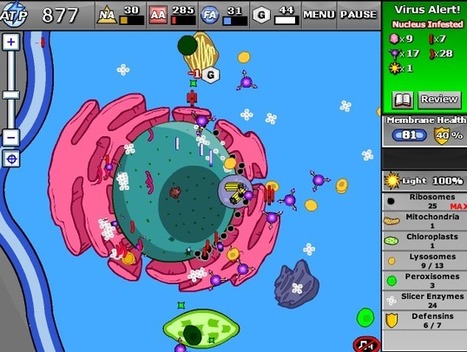
Educational Technology Guy: CellCraft - learn about cells through interactive game. Via Dr. Susan Bainbridge |





